


Python编写简易HTTP服务器:从代码到测试

发布时间:2026-10-13 |
6人浏览过
本文介绍如何使用Python标准库socket模块编写一个简易的HTTP服务器。通过server.py脚本监听指定IP和端口,接收浏览器请求并返回本地HTML文件内容。文章包含完整代码示例、index.html配置及测试步骤,帮助开发者快速理解HTTP通信基础。
编写一个Python脚本,实现基础的HTTP服务器功能。
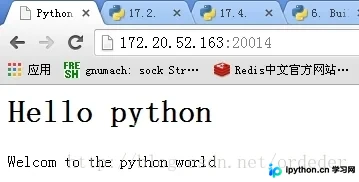
在浏览器地址栏中输入目标网站地址:172.20.52.163:20014。
服务器接收到浏览器的请求后,读取本地index.html文件的内容,并将其作为响应回发给浏览器。
具体代码实现如下。
服务器端脚本:server.py
#!/usr/bin/python
import socket
import signal
import errno
from time import sleep


def HttpResponse(header,whtml):
  f = file(whtml)
  contxtlist = f.readlines()
  context = ''.join(contxtlist)
  response = "%s %d\n\n%s\n\n" % (header,len(context),context)
  return response

def sigIntHander(signo,frame):
  print 'get signo# ',signo
  global runflag
  runflag = False
  global lisfd
  lisfd.shutdown(socket.SHUT_RD)

strHost = "172.20.52.163"
HOST = strHost #socket.inet_pton(socket.AF_INET,strHost)
PORT = 20014

httpheader = '''''\
HTTP/1.1 200 OK
Context-Type: text/html
Server: Python-slp version 1.0
Context-Length: '''

lisfd = socket.socket(socket.AF_INET,socket.SOCK_STREAM)
lisfd.bind((HOST, PORT))
lisfd.listen(2)

signal.signal(signal.SIGINT,sigIntHander)

runflag = True
while runflag:
  try:
    confd,addr = lisfd.accept()
  except socket.error as e:
    if e.errno == errno.EINTR:
      print 'get a except EINTR'
    else:
      raise
    continue

  if runflag == False:
    break;

  print "connect by ",addr
  data = confd.recv(1024)
  if not data:
    break
  print data
  confd.send(HttpResponse(httpheader,'index.html'))
  confd.close()
else:
  print 'runflag#',runflag

print 'Done'
网页文件:index.html
<html>
 <head>
   <title>Python Server</title>
 </head>
 <body>
  <h1>Hello python</h1>
  <p>Welcom to the python world</br>
 </body>
</html>
进行功能测试。
测试结果分析。
root@cloud2:~/slp/pythonLearning/socket# ./server_v1.py
connect by ('172.20.52.110', 6096)
GET / HTTP/1.1
Host: 172.20.52.163:20014
Connection: keep-alive
Accept: text/html,application/xhtml+xml,application/xml;q=0.9,image/webp,*/*;q=0.8
User-Agent: Mozilla/5.0 (Windows NT 5.1) AppleWebKit/537.36 (KHTML, like Gecko) Chrome/33.0.1750.154 Safari/537.36
Accept-Encoding: gzip,deflate,sdch
Accept-Language: zh-CN,zh;q=0.8,en;q=0.6
浏览器端显示效果。
以上就是本文的全部内容,希望对大家的学习有所帮助,也希望大家多多支持本站。
本站声明
本文内容仅供参考,不代表本站观点。转载或引用请注明出处。如发现内容问题,请通过联系我们页面反馈。















