


Python基于Pika实现RabbitMQ RPC调用详解

发布时间:2026-10-13 |
2人浏览过
本文介绍在Python中利用Pika库实现RabbitMQ的RPC功能。通过对比ActiveMQ,阐述为何选择RabbitMQ,并详细解析客户端、服务器及处理器的目录结构与代码实现。重点说明RPC调用中corr_id与reply_to队列的携带机制,以及如何处理异步响应和任务状态查询,帮助开发者避开常见坑点。
在之前的项目中,我们使用了ActiveMQ,仅进行了基础安装和直接调用。由于新项目受到某些硬件条件的限制,我们需要将消息队列中间件替换为RabbitMQ。
RabbitMQ提供的模式与机制比ActiveMQ丰富得多。根据具体的业务需求,我们决定采用RPC(远程过程调用)模式来实现功能。在此过程中遇到的一些问题值得记录,以便后续参考。
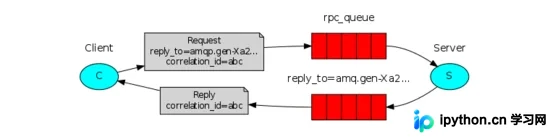
以下是具体代码实现,项目目录结构划分为c_server、c_client和c_handler三个部分。
服务器端代码(c_server)如下:
#!/usr/bin/env python
# -*- coding:utf-8 -*-
import pika
import time
import json
import io
import yaml

s_exchange = input("请输入交换机名称->>").decode('utf-8').strip()
s_queue = input("输入消息队列名称->>").decode('utf-8').strip()
credentials = pika.PlainCredentials('system', 'manager')
connection = pika.BlockingConnection(pika.ConnectionParameters(host='XXX.XXX.XXX.XXX',credentials=credentials))
# 定义
channel = connection.channel()
channel.exchange_declare(exchange=s_exchange, exchange_type='direct')
channel.queue_declare(queue=s_queue, exclusive=True)
channel.queue_bind(queue=s_queue, exchange=s_exchange)

def s_manage(content):
 # 解决unicode转码问题 json.JSONDecoder().decode(content)
 str_content = yaml.safe_load(json.loads(content,encoding='utf-8'))
 str_res = {
  "errorid": 0,
  "resp": str_content['cmd'],
  "errorcont": "成功"
 }
 return json.dumps(str_res)

def on_request(ch, method, props, body):
 response = s_manage(body)
 ch.basic_publish(exchange='',
      routing_key=props.reply_to,
      properties=pika.BasicProperties(correlation_id = \
               props.correlation_id),
      body=response)
 ch.basic_ack(delivery_tag = method.delivery_tag)

channel.basic_qos(prefetch_count=1)
channel.basic_consume(on_request, queue=s_queue)

print(" [x] Awaiting RPC requests")
channel.start_consuming()
客户端代码(c_client)如下:
#!/usr/bin/env python
# -*- coding:utf-8 -*-

import pika
import uuid
import json
import io

class RpcClient(object):
  def __init__(self):
    self.credentials = pika.PlainCredentials('guest', 'guest')
    self.connection = pika.BlockingConnection(pika.ConnectionParameters(host='XXX.XXX.XXX.XXX',
                                credentials=self.credentials))
    self.channel = self.connection.channel()

  def on_response(self, ch, method, props, body):
    if self.callback_id == props.correlation_id:
      self.response = body
    ch.basic_ack(delivery_tag=method.delivery_tag)

  def get_response(self, callback_queue, callback_id):
    '''取队列里的值,获取callback_queued的执行结果'''
    self.callback_id = callback_id
    self.response = None
    self.channel.queue_declare('q_manager', durable=True)
    self.channel.basic_consume(self.on_response, # 只要收到消息就执行on_response
                  queue=callback_queue)
    while self.response is None:
      self.connection.process_data_events() # 非阻塞版的start_consuming
    return self.response

  def call(self, queue_name, command, exchange,rout_key): # 命令下发
    '''队列里发送数据'''
    # result = self.channel.queue_declare(exclusive=False) #exclusive=False 必须这样写
    self.callback_queue = 'q_manager' # result.method.queue
    self.corr_id = str(uuid.uuid4())
    self.channel.basic_publish(exchange=exchange,
                  routing_key=queue_name,
                  properties=pika.BasicProperties(
                    reply_to=self.callback_queue, # 发送返回信息的队列name
                    correlation_id=self.corr_id, # 发送uuid 相当于验证码
                  ),
                  body=command)
    return self.callback_queue,self.corr_id

client
处理器端代码(c_handler)如下:
#!/usr/bin/env python
# -*- coding:utf-8 -*-

from c_client import *
import random, time
import threading
import json
import sys

class Handler(object):
  def __init__(self):
    self.information = {}  # 后台进程信息

  def check_all(self, *args):
    '''查看所有信息'''
    time.sleep(2)
    print('获取消息')
    for key in self.information:
      print("cid【%s】\t 队列【%s】\t 命令【%s】"%(key, self.information[key][0],
                               self.information[key][1]))

  def check_task(self, cmd):
    '''查看task_id执行结果'''
    time.sleep(2)
    try:
      task_id = int(cmd)
      print(task_id)
      callback_queue= self.information[task_id][2]
      callback_id= self.information[task_id][3]
      client = RpcClient()
      response = client.get_response(callback_queue, callback_id)
      print(response)
      # print(response.decode())
      del self.information[task_id]

    except KeyError as e :
      print("error: [%s]" % e)
    except IndexError as e:
      print("error: [%s]" % e)

  def run(self, user_cmd, host, exchange='', rout_key='',que=''):
    try:
      time.sleep(2)
      command = user_cmd
      task_id = random.randint(10000, 99999)
      client = RpcClient()
      response = client.call(queue_name=host, command=command,exchange=exchange,rout_key=que)
      self.information[task_id] = [host, command, response[0], response[1]]
    except IndexError as e:
      print("[error]:%s"%e)

  def reflect(self, str,cmd,host,exchange,que):
    '''反射'''
    if hasattr(self, str):
      getattr(self, str)(cmd,host,exchange,que)

  def start(self, m,cmd, host, exchange,que):
    while True:
      user_resp = input("输入处理消息内容ID->>").decode('utf-8').strip()
      self.check_task(user_resp)
      str = m
      print(self.information)
      t1 = threading.Thread(target=self.reflect, args=(str,cmd,host,exchange,que)) #多线程
      t1.start()

s_exchange = input("请输入交换机名称->>").decode('utf-8').strip()
s_queue = input("输入消息队列名称->>").decode('utf-8').strip()
d_cmd_state =input("输入json命令->>").decode('utf-8').strip()
s_cmd = json.dumps(d_cmd_state)
handler = Handler()
handler.start('run',s_cmd, s_queue, s_exchange, s_queue)

handler
关键点注意:1、c_client在向RabbitMQ发布消息时,必须携带服务器返回的队列名称(reply_to)以及关联ID(corr_id)。
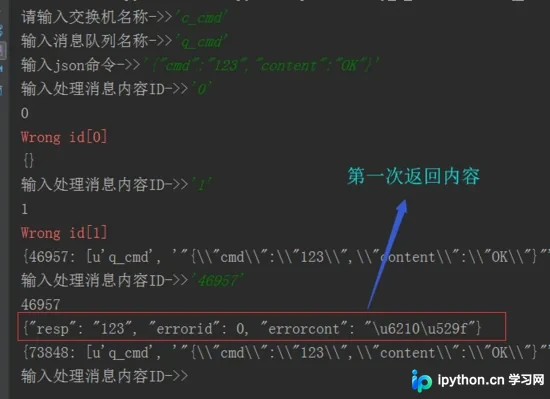
2、c_handler进行了相应处理,每次发送的内容都会存入task列表中。当显示特定的ID号时,即可查询返回的内容。调用方式如下所示:

以上即为本文的全部内容,希望能为各位的学习提供帮助,也欢迎大家继续支持本站。
本站声明
本文内容仅供参考,不代表本站观点。转载或引用请注明出处。如发现内容问题,请通过联系我们页面反馈。















