


Python批量生成指定尺寸图片并添加自定义文字的实现方法

发布时间:2026-10-13 |
2人浏览过
本文介绍利用Python的PIL库实现批量生成指定尺寸图片并添加任意文字的功能。脚本支持通过命令行直接指定宽高与内容,或通过CSV文件批量读取配置。核心逻辑包含自动调整字体大小以适应图片区域,并将文字居中绘制。代码提供完整实现及数据文件格式说明,适合需要快速生成测试素材或特定规格图片的开发场景。
为满足工作中对多种尺寸图片的生成需求,编写了一个辅助脚本。该脚本不仅支持设定图片的具体宽高,还扩展了功能以支持在生成的图片上绘制指定的文字内容。
实现该功能的完整代码逻辑如下所示:
from PIL import Image, ImageDraw, ImageFont
'''
  Auth: Xiaowu Chen
  Note: Please install [pillow] library before run this script.
'''


def draw_image(new_img, text, show_image=False):
  text = str(text)
  draw = ImageDraw.Draw(new_img)
  img_size = new_img.size
  draw.line((0, 0) + img_size, fill=128)
  draw.line((0, img_size[1], img_size[0], 0), fill=128)

  font_size = 40
  fnt = ImageFont.truetype('arial.ttf', font_size)
  fnt_size = fnt.getsize(text)
  while fnt_size[0] > img_size[0] or fnt_size[0] > img_size[0]:
    font_size -= 5
    fnt = ImageFont.truetype('arial.ttf', font_size)
    fnt_size = fnt.getsize(text)

  x = (img_size[0] - fnt_size[0]) / 2
  y = (img_size[1] - fnt_size[1]) / 2
  draw.text((x, y), text, font=fnt, fill=(255, 0, 0))

  if show_image:
    new_img.show()
  del draw


def new_image(width, height, text='default', color=(100, 100, 100, 255), show_image=False):
  new_img = Image.new('RGBA', (int(width), int(height)), color)
  draw_image(new_img, text, show_image)
  new_img.save(r'%s_%s_%s.png' % (width, height, text))
  del new_img


def new_image_with_file(fn):
  with open(fn, encoding='utf-8') as f:
    for l in f:
      l = l.strip()
      if l:
        ls = l.split(',')
        if '#' == l[0] or len(ls) < 2:
          continue

        new_image(*ls)


if '__main__' == __name__:
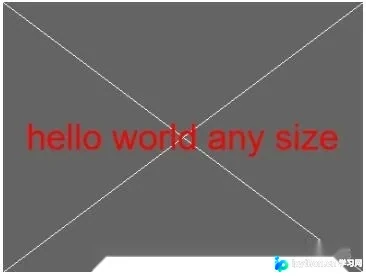
  new_image(400, 300, 'hello world any size', show_image=True)
  # new_image_with_file('image_data.txt')
若需执行批量处理任务,准备的数据文件需遵循以下格式规范:
#width,height,text
200,200,hello
300,255,world
脚本运行后的实际输出效果如下所示:
上述内容即为Python批量生成指定尺寸图片并添加文字功能的完整实现方案。希望该示例能为相关需求提供参考,欢迎进一步交流与支持。
本站声明
本文内容仅供参考,不代表本站观点。转载或引用请注明出处。如发现内容问题,请通过联系我们页面反馈。















