


Python利用wxpy库实现微信定时自动发送消息

发布时间:2026-10-13 |
7人浏览过
本文介绍如何使用Python的wxpy库实现微信指定好友的定时消息发送功能。通过安装wxpy模块,初始化机器人并扫码登录,结合requests库获取网络内容,利用多线程Timer实现周期性自动发送。代码包含好友搜索、消息获取及异常处理,适用于Python 3.4-3.6及2.7版本,帮助开发者实现简单的微信自动化操作。
wxpy库简介与安装
Python拥有丰富的第三方库资源,其中wxpy是用于连接微信的接口工具,具体用法可参考其官方文档。该库支持自动化操作,兼容Python 3.4至3.6版本,同时也支持2.7版本。
一、安装
在Windows 10环境下,直接打开命令提示符(cmd)窗口即可进行后续操作。
pip install wxpy
若遇到网络不稳定的情况导致安装报错,可尝试重新执行上述命令。
微信定时发送消息实现
二、简单介绍
# 导入模块
from wxpy import *
# 初始化机器人,扫码登陆
bot = Bot()
# 搜索名称含有 "游否" 的男性深圳好友
my_friend = bot.friends().search('游否', sex=MALE, city="深圳")[0]
三、详细代码
在cmd中运行jupyter notebook命令以启动ipython环境,随后在浏览器打开的页面中新建一个基于Python 3的.ipynb文件。
from __future__ import unicode_literals
from threading import Timer
from wxpy import *
import requests

bot = None
def get_news():
 #获取一个连接中的内容
 url = "http://open.iciba.com/dsapi/"
 r = requests.get(url)
 print(r.json())
 contents = r.json()['content']
 translation = r.json()['translation']
 return contents,translation
def login_wechat():
 global bot
 bot = Bot()
 # bot = Bot(console_qr=2,cache_path="botoo.pkl")#linux环境上使用
def send_news():
 if bot == None:
  login_wechat()
 try:
  my_friend = bot.friends().search(u'xxx')[0] #xxx表示微信昵称
  my_friend.send(get_news()[0])
  my_friend.send(get_news()[1][5:])
  my_friend.send(u"咦?我是自动人!!")
  t = Timer(360, send_news) #360是秒数
  t.start()
 except:
  print(u"失败!!")
if __name__ == "__main__":
 send_news()
 print(get_news()[0])
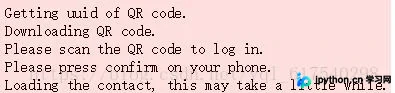
编辑完成后,按下Ctrl+Enter组合键即可执行当前单元格代码。
以上即为本文的全部内容,希望能为读者的学习提供有益帮助,同时也欢迎大家继续支持本站。
本站声明
本文内容仅供参考,不代表本站观点。转载或引用请注明出处。如发现内容问题,请通过联系我们页面反馈。















