


Django Content-Type组件实现多表通用关联详解

发布时间:2026-10-13 |
5人浏览过
本文详解Django中Content-Type组件如何解决多表关联问题。通过设计学位课、普通课程与价格策略表,利用GenericForeignKey实现动态关联,避免频繁修改表结构。文中提供完整的models.py视图代码、路由配置及数据插入示例,展示如何高效管理不同课程类型的价格策略。
Django Content-Type组件实现多表通用关联详解
前言
随着业务逻辑的深入,数据库表数量会不断增加,导致表之间的关联关系日益复杂。如何在初始设计阶段就确定好表结构,从而避免后期因关联数量增加而反复修改数据库表,是解决这一问题的关键所在。
Django框架中提供的Content-Type组件,能够有效协助开发者解决上述多表关联管理的难题。
表结构设计思路
为了演示这一机制,这里预先设计了三张数据表:学位课程表、普通课程表以及价格策略表,其基本结构如下所示。
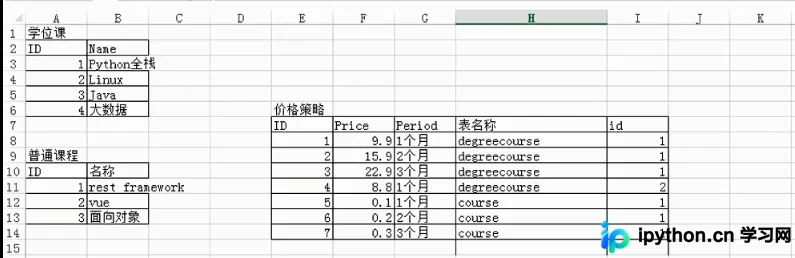
从上述结构图中可以看出,价格策略表通过通用外键与其他两张课程表建立了关联,这种设计允许根据具体的表名动态确定关联对象。
模型定义与视图实现
models.py
from django.db import models
from django.contrib.contenttypes.fields import GenericForeignKey, GenericRelation
from django.contrib.contenttypes.models import ContentType


class Course(models.Model):
  """
  普通课程
  """
  title = models.CharField(max_length=32)
  # 仅用于反向查找 不在数据库中添加字段
  price_policy_list = GenericRelation("PricePolicy")

class DegreeCourse(models.Model):
  """
  学位课程
  """
  title = models.CharField(max_length=32)

  # 仅用于反向查找
  price_policy_list = GenericRelation("PricePolicy")


class PricePolicy(models.Model):
  """
  价格策略
  """
  price = models.IntegerField()
  period = models.IntegerField()

  # 关联表
  content_type = models.ForeignKey(ContentType, verbose_name='关联的表名称') # 7,8 表名称
  object_id = models.IntegerField(verbose_name='关联的表中的数据行的ID')  #
  # 帮助你快速实现content_type操作 ,快速插入数据 不生成数据库中的字段
  content_object = GenericForeignKey('content_type', 'object_id')
接下来定义用于插入数据的类视图逻辑。
from django.shortcuts import render,HttpResponse
from app01 import models
def test(request):

  # 1. 为学位课“Python全栈”添加一个价格策略:一个月 9.9
  # obj1 = models.DegreeCourse.objects.filter(title='Python全栈').first()
  # models.PricePolicy.objects.create(price=9.9, period=30, content_object=obj1)
  #
  # obj2 = models.DegreeCourse.objects.filter(title='Python全栈').first()
  # models.PricePolicy.objects.create(price=19.9, period=60, content_object=obj2)
  #
  # obj3 = models.DegreeCourse.objects.filter(title='Python全栈').first()
  # models.PricePolicy.objects.create(price=29.9, period=90, content_object=obj3)

  # 2. 为学位课“rest”添加一个价格策略:一个月 9.9
  # obj1 = models.Course.objects.filter(title='rest framework').first()
  # models.PricePolicy.objects.create(price=9.9, period=30, content_object=obj1)
  #
  # obj2 = models.Course.objects.filter(title='rest framework').first()
  # models.PricePolicy.objects.create(price=19.9, period=60, content_object=obj2)
  #
  # obj3 = models.Course.objects.filter(title='rest framework').first()
  # models.PricePolicy.objects.create(price=29.9, period=90, content_object=obj3)

  # 3. 根据课程ID获取课程, 并获取该课程的所有价格策略
  # course = models.Course.objects.filter(id=1).first()
  #
  # price_policys = course.price_policy_list.all()
  #
  # print(price_policys)


  return HttpResponse('...')
路由配置与测试验证
随后为视图函数配置相应的URL路由规则。
from django.conf.urls import url
from django.contrib import admin
from app01 import views

urlpatterns = [
  url(r'^admin/', admin.site.urls),
  url(r'^test/', views.test),
]
在手动插入数据时,传统的做法可能需要显式指定content_type_id和object_id,代码较为繁琐。
# 1. 为学位课“Python全栈”添加一个价格策略:一个月 9.9
"""
obj = DegreeCourse.objects.filter(title='Python全栈').first()
# obj.id
cobj = ContentType.objects.filter(model='course').first()
# cobj.id
PricePolicy.objects.create(price='9.9',period='30',content_type_id=cobj.id,object_id=obj.id)
"""
# obj = DegreeCourse.objects.filter(title='Python全栈').first()
# PricePolicy.objects.create(price='9.9',period='30',content_object=obj)
可以通过访问特定的测试地址来验证数据插入功能是否正常。
http://127.0.0.1:8000/test
查看数据库中的实际存储结果,验证数据是否正确写入。

以上就是本文的全部内容,希望对大家的学习有所帮助,也希望大家多多支持本站。
本站声明
本文内容仅供参考,不代表本站观点。转载或引用请注明出处。如发现内容问题,请通过联系我们页面反馈。















