


Python实现Windows全盘文件MD5值快速计算脚本

发布时间:2026-10-13 |
3人浏览过
本文分享一个基于Python的脚本,用于计算Windows系统下全盘文件的MD5值。脚本通过递归遍历目录,利用hashlib库高效读取文件内容并生成哈希摘要,同时结合configparser将结果持久化存储至INI配置文件。该方案适用于批量文件完整性校验与去重场景,代码包含完整的文件处理逻辑与配置管理示例。
Python全盘MD5计算脚本实现
import hashlib
import os
import time
import configparser
import uuid

def test_file_md5(file_path):
  test = hashlib.md5()

  if os.path.isfile(file_path):
    with open(file_path, "rb") as f:
      while True:
        data = f.read(8096)
        if not data:
          break
        else:
          test.update(data)
      ret = test.hexdigest()
      config = configparser.ConfigParser()

      config.read("E:/python/pycharm/再开次开始/前端/test_md5.ini",encoding="utf-8")
      if config.has_section(os.path.basename(file_path)):
        new_section_name = str(os.path.basename(file_path)) + ":" + str(uuid.uuid4())
        config[new_section_name] = {"文件路径":os.path.dirname(file_path),
                 "md5值":ret}
      else:
        config[os.path.basename(file_path)] = {"文件路径": os.path.dirname(file_path),
                        "md5值": ret}
      config.write(open("E:/python/pycharm/再开次开始/前端/test_md5.ini","w",encoding="utf-8"))


def test_dir_md5(file_path):
  test_abs_path = os.path.abspath(file_path)
  # print(test_abs_path)
  os.chdir(test_abs_path)
  for file in os.listdir(os.getcwd()):
    if os.path.isfile(file):
      test_file_md5(os.path.abspath(file))
    elif os.path.isdir(file):
      test_dir_md5(os.path.abspath(file))
    else:
      pass
  # return True


if __name__ == '__main__':
  began_path = os.getcwd()
  test_path = os.path.dirname(os.path.dirname(os.path.dirname(os.path.dirname(began_path))))
  os.chdir(test_path)
  print(os.listdir())
  for test_file in os.listdir():
    os.chdir(test_path)
    if os.path.abspath(test_file).startswith("E:\\$"):
      continue
    else:
      if os.path.isfile(test_file):
        # print("yyyyy")
        test_file_md5(os.path.abspath(test_file))
      elif os.path.isdir(test_file):
        # print("hahah")
        test_dir_md5(os.path.abspath(test_file))
        # print(os.path.abspath(test_file))
      else:
        pass
运行脚本后,控制台将输出相应的处理结果。
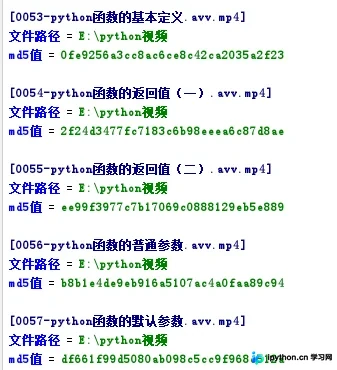
以上就是关于使用Python计算Windows全盘文件MD5值的完整实现,希望这段代码能对你的项目开发或文件管理工作有所帮助。欢迎收藏并支持本站获取更多技术资源。
本站声明
本文内容仅供参考,不代表本站观点。转载或引用请注明出处。如发现内容问题,请通过联系我们页面反馈。















