


Python利用python-docx生成Word文档示例

发布时间:2026-10-13 |
3人浏览过
本文介绍如何使用Python的python-docx库自动生成Word文档。通过结合数据库查询接口,程序可提取订单数据并生成包含汇总表格的Word文件,适用于月度测试费用报销等场景。
Python生成Word文档示例
本文介绍一个使用Python生成Word文档的完整示例,供读者参考学习。
由于每月需进行一次测试费用报销,涉及文档制作,因此编写了一个自动化程序来处理该任务。
# -*- coding: utf-8 -*-
from tools import get_data
from docx import Document
def new_doc(fee_data,doc_path,fee):#新建一个word文档,写入汇总表的数据
  document = Document()
  p_total = document.add_paragraph()
  r_total = p_total.add_run(u'测试订单费用汇总表:')
  r_total.font.bold = True
  table = document.add_table(1,5,style="Light List Accent 5")
  heading_cells = table.rows[0].cells
  heading_cells[0].text = u'序号'
  heading_cells[1].text = u'订单号'
  heading_cells[2].text = u'订单总额'
  heading_cells[3].text = u'运费'
  heading_cells[4].text = u'实付金额'
  total = 0
  for i in range(0,len(fee_data)):
    cells = table.add_row().cells
    cells[0].text = str(i+1)
    cells[1].text = str(fee_data[i][0])
    cells[2].text = str(float(fee_data[i][1])/100)
    cells[3].text = str(float(fee_data[i][2])/100)
    cells[4].text = str(float(fee_data[i][3])/100)
    total = total + fee_data[i][3]
    if total > fee:#如果实付总额大于传入的金额,终止写入数据,并记录序号
      number = i
      break
  total = str(float(total)/100)
  document.add_paragraph(u'实付金额总计:' + total + u' 元。')
  document.add_paragraph()
  p_detail = document.add_paragraph()
  r_detail = p_detail.add_run(u'测试订单明细:')
  r_detail.font.bold = True
  for i in range(0,number+1):
    order_no = str(fee_data[i][0])
    paid_amount = str(float(fee_data[i][3])/100)
    row_str = str(i+1) + '.' + u'订单号:' + order_no + u'实付金额:' + paid_amount + u'元。'
    document.add_paragraph(row_str)
  document.save(doc_path)
if __name__ == "__main__":
  #sql语句筛选实付金额在5元和39元之间的订单
  sql = "SELECT outer_order_id,order_amount,real_shipping_amount,paid_amount FROM oh_order_info WHERE " \
   "order_create_time between '2017-12-01 9:00:00' and '2017-12-27 9:00:00' " \
   "AND paid_amount between '500' and '3900'"
  fee_data = get_data(sql)
  doc_path = r'd:\yuzhong.docx'
  fee = 12300 #多少元以上,单位:分
  new_doc(fee_data,doc_path,fee)
程序调用了tools模块中的get_data函数来获取数据。
# -*- coding: utf-8 -*-
import MySQLdb
import conf
def get_data(*sql_list):#根据sql语句,获取数据库的数据
  conn = MySQLdb.connect(conf.test_dbhost,conf.test_user,conf.test_passd,conf.test_dbname,port=3306,charset="utf8")
  cur = conn.cursor()
  for sql in sql_list:
    cur.execute(sql)
  conn.commit()
  results = cur.fetchall()
  cur.close()
  conn.close()
  return results
数据库连接所需的账号和密码配置信息存储在conf文件中。
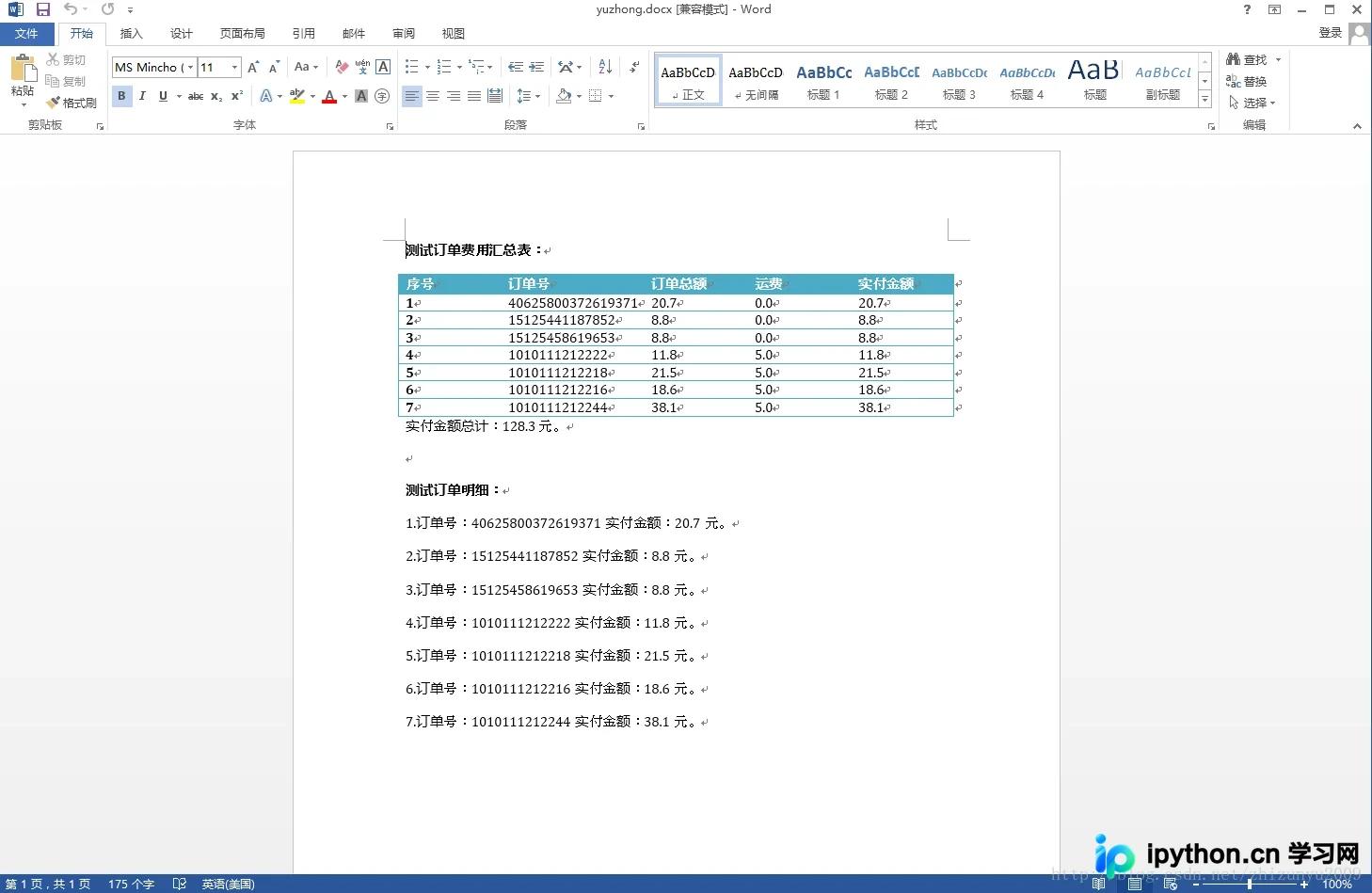
程序运行后的输出结果如下所示。
如需了解更多Python相关知识,建议参考本站的《Python数据结构与算法教程》、《Python函数使用技巧总结》、《Python字符串操作技巧汇总》、《Python入门与进阶经典教程》以及《Python文件与目录操作技巧汇总》等专题文章。
希望上述内容能对读者的Python编程实践提供帮助。
本站声明
本文内容仅供参考,不代表本站观点。转载或引用请注明出处。如发现内容问题,请通过联系我们页面反馈。















