


Python实现智能语音天气预报系统

发布时间:2026-10-13 |
1人浏览过
本文介绍如何使用Python构建一个智能语音天气预报系统。通过调用中华万年历API获取城市天气数据,利用gzip解压并解析JSON,实现当天天气信息的格式化输出。结合百度AipSpeech模块进行语音合成,并通过playsound播放音频,实现语音播报功能。最后使用matplotlib绘制未来几天的温度变化趋势图,提供直观的气象数据分析。
Python智能语音天气预报系统概述
基于Python开发的智能语音天气预报程序
该系统的核心逻辑由四个主要函数模块构成:
天气数据采集与处理流程
1、天气数据采集模块
1、用户需输入目标查询城市名称
2、调用urllib模块向中华万年历天气API接口发起数据请求
3、对获取的二进制数据进行gzip解压,并解码为UTF-8格式字符串
4、将JSON字符串转换为Python字典对象,返回包含嵌套结构的复杂天气预报数据字典
当日天气信息格式化输出
2、当日天气信息展示模块
1、格式化输出当日气象数据,涵盖天气状况、当前温度、最高及最低温度、风力等级和风向等关键指标
语音合成与播报功能实现
3、当日天气语音播报模块
1、构建用于语音合成的文本内容(weather_forecast_txt)
2、调用百度语音合成模块AipSpeech生成语音文件
3、调用playsound模块播放生成的语音文件
未来温度趋势可视化分析
4、未来多日温度变化趋势分析
1、构建包含未来几日最高温和最低温的数据字典
2、调用matplotlib模块绘制温度变化趋势图表
代码实现与效果展示
5、完整代码实现
#导入必要模块
import urllib.parse
import urllib.request
import gzip
import json
import playsound
from aip import AipSpeech
import matplotlib.pyplot as plt
import re
#设置参数,图片显示中文字符,否则乱码
plt.rcParams['font.sans-serif']=['SimHei']
#定义获取天气数据函数
def Get_weather_data():
  print('------天气查询------')
  city_name = input('请输入要查询的城市名称:')
  url = 'http://wthrcdn.etouch.cn/weather_mini?city=' + urllib.parse.quote(city_name)
  weather_data = urllib.request.urlopen(url).read()
  # 读取网页数据
  weather_data = gzip.decompress(weather_data).decode('utf-8')
  # #解压网页数据
  weather_dict = json.loads(weather_data)
  return weather_dict
#定义当天天气输出格式
def Show_weather(weather_data):
  weather_dict = weather_data
  if weather_dict.get('desc') == 'invilad-citykey':
    print('你输入的城市有误或未收录天气,请重新输入...')
  elif weather_dict.get('desc') == 'OK':
    forecast = weather_dict.get('data').get('forecast')
    print('日期:', forecast[0].get('date'))
    print('城市:', weather_dict.get('data').get('city'))
    print('天气:', forecast[0].get('type'))
    print('温度:', weather_dict.get('data').get('wendu') + '℃ ')
    print('高温:', forecast[0].get('high'))
    print('低温:', forecast[0].get('low'))
    print('风级:', forecast[0].get('fengli').split('<')[2].split(']')[0])
    print('风向:', forecast[0].get('fengxiang'))
    weather_forecast_txt = '您好,您所在的城市%s,' \
                '天气%s,' \
                '当前温度%s,' \
                '今天最高温度%s,' \
                '最低温度%s,' \
                '风级%s,' \
                '温馨提示:%s' % \
                (
                  weather_dict.get('data').get('city'),
                  forecast[0].get('type'),
                  weather_dict.get('data').get('wendu'),
                  forecast[0].get('high'),
                  forecast[0].get('low'),
                  forecast[0].get('fengli').split('<')[2].split(']')[0],
                  weather_dict.get('data').get('ganmao')
                )
    return weather_forecast_txt,forecast
#定义语音播报今天天气状况
def Voice_broadcast(weather_forcast_txt):
  weather_forecast_txt = weather_forcast_txt
  APP_ID = 你的百度语音APP_ID
  API_KEY = 你的百度语音API_KEY
  SECRET_KEY = 你的百度语音SECRET_KEY
  client = AipSpeech(APP_ID, API_KEY, SECRET_KEY)
  print('语音提醒:', weather_forecast_txt)
  #百度语音合成
  result = client.synthesis(weather_forecast_txt, 'zh', 1, {'vol': 5})
  if not isinstance(result, dict):
    with open('sound2.mp3', 'wb') as f:
      f.write(result)
      f.close()
  #playsound模块播放语音
  playsound.playsound(r'C:\Users\ban\Desktop\bsy\sound2.mp3')
#未来四天天气变化图
def Future_weather_states(forecast):
  future_forecast = forecast
  dict={}
  #获取未来四天天气状况
  for i in range(5):
    data = []
    date=future_forecast[i]['date']
    date = int(re.findall('\d+',date)[0])
    data.append(int(re.findall('\d+',future_forecast[i]['high'])[0]))
    data.append(int(re.findall('\d+', future_forecast[i]['low'])[0]))
    data.append(future_forecast[i]['type'])
    dict[date] = data
  data_list = sorted(dict.items())
  date=[]
  high_temperature = []
  low_temperature = []
  for each in data_list:
    date.append(each[0])
    high_temperature.append(each[1][0])
    low_temperature.append(each[1][1])
  fig = plt.plot(date,high_temperature,'r',date,low_temperature,'b')
  plt.xlabel('日期')
  plt.ylabel('℃')
  plt.legend(['高温','低温'])
  plt.xticks(date)
  plt.title('最近几天温度变化趋势')
  plt.show()
#主函数
if __name__=='__main__':
  weather_data = Get_weather_data()
  weather_forecast_txt, forecast = Show_weather(weather_data)
  Future_weather_states(forecast)
  Voice_broadcast(weather_forecast_txt)
6、运行效果展示
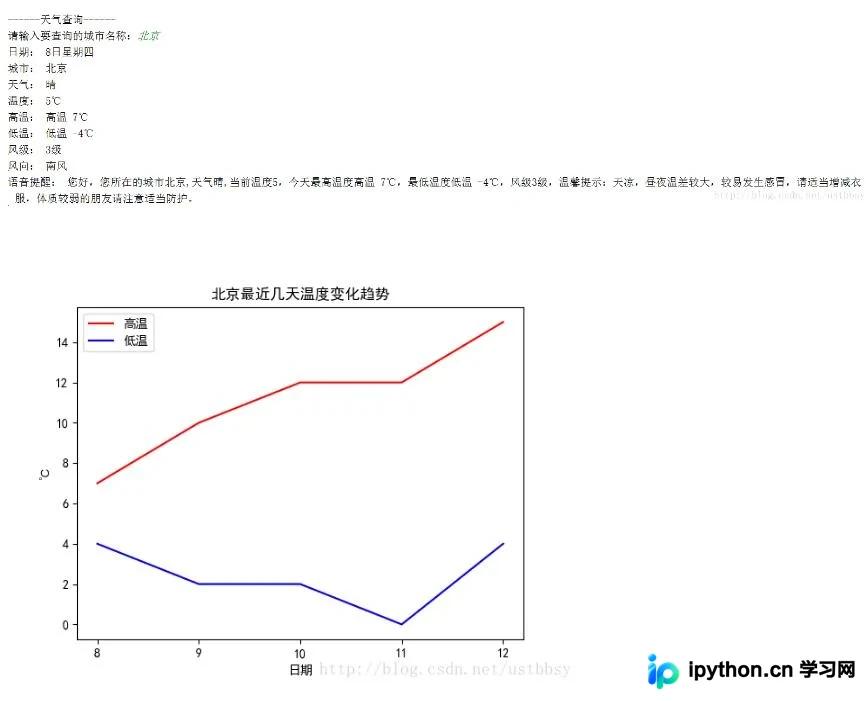
以上关于Python实现智能语音天气预报的分享到此结束,希望能为读者提供有价值的参考,欢迎支持本站更多内容。
本站声明
本文内容仅供参考,不代表本站观点。转载或引用请注明出处。如发现内容问题,请通过联系我们页面反馈。















