


在 Pandas DataFrame 中调整列顺序的方法

发布时间:2026-10-13 |
7人浏览过
本文介绍在 Pandas 中调整 DataFrame 列顺序的两种常用方法。通过操作列名列表或使用 insert 函数,可以将特定列(如 Mid)移动至第一列。示例展示了从读取 CSV 文件到重新排列列并保存结果的完整流程,适用于数据预处理和特征工程场景。
调整 Pandas DataFrame 列顺序的方法
在数据处理过程中,有时需要调整 Pandas DataFrame 中列的显示顺序。
例如,将某一特定列移动到数据框的第一列位置。
假设原始的数据帧 df 包含以下列结构:
df = pd.read_csv('I:/Papers/consumer/codeandpaper/TmallData/result01.csv')
               Net  Upper  Lower Mid Zsore
Answer option
More than once a day     0%  0.22% -0.12%  2  65
Once a day          0%  0.32% -0.19%  3  45
Several times a week     2%  2.45%  1.10%  4  78
Once a week          1%  1.63% -0.40%  6  65
将特定列移至第一列
目标是将 'Mid' 列移动到第一列。
                 Mid  Upper  Lower Net Zsore
Answer option
More than once a day     2  0.22% -0.12%  0%  65
Once a day          3  0.32% -0.19%  0%  45
Several times a week     4  2.45%  1.10%  2%  78
Once a week          6  1.63% -0.40%  1%  65
实现方案
以下是两种解决方案(注:原文提及使用 ix,但新版 Pandas 已弃用该属性,以下提供现代替代方案):
方法一:通过列名列表重新排序。
In [27]:
# get a list of columns
cols = list(df)
# move the column to head of list using index, pop and insert
cols.insert(0, cols.pop(cols.index('Mid')))
cols
Out[27]:
['Mid', 'Net', 'Upper', 'Lower', 'Zsore']
In [28]:
# use ix to reorder
df = df.ix[:, cols]
df
Out[28]:
           Mid Net Upper  Lower Zsore
Answer_option
More_than_once_a_day  2 0% 0.22% -0.12%   65
Once_a_day       3 0% 0.32% -0.19%   45
Several_times_a_week  4 2% 2.45%  1.10%   78
Once_a_week       6 1% 1.63% -0.40%   65
方法二:使用 drop 和 insert 组合操作。
In [39]:
mid = df['Mid']
df.drop(labels=['Mid'], axis=1,inplace = True)
df.insert(0, 'Mid', mid)
df
Out[39]:
           Mid Net Upper  Lower Zsore
Answer_option
More_than_once_a_day  2 0% 0.22% -0.12%   65
Once_a_day       3 0% 0.32% -0.19%   45
Several_times_a_week  4 2% 2.45%  1.10%   78
Once_a_week       6 1% 1.63% -0.40%   65
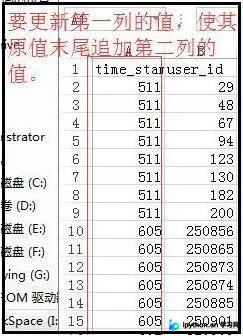
完整数据处理示例
#### full data
df = pd.read_csv('I:/Papers/consumer/codeandpaper/TmallData/result01.csv')
def func(x):
  return str(x['time_stamp'])+str(x['user_id'])
df['session_id'] = df.apply(func, axis=1)
del df['time_stamp']

sessionID=df['session_id']
df.drop(labels=['session_id'],axis=1,inplace=True)
df.insert(0,'session_id',sessionID)
df.to_csv('I:/Papers/consumer/codeandpaper/TmallData/result02.csv')
处理后的最终结果如下:
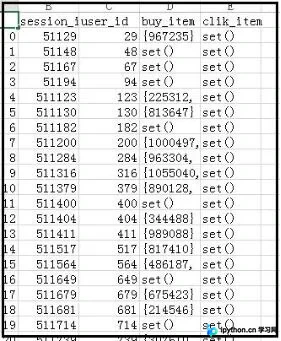
以上即为调整 Pandas DataFrame 列位置的方法,供参考。
本站声明
本文内容仅供参考,不代表本站观点。转载或引用请注明出处。如发现内容问题,请通过联系我们页面反馈。















