


Python调用Jenkins接口:模块安装与403错误排查

本文介绍如何使用Python通过python-jenkins模块调用Jenkins接口。首先讲解pip和easy_install的安装方法,随后提供基础连接代码示例。针对定时构建时常见的403 No valid crumb错误,指出这是由于Jenkins安全配置中启用了防止跨站请求伪造(CSRF)保护所致,解决方法为在Jenkins安全设置中取消勾选该选项即可恢复正常调用。
Python集成Jenkins接口概述
为了提升工作效率,减少重复性劳动,
理想的状态是尽可能自动化处理任务。
因此,近期我致力于将Jenkins功能模块集成到现有系统中,
旨在构建一个操作简单的可视化界面,以便团队其他成员能够便捷使用。
由于Python编程水平有限,恳请各位技术专家指正并提供宝贵建议。
python-jenkins模块安装方法
首先需要完成Jenkins Python支持模块的安装。
推荐使用pip进行安装,命令如下: pip install python-jenkins
或者使用easy_install工具进行安装,命令如下: easy_install python-jenkins
安装完成后,即可开始编写调用代码。
Jenkins Python客户端代码示例
class jenkins_tools():
  def __init__(self):
    cf = get_conf()
    self.username = cf.get('jenkins', 'username')
    self.password = cf.get('jenkins', 'password')
    self.php_jenkins = '''			#本屌自己的jenkins的conf文件
    <project>				#这里可以去抄jenkins的项目文件夹里面的配置文件
     <actions/>				#记得不要加xml头,源码哪里帮我们加了,自己加就是作死
     <description></description>		#项目需求不一样,配置文件也不一样,你们不要抄我的
     <keepDependencies>false</keepDependencies>
     <properties>
      <hudson.model.ParametersDefinitionProperty>
       <parameterDefinitions>
        <hudson.model.StringParameterDefinition>
         <name>Branch</name>
         <description></description>
         <defaultValue>%s</defaultValue>
        </hudson.model.StringParameterDefinition>
       </parameterDefinitions>
      </hudson.model.ParametersDefinitionProperty>
     </properties>
     <scm class="hudson.scm.NullSCM"/>
     <canRoam>true</canRoam>
     <disabled>false</disabled>
     <blockBuildWhenDownstreamBuilding>false</blockBuildWhenDownstreamBuilding>
     <blockBuildWhenUpstreamBuilding>false</blockBuildWhenUpstreamBuilding>
     <triggers/>
     <concurrentBuild>false</concurrentBuild>
     <builders>
      <hudson.tasks.Shell>
       <command>xxxxxxx</command>
      </hudson.tasks.Shell>
     </builders>
     <publishers/>
     <buildWrappers/>
    </project>
      '''
    self.java_newjenkins = '''		#本屌的另外一个jenkins的conf文件
      <project>
       <actions/>
       <description></description>
       <keepDependencies>false</keepDependencies>
       <properties>
        <hudson.model.ParametersDefinitionProperty>
         <parameterDefinitions>
          <hudson.model.StringParameterDefinition>
           <name>Branch</name>
           <description></description>
           <defaultValue>%s</defaultValue>
          </hudson.model.StringParameterDefinition>
         </parameterDefinitions>
        </hudson.model.ParametersDefinitionProperty>
       </properties>
       <scm class="hudson.scm.NullSCM"/>
       <canRoam>true</canRoam>
       <disabled>false</disabled>
       <blockBuildWhenDownstreamBuilding>false</blockBuildWhenDownstreamBuilding>
       <blockBuildWhenUpstreamBuilding>false</blockBuildWhenUpstreamBuilding>
       <triggers/>
       <concurrentBuild>false</concurrentBuild>
       <builders>
        <hudson.tasks.Shell>
         <command>xxxx</command>
        </hudson.tasks.Shell>
       </builders>
       <publishers/>
       <buildWrappers/>
      </project>
        '''
  def __conn_jenkins_server(self, url):
    try:
	  #获得一个jenkins的操作实例
      server = jenkins.Jenkins(url, username=self.username, password=self.password)
      return server
    except Exception:
      logging.warning('login jenkins failed!')
      return None

  def create_project(self, host_ip, project_name, git_path, git_branch, url, environment):
    server = self.__conn_jenkins_server(url)
    if server:
      server.create_job(project_name, self.php_jenkins)	#参数1写的是项目名称,参数2是xml文档
      return True
    else:
      return None

  def project_built(self, url, project_name, git_branch):	#这个函数作用是构建项目
    server = self.__conn_jenkins_server(url)
    server.build_job(project_name, {'Branch': git_branch})

  def check_project_exist(self, project_name, url):		#这个函数是检查项目是否已经存在虽然写得很挫忘不要见怪
    server = self.__conn_jenkins_server(url)
    name = server.get_job_name(project_name)
    if name is None:
      return False
    return True
更多详细用法与API说明,请参考官方文档:http://python-jenkins.readthedocs.io/en/latest/api.html
调用Jenkins API常见错误排查
此外,补充说明Python调用Jenkins API时的常见场景。
在实际应用中,经常需要通过Python脚本对特定作业执行定时构建任务。
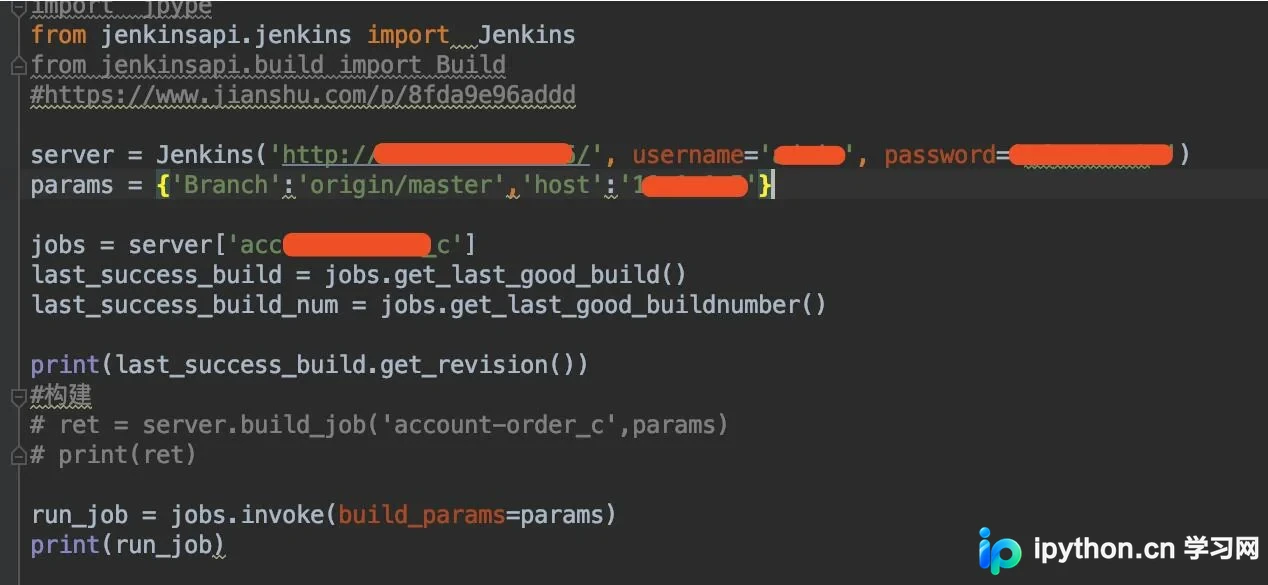
在此过程中,可能会遇到如下报错信息:
<title>Error 403 No valid crumb was included in the request</title>\n</head>\n<body><h2>HTTP ERROR 403</h2>
该错误的原因在于Jenkins的安全配置中启用了防止跨站请求伪造(CSRF)的保护机制。要解决此问题,需在Jenkins后台设置中取消勾选相关选项,从而允许不带crumb的API请求通过。

以上即为Python调用Jenkins接口的完整指南,希望能为读者提供参考与帮助,同时也欢迎大家继续支持本站内容。
本站声明
本文内容仅供参考,不代表本站观点。转载或引用请注明出处。如发现内容问题,请通过联系我们页面反馈。















