


Python Flask实现点击按钮跳转至自定义页面

发布时间:2026-10-14 |
2人浏览过
本文介绍如何利用Python Flask框架实现网页中按钮点击后跳转至自定义页面的功能。通过配置Flask路由、编写HTML模板及处理GET/POST请求,演示了从首页链接到表单页的完整流程。代码示例展示了@app.route装饰器的使用及render_template函数的调用,适用于希望掌握Flask基础页面交互的开发者参考。
Flask按钮跳转核心代码实现
核心实现代码如下:
文件名为_init_.py
from flask import Flask, request, url_for, redirect, render_template

app = Flask(__name__)

@app.route('/')
def index():
  return render_template('index.html')

@app.route('/cool_form', methods=['GET', 'POST'])
def cool_form():
  if request.method == 'POST':
    # do stuff when the form is submitted

    # redirect to end the POST handling
    # the redirect can be to the same route or somewhere else
    return redirect(url_for('index'))

  # show the form, it wasn't submitted
  return render_template('cool_form.html')
首页模板index.html的内容如下:
<!doctype html>
<html>
<body>
  <p><a href="{{ url_for('cool_form') }}" rel="external nofollow" >Check out this cool form!</a></p>
</body>
</html>
自定义表单页面cool_form.html的代码如下:
<!doctype html>
<html>
<body>
  <form method="post">
    <button type="submit">Do it!</button>
  </form>
</html>
页面运行效果与跳转演示
程序运行后的效果如下所示:

启动服务后访问5000端口,页面显示如图所示。点击页面上的按钮,即可跳转至自定义的/cool_form页面。

完整代码获取与扩展应用
相关完整代码托管于GitHub仓库:https://github.com/qingnvsue/flask,具体位于webbutton文件夹内。
在另一个实际应用场景中,程序实现了在Web页面点击“加法器”或“除法器”按钮后,分别跳转至对应功能页面的逻辑。
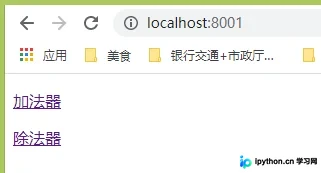
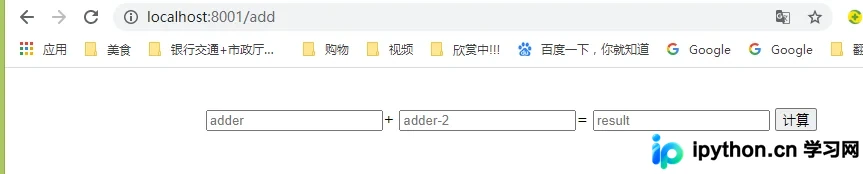

该场景的代码同样托管于GitHub仓库:https://github.com/qingnvsue/flask,具体位于add文件夹内。
以上即为本文的全部内容,希望这些内容能对各位的学习有所帮助,同时也欢迎大家继续支持本站。
本站声明
本文内容仅供参考,不代表本站观点。转载或引用请注明出处。如发现内容问题,请通过联系我们页面反馈。















