


Python 利用 QQ 邮箱 SMTP 实现自动发送邮件教程

发布时间:2026-10-14 |
4人浏览过
本文介绍如何使用 Python 的 smtplib 和 email 库通过 QQ 邮箱自动发送邮件。内容涵盖获取 QQ 邮箱授权码、发送普通文本、添加附件、嵌入图片以及发送 HTML 格式邮件的具体代码实现,帮助开发者快速掌握邮件自动化功能。
Python 自动发送邮件基础配置
近期在开发中涉及 Python 自动发送邮件的需求,核心流程主要包含三个环节:登录邮箱、构建邮件内容以及执行发送操作。实现该功能需依赖 smtplib 和 email 这两个标准库,用户可直接通过 pip 工具进行安装。
本示例以 QQ 邮箱为例,在开始编写代码前,必须先在 QQ 邮箱设置界面中开启 POP3/SMTP 服务。
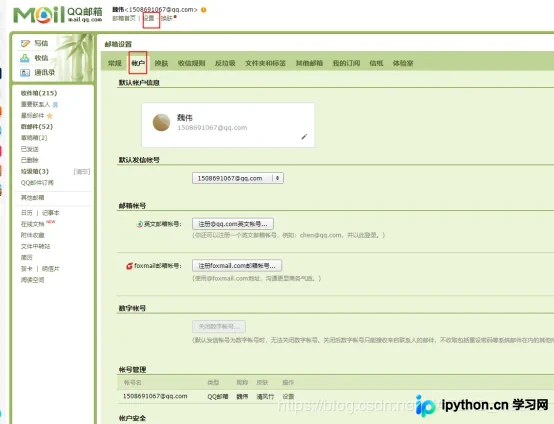
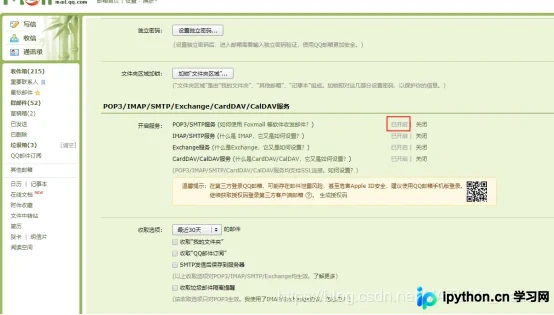
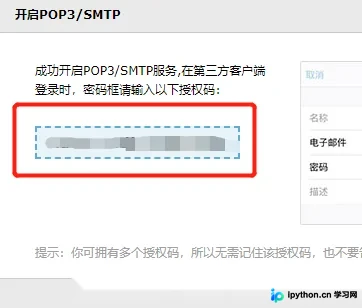
开启服务后会生成一个授权码,该授权码在 Python 脚本中登录邮箱时作为密码使用,切勿与日常登录邮箱的账号密码混淆。
发送普通文本邮件
一.发送普通文本邮件
#发送多种类型的邮件
from email.mime.multipart import MIMEMultipart

msg_from = '1508691067@qq.com' # 发送方邮箱
passwd = 'xxx'  #就是上面的授权码

to= ['1508691067@qq.com'] #接受方邮箱

#设置邮件内容
#MIMEMultipart类可以放任何内容
msg = MIMEMultipart()
conntent="这个是字符串"
#把内容加进去
msg.attach(MIMEText(conntent,'plain','utf-8'))

#设置邮件主题
msg['Subject']="这个是邮件主题"

#发送方信息
msg['From']=msg_from

#开始发送

#通过SSL方式发送,服务器地址和端口
s = smtplib.SMTP_SSL("smtp.qq.com", 465)
# 登录邮箱
s.login(msg_from, passwd)
#开始发送
s.sendmail(msg_from,to,msg.as_string())
print("邮件发送成功")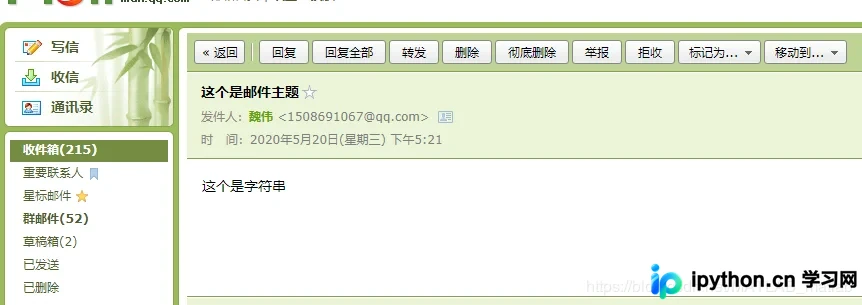
发送携带附件的邮件
二.发送携带附件的邮件
import smtplib
from email.mime.text import MIMEText
#发送多种类型的邮件
from email.mime.multipart import MIMEMultipart

msg_from = '1508691067@qq.com' # 发送方邮箱
passwd = 'xxxxx'

to= ['1508691067@qq.com'] #接受方邮箱

#设置邮件内容
#MIMEMultipart类可以放任何内容
msg = MIMEMultipart()
conntent="这个是字符串"
#把内容加进去
msg.attach(MIMEText(conntent,'plain','utf-8'))

#添加附件
att1=MIMEText(open('result.xlsx','rb').read(),'base64','utf-8') #打开附件
att1['Content-Type']='application/octet-stream'  #设置类型是流媒体格式
att1['Content-Disposition']='attachment;filename=result.xlsx' #设置描述信息

msg.attach(att1)  #加入到邮件中

#设置邮件主题
msg['Subject']="这个是邮件主题"

#发送方信息
msg['From']=msg_from

#开始发送

#通过SSL方式发送,服务器地址和端口
s = smtplib.SMTP_SSL("smtp.qq.com", 465)
# 登录邮箱
s.login(msg_from, passwd)
#开始发送
s.sendmail(msg_from,to,msg.as_string())
print("邮件发送成功")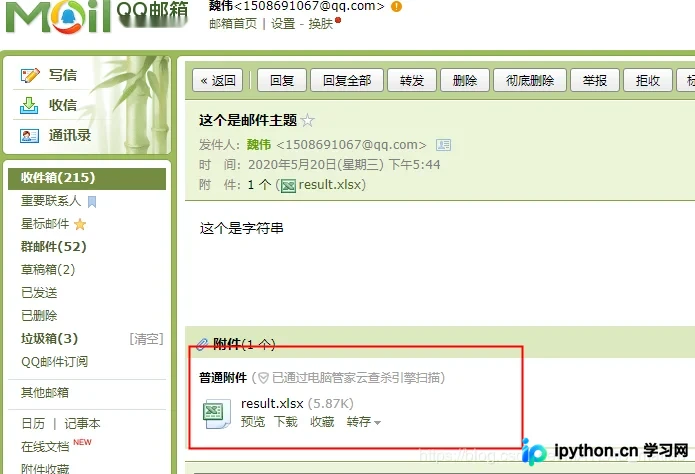
发送携带图片附件
三.发送携带图片的附件
基于上述逻辑,同样可以处理图片附件的发送操作。
import smtplib
from email.mime.text import MIMEText
#发送多种类型的邮件
from email.mime.multipart import MIMEMultipart

msg_from = '1508691067@qq.com' # 发送方邮箱
passwd = 'xxxxx'

to= ['1508691067@qq.com'] #接受方邮箱

#设置邮件内容
#MIMEMultipart类可以放任何内容
msg = MIMEMultipart()
conntent="这个是字符串"
#把内容加进去
msg.attach(MIMEText(conntent,'plain','utf-8'))

#添加附件
att1=MIMEText(open('result.xlsx','rb').read(),'base64','utf-8') #打开附件
att1['Content-Type']='application/octet-stream'  #设置类型是流媒体格式
att1['Content-Disposition']='attachment;filename=result.xlsx' #设置描述信息

att2=MIMEText(open('1.jpg','rb').read(),'base64','utf-8')
att2['Content-Type']='application/octet-stream'  #设置类型是流媒体格式
att2['Content-Disposition']='attachment;filename=1.jpg' #设置描述信息

msg.attach(att1)  #加入到邮件中
msg.attach(att2)

#设置邮件主题
msg['Subject']="这个是邮件主题"

#发送方信息
msg['From']=msg_from

#开始发送

#通过SSL方式发送,服务器地址和端口
s = smtplib.SMTP_SSL("smtp.qq.com", 465)
# 登录邮箱
s.login(msg_from, passwd)
#开始发送
s.sendmail(msg_from,to,msg.as_string())
print("邮件发送成功")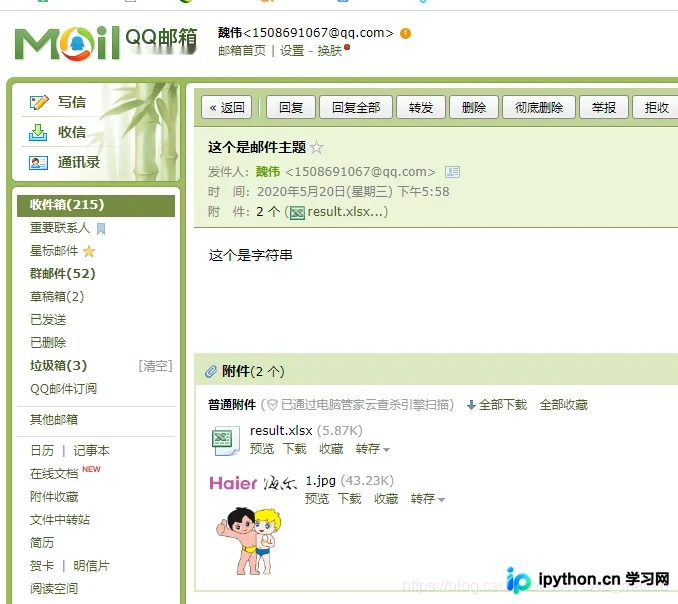
发送 HTML 格式邮件
四.发送 html 格式的邮件
import smtplib
from email.mime.text import MIMEText
#发送多种类型的邮件
from email.mime.multipart import MIMEMultipart
import datetime
msg_from = '1508691067@qq.com' # 发送方邮箱
passwd = 'xxxxxx'

to= ['1508691067@qq.com'] #接受方邮箱

#设置邮件内容
#MIMEMultipart类可以放任何内容
msg = MIMEMultipart()
# conntent="这个是字符串"
# #把内容加进去
# msg.attach(MIMEText(conntent,'plain','utf-8'))

#添加附件
att1=MIMEText(open('result.xlsx','rb').read(),'base64','utf-8') #打开附件
att1['Content-Type']='application/octet-stream'  #设置类型是流媒体格式
att1['Content-Disposition']='attachment;filename=result.xlsx' #设置描述信息

att2=MIMEText(open('1.jpg','rb').read(),'base64','utf-8')
att2['Content-Type']='application/octet-stream'  #设置类型是流媒体格式
att2['Content-Disposition']='attachment;filename=1.jpg' #设置描述信息

msg.attach(att1)  #加入到邮件中
msg.attach(att2)


now_time = datetime.datetime.now()
year = now_time.year
month = now_time.month
day = now_time.day
mytime = str(year) + " 年 " + str(month) + " 月 " + str(day) + " 日 "
fayanren="爱因斯坦"
zhuchiren="牛顿"
#构造HTML
content = '''
        <html>
        <body>
          <h1 align="center">这个是标题,xxxx通知</h1>
          <p><strong>您好:</strong></p>
          <blockquote><p><strong>以下内容是本次会议的纪要,请查收!</strong></p></blockquote>

          <blockquote><p><strong>发言人:{fayanren}</strong></p></blockquote>
          <blockquote><p><strong>主持人:{zhuchiren}</strong></p></blockquote>
          <p align="right">{mytime}</p>
        <body>
        <html>
        '''.format(fayanren=fayanren, zhuchiren=zhuchiren, mytime=mytime)

msg.attach(MIMEText(content,'html','utf-8'))

#设置邮件主题
msg['Subject']="这个是邮件主题"

#发送方信息
msg['From']=msg_from

#开始发送

#通过SSL方式发送,服务器地址和端口
s = smtplib.SMTP_SSL("smtp.qq.com", 465)
# 登录邮箱
s.login(msg_from, passwd)
#开始发送
s.sendmail(msg_from,to,msg.as_string())
print("邮件发送成功")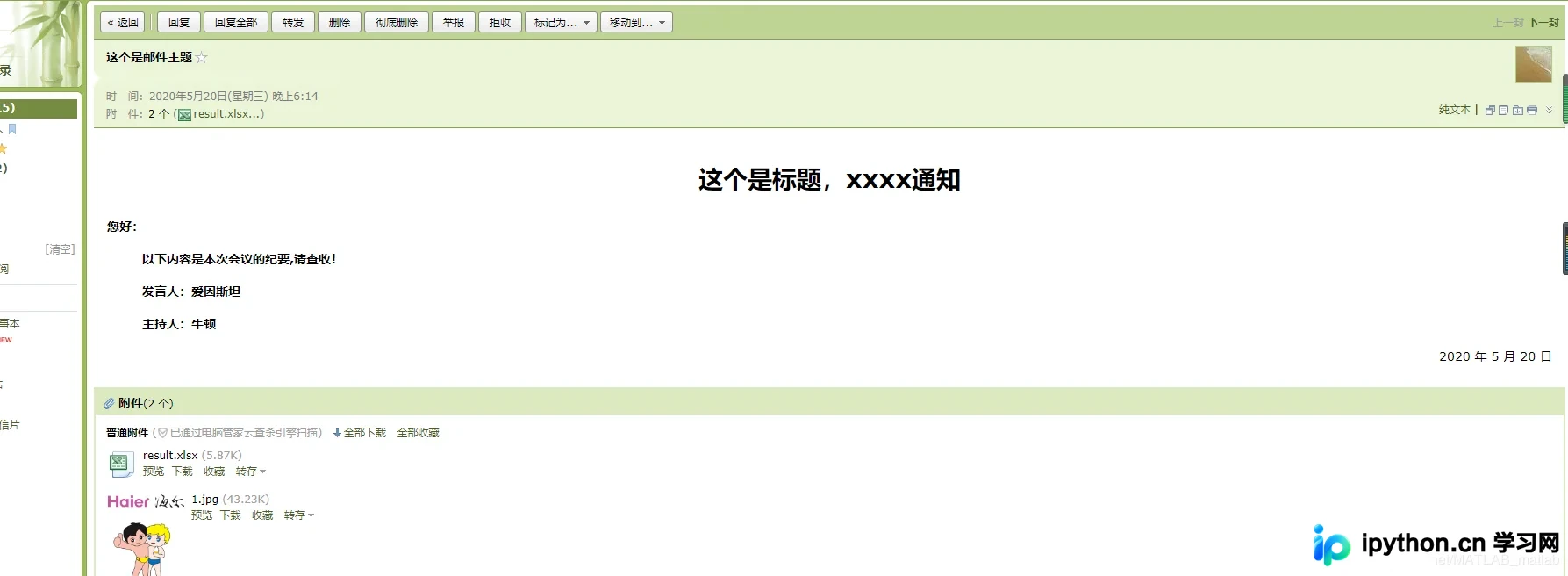
以上内容为本文的全部介绍,希望能为读者的学习提供便利,同时也感谢大家的支持。
本站声明
本文内容仅供参考,不代表本站观点。转载或引用请注明出处。如发现内容问题,请通过联系我们页面反馈。















