


Python实现单机五子棋:基于Tkinter的完整代码与逻辑解析

发布时间:2026-10-14 |
2人浏览过
本文介绍使用Python和Tkinter库开发单机五子棋游戏的完整过程。内容涵盖图形界面创建、棋盘绘制、核心博弈逻辑实现及胜负判定算法。提供从基础类定义到主函数运行的完整代码示例,适合Python初学者理解GUI编程与游戏逻辑结合的实际应用。
Python单机五子棋项目概述
简介
本示例源自实验室2018年底的招新考核题目,要求使用Python编写一个具备基本对战功能的五子棋游戏,主要面向编程新手。
整个程序架构主要包含两大模块:图形界面创建与核心游戏逻辑编写。
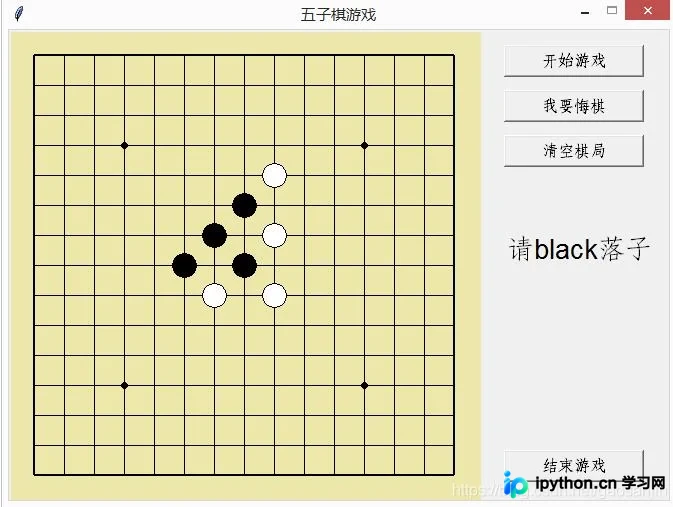
程序运行后的界面效果如下图所示:
图形界面与棋盘绘制实现
样式创建
首先导入程序所需的依赖包。
'''
@Auther : gaoxin
@Date : 2019.01.01
@Version : 1.0
'''

from tkinter import *
import math
接着定义一个名为chessBoard的样式类。为了帮助新手理解,代码中添加了大量注释以说明各函数的具体作用,虽然注释较多可能略显冗余,但有助于降低阅读门槛。
#定义棋盘类
class chessBoard() :
 def __init__(self) :
  #创建一个tk对象,即窗口
  self.window = Tk()
  #窗口命名
  self.window.title("五子棋游戏")
  #定义窗口大小
  self.window.geometry("660x470")
  #定义窗口不可放缩
  self.window.resizable(0,0)
  #定义窗口里的画布
  self.canvas=Canvas(self.window , bg="#EEE8AC" , width=470, height=470)
  #画出画布内容
  self.paint_board()
  #定义画布所在的网格
  self.canvas.grid(row = 0 , column = 0)

 def paint_board(self) :
  #画横线
  for row in range(0,15) :
   if row == 0 or row == 14 :
    self.canvas.create_line(25 , 25+row*30 , 25+14*30 , 25+row*30 , width = 2)
   else :
    self.canvas.create_line(25 , 25+row*30 , 25+14*30 , 25+row*30 , width = 1)

  #画竖线
  for column in range(0,15) :
   if column == 0 or column == 14 :
    self.canvas.create_line(25+column*30 ,25, 25+column*30 , 25+14*30 ,width = 2)
   else :
    self.canvas.create_line(25+column*30 ,25, 25+column*30 , 25+14*30 , width = 1)

  #画圆
  self.canvas.create_oval(112, 112, 118, 118, fill="black")
  self.canvas.create_oval(352, 112, 358, 118, fill="black")
  self.canvas.create_oval(112, 352, 118, 358, fill="black")
  self.canvas.create_oval(232, 232, 238, 238, fill="black")
  self.canvas.create_oval(352, 352, 358, 358, fill="black")
游戏核心逻辑与交互代码解析
逻辑编写
在逻辑部分,重点在于理解各个功能函数的具体职责。
#定义五子棋游戏类
#0为黑子 , 1为白子 , 2为空位
class Gobang() :
 #初始化
 def __init__(self) :
  self.board = chessBoard()
  self.game_print = StringVar()
  self.game_print.set("")
  #16*16的二维列表,保证不会out of index
  self.db = [([2] * 16) for i in range(16)]
  #悔棋用的顺序列表
  self.order = []
  #棋子颜色
  self.color_count = 0
  self.color = 'black'
  #清空与赢的初始化,已赢为1,已清空为1
  self.flag_win = 1
  self.flag_empty = 1
  self.options()


 #黑白互换
 def change_color(self) :
  self.color_count = (self.color_count + 1 ) % 2
  if self.color_count == 0 :
   self.color = "black"
  elif self.color_count ==1 :
   self.color = "white"


 #落子
 def chess_moving(self ,event) :
  #不点击“开始”与“清空”无法再次开始落子
  if self.flag_win ==1 or self.flag_empty ==0 :
   return
  #坐标转化为下标
  x,y = event.x-25 , event.y-25
  x = round(x/30)
  y = round(y/30)
  #点击位置没用落子,且没有在棋盘线外,可以落子
  while self.db[y][x] == 2 and self.limit_boarder(y,x):
   self.db[y][x] = self.color_count
   self.order.append(x+15*y)
   self.board.canvas.create_oval(25+30*x-12 , 25+30*y-12 , 25+30*x+12 , 25+30*y+12 , fill = self.color,tags = "chessman")
   if self.game_win(y,x,self.color_count) :
    print(self.color,"获胜")
    self.game_print.set(self.color+"获胜")
   else :
    self.change_color()
    self.game_print.set("请"+self.color+"落子")


 #保证棋子落在棋盘上
 def limit_boarder(self , y , x) :
  if x<0 or x>14 or y<0 or y>14 :
   return False
  else :
   return True


 #计算连子的数目,并返回最大连子数目
 def chessman_count(self , y , x , color_count ) :
  count1,count2,count3,count4 = 1,1,1,1
  #横计算
  for i in range(-1 , -5 , -1) :
   if self.db[y][x+i] == color_count :
    count1 += 1
   else:
    break
  for i in range(1 , 5 ,1 ) :
   if self.db[y][x+i] == color_count :
    count1 += 1
   else:
    break
  #竖计算
  for i in range(-1 , -5 , -1) :
   if self.db[y+i][x] == color_count :
    count2 += 1
   else:
    break
  for i in range(1 , 5 ,1 ) :
   if self.db[y+i][x] == color_count :
    count2 += 1
   else:
    break
  #/计算
  for i in range(-1 , -5 , -1) :
   if self.db[y+i][x+i] == color_count :
    count3 += 1
   else:
    break
  for i in range(1 , 5 ,1 ) :
   if self.db[y+i][x+i] == color_count :
    count3 += 1
   else:
    break
  #\计算
  for i in range(-1 , -5 , -1) :
   if self.db[y+i][x-i] == color_count :
    count4 += 1
   else:
    break
  for i in range(1 , 5 ,1 ) :
   if self.db[y+i][x-i] == color_count :
    count4 += 1
   else:
    break

  return max(count1 , count2 , count3 , count4)


 #判断输赢
 def game_win(self , y , x , color_count ) :
  if self.chessman_count(y,x,color_count) >= 5 :
   self.flag_win = 1
   self.flag_empty = 0
   return True
  else :
   return False


 #悔棋,清空棋盘,再画剩下的n-1个棋子
 def withdraw(self ) :
  if len(self.order)==0 or self.flag_win == 1:
   return
  self.board.canvas.delete("chessman")
  z = self.order.pop()
  x = z%15
  y = z//15
  self.db[y][x] = 2
  self.color_count = 1
  for i in self.order :
   ix = i%15
   iy = i//15
   self.change_color()
   self.board.canvas.create_oval(25+30*ix-12 , 25+30*iy-12 , 25+30*ix+12 , 25+30*iy+12 , fill = self.color,tags = "chessman")
  self.change_color()
  self.game_print.set("请"+self.color+"落子")


 #清空
 def empty_all(self) :
  self.board.canvas.delete("chessman")
  #还原初始化
  self.db = [([2] * 16) for i in range(16)]
  self.order = []
  self.color_count = 0
  self.color = 'black'
  self.flag_win = 1
  self.flag_empty = 1
  self.game_print.set("")


 #将self.flag_win置0才能在棋盘上落子
 def game_start(self) :
  #没有清空棋子不能置0开始
  if self.flag_empty == 0:
   return
  self.flag_win = 0
  self.game_print.set("请"+self.color+"落子")


 def options(self) :
  self.board.canvas.bind("<Button-1>",self.chess_moving)
  Label(self.board.window , textvariable = self.game_print , font = ("Arial", 20) ).place(relx = 0, rely = 0 ,x = 495 , y = 200)
  Button(self.board.window , text= "开始游戏" ,command = self.game_start,width = 13, font = ("Verdana", 12)).place(relx=0, rely=0, x=495, y=15)
  Button(self.board.window , text= "我要悔棋" ,command = self.withdraw,width = 13, font = ("Verdana", 12)).place(relx=0, rely=0, x=495, y=60)
  Button(self.board.window , text= "清空棋局" ,command = self.empty_all,width = 13, font = ("Verdana", 12)).place(relx=0, rely=0, x=495, y=105)
  Button(self.board.window , text= "结束游戏" ,command = self.board.window.destroy,width = 13, font = ("Verdana", 12)).place(relx=0, rely=0, x=495, y=420)
  self.board.window.mainloop()
最后是主函数(main)的调用部分。
if __name__ == "__main__":
 game = Gobang()
将上述所有代码片段依次复制并组合,即可得到完整的可运行程序。
为方便使用,文末提供了完整程序的整合版本,避免了逐段复制粘贴的繁琐操作。
'''
@Auther : gaoxin
@Date : 2019.01.01
@Version : 1.0

'''

from tkinter import *
import math

#定义棋盘类
class chessBoard() :
 def __init__(self) :
  self.window = Tk()
  self.window.title("五子棋游戏")
  self.window.geometry("660x470")
  self.window.resizable(0,0)
  self.canvas=Canvas(self.window , bg="#EEE8AC" , width=470, height=470)
  self.paint_board()
  self.canvas.grid(row = 0 , column = 0)

 def paint_board(self) :
  for row in range(0,15) :
   if row == 0 or row == 14 :
    self.canvas.create_line(25 , 25+row*30 , 25+14*30 , 25+row*30 , width = 2)
   else :
    self.canvas.create_line(25 , 25+row*30 , 25+14*30 , 25+row*30 , width = 1)
  for column in range(0,15) :
   if column == 0 or column == 14 :
    self.canvas.create_line(25+column*30 ,25, 25+column*30 , 25+14*30 ,width = 2)
   else :
    self.canvas.create_line(25+column*30 ,25, 25+column*30 , 25+14*30 , width = 1)

  self.canvas.create_oval(112, 112, 118, 118, fill="black")
  self.canvas.create_oval(352, 112, 358, 118, fill="black")
  self.canvas.create_oval(112, 352, 118, 358, fill="black")
  self.canvas.create_oval(232, 232, 238, 238, fill="black")
  self.canvas.create_oval(352, 352, 358, 358, fill="black")


#定义五子棋游戏类
#0为黑子 , 1为白子 , 2为空位
class Gobang() :
 #初始化
 def __init__(self) :
  self.board = chessBoard()
  self.game_print = StringVar()
  self.game_print.set("")
  #16*16的二维列表,保证不会out of index
  self.db = [([2] * 16) for i in range(16)]
  #悔棋用的顺序列表
  self.order = []
  #棋子颜色
  self.color_count = 0
  self.color = 'black'
  #清空与赢的初始化,已赢为1,已清空为1
  self.flag_win = 1
  self.flag_empty = 1
  self.options()


 #黑白互换
 def change_color(self) :
  self.color_count = (self.color_count + 1 ) % 2
  if self.color_count == 0 :
   self.color = "black"
  elif self.color_count ==1 :
   self.color = "white"


 #落子
 def chess_moving(self ,event) :
  #不点击“开始”与“清空”无法再次开始落子
  if self.flag_win ==1 or self.flag_empty ==0 :
   return
  #坐标转化为下标
  x,y = event.x-25 , event.y-25
  x = round(x/30)
  y = round(y/30)
  #点击位置没用落子,且没有在棋盘线外,可以落子
  while self.db[y][x] == 2 and self.limit_boarder(y,x):
   self.db[y][x] = self.color_count
   self.order.append(x+15*y)
   self.board.canvas.create_oval(25+30*x-12 , 25+30*y-12 , 25+30*x+12 , 25+30*y+12 , fill = self.color,tags = "chessman")
   if self.game_win(y,x,self.color_count) :
    print(self.color,"获胜")
    self.game_print.set(self.color+"获胜")
   else :
    self.change_color()
    self.game_print.set("请"+self.color+"落子")


 #保证棋子落在棋盘上
 def limit_boarder(self , y , x) :
  if x<0 or x>14 or y<0 or y>14 :
   return False
  else :
   return True


 #计算连子的数目,并返回最大连子数目
 def chessman_count(self , y , x , color_count ) :
  count1,count2,count3,count4 = 1,1,1,1
  #横计算
  for i in range(-1 , -5 , -1) :
   if self.db[y][x+i] == color_count :
    count1 += 1
   else:
    break
  for i in range(1 , 5 ,1 ) :
   if self.db[y][x+i] == color_count :
    count1 += 1
   else:
    break
  #竖计算
  for i in range(-1 , -5 , -1) :
   if self.db[y+i][x] == color_count :
    count2 += 1
   else:
    break
  for i in range(1 , 5 ,1 ) :
   if self.db[y+i][x] == color_count :
    count2 += 1
   else:
    break
  #/计算
  for i in range(-1 , -5 , -1) :
   if self.db[y+i][x+i] == color_count :
    count3 += 1
   else:
    break
  for i in range(1 , 5 ,1 ) :
   if self.db[y+i][x+i] == color_count :
    count3 += 1
   else:
    break
  #\计算
  for i in range(-1 , -5 , -1) :
   if self.db[y+i][x-i] == color_count :
    count4 += 1
   else:
    break
  for i in range(1 , 5 ,1 ) :
   if self.db[y+i][x-i] == color_count :
    count4 += 1
   else:
    break

  return max(count1 , count2 , count3 , count4)


 #判断输赢
 def game_win(self , y , x , color_count ) :
  if self.chessman_count(y,x,color_count) >= 5 :
   self.flag_win = 1
   self.flag_empty = 0
   return True
  else :
   return False


 #悔棋,清空棋盘,再画剩下的n-1个棋子
 def withdraw(self ) :
  if len(self.order)==0 or self.flag_win == 1:
   return
  self.board.canvas.delete("chessman")
  z = self.order.pop()
  x = z%15
  y = z//15
  self.db[y][x] = 2
  self.color_count = 1
  for i in self.order :
   ix = i%15
   iy = i//15
   self.change_color()
   self.board.canvas.create_oval(25+30*ix-12 , 25+30*iy-12 , 25+30*ix+12 , 25+30*iy+12 , fill = self.color,tags = "chessman")
  self.change_color()
  self.game_print.set("请"+self.color+"落子")


 #清空
 def empty_all(self) :
  self.board.canvas.delete("chessman")
  #还原初始化
  self.db = [([2] * 16) for i in range(16)]
  self.order = []
  self.color_count = 0
  self.color = 'black'
  self.flag_win = 1
  self.flag_empty = 1
  self.game_print.set("")


 #将self.flag_win置0才能在棋盘上落子
 def game_start(self) :
  #没有清空棋子不能置0开始
  if self.flag_empty == 0:
   return
  self.flag_win = 0
  self.game_print.set("请"+self.color+"落子")


 def options(self) :
  self.board.canvas.bind("<Button-1>",self.chess_moving)
  Label(self.board.window , textvariable = self.game_print , font = ("Arial", 20) ).place(relx = 0, rely = 0 ,x = 495 , y = 200)
  Button(self.board.window , text= "开始游戏" ,command = self.game_start,width = 13, font = ("Verdana", 12)).place(relx=0, rely=0, x=495, y=15)
  Button(self.board.window , text= "我要悔棋" ,command = self.withdraw,width = 13, font = ("Verdana", 12)).place(relx=0, rely=0, x=495, y=60)
  Button(self.board.window , text= "清空棋局" ,command = self.empty_all,width = 13, font = ("Verdana", 12)).place(relx=0, rely=0, x=495, y=105)
  Button(self.board.window , text= "结束游戏" ,command = self.board.window.destroy,width = 13, font = ("Verdana", 12)).place(relx=0, rely=0, x=495, y=420)
  self.board.window.mainloop()


if __name__ == "__main__":
 game = Gobang()
此外,推荐参考更多有趣的经典小游戏实现专题,内容汇总如下:
C++经典小游戏汇总
Python经典小游戏汇总
Python俄罗斯方块游戏集合
JavaScript经典游戏 玩不停
JavaScript经典小游戏汇总
以上就是本文的全部内容,希望能为读者的学习提供有益帮助,欢迎继续支持本站获取更多技术资源。
本站声明
本文内容仅供参考,不代表本站观点。转载或引用请注明出处。如发现内容问题,请通过联系我们页面反馈。















