


Python 制作简单的音乐播放器

发布时间:2026-10-14 |
6人浏览过
本文介绍如何使用 Python 的 tkinter 和 pygame 库制作一个简易的音乐播放器。该播放器具备加载、播放、暂停和停止功能,界面简洁,适合初学者学习 GUI 编程与音频处理基础。
Python 制作简单的音乐播放器
这个示例的功能非常基础,仅包含播放、停止等基本操作,且目前只支持单首歌曲,主要供初学者参考学习使用。
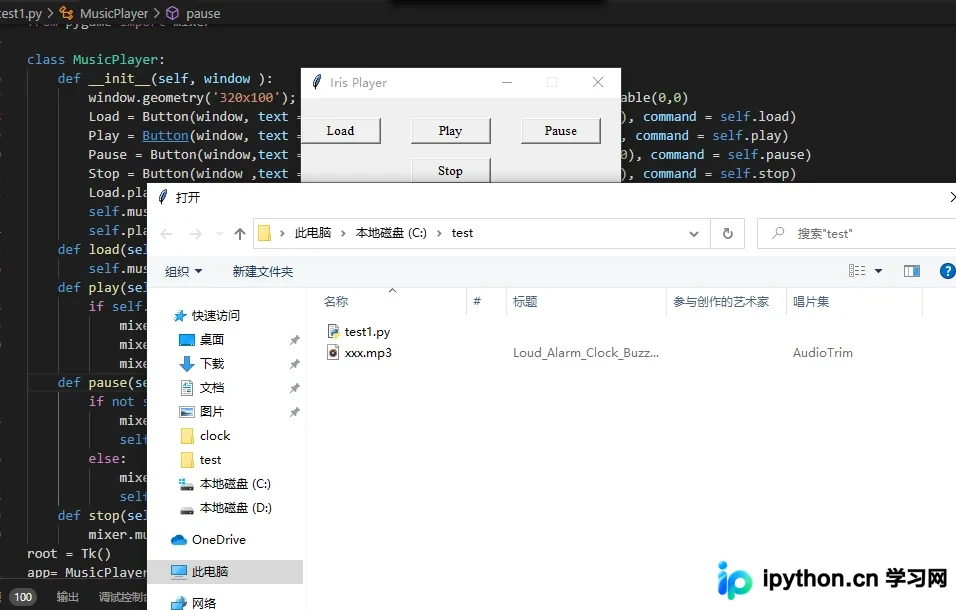
代码实现如下:
from tkinter import *
from tkinter import filedialog
from pygame import mixer

class MusicPlayer:
  def __init__(self, window ):
    window.geometry('320x100'); window.title('Iris Player'); window.resizable(0,0)
    Load = Button(window, text = 'Load', width = 10, font = ('Times', 10), command = self.load)
    Play = Button(window, text = 'Play', width = 10,font = ('Times', 10), command = self.play)
    Pause = Button(window,text = 'Pause', width = 10, font = ('Times', 10), command = self.pause)
    Stop = Button(window ,text = 'Stop', width = 10, font = ('Times', 10), command = self.stop)
    Load.place(x=0,y=20);Play.place(x=110,y=20);Pause.place(x=220,y=20);Stop.place(x=110,y=60)
    self.music_file = False
    self.playing_state = False
  def load(self):
    self.music_file = filedialog.askopenfilename()
  def play(self):
    if self.music_file:
      mixer.init()
      mixer.music.load(self.music_file)
      mixer.music.play()
  def pause(self):
    if not self.playing_state:
      mixer.music.pause()
      self.playing_state=True
    else:
      mixer.music.unpause()
      self.playing_state = False
  def stop(self):
    mixer.music.stop()
root = Tk()
app= MusicPlayer(root)
root.mainloop()
以上是关于使用 Python 制作简单音乐播放器的完整内容,更多关于 Python 音乐播放器开发的资料,欢迎继续关注本站的其他相关文章。
本站声明
本文内容仅供参考,不代表本站观点。转载或引用请注明出处。如发现内容问题,请通过联系我们页面反馈。















