


Python 实现 PS 径向模糊特效:基于 skimage 与 NumPy 的完整代码解析
发布时间:2026-10-14 |
3人浏览过
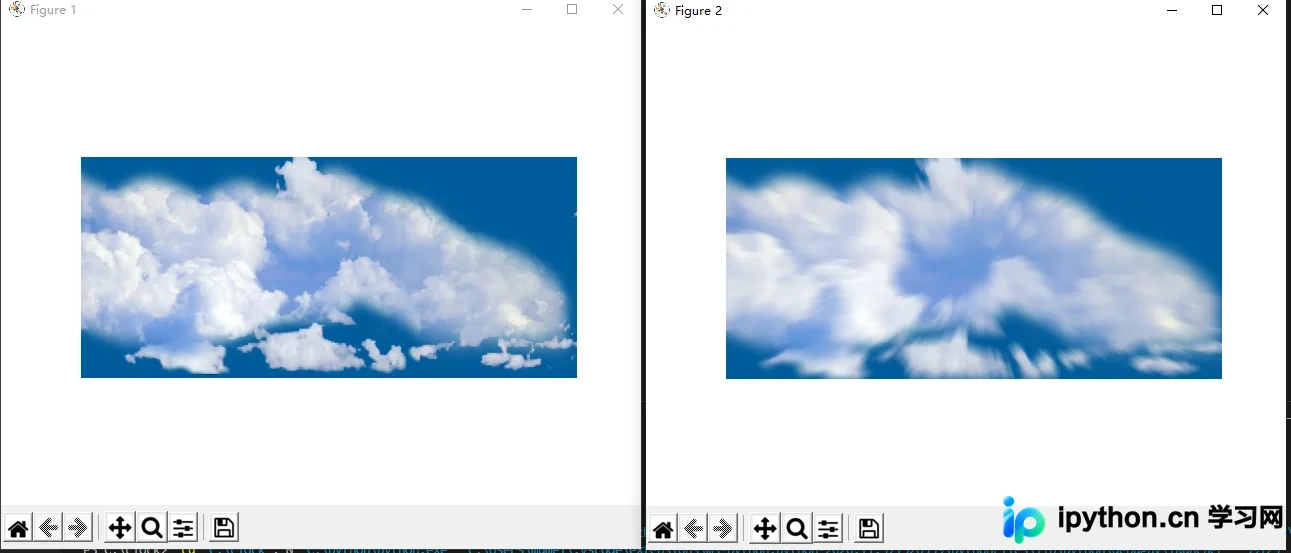
本文详细介绍如何使用 Python 的 skimage 和 NumPy 库实现 Photoshop 风格的径向模糊特效。通过计算像素相对于图像中心的距离与角度,利用矩阵运算批量生成采样点,并对多个采样点的颜色值进行平均处理,从而生成自然的放射状模糊效果。文章提供完整可运行的 Python 代码,涵盖图像读取、坐标掩膜构建、边界处理及结果可视化等关键步骤。
径向模糊特效实现效果
实现效果
Python 实现径向模糊的完整代码
实现代码
from skimage import img_as_float
import matplotlib.pyplot as plt
from skimage import io
import numpy as np
import numpy.matlib

file_name='D:/2020121173119242.png'  # 图片路径
img=io.imread(file_name)

img = img_as_float(img)

img_out = img.copy()

row, col, channel = img.shape

xx = np.arange (col)
yy = np.arange (row)

x_mask = numpy.matlib.repmat (xx, row, 1)
y_mask = numpy.matlib.repmat (yy, col, 1)
y_mask = np.transpose(y_mask)

center_y = (row -1) / 2.0
center_x = (col -1) / 2.0

R = np.sqrt((x_mask - center_x) **2 + (y_mask - center_y) ** 2)

angle = np.arctan2(y_mask - center_y , x_mask - center_x)

Num = 20
arr = np.arange(Num)

for i in range (row):
 for j in range (col):

  R_arr = R[i, j] - arr
  R_arr[R_arr < 0] = 0

  new_x = R_arr * np.cos(angle[i,j]) + center_x
  new_y = R_arr * np.sin(angle[i,j]) + center_y

  int_x = new_x.astype(int)
  int_y = new_y.astype(int)

  int_x[int_x > col-1] = col - 1
  int_x[int_x < 0] = 0
  int_y[int_y < 0] = 0
  int_y[int_y > row -1] = row -1

  img_out[i,j,0] = img[int_y, int_x, 0].sum()/Num
  img_out[i,j,1] = img[int_y, int_x, 1].sum()/Num
  img_out[i,j,2] = img[int_y, int_x, 2].sum()/Num


plt.figure(1)
plt.imshow(img)
plt.axis('off')

plt.figure(2)
plt.imshow(img_out)
plt.axis('off')

plt.show()
以上就是 Python 实现 PS 滤镜中的径向模糊特效的详细内容,更多关于 python 图片模糊滤镜的资料请关注本站其它相关文章!
本站声明
本文内容仅供参考,不代表本站观点。转载或引用请注明出处。如发现内容问题,请通过联系我们页面反馈。















