


Python 实现 PS 旋涡滤镜特效代码详解

发布时间:2026-10-14 |
4人浏览过
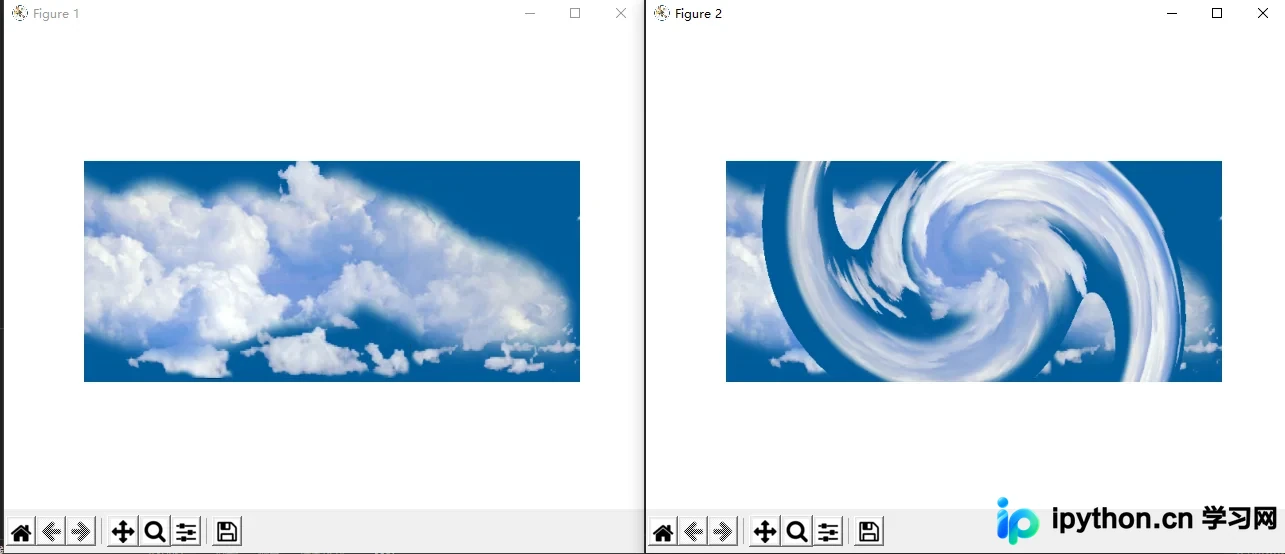
本文详细介绍如何使用 Python 实现 Photoshop 风格的旋涡滤镜特效。通过结合 NumPy 进行坐标变换与极坐标转换,以及 skimage 处理图像数据,完整展示了从读取图片、计算旋涡角度到生成最终特效图像的 Python 代码实现过程,为图像处理爱好者提供实用的技术参考。
Python 实现 PS 旋涡滤镜特效代码详解
实现效果:
实现代码
import numpy as np
from skimage import img_as_float
import matplotlib.pyplot as plt
from skimage import io
import math
import numpy.matlib

file_name2='D:/2020121173119242.png'    # 图片路径
img=io.imread(file_name2)

img = img_as_float(img)

row, col, channel = img.shape
img_out = img * 1.0
degree = 70

center_x = (col-1)/2.0
center_y = (row-1)/2.0

xx = np.arange (col)
yy = np.arange (row)

x_mask = numpy.matlib.repmat (xx, row, 1)
y_mask = numpy.matlib.repmat (yy, col, 1)
y_mask = np.transpose(y_mask)

xx_dif = x_mask - center_x
yy_dif = center_y - y_mask

r = np.sqrt(xx_dif * xx_dif + yy_dif * yy_dif)

theta = np.arctan(yy_dif / xx_dif)

mask_1 = xx_dif < 0
theta = theta * (1 - mask_1) + (theta + math.pi) * mask_1

theta = theta + r/degree

x_new = r * np.cos(theta) + center_x
y_new = center_y - r * np.sin(theta)

int_x = np.floor (x_new)
int_x = int_x.astype(int)
int_y = np.floor (y_new)
int_y = int_y.astype(int)

for ii in range(row):
  for jj in range (col):
    new_xx = int_x [ii, jj]
    new_yy = int_y [ii, jj]

    if x_new [ii, jj] < 0 or x_new [ii, jj] > col -1 :
      continue
    if y_new [ii, jj] < 0 or y_new [ii, jj] > row -1 :
      continue

    img_out[ii, jj, :] = img[new_yy, new_xx, :]


plt.figure (1)
plt.imshow (img)
plt.axis('off')

plt.figure (2)
plt.imshow (img_out)
plt.axis('off')

plt.show()
以上就是 Python 实现 PS 滤镜的旋涡特效的详细内容,更多关于 python ps 滤镜漩涡特效的资料请关注本站其它相关文章!
本站声明
本文内容仅供参考,不代表本站观点。转载或引用请注明出处。如发现内容问题,请通过联系我们页面反馈。















