


Python基于mediainfo批量重命名图片文件

本文介绍如何利用Python调用mediainfo命令行工具,批量获取图片的编码格式、分辨率、位深度及容器信息,并据此生成标准化文件名。通过面向对象封装模块与输入输出目录架构,实现自动化重命名与灰盒测试验证,适用于多媒体测试场景。
案例背景
当前大多数配备彩色屏幕的终端设备,包括智能手机、车载信息娱乐系统以及智能电视等,均涉及图片显示功能。
作为多媒体测试专业人员,我们需要大量符合规范的标准图片测试素材。然而,现有的图片资源命名往往缺乏统一标准,例如常见的IMG_20200325_161111.jpg格式。此类命名方式无法直观反映图片的具体编码格式、分辨率等关键信息。为此,测试经理要求执行批量重命名任务,遵循特定模板:图片编码格式_分辨率_位深度_容器后缀.扩展名,例如JPEG_1920x1080_32bit_jpg.jpg。
图片编解码基础概念
图片编码是指将特定场景画面转换为图片数据文件的过程,该过程涉及取景范围的选择;图片解码则是将图片数据文件还原并显示在屏幕上的过程。
此过程主要涉及以下技术参数:
| 图片技术参数 | 参数释义 | 举例 |
|---|---|---|
| 图片编码格式 (压缩技术) |
即像素点压缩的一类技术, 不同的编码格式, 其压缩率与压缩效果不一样。 |
JPEG, PNG, GIF, BMP, Webp, RAW, Heic |
| 图片分辨率 (单位:Pixel) |
图片长像素点的数量*图片宽像素点的数量 | 4096×2160(4K), 1920x1080, 1280x720,720×480, 640x480, 320x480等 甚至10亿像素的图片都存在的。 |
| 位深度 (单位:bit) |
每个像素点所包含的数据量的大小 | 8bit, 16bit, 32bit |
| 图片容器 | 文件后缀,将图片像素点封装的一种文件格式 | .jpg; .png; .gif; .bmp; .heic; .webp等 |
所有图片文件本质上都是数据的集合,通常情况下,数据量越大,图片呈现的清晰度越高。
准备工作
- 确保mediainfo.exe命令行工具已添加到系统环境变量中。
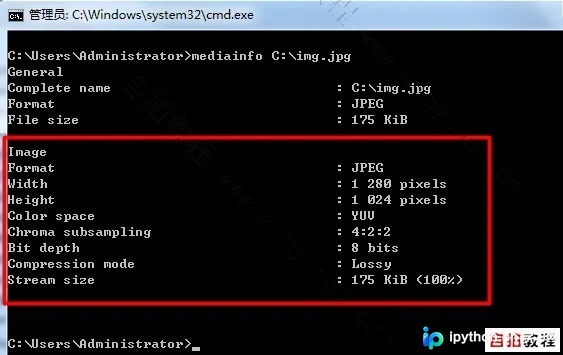
- 以下是某张图片文件的mediainfo输出示例,均为文本格式,使用Python进行解析处理相对简单。
- 为实现批量重命名,采用输入输出文件架构,具体结构如下:
	+---Input_Image  #批量放入待命名的图片文件
	|    1.jpg
	|    2.png
	|
	+---Output_Image  #批量输出已命名的图片文件
	|    JPEG_1920x1080_32bit_jpg.jpg
	|	PNG_1280x720_32bit_png.png
	|
    \image_info.py  # 获取图片文件info信息的模块,
	\rename_image.py #调用image_info.py并实现重名,可双击运行
定义image_info.py模块
鉴于涉及较复杂的逻辑,建议使用面向对象编程方式实现。
# coding=utf-8

import os
import re
import subprocess


class ImageInfoGetter():
  '''获取图片文件的Formate, 分辨率,位深度'''

  def __init__(self, image_file):
    '''判断文件是否存在,如果存在获取其mediainfo信息'''
    if os.path.exists(image_file):
      self.image_file = image_file
      p_obj = subprocess.Popen('mediainfo "%s"' % self.image_file, shell=True, stdout=subprocess.PIPE,
                   stderr=subprocess.PIPE)
      self.info = p_obj.stdout.read().decode("utf-8") # 解决非英文字符的编码问题
    else:
      raise FileNotFoundError("Not this File!") # 如果多媒体文件路径不存在,必须中断

  def get_image_format(self):
    '''获取图片的格式,比如JPEG, PNG, BMP等'''
    try:
      image_codec = re.findall(r"Format\s+:\s(.*)", self.info)[-1] # 取第最后一个Format字段
      image_codec = image_codec.strip() # 去除前后的空格
      if image_codec == "RGB":
        image_codec = "BMP"
    except:
      image_codec = "undef" # 防止程序因为异常而中断
    return image_codec

  def get_image_resolution(self):
    '''获取图片的分辨率'''
    try:
      image_widget = re.findall(r'Width\s+:\s(.*)pixels', self.info)[-1]
      image_widget = image_widget.replace(" ", "")
      image_height = re.findall(r'Height\s+:\s(.*)pixels', self.info)[-1]
      image_height = image_height.replace(" ", "")
      image_resolution = image_widget + "x" + image_height
    except:
      image_resolution = "undef" # 防止程序因为异常而中断
    return image_resolution

  def get_image_bit_depth(self):
    '''获取图片的位深度'''
    try:
      image_bit_depth = re.findall(r"Bit depth\s+:\s(.*bit)s", self.info)[-1].strip()
      image_bit_depth = image_bit_depth.replace(" ", "") # 去空格
    except:
      image_bit_depth = "undef" # 防止程序因为异常而中断
    return image_bit_depth

  def get_image_container(self):
    '''获取图片容器,即文件后缀名'''
    _, image_container = os.path.splitext(self.image_file)
    if not image_container:
      raise NameError("This file no extension")
    image_container = image_container.replace(".", "")
    image_container = image_container.lower() # 全部转成小写
    return image_container


if __name__ == '__main__':
  # 以下代码块,只是用来测试本模块的,一般不建议直接在这里大面积调用本模块'''
  i_obj = ImageInfoGetter("C:\\img.jpg")
  image_format = i_obj.get_image_format()
  print(image_format)
  image_resolution = i_obj.get_image_resolution()
  print(image_resolution)
  image_bit_depth = i_obj.get_image_bit_depth()
  print(image_bit_depth)
  image_container = i_obj.get_image_container()
  print(image_container)
调用image_info.py模块并执行批量重命名操作
# coding=utf-8

import os
import image_info
from shutil import copyfile

curdir = os.getcwd()

# 输入文件夹,放入待重命名的图片
input_image_path = os.path.join(curdir, "Input_Image")
filelist = os.listdir(input_image_path) # 获取文件列表

# 输出文件夹,已命名的图片存放在这里
output_image_path = os.path.join(curdir, "Output_Image")

# 如果没有Output_Image这个文件夹,则创建这个文件夹
if not os.path.exists(output_image_path):
  os.mkdir(output_image_path)

if filelist: # 如果文件列表不为空
  for i in filelist: # 遍历文件列表
    # 以下代码块,只是用来测试本模块的,一般不建议直接在这里大面积调用本模块'''
    image_file = os.path.join(input_image_path, i)
    i_obj = image_info.ImageInfoGetter(image_file)
    image_format = i_obj.get_image_format()
    image_resolution = i_obj.get_image_resolution()
    image_bit_depth = i_obj.get_image_bit_depth()
    image_container = i_obj.get_image_container()
    new_image_name = image_format + "_" + image_resolution + "_" + image_bit_depth + "_" \
             + image_container + "." + image_container
    print(new_image_name)
    new_image_file = os.path.join(output_image_path, new_image_name)
    copyfile(image_file, new_image_file) # 复制文件
else:
  print("It's a Empty folder, please input the image files which need to be renamed firstly!!!")
os.system("pause")
本案例练习素材下载
下载包包含:mediainfo.exe(建议将其放置于环境变量目录中)、各种编码格式的图片测试文件、image_info.py模块以及rename_image.py批处理脚本。点击下载。运行效果如下:
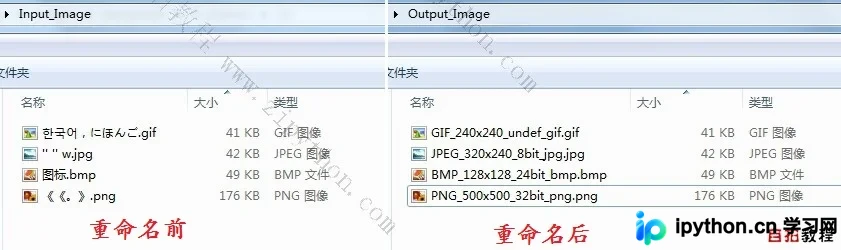
从上述结果可以看出,采用输入输出文件架构的优势在于:只需将不同名称和字符的待重命名图片放入Input_Image文件夹,运行程序脚本后检查Output_Image输出目录,即可验证脚本运行是否正常及健壮性(容错能力)是否符合要求,从而对该程序脚本实现“灰盒测试”。
补充说明
以Android手机为例,Google发布了CDD(Compatibility Definition Document,兼容性定义文档)。
该文档的第5部分涉及大量关于图片编解码格式的规定。
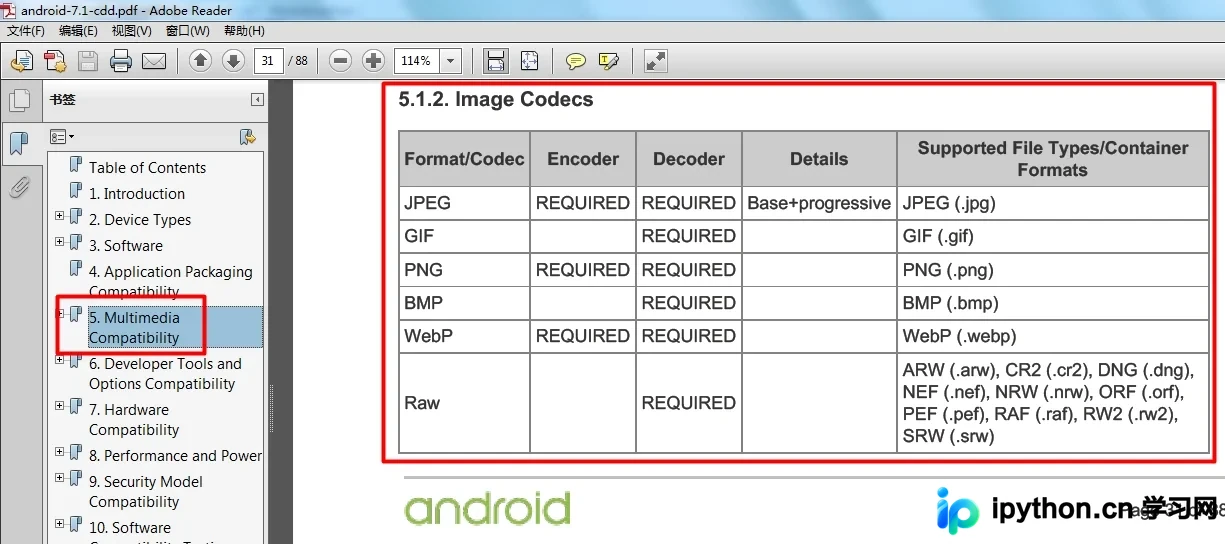
这构成了Android平台最主要的图片多媒体编解码测试需求。
以上为Python基于mediainfo批量重命名图片文件的详细内容,更多关于python批量重命名文件的资料请关注本站其它相关文章!
本站声明
本文内容仅供参考,不代表本站观点。转载或引用请注明出处。如发现内容问题,请通过联系我们页面反馈。















