


Python自动化生成代码审查回复消息的实战指南

本文介绍如何利用Python脚本自动化生成代码审查(Code Review)的回复消息,以简化研发流程中的重复性工作。通过调用Git命令获取分支名、Commit ID及提交信息,并结合随机感谢语,自动生成符合Markdown格式的标准化回复。文章对比了面向过程与面向对象两种实现方式,并探讨了subprocess模块的使用细节及后续优化方向。
在规范的软件研发流程中,通常遵循一套标准化的步骤。
- 开发阶段:完成功能开发或Bug修复,并在本地环境进行自测。
- 代码审核阶段:提交代码,并向团队成员发起Code Review请求。
- 测试环境测试阶段:将代码部署至测试环境,并通知测试人员进行验证。
- 发布线上待测阶段:测试环境验证通过后,将代码发布至线上环境进行进一步测试。
- 验收完成任务:线上验证成功后,关闭相关任务单。
上述流程仅为理想状态,假设每次状态流转均顺利且无异常,开发无缺陷,测试一次通过。
实际研发流程往往更为复杂,具体流转情况如图所示。
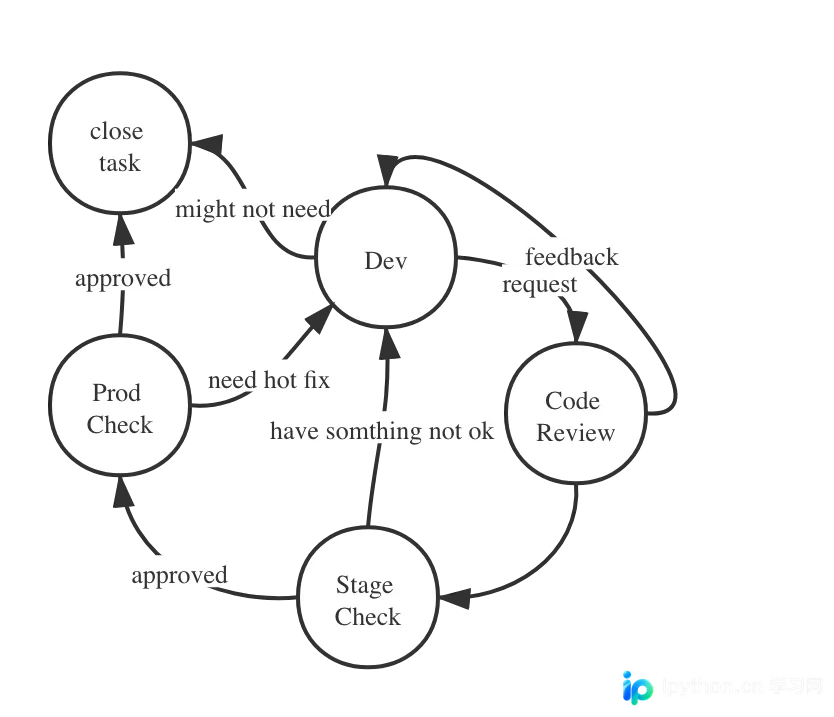
整个流程环环相扣,其中第二步“请求他人进行Code Review”时的反馈消息生成环节,具备较高的自动化潜力。
根据实践经验,较为理想的回复内容格式如下(包含Markdown格式,因为任务跟踪系统支持该格式):
**Changes has been committed to feature/xxx-xxx**

- https://git.xxx.com/xxxx/ddaf18f9be4613c31363d4c92b8bafc3sdfdsf

**Details**
Remove invalid logic for admin pannel
鉴于每次进入Code Review环节均需手动编写类似的回复至任务管理系统,因此考虑使用Python脚本自动生成此类文字,以简化工作流程。
通过分析样例回复,需提取项目分支名(即任务目标分支)以及项目最后一次提交的Commit ID,用于组装第二行的Git Commit链接;Details内容则可从Git Log的提交信息中提取。
第一步:获取分支名称。
为简化处理过程,默认当前项目分支即为所需分支,问题简化为获取当前分支名。可利用Git相关命令实现,具体操作如下:
git branch | sed -n '/\* /s///p'第二步:获取Commit ID。
获取Commit ID的过程同样简单,只需执行以下命令:
git rev-parse HEAD第三步:获取提交信息。
还需获取提交信息,利用Git Log命令进行过滤即可得到:
git log --pretty=format:"%s" -1Git Log的--pretty=format参数功能强大,除获取提交信息外,还支持以下参数配置。
%H 提交对象(commit)的完整哈希字串
%h 提交对象的简短哈希字串
%T 树对象(tree)的完整哈希字串
%t 树对象的简短哈希字串
%P 父对象(parent)的完整哈希字串
%p 父对象的简短哈希字串
%an 作者(author)的名字
%ae 作者的电子邮件地址
%ad 作者修订日期(可以用 -date= 选项定制格式)
%ar 作者修订日期,按多久以前的方式显示
%cn 提交者(committer)的名字
%ce 提交者的电子邮件地址
%cd 提交日期
%cr 提交日期,按多久以前的方式显示
%s 提交说明
因此,第二步也可通过Git Log命令实现,具体示例如下:
git log --pretty=format:"%H" -1此外,还需在末尾添加一些人性化的感谢语,毕竟这是请求他人协助审核代码,表达谢意是必要的。此处使用列表存储若干感谢语,并随机选取一条附加至文末。 若采用面向过程方式编写,代码示例如下:
#coding=utf-8
#!/usr/bin/python

import os, subprocess
import random

# use subprocess to get the current branch name from output
def get_branch_name(cd_path):
 os.chdir(cd_path)
 status, branch_name = subprocess.getstatusoutput("git branch | sed -n '/\* /s///p'")
 # print(output)
 # exit(0)
 return branch_name

def get_latest_git_log(cd_path):
 """
 docstring
 """
 os.chdir(cd_path)
 status, log_info = subprocess.getstatusoutput("git log --pretty=format:\"%s\" -1")
 return log_info

def get_latest_commit_id(cd_path):
 os.chdir(cd_path)
 status, commit_id = subprocess.getstatusoutput("git rev-parse HEAD")
 return commit_id

def get_reviewer_by_random(reviewers):
 return random.choice(reviewers)

def get_thanks_words_by_random(thanks_words):
 return random.choice(thanks_words)

def create_comment(reviewers, branch_name, log_info, commit_id, thanks_words):
 print(get_reviewer_by_random(reviewers))
 print("*Changes made has been committed to " + branch_name + "*")
 print("- https://git.xxxxx.com/someproject/subname/-/commit/" + commit_id)
 print("*Details*")
 print("-" + log_info)
 print(get_thanks_words_by_random(thanks_words))

branch_name = get_branch_name('/Users/tony/www/autoWork')
log_info = get_latest_git_log('/Users/tony/www/autoWork')
commit_id = get_latest_commit_id('/Users/tony/www/autoWork')

reviewers = [
 '[~Harry]',
 '[~Tom]'
]

random_thanks_words = [
 'Review it please, thanks.',
 'Actually, I am glad to see you have time to review it, thanks a lot.',
 'Please check it if you have free time, thanks.',
 'Check it please.'
 'Waiting for your code review, thank you.'
]

create_comment(reviewers, branch_name, log_info, commit_id, random_thanks_words)
由于Python脚本与项目目录不在同一位置,每次执行Git相关命令前需先切换至目标项目目录。分别执行Git命令时,使用subprocess.getstatusoutput()以便获取标准化输出结果。此处未使用os.system,因其返回值包含两部分:命令的标准输出及表示命令执行成功与否的状态码。
例如,执行os.system("git branch | sed -n '/* /s///p'")将返回如下内容:
feature/ST-247
0
第一行为获取到的分支名,第二行为成功标识符,0表示命令执行无误。
因此,考虑使用subprocess.getstatusoutput来运行命令,该函数分别返回状态标识和输出内容,便于获取期望的执行结果。
尽管代码仍有优化空间,但已能满足当前需求。运行该脚本可得到如下输出结果:
[~Harry]
*Changes made has been committed to feature/ST-247*
- https://git.xxxxx.com/someproject/subname/-/commit/d21033057677e6d49d9cea07c64c49e35529545dx
*Details*
- Remove some invalid logic
Please check it if you have free time, thanks.
若改写为面向对象方式,调用更简洁,参数传递更少,采用Python3语法编写的代码如下所示:
#coding=utf-8
#!/usr/bin/python
import os
import subprocess
import random

class CommitComment:
 def __init__(self, project_path: str, reviewers: list, thanks_words: list):
  self.project_path = project_path
  self.reviewers = reviewers
  self.thanks_words = thanks_words
 # use subprocess to get the current branch name from output
 def get_branch_name(self) -> str:
  os.chdir(self.project_path)
  status, branch_name = subprocess.getstatusoutput("git branch | sed -n '/\* /s///p'")
  return branch_name
 # use subprocess to get the latest commit message from git log
 def get_latest_git_log(self) -> str:
  os.chdir(self.project_path)
  status, log_info = subprocess.getstatusoutput("git log --pretty=format:\"%s\" -1")
  return log_info

 # use subprocess to get the latest commit id from git log
 def get_latest_commit_id(self) -> str:
  os.chdir(self.project_path)
  status, commit_id = subprocess.getstatusoutput("git rev-parse HEAD")
  return commit_id

 def get_reviewer_by_random(self) -> str:
  return random.choice(self.reviewers)

 def get_thanks_words_by_random(self) -> str:
  return random.choice(self.thanks_words)

 def create_comment(self):
  print(self.get_reviewer_by_random())
  print("*Changes has been committed to " + self.get_branch_name() + "*")
  print("- https://git.xxxx.com/MyProject/ProjectName/-/commit/" + self.get_latest_commit_id())
  print("*Details*")
  print("-" + self.get_latest_git_log())
  print(self.get_thanks_words_by_random())


thanks_words = [
  'Review it please, thanks.',
  'Actually, I am glad to see you have time to review it, thanks a lot.',
  'Please check it if you have free time, thanks.',
  'Check it please.'
  'Waiting for your code review, thank you.'
 ]
reviewers = [
'[~Harry]',
'[~Tom]'
]

comment = CommitComment('/Users/tony/www/autoWork', reviewers, thanks_words)

comment.create_comment() # will print out the complete comment
thanks_words列表可进一步扩充,以降低随机获取时的重复概率。当然,最后一段也可每次手动定制,毕竟发自内心的感谢最为重要。
此类简化工作流的脚本本质在于减少重复性劳动,特别是在一天内处理大量任务时。然而,反思本身无法被简化,我们应成为工作的主人而非奴隶。 抛砖引玉,希望这对自己和未来的自己也是一面还原镜像。
Todo:
1. 可设置每日定时执行该脚本,自动生成回复消息。 2. 通过脚本传参动态选择需处理的项目目录。本案例代码中为硬编码,默认选择autoWork项目。 3. 还可考虑接入语料库(thanks words),使感谢语永不重复,并学习新词汇。:)
以上就是Python实现代码审查回复消息生成的详细内容,更多关于Python回复消息生成的资料请关注本站其它相关文章!
本站声明
本文内容仅供参考,不代表本站观点。转载或引用请注明出处。如发现内容问题,请通过联系我们页面反馈。















