


Python爬虫实战:BeautifulSoup库解析与遍历全指南

本文详解Python中BeautifulSoup库的核心用法,涵盖从安装配置到解析器选择(html.parser、lxml等)。深入解析Tag、NavigableString、Comment三大基本元素,系统讲解下行、上行及平行遍历技巧,并演示如何利用find_all结合正则表达式精准提取网页数据,助力爬虫开发入门。
本系列文章专注于Python爬虫的基础实践,旨在通过通俗易懂的语言,总结高效且实用的操作方案。作者始终认为,系统的总结与复盘是提升技术能力的必经之路。
1. BeautifulSoup库简介
在Python生态中,BeautifulSoup常被亲切地称为“靓汤”。它与lxml类似,都是用于解析HTML和XML文档的工具,核心功能在于从网页数据中提取所需信息。BeautifulSoup兼容Python标准库中的HTML解析器,同时也支持多种第三方解析器。若未手动指定解析器,Python默认调用lxml,其解析速度更快且性能更优;而BeautifulSoup集成的lxml解析器则进一步增强了功能的强大程度。
值得注意的是,BeautifulSoup会自动将输入文档转换为Unicode编码,并将输出文档转换为utf-8编码。因此,在使用时无需过度担忧编码问题,只需明确原始文档的编码格式即可。
使用pip命令工具安装BeautifulSoup4库
pip install -i https://pypi.tuna.tsinghua.edu.cn/simple/ BeautifulSoup # 使用清华大学镜像源安装2. BeautifulSoup库的主要解析器
在代码中 html.parser是一种针对于html网页页面的解析器,Beautiful Soup库还有其他的解析器,用于针对不同的网页
demo = 'https://www.baidu.com'
soup = BeautifulSoup(demo,'html.parser')
| 解析器 | 使用方法 | 条件 |
|---|---|---|
| bs4的html解析器 | BeautifulSoup(demo,‘html.parser') | 安装bs4库 |
| lxml的html解析器 | BeautifulSoup(demo,‘lxml') | pip install lxml |
| lxml的xml解析器 | BeautifulSoup(demo,‘xml') | pip install lxml |
| html5lib的解析器 | BeautifulSoup(demo,‘html5lib') | pip install html5lib |
3. BeautifulSoup的简单使用
假设有一个简单的网页,以提取百度搜索页面的一部分源代码为例进行演示。
<!DOCTYPE html>
<html>
<head>
 <meta content="text/html;charset=utf-8" http-equiv="content-type" />
 <meta content="IE=Edge" http-equiv="X-UA-Compatible" />
 <meta content="always" name="referrer" />
 <link
href="https://ss1.bdstatic.com/5eN1bjq8AAUYm2zgoY3K/r/www/cache/bdorz/baidu.min.
css" rel="stylesheet" type="text/css" />
 <title>百度一下,你就知道 </title>
</head>
<body link="#0000cc">
 <div >
 <div >
 <div >
  <div >
  <a href="http://news.baidu.com" rel="external nofollow" rel="external nofollow" name="tj_trnews">新闻
</a>
  <a href="https://www.hao123.com" rel="external nofollow"
name="tj_trhao123">hao123 </a>
  <a href="http://map.baidu.com" rel="external nofollow" name="tj_trmap">地图 </a>
  <a href="http://v.baidu.com" rel="external nofollow" name="tj_trvideo">视频 </a>
  <a href="http://tieba.baidu.com" rel="external nofollow" name="tj_trtieba">贴吧
</a>
  <a href="//www.baidu.com/more/" rel="external nofollow" name="tj_briicon"
>更多产品 </a>
  </div>
 </div>
 </div>
 </div>
</body>
</html>
结合requests库和使用BeautifulSoup库的html解析器,对其进行解析有如下
import requests
from bs4 import BeautifulSoup

# 使用Requests库加载页面代码
r = requests.get('https://www.baidu.com')
r.raise_for_status()  # 状态码返回
r.encoding = r.apparent_encoding
demo = r.text

# 使用BeautifulSoup库解析代码
soup = BeautifulSoup(demo,'html.parser')  # 使用html的解析器

print(soup.prettify())   # prettify 方式输出页面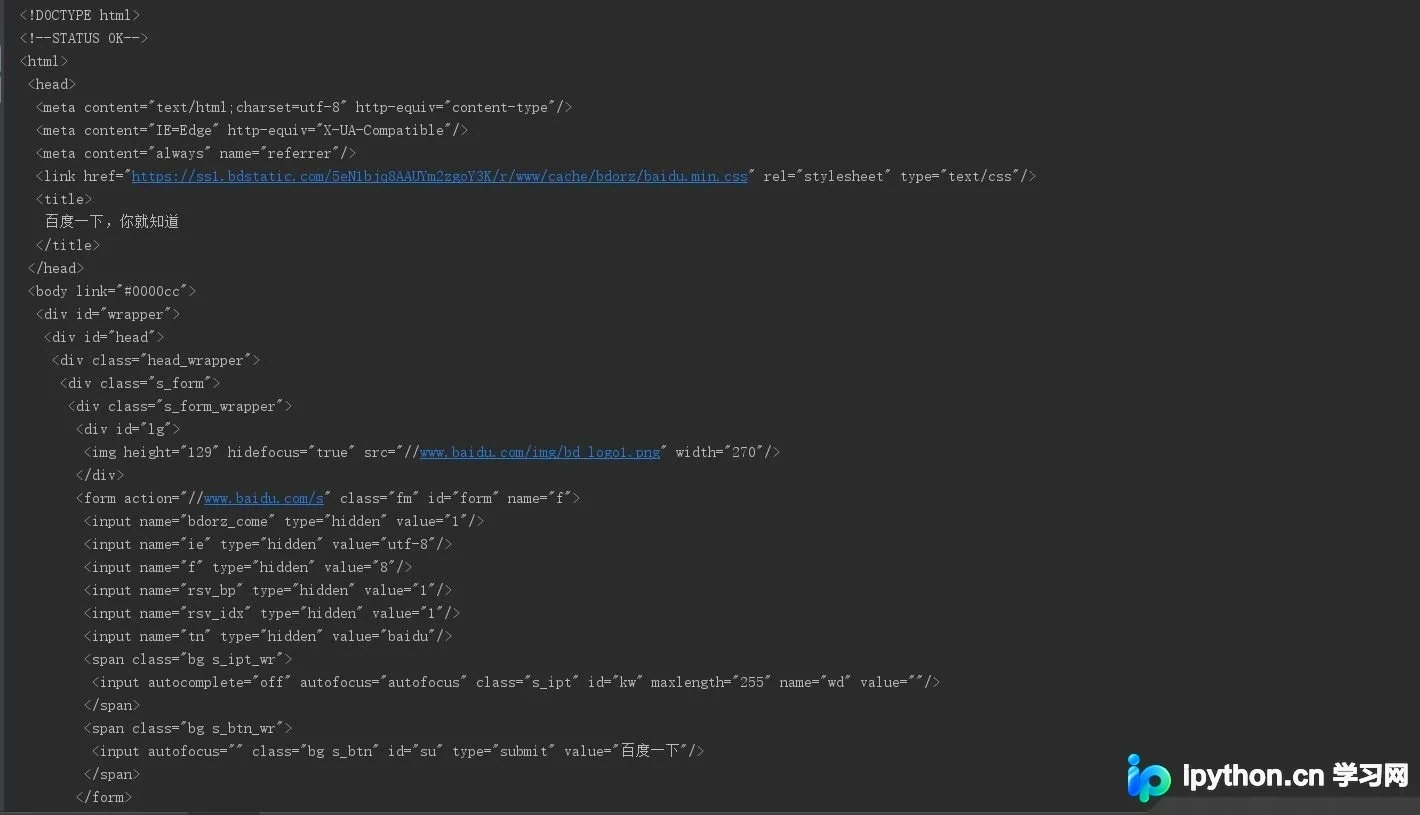
4. BeautifuSoup的类的基本元素
BeautifulSoup4会将复杂的HTML文档转换为一棵复杂的树形结构,其中每个节点均为Python对象。针对HTML标签树,BeautifulSoup库提供了特定的元素类型,重点包括以下三种:
<p > ... </p> - Tag
- NavigableString
- Comment
- BeautifulSoup
| 基本元素 | 说明 |
|---|---|
| Tag | 标签,最基本的信息组织单元,分别用<>和</>标明开头和结尾,格式:soup.a或者soup.p(获取a标签中或者p标签中的内容) |
| Name | 标签的名字,
… 的名字是‘p' 格式为:.name |
| Attributes | 标签的属性,字典形式组织,格式:.attrs |
| NavigableString | 标签内非属性字符串,<>…</>中的字符串,格式:.string |
| Comment | 标签内的字符串的注释部分,一种特殊的Comment类型 |
4.1 Tag
标签是HTML中最基本的信息组织单元,具体使用方式如下:
from bs4 import BeautifulSoup
html = 'https://www.baidu.com'
bs = BeautifulSoup(html,"html.parser")

print(bs.title) # 获取title标签的所有内容
print(bs.head) # 获取head标签的所有内容
print(bs.a)  # 获取第一个a标签的所有内容
print(type(bs.a))	# 类型
在Tag标签中,最重要的属性是HTML页面中的name和attrs属性,具体使用方式如下:
print(bs.name)
print(bs.head.name)			# head 之外对于其他内部标签,输出的值便为标签本身的名称
print(bs.a.attrs) 			# 把 a 标签的所有属性打印输出了出来,得到的类型是一个字典。
print(bs.a['class']) 		# 等价 bs.a.get('class') 也可以使用get方法,传入属性的名称,二者是等价的
bs.a['class'] = "newClass" # 对这些属性和内容进行修改
print(bs.a)
del bs.a['class']			# 对这个属性进行删除
print(bs.a)
4.2 NavigableString
NavigableString中的string方法用于获取标签内部的文字内容。
from bs4 import BeautifulSoup
html = 'https://www.baidu.com'
bs = BeautifulSoup(html,"html.parser")
print(bs.title.string)
print(type(bs.title.string))
4.3 Comment
Comment对象是一种特殊类型的NavigableString对象,其输出内容不包含注释符号,专门用于提取注释中的文本信息。
from bs4 import BeautifulSoup
html = 'https://www.baidu.com'
bs = BeautifulSoup(html,"html.parser")
print(bs.a)
# 标签中的内容<a href="http://news.baidu.com" rel="external nofollow" rel="external nofollow" name="tj_trnews"><!--新闻--></a>
print(bs.a.string) 		# 新闻
print(type(bs.a.string)) # <class 'bs4.element.Comment'>
5. 基于bs4库的HTML内容的遍历方法
HTML具有特定的基本格式,这也是构成网页的基本组成成分。
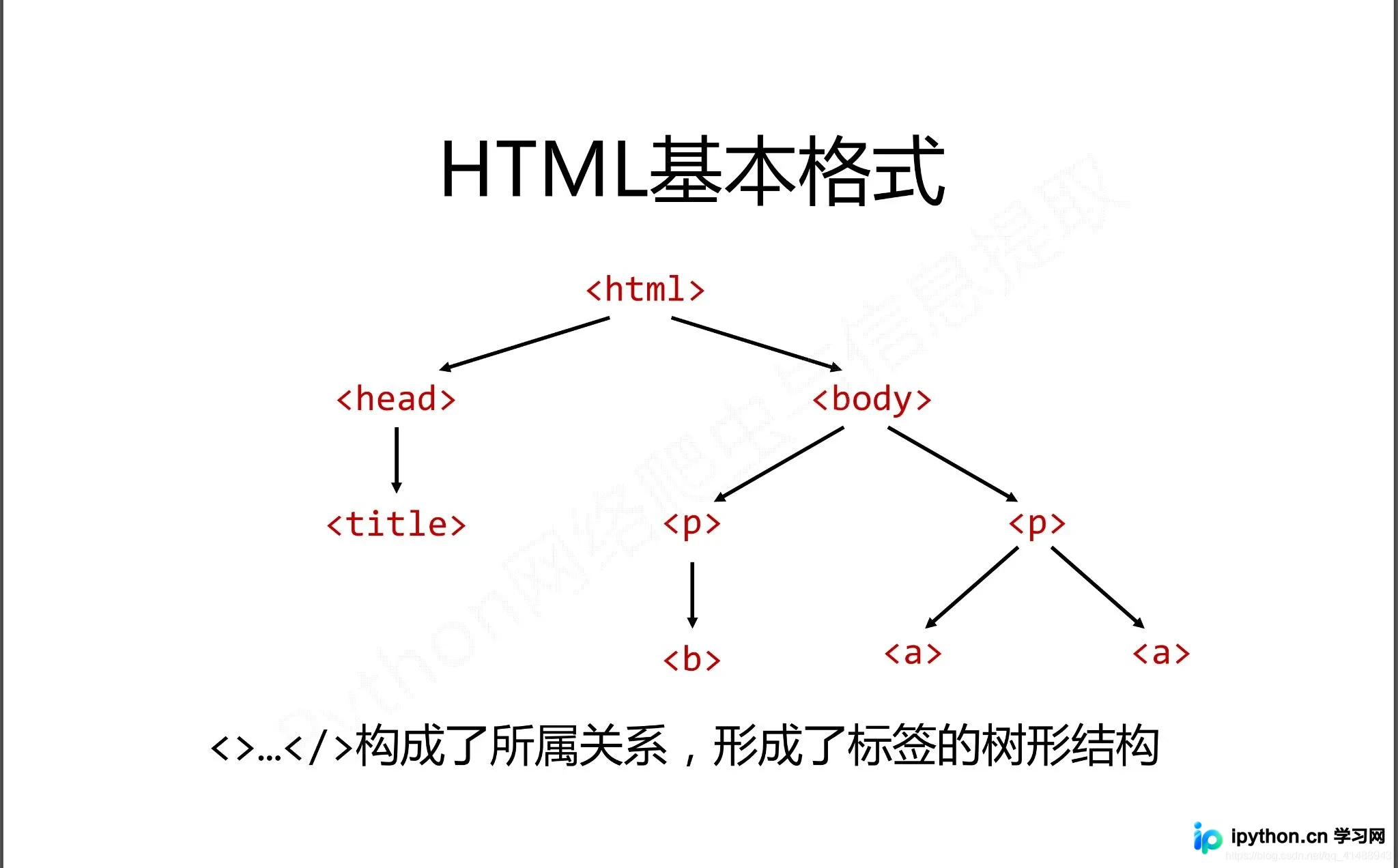
在这种基本格式下,存在三种基本的遍历流程:
- 下行遍历
- 上行遍历
- 平行遍历
这三种遍历方式分别从当前节点出发,对其上方、下方或平行位置的节点格式及关系进行遍历操作。
5.1 下行遍历
下行遍历包含三种遍历属性,分别是:
- contents
- children
- descendants
| 属性 | 说明 |
|---|---|
| .contents | 子节点的列表,将所有儿子节点存入列表 |
| .children | 子节点的迭代类型,用于循环遍历儿子节点 |
| .descendants | 子孙节点的迭代类型,包含所有子孙节点,用于循环遍历 |
使用举例
soup = BeautifulSoup(demo,'html.parser')

# 循环遍历儿子节点
for child in soup.body.children:
	print(child)

# 循环遍历子孙节点
for child in soup.body.descendants:
 print(child)

# 输出子节点的列表形式
print(soup.head.contents)
print(soup.head.contents[1])	# 用列表索引来获取它的某一个元素
5.2 上行遍历
上行遍历主要有两种方式:
- parent
- parents
| 属性 | 说明 |
|---|---|
| .parent | 节点的父亲标签 |
| .parents | 节点先辈标签的迭代类型,用于循环遍历先辈节点,返回一个生成器 |
使用举例
soup = BeautifulSoup(demo,'html.parser')

for parent in soup.a.parents:
	if parent is None:
		parent(parent)
	else:
		print(parent.name)
5.3 平行遍历
平行遍历包含四种属性:
- next_sibling
- previous_sibling
- next_siblings
- previous_siblings
| 属性 | 说明 |
|---|---|
| .next_sibling | 返回按照HTML文本顺序的下一个平行节点标签 |
| .previous_sibling | 返回按照HTML文本顺序的上一个平行节点标签 |
| .next_siblings | 迭代类型,返回按照html文本顺序的后续所有平行节点标签 |
| .previous_siblings | 迭代类型,返回按照html文本顺序的前序所有平行节点标签 |
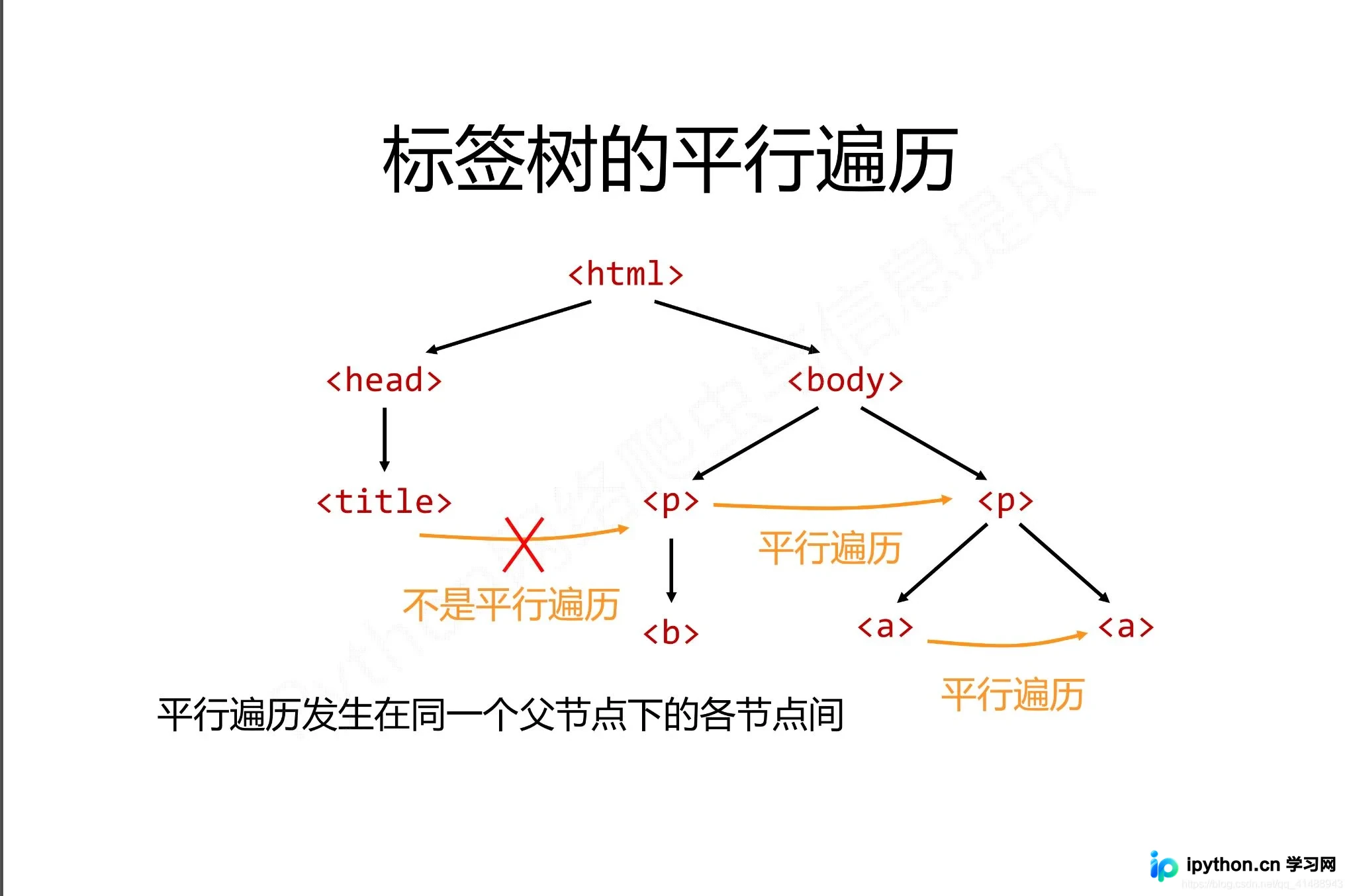
平行遍历举例如下
for sibling in soup.a.next_sibling:
	print(sibling)		# 遍历后续节点

for sibling in soup.a.previous_sibling:
	print(sibling)		# 遍历
5.4 其他遍历
| 属性 | 说明 |
|---|---|
| .strings | 如果Tag包含多个字符串,即在子孙节点中有内容,可以用此获取,而后进行遍历 |
| .stripped_strings | 与strings用法一致,可以去除掉那些多余的空白内容 |
| .has_attr | 判断Tag是否包含属性 |
6. 文件树搜索
使用soup.find_all(name,attrs,recursive,string,**kwargs)方法,用于返回一个列表类型,存储查找的结果
- name:对标签名称的检索字符串
- attrs:对标签属性值得检索字符串,可标注属性检索
- recursive:是否对子孙全部检索,默认为
- Truestring:用与在信息文本中特定字符串的检索
6.1 name参数
如果是指定的字符串:会查找与字符串完全匹配的内容,如下
a_list = bs.find_all("a")
print(a_list)		# 将会返回所有包含a标签的内容
如果是使用正则表达式:将会使用BeautifulSoup4中的search()方法来匹配内容,如下
from bs4 import BeautifulSoup
import re

html = 'https://www.baidu.com'
bs = BeautifulSoup(html,"html.parser")
t_list = bs.find_all(re.compile("a"))
for item in t_list:
 	print(item)		# 输出列表
如果传入一个列表:BeautifulSoup4将会与列表中的任一元素匹配到的节点返回,如下
t_list = bs.find_all(["meta","link"])
for item in t_list:
	print(item)
如果传入一个函数或者方法:将会根据函数或者方法来匹配
from bs4 import BeautifulSoup

html = 'https://www.baidu.com'
bs = BeautifulSoup(html,"html.parser")
def name_is_exists(tag):
 	 return tag.has_attr("name")
t_list = bs.find_all(name_is_exists)
for item in t_list:
 	 print(item)
6.2 attrs参数
并不是所有的属性都可以使用上面这种方式进行搜索,比如HTML的data属性,用于指定属性搜索
t_list = bs.find_all(data-foo="value")6.3 string参数
通过通过string参数可以搜索文档中的字符串内容,与name参数的可选值一样,string参数接受字符串,正则表达式,列表
from bs4 import BeautifulSoup
import re

html = 'https://www.baidu.com'
bs = BeautifulSoup(html, "html.parser")
t_list = bs.find_all(attrs={"data-foo": "value"})
for item in t_list:
 	print(item)
t_list = bs.find_all(text="hao123")
for item in t_list:
 	print(item)
t_list = bs.find_all(text=["hao123", "地图", "贴吧"])
for item in t_list:
 	print(item)
t_list = bs.find_all(text=re.compile("\d"))
for item in t_list:
print(item)使用find_all()方法的时,常用到正则表达式的形式import re如下所示
soup.find_all(sring = re.compile('pyhton'))		# 指定查找内容

# 或者指定使用正则表达式要搜索的内容
sring = re.compile('pyhton')		# 字符为python
soup.find_all(string)				# 调用方法模板
6.4 常用的fiid()方法如下
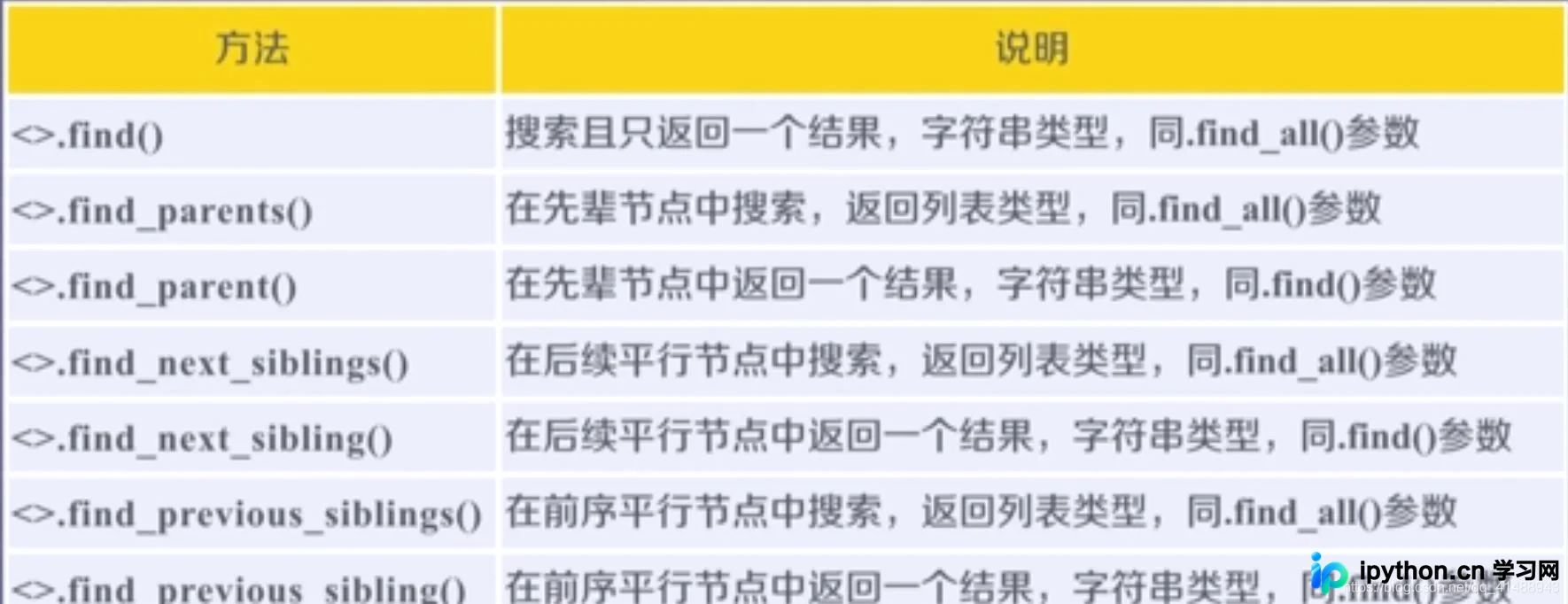
7. 总结参考
此文列举了BeautifulSoup库在爬虫中的基本使用,不正确之处望指教,参考
到此这篇关于python爬虫beautifulsoup库使用操作教程全解(python爬虫基础入门)的文章就介绍到这了,更多相关python爬虫beautifulsoup库内容请搜索本站以前的文章或继续浏览下面的相关文章希望大家以后多多支持本站!
本站声明
本文内容仅供参考,不代表本站观点。转载或引用请注明出处。如发现内容问题,请通过联系我们页面反馈。















