


Python结合DOS命令批量获取已保存的WiFi密码

本文介绍如何通过Python脚本调用Windows的netsh命令,自动提取系统中已保存的所有WiFi名称及对应密码。文章详细解析了subprocess和re模块的使用,展示了如何遍历配置文件、判断密钥状态并提取明文密码,适用于忘记家庭或办公网络密码的快速找回场景。
通过CMD命令提取计算机中已配置的WiFi信息
设想这样一个场景:当你忘记自家WiFi密码,而朋友来访需要连接网络打游戏时,你便有了展示技术的机会。
具体操作步骤如下:
按下Win+R组合键,输入CMD以打开命令提示符窗口,随后输入以下命令来查看电脑中保存过的WiFi列表。
netsh wlan show profiles
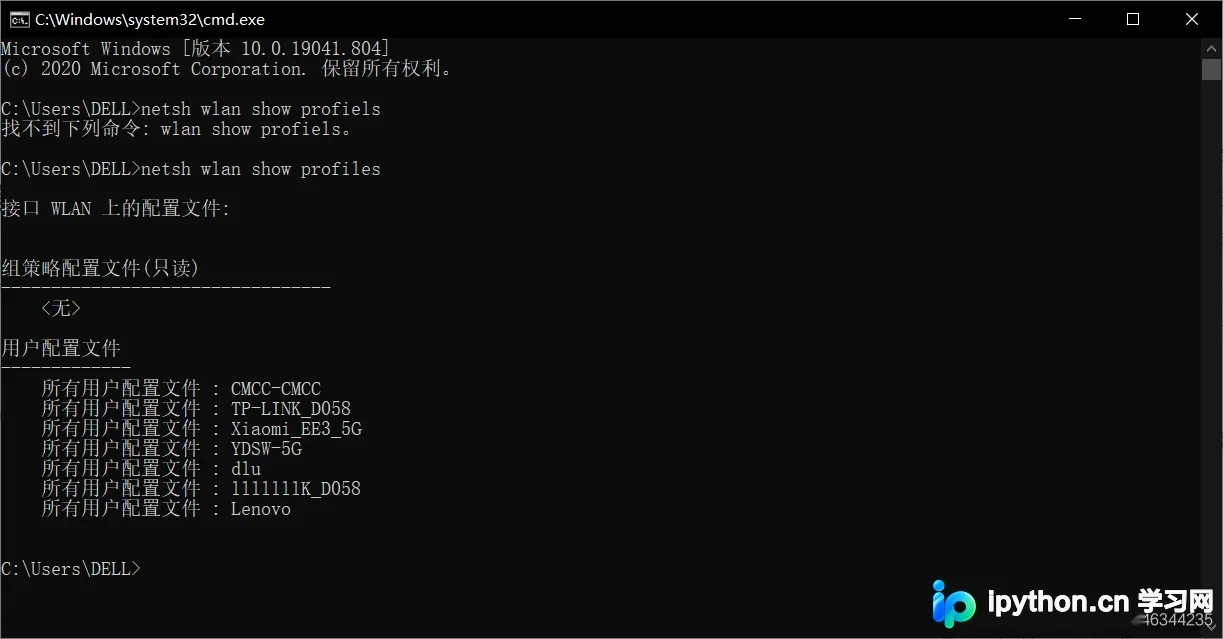
假设列表中显示你家的WiFi名称为CMCC-CMCC,接下来需要查询该特定WiFi的详细信息,相关代码如下:
netsh wlan show profiles CMCC-CMCC
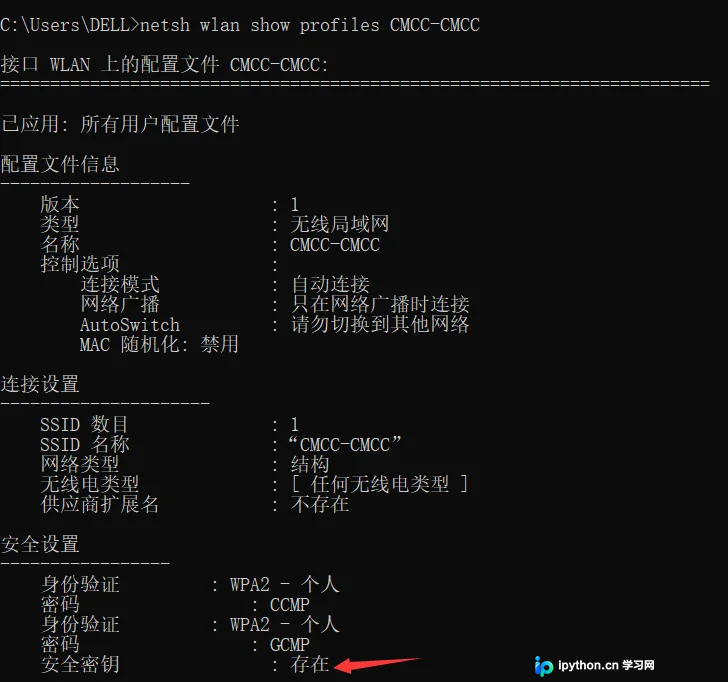
在输出结果中,若“安全密钥”一项显示为“存在”,则表明该WiFi设置了密码。此时,在原有命令后追加“key=clear”参数即可显示明文密码(注:此处的clear仅用于显示,不会删除你的WiFi密码)。
netsh wlan show profiles CMCC-CMCC key=clear
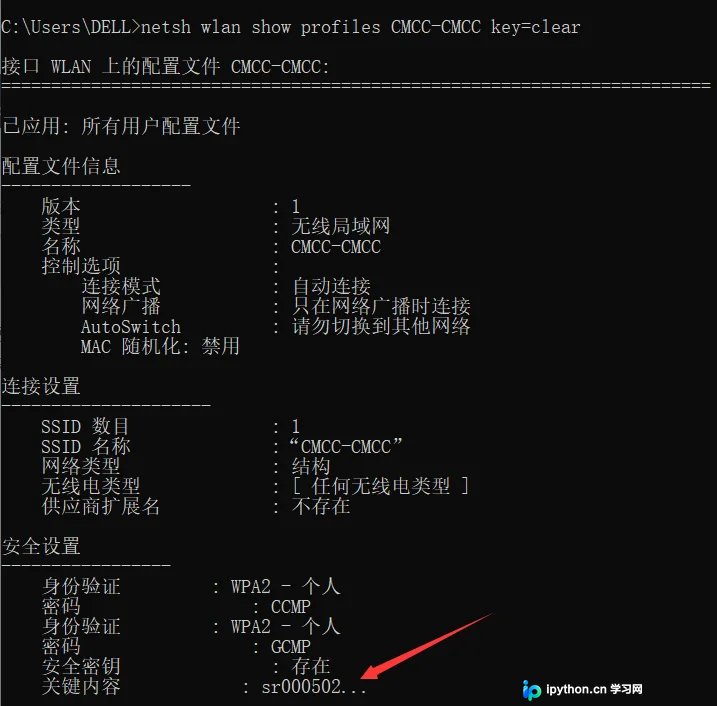
此时屏幕上显示的内容即为该WiFi的密码。
使用Python脚本自动化执行上述操作,以获取所有已配置WiFi的密码。
首先,需要导入两个必要的Python库:subprocess和re。
- subprocess模块允许启动新进程,并连接其输入/输出/错误管道,从而获取命令执行的返回值。
- re模块为Python提供了完整的正则表达式功能,用于文本匹配和处理。
我们建立通道执行DOS命令以列出所有连接过的WiFi,并将WiFi名称存入profile_names变量。输出格式采用字典形式,每个字典包含一个WiFi名及其对应的密码,同时定义一个列表用于存储这些字典对象。
command_output = subprocess.run(['netsh','wlan','show','profiles'],capture_output= True).stdout.decode(encoding='gbk')
profile_names = re.findall('所有用户配置文件 :(.*)\r',command_output)#返回一个列表
wifi_list=list()
将“查看WiFi是否存在密钥”的逻辑写入代码中。
if len(profile_names) != 0:
  for name in profile_names:
    wifi_profile = dict()
    profile_info = subprocess.run(['netsh','wlan','show','profiles',name],capture_output=True).stdout.decode(encoding='gbk')
若安全密钥的内容显示为“不存在”,说明该WiFi无密码,可直接跳过(continue)。若显示“存在”,则执行下一步:追加key=clear参数以查看密码。这里解释一下为何使用name[1:]:由于编码原因,正则表达式提取的name变量前可能包含一个空格,若直接使用可能导致系统无法识别该WiFi名称(例如,实际名为“CMCC-CMCC”,但正则提取结果可能为“ CMCC-CMCC”,多出的空格会导致系统判定为不同网络)。
    if re.search('安全密钥        : 不存在',profile_info):
      continue
    else:
      wifi_profile['ssid'] = name[1:]
      profile_info_pass = subprocess.run(['netsh','wlan','show','profiles',name[1:],'key=clear'],capture_output=True).stdout.decode(encoding='gbk')
      password = re.search('关键内容      :(.*)\r',profile_info_pass)
      if password == None:
        wifi_profile["password"]=None
      else:
        wifi_profile["password"] = password[1]
      wifi_list.append(wifi_profile)
最后,只需打印出包含所有WiFi信息的列表(wifi_list)即可。完整代码附后,便于理解。
import subprocess
import re
command_output = subprocess.run(['netsh','wlan','show','profiles'],capture_output= True).stdout.decode(encoding='gbk')
profile_names = re.findall('所有用户配置文件 :(.*)\r',command_output)
wifi_list=list()
print(type(profile_names))
if len(profile_names) != 0:
  for name in profile_names:
    wifi_profile = dict()
    profile_info = subprocess.run(['netsh','wlan','show','profiles',name],capture_output=True).stdout.decode(encoding='gbk')
    if re.search('安全密钥        : 不存在',profile_info):
      continue
    else:
      wifi_profile['ssid'] = name[1:]
      profile_info_pass = subprocess.run(['netsh','wlan','show','profiles',name[1:],'key=clear'],capture_output=True).stdout.decode(encoding='gbk')
      password = re.search('关键内容      :(.*)\r',profile_info_pass)
      if password == None:
        wifi_profile["password"]=None
      else:
        wifi_profile["password"] = password[1]
      wifi_list.append(wifi_profile)
for x in range(len(wifi_list)):
  print(wifi_list[x])
如有其他建议,欢迎批评指正。
以上就是关于利用Python和DOS命令获取WiFi密码的详细内容,更多相关技术文章请关注本站其他文章。
本站声明
本文内容仅供参考,不代表本站观点。转载或引用请注明出处。如发现内容问题,请通过联系我们页面反馈。















