


Python利用PyVista进行mesh的色彩映射的实现

本文介绍如何使用Python库PyVista对3D网格模型进行色彩映射。PyVista作为VTK的高级封装,简化了网格数据处理与可视化流程。文章详细演示了四种实现方式:通过自定义颜色数组生成渐变映射、使用PyVista内置的viridis_r色彩图、调用Matplotlib的colormap以及集成colorcet库的高级色彩方案。内容涵盖安装、文件读取及具体代码示例,帮助开发者快速实现基于高度或其他标量的网格着色效果。
近期在项目开发中,需要对3D网格模型(mesh)执行色彩映射处理。在探索过程中发现,VTK(Visualization Toolkit)的高级封装库PyVista功能强大且易于使用,因此进行了尝试并总结相关经验。
PyVista简介
PyVista是什么
PyVista具备以下核心特性:
- 它是“面向人类”的可视化工具包,提供了VTK的高级API接口。
- 内置了空间数据的网格数据结构及相应的滤波处理方法。
- 简化了3D绘图流程,能够高效处理大型或复杂数据的图像化展示。
PyVista(前身为vtki)是可视化工具包VTK的一个辅助模块。它采用了一种不同的交互方式,通过NumPy数组和直接数组访问与VTK后端进行接口对接。该库提供了一个符合Python编程习惯、文档完善的接口,旨在展示VTK强大的可视化后端能力,从而方便用户对空间引用数据集进行快速原型开发、分析及可视化集成。
该模块不仅适用于演示文稿和研究论文中的科学绘图,还可作为其他依赖网格处理的Python模块的支持组件。
官方文档参考地址:https://docs.pyvista.org/index.html
GitHub仓库
官方教程链接
pyvista与其他3D可视化工具的比较分析
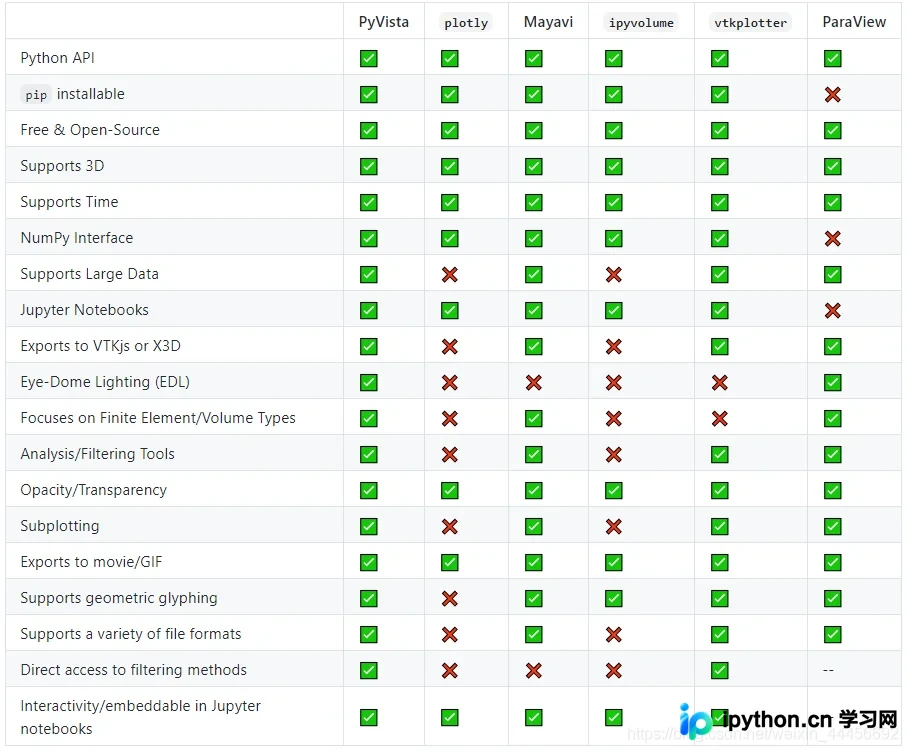
相关讨论参考:https://github.com/pyvista/pyvista/issues/146
pyvista使用指南
安装方法
pip install pyvista -i https://pypi.tuna.tsinghua.edu.cn/simple
I/O读取及可视化操作
支持的mesh类型
PyVista支持读取大多数常见的网格文件格式,例如PLY、VTK、STL、OBJ、BYU等。对于一些不常见的网格文件格式,如FEniCS/Dolfin_ XML format,也提供支持。
需要注意的是,PyVista目前不支持直接读取点云PCD格式文件。若需处理PCD文件,可借助pcdpy、pclpy或python-pcl等第三方库进行读取。
import pyvista as pv
# 读取
mesh = pv.read('pointCloudData/data.vtk')
# 显示
mesh.plot()
# 其他类似
mesh = pv.read('pointCloudData/data.ply')
……
支持的图片类型
PyVista支持读取多种图片格式数据,包括JPEG、TIFF、PNG等常见图像格式。
# 读取
image = pv.read('my_image.jpg')
# 显示
image.plot(rgb=True, cpos="xy")

# 其余图片类型类似
……
mesh彩色映射实现
在项目需求中,需要根据网格的高度数据对mesh进行彩色映射。在PyVista中,大致有四种实现方法。
自定义色彩映射
具体代码实现如下:
import pyvista as pv
import matplotlib.pyplot as plt
from matplotlib.colors import ListedColormap
import numpy as np

def mesh_cmp_custom(mesh, name):
 """
 自定义色彩映射
 :param mesh: 输入mesh
 :param name: 比较数据的名字
 :return:
 """
 pts = mesh.points
 mesh[name] = pts[:, 1]
 # Define the colors we want to use
 blue = np.array([12 / 256, 238 / 256, 246 / 256, 1])
 black = np.array([11 / 256, 11 / 256, 11 / 256, 1])
 grey = np.array([189 / 256, 189 / 256, 189 / 256, 1])
 yellow = np.array([255 / 256, 247 / 256, 0 / 256, 1])
 red = np.array([1, 0, 0, 1])

 c_min = mesh[name].min()
 c_max = mesh[name].max()
 c_scale = c_max - c_min

 mapping = np.linspace(c_min, c_max, 256)
 newcolors = np.empty((256, 4))
 newcolors[mapping >= (c_scale * 0.8 + c_min)] = red
 newcolors[mapping < (c_scale * 0.8 + c_min)] = grey
 newcolors[mapping < (c_scale * 0.55 + c_min)] = yellow
 newcolors[mapping < (c_scale * 0.3 + c_min)] = blue
 newcolors[mapping < (c_scale * 0.1 + c_min)] = black

 # Make the colormap from the listed colors
 my_colormap = ListedColormap(newcolors)
 mesh.plot(scalars=name, cmap=my_colormap)

if __name__ == '__main__':
 mesh = pv.read('pointCloudData/1.ply')
 mesh_cmp_custom(mesh, 'y_height')
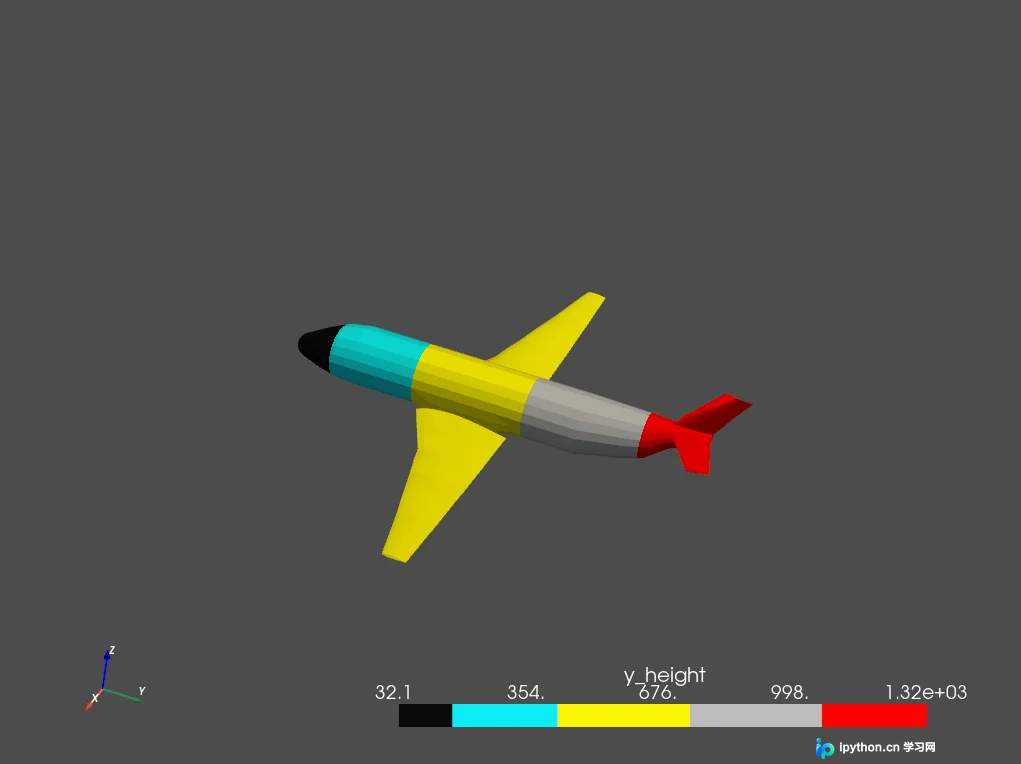
运行效果如图所示。
使用PyVista自带的色彩映射函数
通过调用函数mesh.plot(scalars=name, cmap='viridis_r')即可实现。
其中cmap参数支持多种预设样式,包括但不限于:
‘Accent', ‘Accent_r', ‘Blues', ‘Blues_r', ‘BrBG', ‘BrBG_r', ‘BuGn', ‘BuGn_r', ‘BuPu', ‘BuPu_r', ‘CMRmap', ‘CMRmap_r', ‘Dark2', ‘Dark2_r', ‘GnBu', ‘GnBu_r', ‘Greens', ‘Greens_r', ‘Greys', ‘Greys_r', ‘OrRd', ‘OrRd_r', ‘Oranges', ‘Oranges_r', ‘PRGn', ‘PRGn_r', ‘Paired', ‘Paired_r', ‘Pastel1', ‘Pastel1_r', ‘Pastel2', ‘Pastel2_r', ‘PiYG', ‘PiYG_r', ‘PuBu', ‘PuBuGn', ‘PuBuGn_r', ‘PuBu_r', ‘PuOr', ‘PuOr_r', ‘PuRd', ‘PuRd_r', ‘Purples', ‘Purples_r', ‘RdBu', ‘RdBu_r', ‘RdGy', ‘RdGy_r', ‘RdPu', ‘RdPu_r', ‘RdYlBu', ‘RdYlBu_r', ‘RdYlGn', ‘RdYlGn_r', ‘Reds', ‘Reds_r', ‘Set1', ‘Set1_r', ‘Set2', ‘Set2_r', ‘Set3', ‘Set3_r', ‘Spectral', ‘Spectral_r', ‘Wistia', ‘Wistia_r', ‘YlGn', ‘YlGnBu', ‘YlGnBu_r', ‘YlGn_r', ‘YlOrBr', ‘YlOrBr_r', ‘YlOrRd', ‘YlOrRd_r', ‘afmhot', ‘afmhot_r', ‘autumn', ‘autumn_r', ‘binary', ‘binary_r', ‘bone', ‘bone_r', ‘brg', ‘brg_r', ‘bwr', ‘bwr_r', ‘cividis', ‘cividis_r', ‘cool', ‘cool_r', ‘coolwarm', ‘coolwarm_r', ‘copper', ‘copper_r', ‘cubehelix', ‘cubehelix_r', ‘flag', ‘flag_r', ‘gist_earth', ‘gist_earth_r', ‘gist_gray', ‘gist_gray_r', ‘gist_heat', ‘gist_heat_r', ‘gist_ncar', ‘gist_ncar_r', ‘gist_rainbow', ‘gist_rainbow_r', ‘gist_stern', ‘gist_stern_r', ‘gist_yarg', ‘gist_yarg_r', ‘gnuplot', ‘gnuplot2', ‘gnuplot2_r', ‘gnuplot_r', ‘gray', ‘gray_r', ‘hot', ‘hot_r', ‘hsv', ‘hsv_r', ‘inferno', ‘inferno_r', ‘jet', ‘jet_r', ‘magma', ‘magma_r', ‘nipy_spectral', ‘nipy_spectral_r', ‘ocean', ‘ocean_r', ‘pink', ‘pink_r', ‘plasma', ‘plasma_r', ‘prism', ‘prism_r', ‘rainbow', ‘rainbow_r', ‘seismic', ‘seismic_r', ‘spring', ‘spring_r', ‘summer', ‘summer_r', ‘tab10', ‘tab10_r', ‘tab20', ‘tab20_r', ‘tab20b', ‘tab20b_r', ‘tab20c', ‘tab20c_r', ‘terrain', ‘terrain_r', ‘turbo', ‘turbo_r', ‘twilight', ‘twilight_r', ‘twilight_shifted', ‘twilight_shifted_r', ‘viridis', ‘viridis_r', ‘winter', ‘winter_r'
相关代码示例如下:
import pyvista as pv
def mesh_cmp(mesh, name):
 """
  使用进行plot自带的色彩映射
  :param mesh: 输入mesh
  :param name: 比较数据的名字
  :return:
 """
 pts = mesh.points
 mesh[name] = pts[:, 1]
 mesh.plot(scalars=name, cmap='viridis_r')

if __name__ == '__main__':
 mesh = pv.read('vtkData/airplane.ply')
 mesh_cmp(mesh, 'y_height')
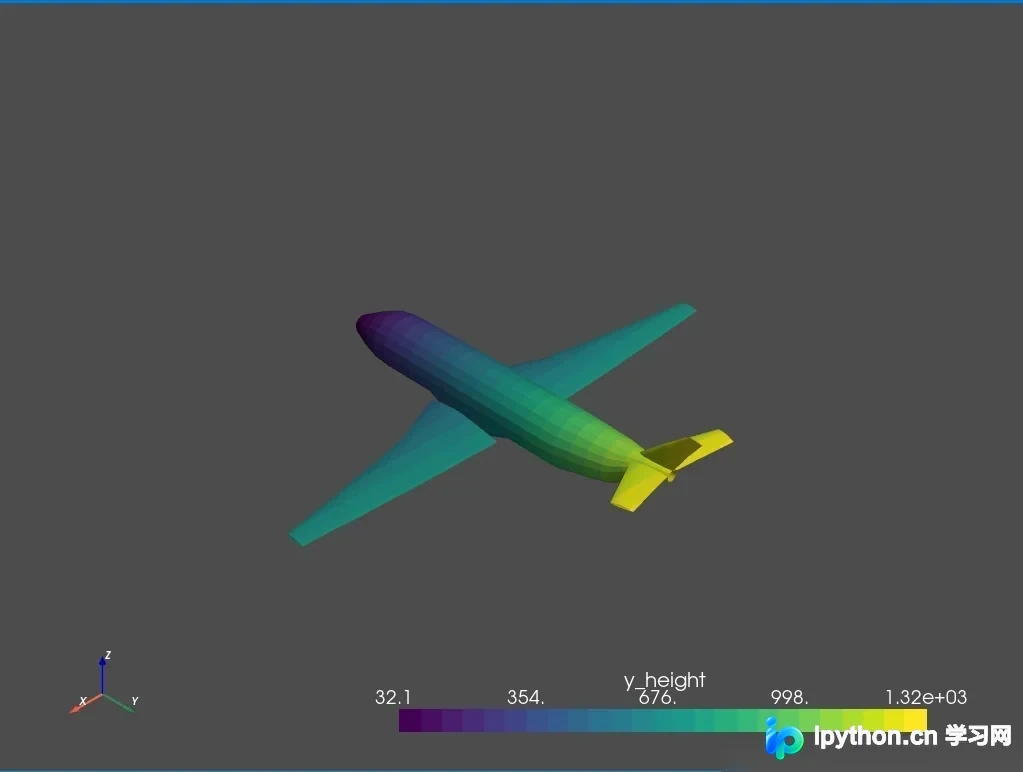
执行后的视觉效果如图所示。
使用Matplotlib的色彩映射
具体代码实现如下:
import pyvista as pv
import matplotlib.pyplot as plt

def mesh_cmp_mpl(mesh, name):
 """
  使用Matplotlib进行色彩映射
  :param mesh: 输入mesh
  :param name: 比较数据的名字
  :return:
  """
 pts = mesh.points
 mesh[name] = pts[:, 1]
 mlp_cmap = plt.cm.get_cmap("viridis", 25)
 mesh.plot(scalars=name, cmap=mlp_cmap)

if __name__ == '__main__':
 mesh = pv.read('vtkData/airplane.ply')
 mesh_cmp_mpl(mesh, 'y_height')
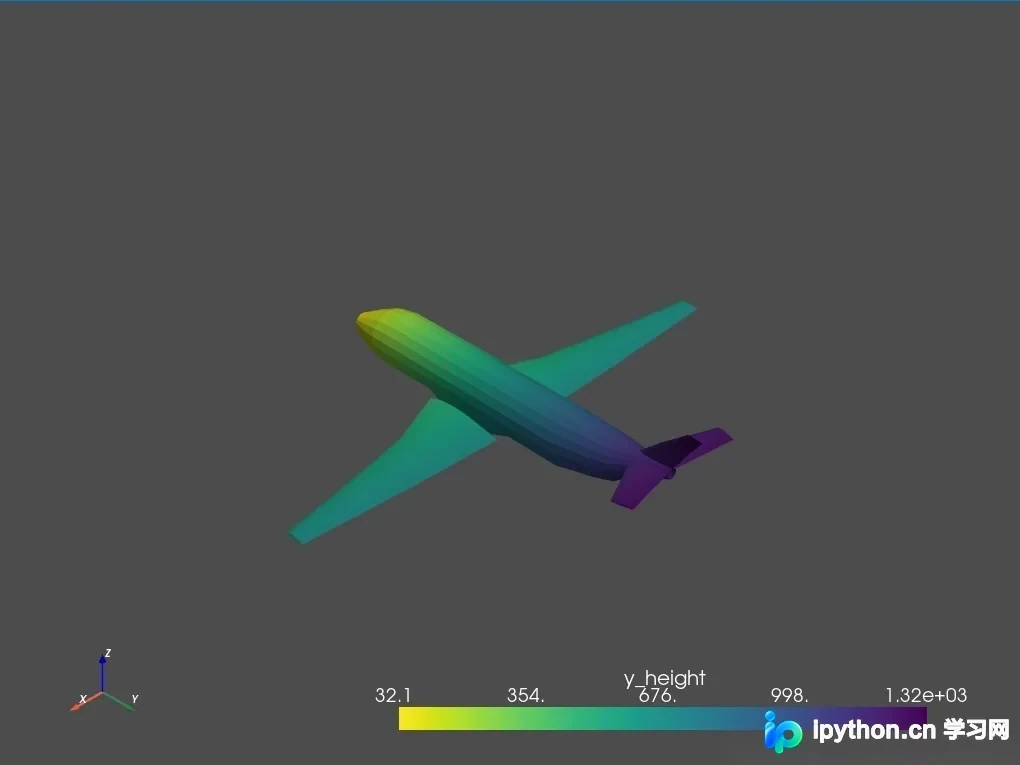
运行效果如图所示。
使用colorcet库的色彩映射
使用前需先安装colorcet库:
pip install colorcet
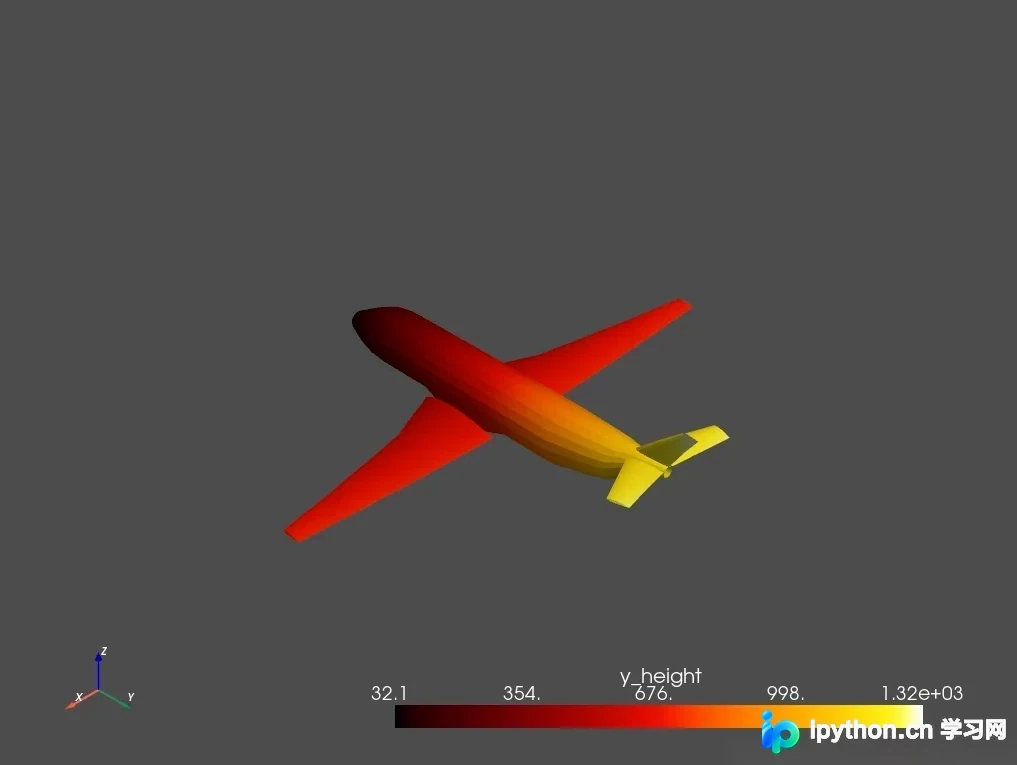
其使用方式与上述几种方法类似。若希望使用colorcet库中的hot色彩图,可参考以下用法。
代码示例:mesh.plot(scalars=name, cmap=“hot”)。
完整代码实现如下:
def mesh_cmp_colorcet(mesh, name):
 """
  使用进行colorcet进行色彩映射
  :param mesh: 输入mesh
  :param name: 比较数据的名字
  :return:
 """
 pts = mesh.points
 mesh[name] = pts[:, 1]
 mesh.plot(scalars=name, cmap=colorcet.fire)

if __name__ == '__main__':
 mesh = pv.read('vtkData/airplane.ply')
 mesh_cmp_colorcet(mesh, 'y_height')
最终显示效果如图所示。
总结
PyVista功能相当强大,且相比直接使用VTK更为便捷,代码量有肉眼可见的降低。
本文介绍了Python利用PyVista进行mesh色彩映射的实现方法,更多相关内容可搜索本站历史文章或继续浏览后续文章,感谢支持。
本站声明
本文内容仅供参考,不代表本站观点。转载或引用请注明出处。如发现内容问题,请通过联系我们页面反馈。















