


Python基于Tkinter实现带界面的倒计时程序及打包

发布时间:2026-10-14 |
5人浏览过
本文介绍如何使用Python的Tkinter库构建图形界面倒计时应用,利用time.sleep实现秒级计时,并通过多线程机制防止界面卡死。文章详细讲解了全局标志位对计时重置与退出的控制逻辑,最后演示使用PyInstaller将脚本打包为隐藏控制台的单文件exe程序。
Python Tkinter倒计时程序实现与打包
本文展示如何使用Python编写一个简单的倒计时程序,供读者参考。
程序采用Tkinter库来构建用户交互界面,以实现可视化的倒计时功能。
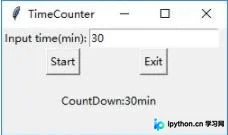
- 核心计时逻辑通过调用time.sleep(1)函数实现,确保每次循环暂停一秒,从而达成秒级倒计时的效果。
- 为避免长时间运行导致界面无响应,程序引入线程机制处理计时任务,确保主界面保持流畅。
- 在线程的循环逻辑中,程序持续检测全局标志位,以此支持计时器的重置操作以及安全退出功能。
- 最终使用命令pyinstaller -F file.py -w生成可执行文件,其中-w参数用于隐藏控制台窗口,-F参数用于生成独立的单文件exe。
具体实现代码如下:
#!/usr/bin/python3.8
# -*- coding: utf-8 -*-
# @Time    : 2021/4/19 14:09
# @Author  : dongdong
# @File    : CountdownGUI.py
# @Software: PyCharm

from tkinter import *
import time
import threading
def cyclethread():
    global counttime
    global restartflag
    global runflag
    restartflag=False

    if (timestr.get().isdigit()):
        counttime = int(timestr.get()) * 60
    else:
        runflag=False
        return;
    while (1):
        if(restartflag):
            counttime = int(timestr.get()) * 60
            restartflag=False
        if(exitflag):
            sys.exit()

        counttime=counttime-1
        v='\nleft time:'+str(counttime//60)+' :'+str(counttime%60)
        textshow.set(v)
        root.update()
        if (counttime <= 0):
            runflag = False
            return
        time.sleep(1)

def startCount():
    global  restartflag
    global runflag
    restartflag=True
    if( not runflag):
        th=threading.Thread(target=cyclethread)
        th.setDaemon(True)
        th.start()
        runflag = True

def exitfun():
    global exitflag
    exitflag=True
    sys.exit()

restartflag=False
exitflag=False
counttime=None
runflag=False
root=Tk()
root.geometry('250x120')
root.title('TimeCounter')

timestr = StringVar(value="30")
textshow=StringVar(value='\nCountDown:30min ')

text0=Label(root,text='Input time(min):').grid(row=0,column=0,columnspan=3)
entext=Entry(root,textvariable=timestr).grid(row=0,column=3,columnspan=1)

# bnframe=ttk.Frame(root).grid(row=1,column=0,columnspan=4)
stbn=Button(root,text='Start',command=startCount).grid(row=1,column=2,columnspan=1)
enbn=Button(root,text='Exit',command=exitfun).grid(row=1,column=3,columnspan=1)

text=Label(root,textvariable=textshow).grid(row=2,column=0,columnspan=4)
root.mainloop()
以上内容即为本文的全部分享,希望能为读者的学习提供便利,同时也欢迎持续关注本站以获取更多信息。
本站声明
本文内容仅供参考,不代表本站观点。转载或引用请注明出处。如发现内容问题,请通过联系我们页面反馈。















