


利用Python与Excel自动生成含农历节假日的个性化日历

发布时间:2026-10-15 |
4人浏览过
本文介绍如何使用Python脚本结合Excel模板,自动生成包含公历、农历、法定节假日及自定义特殊日期的个性化日历。通过修改Excel文件中的年份和特定日期,运行脚本即可批量生成全年日历,实现低门槛、可扩展的日历定制方案。
效果展示
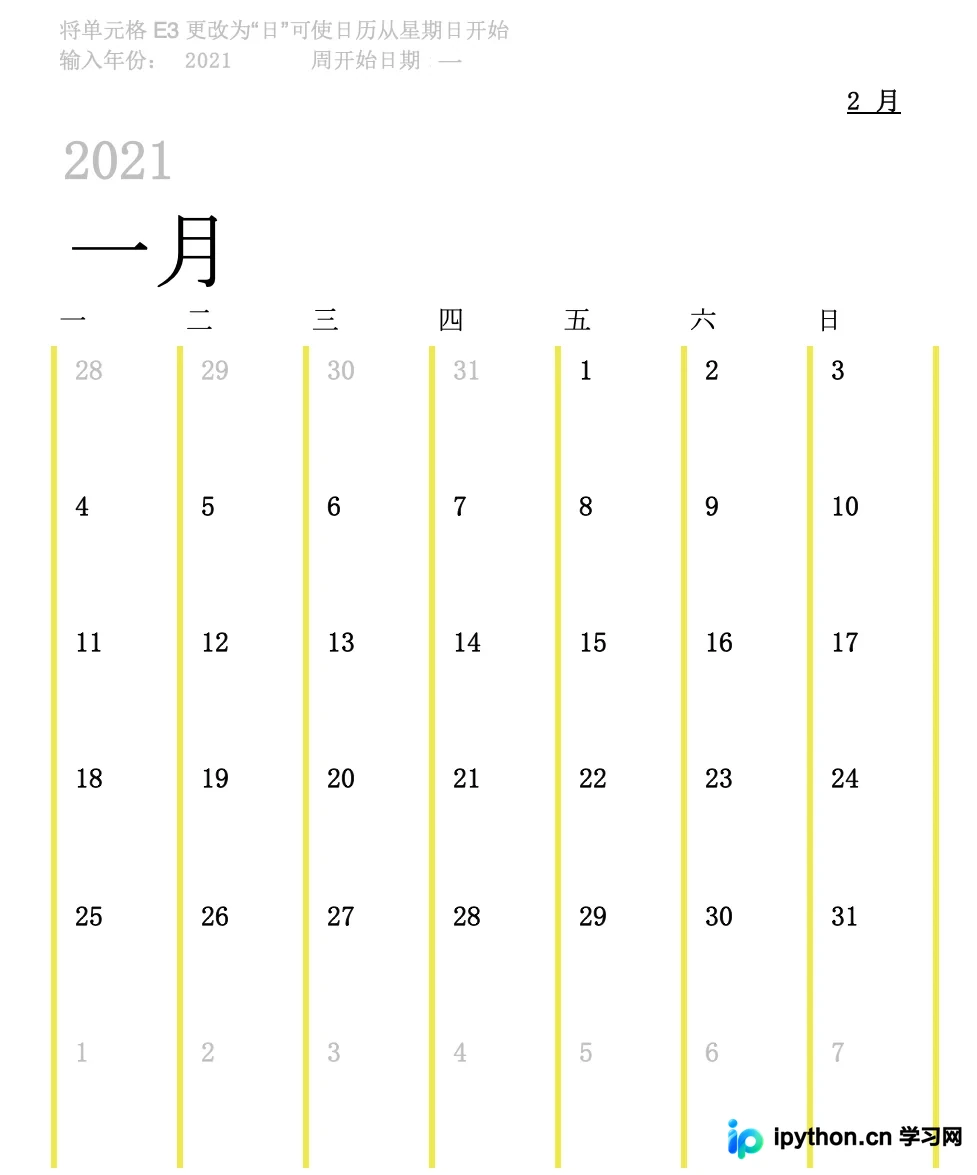
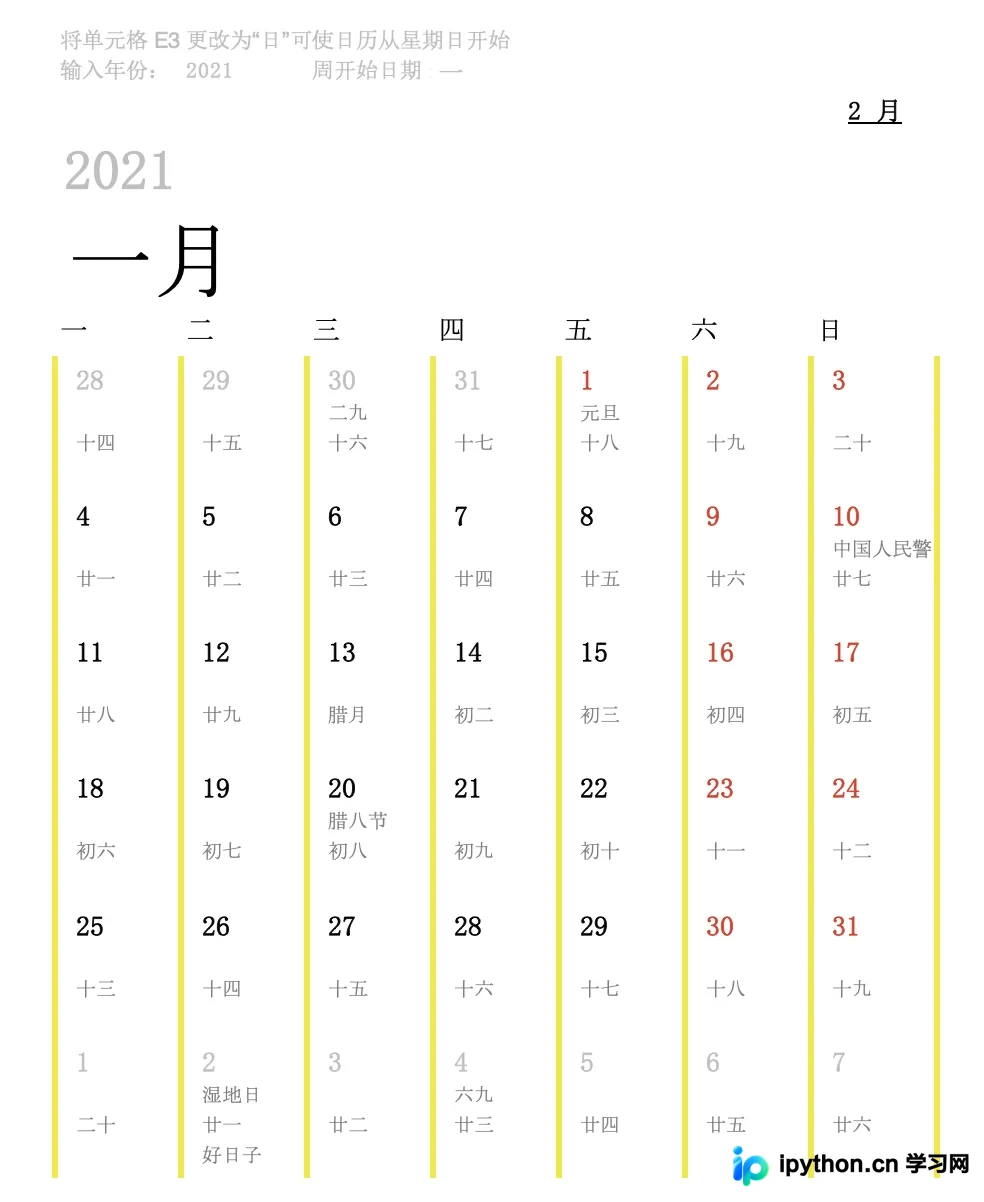
基于现有的Excel日历模板,通过脚本生成包含农历日期、法定节假日以及调休/休班信息的完整日历,从而解决DIY日历制作中的核心技术难点。
生成的日历表中,第一行显示公历日期,第二行标注法定节假日,第三行对应农历日期,第四行则用于记录其他特别日子,如生日或纪念日等。
功能特点
- 低使用门槛
仅需掌握Python脚本运行及Excel基本操作即可上手使用。
- 操作步骤简单
只需在Excel模板的一月份表头处修改目标年份,随后执行一次脚本即可完成生成。
- 具备高度可扩展性
通过修改年份参数,即可制作任意年份的日历。
- 支持高度定制
用户可根据需求添加任意特殊的自定义日期。
使用指南
第一步:设置日历年份及样式
打开calendar.xlsx文件,找到一月份表头中的“输入年份”单元格,将其修改为所需的年份。
第二步:录入自定义日期
在calendar.xlsx文件的指定“生日栏”或类似区域,添加需要特别标注的日期,并保存文件。
第三步:执行脚本生成
核心代码模块
BdDataFetcher.py
#!/usr/bin/python3
# -*- coding: UTF-8 -*-
import datetime
import logging
import time

import requests
import re
import json

class BdDataFetcher(object):
    def __init__(self):
        self.url = 'https://sp0.baidu.com/8aQDcjqpAAV3otqbppnN2DJv/api.php'
        self.request_session = requests.session()
        self.request_session.headers = {
            "User-Agent": "Mozilla/5.0 (Macintosh; Intel Mac OS X 10_14_4) AppleWebKit/537.36 (KHTML, like Gecko) Chrome/84.0.4147.135 Safari/537.36",
            "Accept": "application/json, text/plain, */*",
            "Accept-Encoding": "gzip, deflate",
            "Accept-Language": "zh-CN,zh;q=0.9,en;q=0.8",
            "Connection": "keep-alive"
        }

    def request(self, year_month):
        payload = {
            'query': year_month,
            'resource_id': 39043,
            't': int(round(time.time() * 1000)),
            'ie': 'utf8',
            'oe': 'utf8',
            'cb': 'op_aladdin_callback',
            'format': 'json',
            'tn': 'wisetpl',
            'cb': 'jQuery110206747607329442493_1606743811595',
            '_': 1606743811613
        }
        resp = self.request_session.get(url=self.url, params=payload)
        logging.debug('data fetcher resp = {}'.format(resp.text))
        bracket_pattern = re.compile(r'[(](.*?)[)]', re.S)
        valid_data = re.findall(bracket_pattern, resp.text)
        json_data = json.loads(valid_data[0])
        almanac = json_data['data'][0]['almanac']
        result = {}
        for day in almanac:
            key = '{}-{}-{}'.format(day['year'], day['month'],day['day'])
            result[key] = day
        return result
if __name__ == '__main__':
    logging.basicConfig(level=logging.DEBUG,
                        format='%(asctime)s %(filename)s[line:%(lineno)d] %(levelname)s %(message)s',
                        datefmt='%a, %d %b %Y %H:%M:%S')
    BdDataFetcher().request('2021年1月')
ExcelDateFiller.py
#!/usr/bin/python3
# -*- coding: UTF-8 -*-
import logging
import os
import sys
from copy import copy

import openpyxl
import pandas as pandas
import xlrd
import xlutils
import yaml
from pandas._libs.tslibs.timestamps import Timestamp

from BdDataFetcher import BdDataFetcher


class Config(object):
    def __init__(self, config_path):
        try:
            with open(config_path, "r", encoding="utf-8") as yaml_file:
                data = yaml.load(yaml_file)
                self.excel_path = data['excel_path']
                self.sheet_special = data['sheet_special']
                self.skip_row = data['date_skip_row']
                self.skip_col = data['date_skip_col']
                self.max_length = data['max_length']
                self.holiday_color = data['holiday_color']
                self.workday_color = data['workday_color']
                logging.basicConfig(level=logging.DEBUG,
                            format='%(asctime)s %(filename)s[line:%(lineno)d] %(levelname)s %(message)s',
                            datefmt='%a, %d %b %Y %H:%M:%S')

        except Exception as e:
            logging.error(repr(e))
            sys.exit()

class SpecialDay(object):
    def __init__(self):
        self.is_lunar = False
        self.desc = ''

class ExcelDateFiller(object):
    def __init__(self):
        self.data_fetcher = BdDataFetcher()
        self.target = os.path.splitext(config.excel_path)[0] + '_out' + os.path.splitext(config.excel_path)[-1]
        # try:
        #     shutil.copy(config.excel_path, self.target)
        # except IOError as e:
        #     print("Unable to copy file. %s" % e)
        # except:
        #     print("Unexpected error:", sys.exc_info())
        # self.target_workbook = openpyxl.load_workbook(self.target, data_only=True)

    def fill_date_with_openpyxl(self):
        for sheet in self.target_workbook.worksheets:
            for column_index in range(1, sheet.max_column):
                for row_index in range(1, sheet.max_row):
                    data = sheet.cell(column=column_index, row=row_index)
                    print(data.value)

    def read_with_xlrd(self):
        workbook = xlrd.open_workbook(self.target)
        for sheet in workbook.sheets():
            for column_index in range(0, sheet.ncols):
                for row_index in range(0, sheet.nrows):
                    data = sheet.cell(rowx=row_index, colx=column_index)
                    logging.debug('ctype = {}, value = {}, xf_index = {}'.format(data.ctype, data.value, data.xf_index))

    def write_with_openpyxl(self):
        target_workbook = openpyxl.load_workbook(self.target)
        sheet = target_workbook.get_sheet_by_name('sheet_name')
        sheet.cell(0, 0).value = 'value'
        target_workbook.save()

    def write_with_xlwt(self):
        workbook = xlrd.open_workbook(self.target)
        workbook = xlutils.copy(workbook)
        sheet = workbook.get_sheet(0)
        sheet.write(0, 0, 'value')
        workbook.save()

    def load_special_sheet(self):
        data = {}
        special_sheet = pandas.read_excel(config.excel_path, sheet_name=config.sheet_special, header=0)
        for row_index in range(special_sheet.shape[0]):
            key = special_sheet.iloc[row_index, 0]
            struct_time = pandas.to_datetime(key.timestamp(), unit='s').timetuple()
            key = '{}-{}'.format(struct_time.tm_mon, struct_time.tm_mday)
            value = SpecialDay()
            value.desc = special_sheet.iloc[row_index, 1]
            value.is_lunar = special_sheet.iloc[row_index, 2] == '是'
            data[key] = value
        return data


    def fill_date(self):
        pandas_workbook = pandas.read_excel(config.excel_path, sheet_name=None, skiprows= config.skip_row, keep_default_na=False)
        out_workbook = openpyxl.load_workbook(config.excel_path)

        special_day = self.load_special_sheet()

        day_data = {}
        for sheet_name in pandas_workbook.keys():
            if not sheet_name.endswith('月'):
                continue
            sheet = pandas_workbook.get(sheet_name)
            out_sheet = out_workbook.get_sheet_by_name(sheet_name)

            nrows = sheet.shape[0]
            ncols = sheet.shape[1]
            for row_index in range(nrows):
                for col_index in range(ncols):
                    data = sheet.iloc[row_index, col_index]
                    logging.debug('origin row = {}, col = {}, data = {}'.format(row_index, col_index, data))
                    if type(data) == Timestamp:
                        struct_time = pandas.to_datetime(data.timestamp(), unit='s').timetuple()
                        date = '{}-{}-{}'.format(struct_time.tm_year, struct_time.tm_mon, struct_time.tm_mday)
                        if not day_data.__contains__(date):
                            request_data = self.data_fetcher.request(year_month='{}年{}月'.format(struct_time.tm_year, struct_time.tm_mon))
                            day_data.update(request_data)

                        temp_row = row_index + 2 + config.skip_row
                        temp_col = col_index + 1
                         # weekend color
                        if day_data[date]['cnDay'] == '六' or day_data[date]['cnDay'] == '日':
                            holiday_font = copy(out_sheet.cell(temp_row, temp_col).font)
                            holiday_font.color = config.holiday_color
                            out_sheet.cell(temp_row, temp_col).font = holiday_font
                        # holiday color
                        if day_data[date].__contains__('status'):
                            if day_data[date]['status'] == '1': # 休假
                                holiday_font = copy(out_sheet.cell(temp_row, temp_col).font)
                                holiday_font.color = config.holiday_color
                                out_sheet.cell(temp_row, temp_col).font = holiday_font
                            if day_data[date]['status'] == '2': #班
                                workday_font = copy(out_sheet.cell(temp_row, temp_col).font)
                                workday_font.color = config.workday_color
                                out_sheet.cell(temp_row, temp_col).font = workday_font
                        lunar_date = day_data[date]['lDate']
                        if lunar_date == '初一':
                            lunar_date = '{}月'.format(day_data[date]['lMonth'])
                        # logging.debug('date = {}, value = {}'.format(str(date), lunar_date))
                        temp_content = ''
                        if day_data[date].__contains__('value'):
                            temp_content += day_data[date]['value']
                            if len(temp_content) > config.max_length:
                                temp_content = temp_content[:config.max_length]
                        temp_content += '\n'
                        temp_content += lunar_date
                        # spacial day
                        month_day = day_data[date]['month'] + '-' + day_data[date]['day']
                        if special_day.__contains__(month_day):
                            temp_special_day = special_day.get(month_day)
                            if not temp_special_day.is_lunar:
                                temp_content += '\n'
                                temp_content += temp_special_day.desc

                        lunar_month_day = day_data[date]['lunarMonth'] + '-' + day_data[date]['lunarDate']
                        if special_day.__contains__(lunar_month_day):
                            temp_special_day = special_day.get(lunar_month_day)
                            if temp_special_day.is_lunar:
                                temp_content += '\n'
                                temp_content += temp_special_day.desc

                        temp_row = row_index + 3 + config.skip_row
                        temp_col = col_index + 1
                        out_sheet.cell(temp_row, temp_col).value = temp_content


        out_workbook.save(filename=self.target)
        out_workbook.close()

if __name__ == '__main__':
    config = Config(config_path='config.yaml')
    date_filler = ExcelDateFiller()
    date_filler.fill_date()
完整项目源码地址
https://github.com/yongjiliu/diycalendar
处理完成后,生成的日历文件名为calendar_out.xlsx。
以上即为利用Python自动生成日历的完整流程,更多Python生成日历的相关技巧可参考本站其他文章。
本站声明
本文内容仅供参考,不代表本站观点。转载或引用请注明出处。如发现内容问题,请通过联系我们页面反馈。















