


Python 通过 Kubernetes API 直接访问集群:Token 认证与配置详解

发布时间:2026-10-14 |
2人浏览过
本文介绍如何使用 Python 直接调用 Kubernetes API 访问集群,无需依赖 kubectl 代理。详细讲解了两种配置方式:一是利用现有的 kubeconfig 文件进行身份验证,二是通过提取 ServiceAccount Token 直接构建 API 客户端。包含完整的 Python 代码示例,涵盖列出 Namespace、Node、Pod 及 Service 等常见操作,帮助开发者实现集群资源的自动化管理。
Python 直接访问 Kubernetes API 概述
为了避免使用 kubectl 代理,可以直接将身份认证令牌传递给 API 服务器。具体实现方式可以通过 grep 和 cut 命令提取相关信息,如下所示:
# 查看所有的集群,因为你的 .kubeconfig 文件中可能包含多个上下文
kubectl config view -o jsonpath='{"Cluster name\tServer\n"}{range .clusters[*]}{.name}{"\t"}{.cluster.server}{"\n"}{end}'

# 从上述命令输出中选择你要与之交互的集群的名称
export CLUSTER_NAME="some_server_name"

# 指向引用该集群名称的 API 服务器
APISERVER=$(kubectl config view -o jsonpath="{.clusters[?(@.name==\"$CLUSTER_NAME\")].cluster.server}")

# 获得令牌
TOKEN=$(kubectl get secrets -o jsonpath="{.items[?(@.metadata.annotations['kubernetes\.io/service-account\.name']=='default')].data.token}"|base64 -d)

# 使用令牌玩转 API
curl -X GET $APISERVER/api --header "Authorization: Bearer $TOKEN" --insecure
Kubernetes 官方提供了多种语言的客户端库,参考地址为:https://kubernetes.io/zh/docs/reference/using-api/client-libraries/
Python 客户端库与示例代码
以下是 Python 语言的具体应用示例:
项目的目录结构如下:
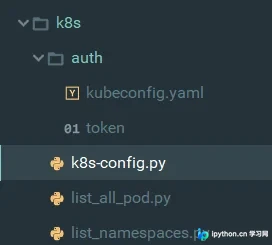
配置文件配置方式详解
配置文件支持两种不同的配置方式:
方式一:使用 kubeconfig 文件
第一种方式是将集群中的 ~/.kube/config 文件重命名为 kubeconfig.yaml。相关代码如下:
from kubernetes import  client,config
from kubernetes.stream import stream
import yaml
config_file = r"D:\Users\JackHe\PycharmProjects\JJ\k8s\auth\kubeconfig.yaml"
config.kube_config.load_kube_config(config_file=config_file)
Api_Instance = client.CoreV1Api()
Api_Batch = client.BatchV1Api()

#列出所有的namesapce
for ns in Api_Instance.list_namespace().items:
    print(ns.metadata.name)

#列出所有的nodes
def list_node():
    api_response = Api_Instance.list_node()
    data = {}
    for i in api_response.items:
        data[i.metadata.name] = {"name": i.metadata.name,
                                "status": i.status.conditions[-1].type if i.status.conditions[-1].status == "True" else "NotReady",
                                "ip": i.status.addresses[0].address,
                                "kubelet_version": i.status.node_info.kubelet_version,
                                "os_image": i.status.node_info.os_image,
                                 }
    return data
nodes = list_node()
print(nodes)
方式二:使用 Token 认证
第二种方式是使用 Token 形式,获取命令参考上文所述步骤。相关代码如下:
# -*- coding: utf-8 -*-
from kubernetes.client import api_client
from kubernetes.client.apis import core_v1_api
from kubernetes import client,config


class KubernetesTools(object):
    def __init__(self):
        self.k8s_url = 'https://192.168.1.56:6443'

    def get_token(self):
        """
        获取token
        :return:
        """
        with open(r'D:\Users\JackHe\PycharmProjects\JJ\k8s\auth\token', 'r') as file:
            Token = file.read().strip('\n')
            return Token

    def get_api(self):
        """
        获取API的CoreV1Api版本对象
        :return:
        """
        configuration = client.Configuration()
        configuration.host = self.k8s_url
        configuration.verify_ssl = False
        configuration.api_key = {"authorization": "Bearer " + self.get_token()}
        client1 = api_client.ApiClient(configuration=configuration)
        api = core_v1_api.CoreV1Api(client1)
        return api

    def get_namespace_list(self):
        """
        获取命名空间列表
        :return:
        """
        api = self.get_api()
        namespace_list = []
        for ns in api.list_namespace().items:
            # print(ns.metadata.name)
            namespace_list.append(ns.metadata.name)

        return namespace_list

    def get_pod_list(self):
       api = self.get_api()
       print("Listing pods with their IPs:")
       ret = api.list_pod_for_all_namespaces(watch=False)
       for i in ret.items:
           print("%s\t%s\t%s" % (i.status.pod_ip, i.metadata.namespace, i.metadata.name))

    def get_service_list(self):
        api = self.get_api()
        ret = api.list_service_for_all_namespaces(watch=False)
        for i in ret.items:
            print("%s \t%s \t%s \t%s \t%s \n" %(i.kind,i.metadata.namespace,i.metadata.name,i.spec.cluster_ip,i.spec.ports))

if __name__ == '__main__':
    namespace_list = KubernetesTools().get_namespace_list()
    pod_list = KubernetesTools().get_pod_list()
    service = KubernetesTools().get_service_list()
    print(namespace_list)
    print(pod_list)
    print(service)
至此,关于 Python 使用 Kubernetes API 访问集群的介绍已完成。如需了解更多相关 Python 与 Kubernetes API 的内容,建议查阅本站过往文章或继续浏览后续内容。感谢大家的支持!
本站声明
本文内容仅供参考,不代表本站观点。转载或引用请注明出处。如发现内容问题,请通过联系我们页面反馈。















