


Python BeautifulSoup库安装与核心用法详解

发布时间:2026-10-15 |
5人浏览过
本文详细介绍Python中BeautifulSoup库的安装方法及核心功能。内容涵盖从bs4库的引用、BeautifulSoup类的基本概念,到Tag标签的name、attrs及字符串类型解析。重点讲解标签树的上下行与平行遍历操作,以及prettify()格式化输出和编码处理,帮助开发者快速掌握HTML/XML文档解析技巧。
首先需要安装BeautifulSoup库。在命令行环境中,执行以下命令即可完成安装:
pip install beautifulsoup4BeautifulSoup是Python中用于解析HTML和XML文档的强大工具库。
该库的核心功能在于解析、遍历以及维护HTML或XML文档生成的“标签树”结构。
在使用库之前,需要在Python代码中正确引用相关模块。
from bs4 import BeautifulSoup
import bs4
BeautifulSoup类是整个解析过程的基础,它对应一个HTML或XML文档的全部内容。
通过BeautifulSoup类,可以将整个文档解析为一个对象,从而方便地进行后续操作。
为了演示具体用法,我们回顾一个示例HTML文档demo.html。
import requests

r = requests.get("http://python123.io/ws/demo.html")
demo = r.text
print(demo)
<html><head><title>This is a python demo page</title></head>
<body>
<p class="title"><b>The demo python introduces several python courses.</b></p>
<p class="course">Python is a wonderful general-purpose programming language. You can learn Python from novice to professional by tracking the following courses:
<a href="http://www.icourse163.org/course/BIT-268001" class="py1" id="link1">Basic Python</a> and <a href="http://www.icourse163.org/course/BIT-1001870001" class="py2" id="link2">Advanced Python</a>.</p>
</body></html>
Tag标签是HTML文档中最基本的信息组织单元,分别用<和>以及</>标明开头和结尾。
| 基本元素 | 说明 |
|---|---|
| Tag | 标签,最基本的信息组织单元,分别用<>和</>标明开头和结尾 |
import requests
from bs4 import BeautifulSoup
r = requests.get("http://python123.io/ws/demo.html")
demo = r.text
soup = BeautifulSoup(demo,"html.parser")
print(soup.title)
tag = soup.a
print(tag)
<title>This is a python demo page</title>
<a  href="http://www.icourse163.org/course/BIT-268001" >Basic Python</a>
任何存在于HTML语法中的标签都可以使用soup.标签名的方式访问并获得。当HTML文档中存在多个相同对应内容时,soup.方法返回第一个匹配的结果。
每个Tag对象都有一个name属性,用于获取标签的名字。
| 基本元素 | 说明 |
|---|---|
| Name | 标签的名字,
… 的名字是'p',格式:.name |
import requests
from bs4 import BeautifulSoup
r = requests.get("http://python123.io/ws/demo.html")
demo = r.text
soup = BeautifulSoup(demo,"html.parser")
print(soup.a.name)
print(soup.a.parent.name)
print(soup.a.parent.parent.name)
a
p
body
Tag对象还包含attrs属性,以字典形式组织标签的属性。
| 基本元素 | 说明 |
|---|---|
| Attributes | 标签的属性,字典形式组织,格式:.attrs |
import requests
from bs4 import BeautifulSoup
r = requests.get("http://python123.io/ws/demo.html")
demo = r.text
soup = BeautifulSoup(demo,"html.parser")
tag = soup.a
print(tag.attrs)
print(tag.attrs['class'])
print(tag.attrs['href'])
print(type(tag.attrs))
print(type(tag))
{'href': 'http://www.icourse163.org/course/BIT-268001', 'class': ['py1'], 'id': 'link1'}
['py1']
http://www.icourse163.org/course/BIT-268001
<class 'dict'>
<class 'bs4.element.Tag'>
NavigableString表示标签内非属性字符串,即<...>标签中的文本内容。
通过.string属性可以获取标签内的字符串内容。
| 基本元素 | 说明 |
|---|---|
| NavigableString | 标签内非属性字符串,<>…</>中字符串,格式:.string |
Comment是一种特殊的NavigableString类型,用于表示标签内字符串的注释部分。
| 基本元素 | 说明 |
|---|---|
| Comment | 标签内字符串的注释部分,一种特殊的Comment类型 |
import requests
from bs4 import BeautifulSoup
newsoup = BeautifulSoup("<b><!--This is a comment--></b><p>This is not a comment</p>","html.parser")
print(newsoup.b.string)
print(type(newsoup.b.string))
print(newsoup.p.string)
print(type(newsoup.p.string))
This is a comment
<class 'bs4.element.Comment'>
This is not a comment
<class 'bs4.element.NavigableString'>
了解HTML基本格式有助于更好地理解BeautifulSoup的解析逻辑。
标签树的下行遍历允许我们访问子节点、子孙节点等。
| 属性 | 说明 |
|---|---|
| .contents | 子节点的列表,将所有儿子结点存入列表 |
| .children | 子节点的迭代类型,与.contents类似,用于循环遍历儿子结点 |
| .descendents | 子孙节点的迭代类型,包含所有子孙节点,用于循环遍历 |
BeautifulSoup类型本身被视为标签树的根节点,所有其他节点都由此衍生。
import requests
from bs4 import BeautifulSoup
r = requests.get("http://python123.io/ws/demo.html")
demo = r.text

soup = BeautifulSoup(demo,"html.parser")
print(soup.head)
print(soup.head.contents)
print(soup.body.contents)
print(len(soup.body.contents))
print(soup.body.contents[1])
<head><title>This is a python demo page</title></head>
[<title>This is a python demo page</title>]
['\n', <p ><b>The demo python introduces several python courses.</b></p>, '\n', <p >Python
is a wonderful general-purpose programming language. You can learn Python from novice to professional by tracking the
following courses:
<a  href="http://www.icourse163.org/course/BIT-268001" >Basic Python</a> and <a  href="http://www.icourse163.org/course/BIT-1001870001" >Advanced Python</a>.</p>, '\n']
5
<p ><b>The demo python introduces several python courses.</b></p>
for child in soup.body.children:
	print(child)  #遍历儿子结点
for child in soup.body.descendants:
	print(child) #遍历子孙节点
标签树的上行遍历允许我们访问节点的父亲标签及先辈节点。
| 属性 | 说明 |
|---|---|
| .parent | 节点的父亲标签 |
| .parents | 节点先辈标签的迭代类型,用于循环遍历先辈节点 |
import requests
from bs4 import BeautifulSoup
r = requests.get("http://python123.io/ws/demo.html")
demo = r.text

soup = BeautifulSoup(demo,"html.parser")
print(soup.title.parent)
print(soup.html.parent)
<head><title>This is a python demo page</title></head>
<html><head><title>This is a python demo page</title></head>
<body>
<p ><b>The demo python introduces several python courses.</b></p>
<p >Python is a wonderful general-purpose programming language. You can learn Python from novice to professional by tracking the following courses:
<a  href="http://www.icourse163.org/course/BIT-268001" >Basic Python</a> and <a  href="http://www.icourse163.org/course/BIT-1001870001" >Advanced Python</a>.</p>
</body></html>
import requests
from bs4 import BeautifulSoup
r = requests.get("http://python123.io/ws/demo.html")
demo = r.text

soup = BeautifulSoup(demo,"html.parser")
for parent in soup.a.parents:
    if parent is None:
        print(parent)
    else:
        print(parent.name)
p
body
html
[document]
标签的平行遍历允许我们访问同一层级的前后节点。
| 属性 | 说明 |
|---|---|
| .next_sibling | 返回按照HTML文本顺序的下一个平行节点标签 |
| .previous.sibling | 返回按照HTML文本顺序的上一个平行节点标签 |
| .next_siblings | 迭代类型,返回按照HTML文本顺序的后续所有平行节点标签 |
| .previous.siblings | 迭代类型,返回按照HTML文本顺序的前续所有平行节点标签 |
import requests
from bs4 import BeautifulSoup
r = requests.get("http://python123.io/ws/demo.html")
demo = r.text

soup = BeautifulSoup(demo,"html.parser")
print(soup.a.next_sibling)
print(soup.a.next_sibling.next_sibling)

print(soup.a.previous_sibling)
print(soup.a.previous_sibling.previous_sibling)

print(soup.a.parent)
and
<a class="py2" href="http://www.icourse163.org/course/BIT-1001870001" id="link2">Advanced Python</a>
Python is a wonderful general-purpose programming language. You can learn Python from novice to professional by tracking the following courses:

None
<p class="course">Python is a wonderful general-purpose programming language. You can learn Python from novice to professional by tracking the following courses:
<a class="py1" href="http://www.icourse163.org/course/BIT-268001" id="link1">Basic Python</a> and <a class="py2" href="http://www.icourse163.org/course/BIT-1001870001" id="link2">Advanced Python</a>.</p>
for sibling in soup.a.next_sibling:
	print(sibling)  #遍历后续节点
for sibling in soup.a.previous_sibling:
	print(sibling)  #遍历前续节点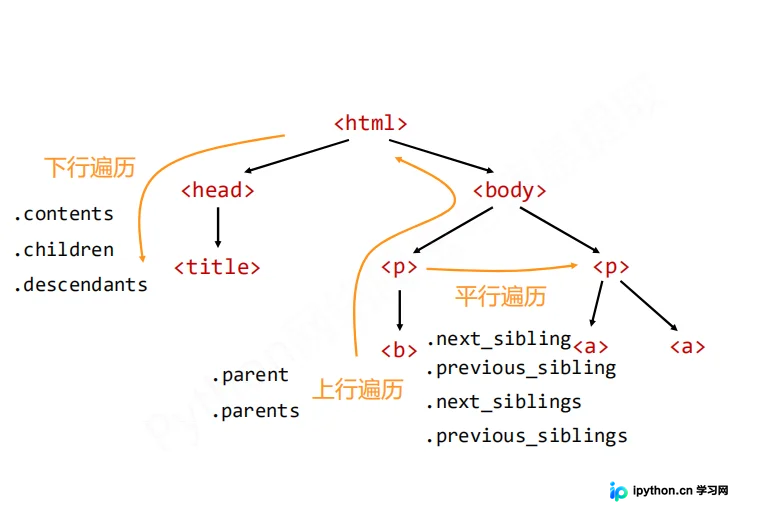
bs库提供了prettify()方法,用于美化HTML文本的输出格式。
import requests
from bs4 import BeautifulSoup
r = requests.get("http://python123.io/ws/demo.html")
demo = r.text

soup = BeautifulSoup(demo,"html.parser")
print(soup.prettify())
<html>
 <head>
  <title>
   This is a python demo page
  </title>
 </head>
 <body>
  <p class="title">
   <b>
    The demo python introduces several python courses.
   </b>
  </p>
  <p class="course">
   Python is a wonderful general-purpose programming language. You can learn Python from novice to professional by tracking the following courses:
    Basic Python
   </a>
   and
   <a class="py2" href="http://www.icourse163.org/course/BIT-1001870001" id="link2">
    Advanced Python
   </a>
   .
  </p>
 </body>
</html>
.prettify()方法为HTML文本中的<>及其内容增加了更多的换行符'\n'。该方法可用于任何标签,调用方式为.tag.prettify()。
bs4库在处理编码时具有自动转换功能。
bs4库将任何HTML输入都自动转换为utf-8编码。由于Python 3.x默认支持编码是utf-8,因此解析过程通常无障碍。
import requests
from bs4 import BeautifulSoup

soup = BeautifulSoup("<p>中文</p>","html.parser")
print(soup.p.string)

print(soup.p.prettify())
中文

<p>
 中文
</p>
到此这篇关于python beautiful soup库入门安装教程的文章就介绍到这了,更多相关python beautiful soup库入门内容请搜索本站以前的文章或继续浏览下面的相关文章希望大家以后多多支持本站!
本站声明
本文内容仅供参考,不代表本站观点。转载或引用请注明出处。如发现内容问题,请通过联系我们页面反馈。















