


TensorFlow2张量操作指南:排序、填充、复制与查找替换详解

本文详细介绍TensorFlow2中张量的核心操作,包括使用tf.sort和tf.argsort进行排序,利用tf.pad进行边缘填充,通过tf.tile实现张量复制,以及使用tf.where和tf.scatter_nd进行条件查找与索引更新。涵盖参数说明、代码示例及输出解析,帮助开发者掌握基础张量处理技巧。
张量排序

tf.sort
利用tf.sort函数,我们可以对张量执行排序操作。
其语法格式如下:
tf.sort(
    values, axis=-1, direction='ASCENDING', name=None
)
主要参数说明:
- values:指定需要进行排序的输入张量。
- axis:定义执行排序操作的维度,默认为最后一个轴。
- direction:指定排序方向,可选正序(ASCENDING)或倒序(DESCENDING)。
- name:为操作指定可选的名称标识。
具体代码示例如下:
# 创建张量0~9, 并打乱顺序
a = tf.random.shuffle(tf.range(10))
print(a)

# 从小到大
b = tf.sort(a)  # direction="ASCENDING"
print(b)

# 从大到小
c = tf.sort(a, direction="DESCENDING")
print(c)
运行后得到的输出结果:
tf.Tensor([6 3 7 5 4 0 2 9 8 1], shape=(10,), dtype=int32) tf.Tensor([0 1 2 3 4 5 6 7 8 9], shape=(10,), dtype=int32) tf.Tensor([9 8 7 6 5 4 3 2 1 0], shape=(10,), dtype=int32)
tf.argsort
调用tf.argsort函数可以返回张量沿指定轴排序后的索引序列。
该函数的格式定义如下:
tf.argsort(
    values, axis=-1, direction='ASCENDING', stable=False, name=None
)
相关参数包括:
- values:指定需要进行排序操作的张量。
- axis:指定执行排序的维度。
- direction:设定排序方向,支持正序或倒序。
- stable:若设为True,则保持原始张量中相等元素的相对顺序不变。
- name:可选的操作名称。
示例代码展示:
# 创建张量0~9, 并打乱顺序
a = tf.random.shuffle(tf.range(10))
print(a)

# 从小到大
b = tf.argsort (a)
print(b)

# 从大到小
c = tf.argsort (a, direction="DESCENDING")
print(c)
对应的输出结果:
tf.Tensor([9 4 3 1 2 6 0 5 7 8], shape=(10,), dtype=int32) tf.Tensor([6 3 4 2 1 7 5 8 9 0], shape=(10,), dtype=int32) tf.Tensor([0 9 8 5 7 1 2 4 3 6], shape=(10,), dtype=int32)
tf.math.top_k
通过tf.math.top_k函数,可以查找并返回最后一个维度中前k个最大条目的值及其对应的索引。
函数格式如下:
tf.math.top_k(
    input, k=1, sorted=True, name=None
)
参数定义如下:
- input:指定传入的输入张量。
- k:指定需要返回的前k个元素,默认为1。
- sorted:布尔值,指示是否对结果进行排序,默认为True。
- name:可选的操作名称。
代码示例如下:
# 创建张量0~9, 并打乱顺序, 形状为 3*3
a = tf.reshape(tf.random.shuffle(tf.range(9)), [3, 3])
print(a)

# 取top2
b = tf.math.top_k(a, 2)
print(b)
执行后的输出结果:
tf.Tensor( [[2 1 4] [5 7 0] [8 6 3]], shape=(3, 3), dtype=int32) TopKV2(values=<tf.Tensor: shape=(3, 2), dtype=int32, numpy= array([[4, 2], [7, 5], [8, 6]])>, indices=<tf.Tensor: shape=(3, 2), dtype=int32, numpy= array([[2, 0], [1, 0], [0, 1]])>)
填充与复制
tf.pad
使用tf.pad函数,可以对张量的各个维度边缘进行填充处理。
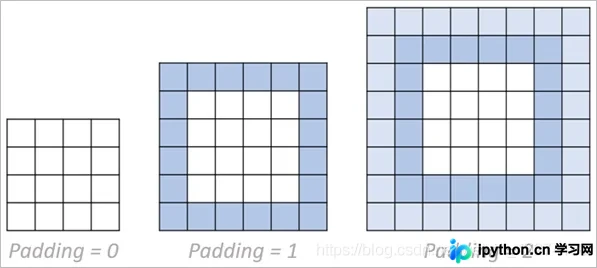
其语法格式为:
tf.pad(
    tensor, paddings, mode='CONSTANT', constant_values=0, name=None
)
主要参数说明:
- tensor:指定需要填充的输入张量。
- paddings:指定每个维度前后需要扩展的填充数量。
- mode:指定填充模式,默认为“CONSTANT”。
- constant_value:在“CONSTANT”模式下,指定用于填充的标量值,必须与张量类型一致。
- name:可选的操作名称。
具体示例代码:
# pad
a = tf.reshape(tf.range(9), [3, 3])
print(a)

# 上下左右填充一圈0
b = tf.pad(a, [[1, 1], [1, 1]])
print(b)
输出结果如下:
tf.Tensor( [[0 1 2] [3 4 5] [6 7 8]], shape=(3, 3), dtype=int32) tf.Tensor( [[0 0 0 0 0] [0 0 1 2 0] [0 3 4 5 0] [0 6 7 8 0] [0 0 0 0 0]], shape=(5, 5), dtype=int32)
tf.tile
借助tf.tile函数,可以实现张量的重复复制操作。
函数格式定义如下:
tf.tile(
    input, multiples, name=None
)
参数说明:
- input:指定需要复制的输入张量。
- multiples:指定沿各维度复制的次数。
- name:可选的操作名称。
示例代码展示:
# tile
a = tf.reshape(tf.range(9), [3, 3])
print(a)

b = tf.tile(a, [2, 2])
print(b)
运行得到的输出结果:
tf.Tensor( [[0 1 2] [3 4 5] [6 7 8]], shape=(3, 3), dtype=int32) tf.Tensor( [[0 1 2 0 1 2] [3 4 5 3 4 5] [6 7 8 6 7 8] [0 1 2 0 1 2] [3 4 5 3 4 5] [6 7 8 6 7 8]], shape=(6, 6), dtype=int32)
查找与替换

tf.where (第一种)
该用法用于返回条件判断为True的元素位置索引。
语法格式如下:
tf.where(
    condition, name=None
)
参数说明:
- condition:指定用于判断条件的布尔张量。
- name:可选的操作名称。
代码示例:
# 第一种用法(单参数)
mask = tf.constant([[True, True, True], [False, True, True], [True, False, False]])
print(mask)

indices = tf.where(mask)
print(indices)
输出结果:
tf.Tensor( [[ True True True] [False True True] [ True False False]], shape=(3, 3), dtype=bool) tf.Tensor( [[0 0] [0 1] [0 2] [1 1] [1 2] [2 0]], shape=(6, 2), dtype=int64)
tf.where (第二种)
这种用法类似于三元运算符,根据条件真假分别赋值。
函数格式如下:
tf.where(
    condition, x=None, y=None, name=None
)
参数说明:
- condition:指定用于判断条件的布尔张量。
- x:当条件为True时,从该张量取值。
- y:当条件为False时,从该张量取值。
- name:可选的操作名称。
示例代码:
# 第二种用法(三个参数)
zeros = tf.zeros([3, 3])
print(zeros)

ones = tf.ones([3, 3])
print(ones)

mask = tf.constant([[True, True, True], [False, True, True], [True, False, False]])
print(mask)

result = tf.where(mask, zeros, ones)
print(result)
输出结果:
tf.Tensor( [[0. 0. 0.] [0. 0. 0.] [0. 0. 0.]], shape=(3, 3), dtype=float32) tf.Tensor( [[1. 1. 1.] [1. 1. 1.] [1. 1. 1.]], shape=(3, 3), dtype=float32) tf.Tensor( [[ True True True] [False True True] [ True False False]], shape=(3, 3), dtype=bool) tf.Tensor( [[0. 0. 0.] [1. 0. 0.] [0. 1. 1.]], shape=(3, 3), dtype=float32)
tf.scatter_nd
该函数用于根据指定索引更新张量的值。
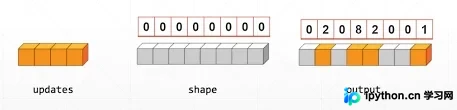
语法格式如下:
tf.scatter_nd(
    indices, updates, shape, name=None
)
参数说明:
- indices:指定需要更新的索引位置。
- updates:指定用于更新的新值。
- shape:指定输出张量的形状。
- name:可选的操作名称。
代码示例:
# scatter_nd
indices = tf.constant([[4], [3], [1], [7]])
print(indices)

updates = tf.constant([9, 10, 11, 12])
print(updates)

shape = tf.constant([8])
print(shape)

result = tf.scatter_nd(indices, updates, shape)
print(result)
输出结果:
tf.Tensor( [[4] [3] [1] [7]], shape=(4, 1), dtype=int32) tf.Tensor([ 9 10 11 12], shape=(4,), dtype=int32) tf.Tensor([8], shape=(1,), dtype=int32) tf.Tensor([ 0 11 0 10 9 0 0 12], shape=(8,), dtype=int32)
本文介绍了TensorFlow2中关于张量排序、填充、复制以及查找替换的基本操作,更多相关TensorFlow2基本操作内容请搜索本站以前的文章或继续浏览下面的相关文章希望大家以后多多支持本站!
本站声明
本文内容仅供参考,不代表本站观点。转载或引用请注明出处。如发现内容问题,请通过联系我们页面反馈。















