


Python提取字符串中数字的多种方法详解

本文详细介绍在Python中提取字符串内数字的几种常用方法。首先解析isdigit()函数的局限性,接着演示如何利用filter()函数结合自定义逻辑或内置方法过滤序列。重点讲解使用正则表达式re模块进行复杂场景下的数字提取,包括匹配特定前缀后的数值及标准时间格式。通过具体代码示例,帮助开发者掌握不同场景下的最佳实践。
一、isdigit()函数
isdigit()函数用于检测输入字符串是否仅由数字字符构成。若字符串完全由数字组成,该函数返回True;否则返回False。
dream = "123456"
print(dream.isdigit())
# 返回:True

dream = "123abc456"
print(dream.isdigit())
# 返回:False

dream = 'abcd'
print(dream.isdigit())
# 返回:False
二、filter() 函数
说明:filter()函数用于对序列进行过滤,剔除不符合条件的元素,并返回一个迭代器对象;
如需将结果转换为列表,可调用list()进行转换。
该函数接收两个参数:第一个为过滤函数,第二个为序列。序列中的每个元素将作为参数传递给该函数进行判断,函数返回True或False,最终将返回True的元素组成新列表。
语法:
filter(function, iterable)
1、过滤出列表中的所有奇数:
def is_odd(n):
    return n % 2 == 1

tmplist = filter(is_odd, [1, 2, 3, 4, 5, 6, 7, 8, 9, 10])
newlist = list(tmplist)
print(newlist)
2、过滤出列表中的所有偶数:
l = [x for x in range(10)]
print(list(filter(lambda x : x%2 == 0, l)))
3、过滤出1~100中平方根是整数的数:
import math
def is_sqr(x):
    return math.sqrt(x) % 1 == 0

tmplist = filter(is_sqr, range(1, 101))
newlist = list(tmplist)
print(newlist)
4、删除1-100中素数
L = range(1, 101)

def isprimer(n):
    flag = 1
    for i in range(2, n):
        if n % i == 0:
            flag = 0
    if flag == 0:
        return n

print(list(filter(isprimer, L)))
5、去除空格和空值
def not_empty(s):
  return s and s.strip()

filter(not_empty, ['A', '', 'B', None, 'C', ' '])
6、高阶运用
def _odd_iter():
    n = 1
    while True:
        n = n + 2
        yield n

def _not_divisible(n):
    return lambda x : x%n>0

def primes():
    yield 2
    it = _odd_iter()
    ftr = filter(_not_divisible(2), it) #1
    while True:
        n = next(ftr )        #2
        yield n
        ftr = filter(_not_divisible(n), ftr ) #3

for n in primes():
    if n < 100:
        print('now:',n)
    else:
        break
三、提取一段字符串中的数字
列表转字符串
number = ['12', '333', '4']
number_ = "".join(number)    # 列表转字符串
print(number_)    # 123334
a = "".join(list(filter(str.isdigit, '123ab45')))
print(a)
# 返回12345

b = list(filter(str.isdigit, '123ab45'))
print(b)
# 返回['1', '2', '3', '4', '5']
time_ = "2019年09月04日 11:00"
time_filter = filter(str.isdigit, time_)

print(time_filter)           # <filter object at 0x0000019358731BE0>
print(type(time_filter))     # <class 'filter'>
time_list = list(time_filter)       # ['2', '0', '1', '9', '0', '9', '0', '4', '1', '1', '0', '0']
time_str = "".join(time_list)       # 转为str    201909041100
time_int = int(time_str)            # 转为int    201909041100
利用正则表达式
import re
str_ = "12今天333天气4不错"
number = re.findall("\d+",str_)    # 输出结果为列表
print(number)

# 输出结果:['12', '333', '4']
四、匹配指定字符串开头的数字
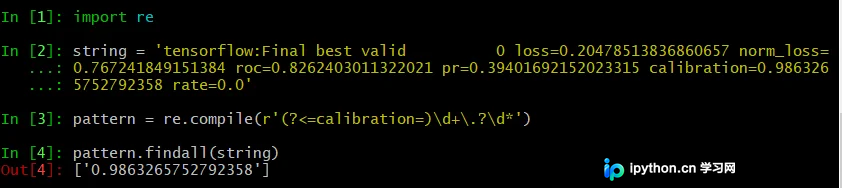
例如下面的string:
tensorflow:Final best valid 0 loss=0.20478513836860657 norm_loss=0.767241849151384 roc=0.8262403011322021 pr=0.39401692152023315 calibration=0.9863265752792358 rate=0.0
提取 calibration=0.9863265752792358 .
# 匹配“calibration=”后面的数字
pattern = re.compile(r'(?<=calibration=)\d+\.?\d*')
pattern.findall(string)

# ['0.9863265752792358']
五、匹配时间,17:35:24
string = "WARNING:tensorflow: 20181011 15:28:39 Initialize training"
pattern = re.compile(r'\d{2}:\d{2}:\d{2}')
pattern.findall(string)
# ['15:28:39']
六、匹配时间,20181011 15:28:39
string = "WARNING:tensorflow: 20181011 15:28:39 Initialize training"
pattern = re.compile(r'\d{4}\d{2}\d{2}\s\d{2}:\d{2}:\d{2}')
pattern.findall(string)
# ['20181011 15:28:39']
总结
到此这篇关于如何利用python提取字符串中的数字的文章就介绍到这了,更多相关python提取字符串中数字内容请搜索本站以前的文章或继续浏览下面的相关文章希望大家以后多多支持本站!
本站声明
本文内容仅供参考,不代表本站观点。转载或引用请注明出处。如发现内容问题,请通过联系我们页面反馈。















