


Python基于Tkinter与Socket实现简易聊天室

发布时间:2026-10-15 |
3人浏览过
本文介绍使用Python标准库Tkinter和Socket模块构建简易聊天对话框的方法。通过多线程处理网络接收与界面响应,实现客户端与服务器的实时通信。代码包含完整的UI布局、消息发送接收逻辑及时间戳显示功能,适合Python初学者学习GUI开发与网络编程基础。
本示例展示了如何使用Python语言编写一个简易的聊天对话框程序,供读者参考学习。
程序运行效果如下图所示:
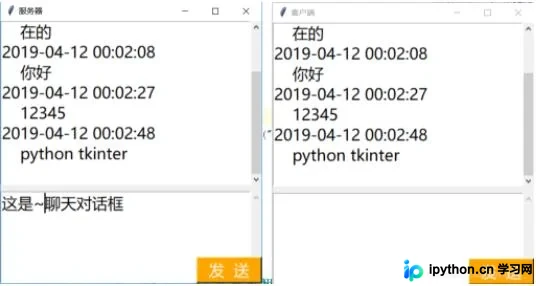
以下是客户端部分的实现代码:
import tkinter as tk
from tkinter import scrolledtext
import socket
import threading
from datetime import datetime

def tcp_recv(sock):
    while True:
        str = sock.recv(1024).decode("utf-8")
        show_info(str)
def send_func(sock):
    str = send_msg.get("0.0", "end")
    sock.send(str.encode("utf-8"))
    show_info(str)

def show_info(str):
    now = datetime.now()
    s_time = now.strftime("%Y-%m-%d %H:%M:%S")
    str = str.rstrip()
    if len(str) == 0:
        return -1
    send_msg.delete("0.0", "end")
    temp = s_time + "\n    " + str + "\n"
    show_msg.insert(tk.INSERT, "%s" % temp)

msFont = '微软雅黑' #字体
fontSize = 18 #字体大小
sock = socket.socket(socket.AF_INET,socket.SOCK_STREAM)
sock.connect(("127.0.0.1",8888))

mainWindow = tk.Tk()
mainWindow.title("客户端")
mainWindow.minsize(400,400)
show_msg = scrolledtext.ScrolledText(mainWindow,font=(msFont,fontSize))
show_msg.place(width=400,height=250,x=0,y=0)
#show_msg.insert(tk.INSERT,"%s 已连接\n"%addr[0])
send_msg = scrolledtext.ScrolledText(mainWindow,font=(msFont,fontSize))
send_msg.place(width=400,height=140,x=0,y=260)
button_send = tk.Button( mainWindow, font=(msFont,fontSize),text = "发  送",bg="orange",fg="white",
                         command=lambda:send_func(sock))
button_send.place(width=100,height=40,x=300,y=360)

t = threading.Thread(target=tcp_recv,args=(sock,))
t.start()
tk.mainloop()
服务器端的实现代码如下:
import tkinter as tk
from tkinter import scrolledtext
import socket
import threading
from datetime import datetime

def tcp_recv(sock):
    while True:
        str = sock.recv(1024).decode("utf-8")
        show_info(str)
def send_func(sock):
    str = send_msg.get("0.0", "end")
    sock.send(str.encode("utf-8"))
    show_info(str)

def show_info(str):
    now = datetime.now()
    s_time = now.strftime("%Y-%m-%d %H:%M:%S")
    str = str.rstrip()
    if len(str) == 0:
        return -1
    send_msg.delete("0.0", "end")
    temp = s_time + "\n    " + str + "\n"
    show_msg.insert(tk.INSERT, "%s" % temp)

msFont = '微软雅黑' #字体
fontSize = 18 #字体大小
sock = socket.socket(socket.AF_INET,socket.SOCK_STREAM)
sock.bind(("127.0.0.1",8888))
sock.listen(5)

mainWindow = tk.Tk()
mainWindow.title("服务器")
mainWindow.minsize(400,400)
show_msg = scrolledtext.ScrolledText(mainWindow,font=(msFont,fontSize))
show_msg.place(width=400,height=250,x=0,y=0)
send_msg = scrolledtext.ScrolledText(mainWindow,font=(msFont,fontSize))
send_msg.place(width=400,height=140,x=0,y=260)
button_send = tk.Button( mainWindow, font=(msFont,fontSize),text = "发  送",bg="orange",fg="white",
                         command=lambda:send_func(s))
button_send.place(width=100,height=40,x=300,y=360)

s,addr = sock.accept()
t = threading.Thread(target=tcp_recv,args=(s,))
t.start()
tk.mainloop()
以上就是本文介绍的全部内容,希望能为读者的学习提供有益帮助,同时也欢迎大家继续支持本站。
本站声明
本文内容仅供参考,不代表本站观点。转载或引用请注明出处。如发现内容问题,请通过联系我们页面反馈。















