


Python交互式可视化库HoloViews实战:从入门到高级图表绘制

本文详细介绍Python开源可视化库HoloViews,重点讲解其如何与Bokeh结合实现交互式统计图表。内容涵盖密度图、箱线图、散点图、面积图、直方图系列、Route Chord及小提琴图等常见图表的绘制方法与代码示例,展示其在数据分析与出版级图表生成中的优势。
在整理统计图表绘制方法的过程中,我发现除了经典的Seaborn库外,Python中还存在一些优秀的第三方交互式可视化库。这些库不仅能绘制常见的统计图表,还具备Matplotlib和Seaborn所不具备的交互功能。
同时,这些库也能满足出版级别的图表质量要求。此外,一些在Matplotlib中需要自定义函数才能实现的复杂图表,在这些第三方库中已集成,从而大大缩短了绘图时间。
本文将详细介绍一个优秀的第三方库——HoloViews,主要内容如下:
- Python-HoloViews库介绍
- Python-HoloViews库样例介绍
Python-HoloViews库介绍
HoloViews是一个开源的可视化库,旨在实现数据分析结果与可视化的无缝衔接。它提供了默认的绘图主题和配色方案,且绘图代码量较少,使用户能专注于数据分析本身。同时,其统计绘图功能也非常出色。更多关于HoloViews的介绍,可参考:Python-HoloViews库官网[1]。
Python-HoloViews库样例介绍
本节重点介绍统计图表的绘制。其结果不仅支持网页交互,默认绘图效果也完全满足出版级要求。主要内容如下(以下图表均为可交互形式):
密度图+箱线图
import pandas as pd
import holoviews as hv
from bokeh.sampledata import autompg

hv.extension('bokeh')
df = autompg.autompg_clean
bw = hv.BoxWhisker(df, kdims=["origin"], vdims=["mpg"])
dist = hv.NdOverlay(
    {origin: hv.Distribution(group, kdims=["mpg"])
         for origin, group in df.groupby("origin")}
)

bw + dist
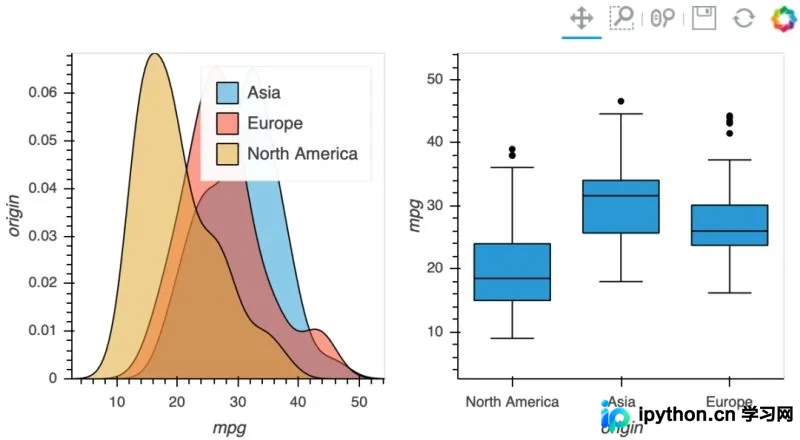
密度图+箱线图
散点图+横线图
scatter = hv.Scatter(df, kdims=["origin"], vdims=["mpg"]).opts(jitter=0.3)

yticks = [(i + 0.25, origin) for i, origin in enumerate(df["origin"].unique())]
spikes = hv.NdOverlay(
    {
        origin: hv.Spikes(group["mpg"]).opts(position=i)
            for i, (origin, group) in enumerate(df.groupby("origin", sort=False))
    }
).opts(hv.opts.Spikes(spike_length=0.5, yticks=yticks, show_legend=False, alpha=0.3))

scatter + spikes
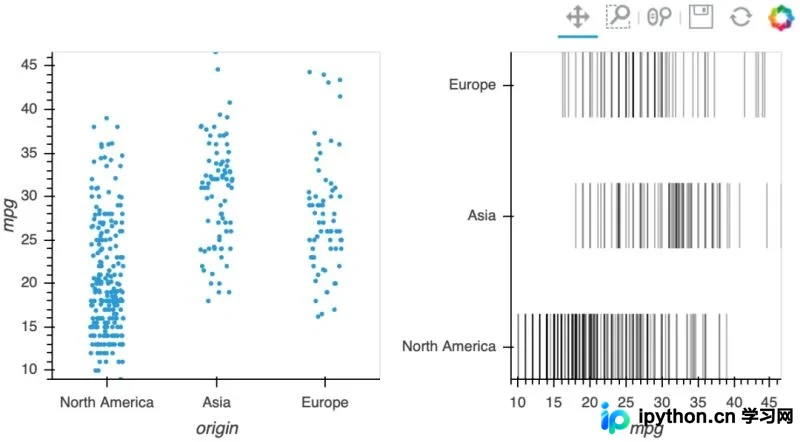
散点图+横线图
Iris Splom
from bokeh.sampledata.iris import flowers
from holoviews.operation import gridmatrix

ds = hv.Dataset(flowers)

grouped_by_species = ds.groupby('species', container_type=hv.NdOverlay)
grid = gridmatrix(grouped_by_species, diagonal_type=hv.Scatter)
grid.opts(opts.Scatter(tools=['hover', 'box_select'], bgcolor='#efe8e2', fill_alpha=0.2, size=4))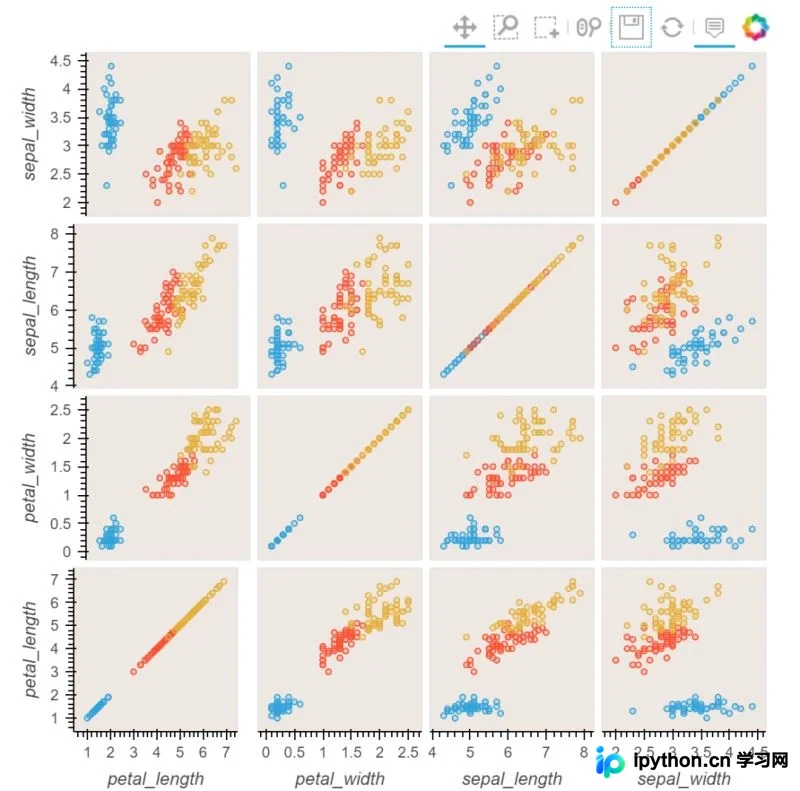
Iris Splom
面积图
# create some example data
python=np.array([2, 3, 7, 5, 26, 221, 44, 233, 254, 265, 266, 267, 120, 111])
pypy=np.array([12, 33, 47, 15, 126, 121, 144, 233, 254, 225, 226, 267, 110, 130])
jython=np.array([22, 43, 10, 25, 26, 101, 114, 203, 194, 215, 201, 227, 139, 160])

dims = dict(kdims='time', vdims='memory')
python = hv.Area(python, label='python', **dims)
pypy   = hv.Area(pypy,   label='pypy',   **dims)
jython = hv.Area(jython, label='jython', **dims)

opts.defaults(opts.Area(fill_alpha=0.5))
overlay = (python * pypy * jython)
overlay.relabel("Area Chart") + hv.Area.stack(overlay).relabel("Stacked Area Chart")
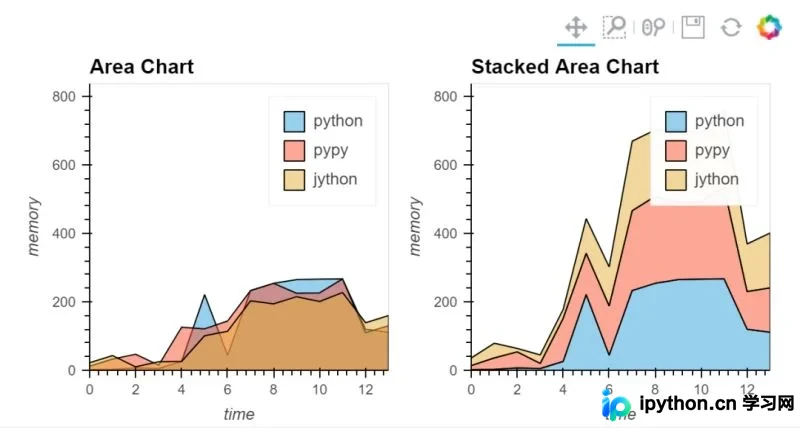
面积图
直方图系列
def get_overlay(hist, x, pdf, cdf, label):
    pdf = hv.Curve((x, pdf), label='PDF')
    cdf = hv.Curve((x, cdf), label='CDF')
    return (hv.Histogram(hist, vdims='P(r)') * pdf * cdf).relabel(label)

np.seterr(divide='ignore', invalid='ignore')

label = "Normal Distribution (μ=0, σ=0.5)"
mu, sigma = 0, 0.5

measured = np.random.normal(mu, sigma, 1000)
hist = np.histogram(measured, density=True, bins=50)

x = np.linspace(-2, 2, 1000)
pdf = 1/(sigma * np.sqrt(2*np.pi)) * np.exp(-(x-mu)**2 / (2*sigma**2))
cdf = (1+scipy.special.erf((x-mu)/np.sqrt(2*sigma**2)))/2
norm = get_overlay(hist, x, pdf, cdf, label)


label = "Log Normal Distribution (μ=0, σ=0.5)"
mu, sigma = 0, 0.5

measured = np.random.lognormal(mu, sigma, 1000)
hist = np.histogram(measured, density=True, bins=50)

x = np.linspace(0, 8.0, 1000)
pdf = 1/(x* sigma * np.sqrt(2*np.pi)) * np.exp(-(np.log(x)-mu)**2 / (2*sigma**2))
cdf = (1+scipy.special.erf((np.log(x)-mu)/(np.sqrt(2)*sigma)))/2
lognorm = get_overlay(hist, x, pdf, cdf, label)


label = "Gamma Distribution (k=1, θ=2)"
k, theta = 1.0, 2.0

measured = np.random.gamma(k, theta, 1000)
hist = np.histogram(measured, density=True, bins=50)

x = np.linspace(0, 20.0, 1000)
pdf = x**(k-1) * np.exp(-x/theta) / (theta**k * scipy.special.gamma(k))
cdf = scipy.special.gammainc(k, x/theta) / scipy.special.gamma(k)
gamma = get_overlay(hist, x, pdf, cdf, label)


label = "Beta Distribution (α=2, β=2)"
alpha, beta = 2.0, 2.0

measured = np.random.beta(alpha, beta, 1000)
hist = np.histogram(measured, density=True, bins=50)

x = np.linspace(0, 1, 1000)
pdf = x**(alpha-1) * (1-x)**(beta-1) / scipy.special.beta(alpha, beta)
cdf = scipy.special.btdtr(alpha, beta, x)
beta = get_overlay(hist, x, pdf, cdf, label)


label = "Weibull Distribution (λ=1, k=1.25)"
lam, k = 1, 1.25

measured = lam*(-np.log(np.random.uniform(0, 1, 1000)))**(1/k)
hist = np.histogram(measured, density=True, bins=50)

x = np.linspace(0, 8, 1000)
pdf = (k/lam)*(x/lam)**(k-1) * np.exp(-(x/lam)**k)
cdf = 1 - np.exp(-(x/lam)**k)
weibull = get_overlay(hist, x, pdf, cdf, label)
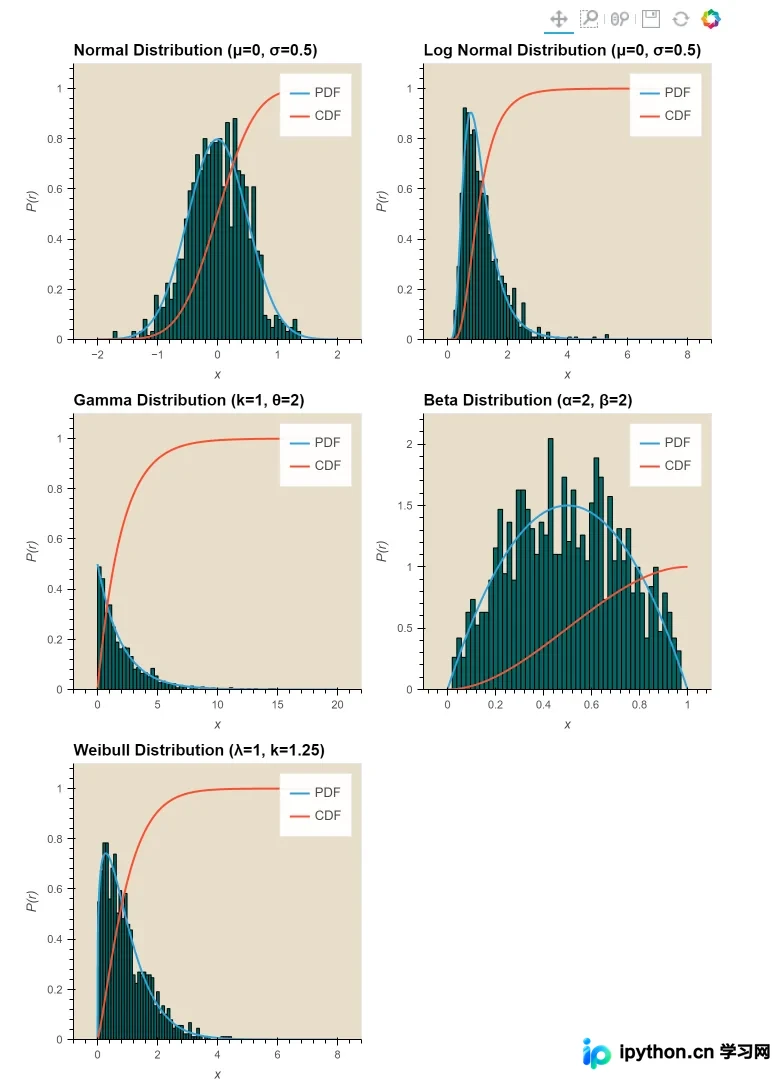
直方图系列
Route Chord
import holoviews as hv
from holoviews import opts, dim
from bokeh.sampledata.airport_routes import routes, airports

hv.extension('bokeh')

# Count the routes between Airports
route_counts = routes.groupby(['SourceID', 'DestinationID']).Stops.count().reset_index()
nodes = hv.Dataset(airports, 'AirportID', 'City')
chord = hv.Chord((route_counts, nodes), ['SourceID', 'DestinationID'], ['Stops'])

# Select the 20 busiest airports
busiest = list(routes.groupby('SourceID').count().sort_values('Stops').iloc[-20:].index.values)
busiest_airports = chord.select(AirportID=busiest, selection_mode='nodes')
busiest_airports.opts(
    opts.Chord(cmap='Category20', edge_color=dim('SourceID').str(),
               height=800, labels='City', node_color=dim('AirportID').str(), width=800))
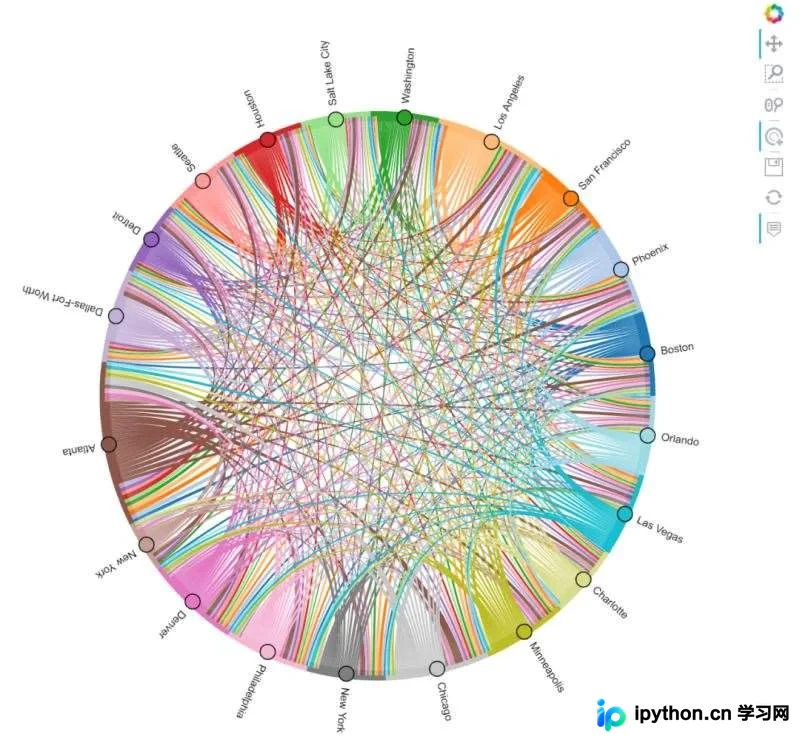
Route Chord
小提琴图
import holoviews as hv
from holoviews import dim

from  bokeh.sampledata.autompg import autompg
hv.extension('bokeh')

violin = hv.Violin(autompg, ('yr', 'Year'), ('mpg', 'Miles per Gallon')).redim.range(mpg=(8, 45))
violin.opts(height=500, width=900, violin_fill_color=dim('Year').str(), cmap='Set1')
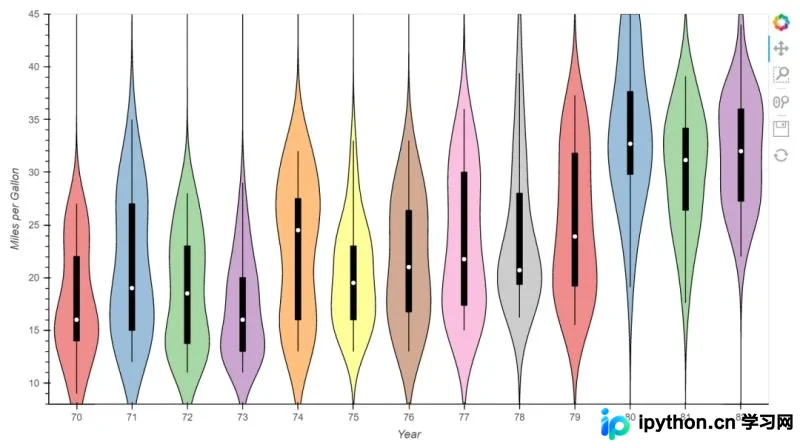
小提琴图
更多样例可查看:Python-HoloViews样例[2]。
总结
本文主要介绍了Python可视化库HoloViews,重点展示了其中的统计图表部分。该库在整理资料中也会频繁出现,对于使用Matplotlib较难绘制的常见图表非常友好。感兴趣的小伙伴可以学习一下。
参考资料
[1] Python-HoloViews库官网: https://holoviews.org/。
[2] Python-HoloViews样例: https://holoviews.org/gallery/index.html。
以上就是Python可视化库之HoloViews的使用教程的详细内容,更多关于Python HoloViews库的资料请关注本站其它相关文章!
本站声明
本文内容仅供参考,不代表本站观点。转载或引用请注明出处。如发现内容问题,请通过联系我们页面反馈。















