


Python使用Pillow为数据分析图片添加水印

发布时间:2026-10-15 |
4人浏览过
本文介绍如何在Python中利用Pillow库为数据分析生成的图片添加水印。通过结合Matplotlib绘制图表并保存,再使用Pillow的ImageDraw模块在指定坐标位置写入文本,实现自动添加水印功能。示例代码展示了字体配置、图片保存及水印添加的完整流程。
Python使用Pillow为数据分析图片添加水印
本文分享使用Python配合Pillow库为图片添加水印的具体实现方法,供读者参考。
在使用Python进行数据分析并生成图片后,若需为照片添加水印,可借助Pillow库。PIL的功能已包含在Pillow中,因此若需从PIL导入相关模块,必须先安装Pillow。
安装依赖库
# install
pip install pillow
安装完成后,即可通过以下导入语句进行后续操作。
导入必要模块
from PIL import Image, ImageDraw采用函数式编程方式实现:
生成图表并添加水印代码实现
#!/usr/bin/python
from PIL import Image, ImageDraw
from matplotlib import pyplot as plt, font_manager


# 保存通过数据分析得到的图片
def save_img():
    # mac系统下查询包含中文字体的方式是命令fc-list :lang=zh
    my_font = font_manager.FontProperties(        fname="/System/Library/Assets/com_apple_MobileAsset_Font5/b2d7b382c0fbaa5777103242eb048983c40fb807.asset/AssetData/Kaiti.ttc")

    x = [i for i in range(11, 31)]
    y_1 = [1, 0, 1, 1, 2, 4, 3, 2, 3, 4, 4, 5, 6, 5, 4, 3, 3, 1, 1, 1]
    y_2 = [0, 0, 0, 1, 2, 4, 3, 2, 3, 4, 2, 2, 1, 1, 1, 1, 1, 1, 1, 1]

    # 做出两个图,分别包括的是自己和同桌的每个年龄点交的女朋友数量
    plt.plot(x, y_1, label="自己", color="cyan", linestyle="--")
    plt.plot(x, y_2, label="同桌", color="r")

    _xtick_labels = ["{}岁".format(i) for i in x]
    plt.title("每年交的女朋友的数量走势图", fontproperties=my_font)
    # 给x轴添加刻度
    plt.xticks(x, _xtick_labels, fontproperties=my_font, rotation=45)
    # 给y轴添加刻度
    plt.yticks(range(min(y_1), max(y_1) + 1))
    # 给xy轴添加说明
    plt.xlabel("年龄", fontproperties=my_font)
    plt.ylabel("数量", fontproperties=my_font)

    # 做出网格更加直观看出坐标点值
    plt.grid(alpha=0.4, linestyle=":")
    # 添加图例
    plt.legend(prop=my_font)
    plt.savefig("./girl.png")
    plt.show()


# 对保存的图片进行添加
def add_watermark(a):
    im = Image.open(a)
    draw = ImageDraw.Draw(im)

    # 这里的hello world是添加的水印
    # 数组(50,50)表示的是水印要添加的位置
    draw.text((50, 50), 'hello world'.encode('utf-8'), fill=(1, 0, 0))
    im.show()


if __name__ == '__main__':
    save_img()
    add_watermark("girl.png")
代码执行后的输出结果如下: 请注意,图中显示的“hello world”即为添加的水印内容。
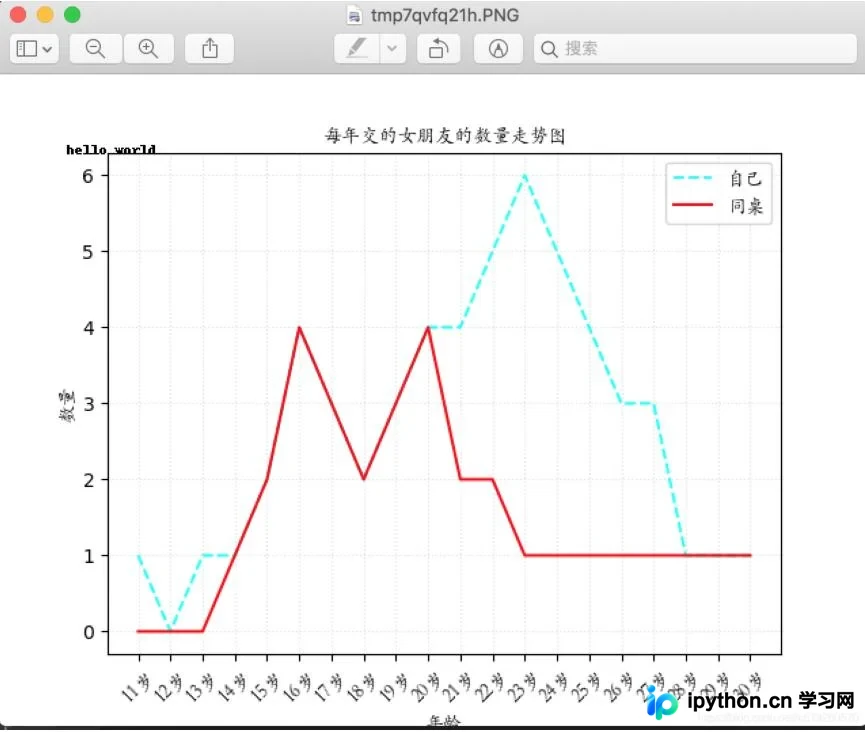
以上内容为本文的全部介绍,希望能为各位的学习提供便利,同时也欢迎大家继续支持本站。
本站声明
本文内容仅供参考,不代表本站观点。转载或引用请注明出处。如发现内容问题,请通过联系我们页面反馈。















