


Python skimage图像滤波详解:从边缘检测到平滑处理

本文详解Python中skimage库的图像滤波功能,涵盖Sobel、Roberts、Scharr、Prewitt及Canny等边缘检测算子的用法与参数调整,以及Gaussian、Median和Gabor滤波在去噪与纹理提取中的应用。通过具体代码示例解析sigma、frequency等关键参数的影响,帮助开发者掌握图像特征提取与噪声抑制的核心技术。
引言
对图像进行滤波处理主要旨在实现两种效果:一是通过平滑滤波抑制图像噪声,二是利用微分算子检测图像边缘并提取关键特征。
在Python的skimage库中,滤波操作主要通过filters模块来执行。
1、Sobel算子
Sobel算子常用于检测图像中的边缘信息。
其函数调用格式为:skimage.filters.sobel(image, mask=None)
from skimage import data,filters
import matplotlib.pyplot as plt
img = data.camera()
edges = filters.sobel(img)
plt.imshow(edges,plt.cm.gray)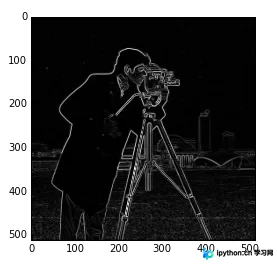
2、Roberts算子
Roberts算子的功能与Sobel算子类似,同样用于边缘检测。
其调用格式与Sobel算子保持一致。
edges = filters.roberts(img)3、Scharr算子
Scharr算子的功能同Sobel,其调用格式为:
edges = filters.scharr(img)4、Prewitt算子
Prewitt算子的功能同Sobel,其调用格式为:
edges = filters.prewitt(img)5、Canny算子
Canny算子同样用于提取边缘特征,但它不属于filters模块,而是位于feature模块中。
函数格式为:skimage.feature.canny(image,sigma=1.0)
用户可以通过修改sigma的值来调整滤波效果。
from skimage import data,filters,feature
import matplotlib.pyplot as plt
img = data.camera()
edges1 = feature.canny(img)   #sigma=1
edges2 = feature.canny(img,sigma=3)   #sigma=3
plt.figure('canny',figsize=(8,8))
plt.subplot(121)
plt.imshow(edges1,plt.cm.gray)
plt.subplot(122)
plt.imshow(edges2,plt.cm.gray)
plt.show()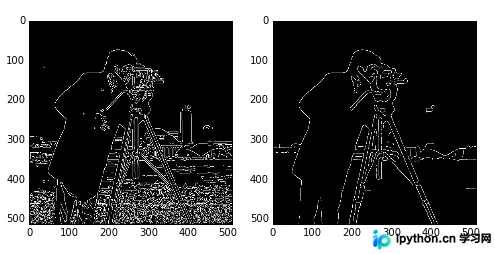
从实验结果可以看出,sigma值越小,检测出的边缘线条越细。
6、Gabor滤波
Gabor滤波可用于边缘检测以及纹理特征的提取。
函数调用格式为:skimage.filters.gabor_filter(image, frequency)
通过调整frequency值可以改变滤波效果,该函数返回一对边缘结果:分别基于真实滤波核和理想滤波核的计算结果。
from skimage import data,filters
import matplotlib.pyplot as plt
img = data.camera()
filt_real, filt_imag = filters.gabor_filter(img,frequency=0.6)
plt.figure('gabor',figsize=(8,8))
plt.subplot(121)
plt.title('filt_real')
plt.imshow(filt_real,plt.cm.gray)
plt.subplot(122)
plt.title('filt-imag')
plt.imshow(filt_imag,plt.cm.gray)
plt.show()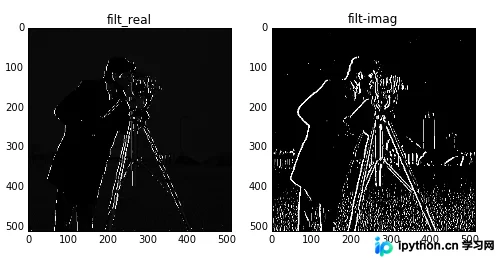
上图展示了frequency=0.6时的处理结果。
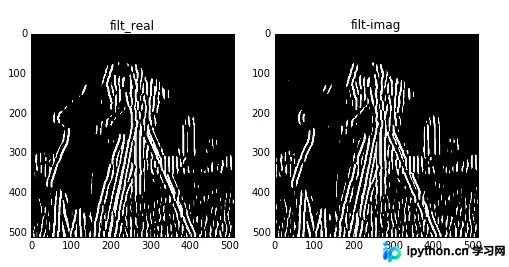
上图展示了frequency=0.1时的处理结果。
7、Gaussian滤波
这是一种多维滤波器,属于平滑滤波范畴,主要用于消除高斯噪声。
调用函数为:skimage.filters.gaussian_filter(image, sigma)
通过调节sigma的值可以控制滤波效果。
from skimage import data,filters
import matplotlib.pyplot as plt
img = data.astronaut()
edges1 = filters.gaussian_filter(img,sigma=0.4)   #sigma=0.4
edges2 = filters.gaussian_filter(img,sigma=5)   #sigma=5
plt.figure('gaussian',figsize=(8,8))
plt.subplot(121)
plt.imshow(edges1,plt.cm.gray)
plt.subplot(122)
plt.imshow(edges2,plt.cm.gray)
plt.show()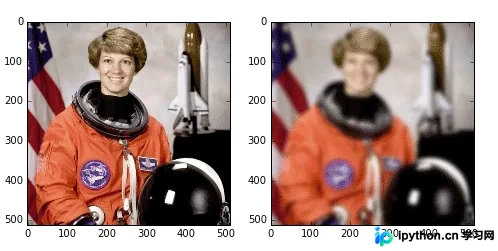
观察结果可知,sigma值越大,滤波后的图像越模糊。
8、Median(中值滤波)
中值滤波是一种平滑滤波技术,能够有效消除噪声。
需要使用skimage.morphology模块来设置滤波器的形状。
from skimage import data,filters
import matplotlib.pyplot as plt
from skimage.morphology import disk
img = data.camera()
edges1 = filters.median(img,disk(5))
edges2= filters.median(img,disk(9))
plt.figure('median',figsize=(8,8))
plt.subplot(121)
plt.imshow(edges1,plt.cm.gray)
plt.subplot(122)
plt.imshow(edges2,plt.cm.gray)
plt.show()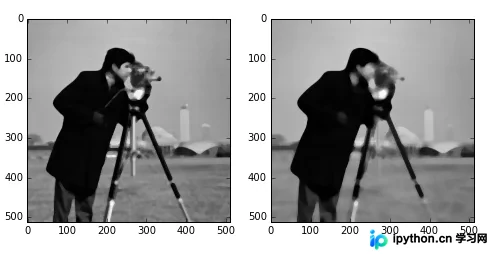
从结果可以看出,滤波器尺寸越大,图像越模糊。
9、水平与垂直边缘检测
上述示例均进行全方向边缘检测,若只需检测水平或垂直边缘,可采用以下方法。
水平边缘检测函数:sobel_h, prewitt_h, scharr_h
垂直边缘检测函数:sobel_v, prewitt_v, scharr_v
from skimage import data,filters
import matplotlib.pyplot as plt
img = data.camera()
edges1 = filters.sobel_h(img)
edges2 = filters.sobel_v(img)
plt.figure('sobel_v_h',figsize=(8,8))
plt.subplot(121)
plt.imshow(edges1,plt.cm.gray)
plt.subplot(122)
plt.imshow(edges2,plt.cm.gray)
plt.show()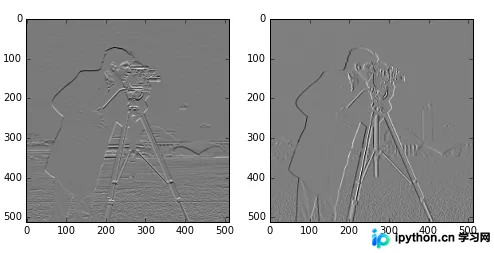
上图左侧为检测出的水平边缘,右侧为检测出的垂直边缘。
10、交叉边缘检测
可使用Roberts的十字交叉核进行过滤,以检测交叉边缘。这些交叉边缘实际上是梯度在特定方向上的分量。
其中一个核矩阵为:
0 1 -1 0
对应的处理函数为:
roberts_neg_diag(image)
示例代码如下:
from skimage import data,filters
import matplotlib.pyplot as plt
img =data.camera()
dst =filters.roberts_neg_diag(img)
plt.figure('filters',figsize=(8,8))
plt.subplot(121)
plt.title('origin image')
plt.imshow(img,plt.cm.gray)
plt.subplot(122)
plt.title('filted image')
plt.imshow(dst,plt.cm.gray)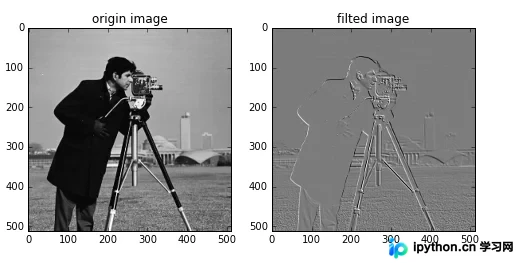
另一个核矩阵为:
1 0 0 -1
对应的函数为:
roberts_pos_diag(image)
from skimage import data,filters
import matplotlib.pyplot as plt
img =data.camera()
dst =filters.roberts_pos_diag(img)
plt.figure('filters',figsize=(8,8))
plt.subplot(121)
plt.title('origin image')
plt.imshow(img,plt.cm.gray)
plt.subplot(122)
plt.title('filted image')
plt.imshow(dst,plt.cm.gray)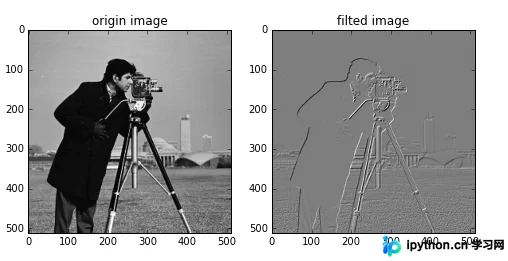
以上就是Python数字图像处理中图像简单滤波实现的详细内容,更多关于Python数字图像处理简单滤波的资料请关注本站其它相关文章!
本站声明
本文内容仅供参考,不代表本站观点。转载或引用请注明出处。如发现内容问题,请通过联系我们页面反馈。















