


Python Turtle绘制六种对称图形详解与代码实现

发布时间:2026-10-15 |
4人浏览过
本文详细介绍如何使用Python的turtle库绘制六种有趣的对称图形,包括三角形组成的花、旋风轮、八叶花、16叶花、小太阳以及阴阳图。文章提供了完整的Python代码示例,并解析了通过调整参数(如循环次数、旋转角度和颜色)来生成不同图形的技巧,适合Python初学者进行图形编程练习。
近期有朋友请求协助使用Python绘制若干图形,在绘制过程中发现部分图案颇具趣味性,特此整理分享。
图1:三角形花卉
首个图形是由多个三角形组合而成的花卉图案,感兴趣的用户可以尝试在Python环境中利用turtle库进行复现。
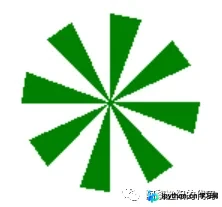
相关实现代码如下:
# -*- coding: UTF-8 -*-
'''
代码用途 :画对称图形
作者     :阿黎逸阳
博客     :  https://blog.csdn.net/qq_32532663/article/details/106176609
'''
import os
import time
import pygame
import turtle as t

t.title('阿黎逸阳的代码公众号')
t.speed(10)
t.setup(startx=0, starty = 0, width=800, height = 600)
#第一幅图
def w_sg1(theta):
    t.setheading(theta)
    t.color('green')
    t.begin_fill()
    t.forward(60)
    t.left(100)
    t.forward(20)
    t.left(100)
    t.forward(60)
    t.end_fill()
for i in range(8):
    w_sg1(70 + i*45)
    t.hideturtle()
图2:旋风轮
第二个图形为旋风轮样式,思考如何基于图1的代码逻辑进行调整以生成如下所示的效果?
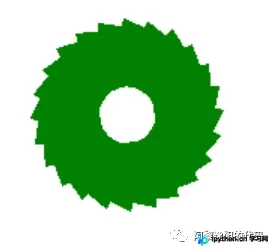
具体实现代码如下:
# -*- coding: UTF-8 -*-
'''
代码用途 :画对称图形
作者     :阿黎逸阳
博客     :  https://blog.csdn.net/qq_32532663/article/details/106176609
'''
import os
import time
import pygame
import turtle as t

t.title('阿黎逸阳的代码公众号')
t.speed(10)
t.setup(startx=0, starty = 0, width=800, height = 600)
#第二幅图
def w_sg2(theta):
    t.setheading(theta)
    t.color('green')
    t.begin_fill()
    t.forward(55)
    t.left(100)
    t.forward(20)
    t.left(100)
    t.forward(60)
    t.end_fill()
for i in range(24):
    w_sg2(70 + i*15)
    t.hideturtle()
图3:八叶花
第三个图形呈现为八叶花形态,用户也可尝试修改叶片颜色以获得不同的视觉效果。
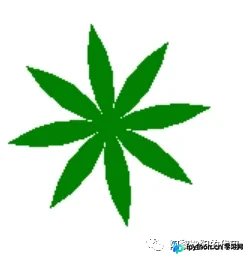
具体实现代码如下:
# -*- coding: UTF-8 -*-
'''
代码用途 :画对称图形
作者     :阿黎逸阳
博客     :  https://blog.csdn.net/qq_32532663/article/details/106176609
'''
import os
import time
import pygame
import turtle as t

t.title('阿黎逸阳的代码公众号')
t.speed(10)
t.setup(startx=0, starty = 0, width=800, height = 600)
#第三幅图
def w_sg3(theta):
    t.color('green')
    t.begin_fill()
    t.setheading(theta)
    t.circle(80, 50)
    t.left(130)
    t.circle(80, 50)
    t.end_fill()
for i in range(8):
    w_sg3(30 + i*45)
    t.hideturtle()
图4:十六叶花
第四个图形是拥有16个叶片的图案,探讨如何基于八叶花的代码进行微调以绘制出如下图形?
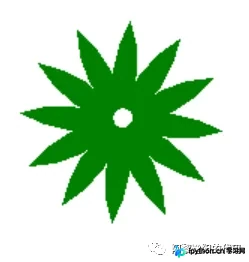
具体实现代码如下:
t.clearscreen()
#第四幅图
for i in range(16):
    w_sg3(30 + i*30)
    t.hideturtle()
t.goto(0, -3)
t.color('white')
t.begin_fill()
t.circle(6, 360)
t.end_fill()
图5:小太阳
第五个图形设计为小太阳样式,思考如何基于八叶花的代码逻辑进行调整以生成如下效果?
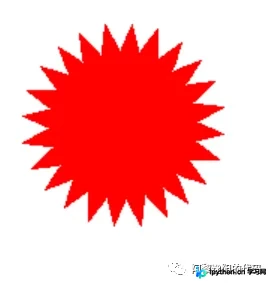
具体实现代码如下:
# -*- coding: UTF-8 -*-
'''
代码用途 :画对称图形
作者     :阿黎逸阳
博客     :  https://blog.csdn.net/qq_32532663/article/details/106176609
'''
import os
import time
import pygame
import turtle as t

t.title('阿黎逸阳的代码公众号')
t.speed(10)
t.setup(startx=0, starty = 0, width=800, height = 600)
#第五幅图
def w_sg3(theta):
    t.color('red')
    t.begin_fill()
    t.setheading(theta)
    t.circle(80, 50)
    t.left(130)
    t.circle(80, 50)
    t.end_fill()
for i in range(24):
    w_sg3(30 + i*15)
    t.hideturtle()
图6:阴阳图
第六个图形展示了经典的阴阳图案。
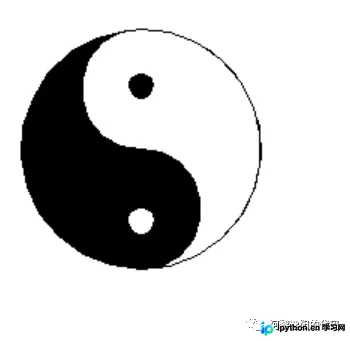
具体实现代码如下:
# -*- coding: UTF-8 -*-
'''
代码用途 :画对称图形
作者     :阿黎逸阳
博客     :  https://blog.csdn.net/qq_32532663/article/details/106176609
'''
import os
import time
import pygame
import turtle as t

t.title('阿黎逸阳的代码公众号')
t.speed(10)
t.setup(startx=0, starty = 0, width=800, height = 600)
#阴阳图
def w_sg4():
    t.color('black')
    t.begin_fill()
    t.circle(80, 360)
    t.end_fill()
    t.color('black', 'white')
    t.begin_fill()
    t.circle(80, 180)
    t.circle(40, 180)
    t.circle(-40, 180)
    t.end_fill()
    t.penup()
    t.goto(0, 130)
    t.pendown()
    t.begin_fill()
    t.color('black')
    t.circle(8, 360)
    t.end_fill()
    t.penup()
    t.goto(0, 130-90)
    t.pendown()
    t.begin_fill()
    t.color('white')
    t.circle(8, 360)
    t.end_fill()
    t.hideturtle()
w_sg4()
以上就是关于使用Python结合turtle库绘制对称图形的示例代码介绍,更多涉及Python turtle绘制对称图形的内容,欢迎查阅本站往期文章或继续浏览后续相关教程,感谢大家的支持!
本站声明
本文内容仅供参考,不代表本站观点。转载或引用请注明出处。如发现内容问题,请通过联系我们页面反馈。















