


Python select.select模块通信全过程解析

本文深入解析Python中select.select模块的核心参数与三个返回值,通过服务器端与客户端的完整代码示例,展示如何监控输入、输出及错误信息。文章还探讨了客户端断开连接时的空数据判断及服务器端Socket关闭后的异常处理机制,帮助开发者掌握非阻塞IO的高效实现。
要深入理解 select.select 模块,关键在于掌握其接收的参数类型以及它返回的三个具体结果。
select() 方法负责监控三个通信列表:第一个列表包含所有待处理的输入数据(即从外部接收到的数据);第二个列表用于监控和发送所有待输出的数据;第三个列表则专门用于监控错误信息。
网络上关于 select.select 参数解释的资料较少,因此需要自行分析其工作机制。核心调用形式为:readable, writable, exceptional = select.select(inputs, outputs, inputs)。
在服务器端实现中,第一个参数通常指向服务器自身的 Socket 对象;第二个参数存储运行过程中建立的客户端 Socket 列表;第三个参数用于记录错误信息。返回值同样分为三部分:第一个返回值是可读的 Socket 列表,第二个是可写的 Socket 列表,第三个则是发生异常的 Socket 列表。
无需过度深究理论,通过观察具体代码逻辑即可建立直观理解。
网上现有的 select.select 示例代码大多相似,但部分存在运行错误或内容不全的问题。为此,本文提供了一份经过调试、可正常运行的完整程序,并添加了详细注释,仔细阅读即可掌握其工作原理。
以下是服务器端的实现代码。
# coding: utf-8
import select
import socket
import Queue
from time import sleep


# Create a TCP/IP
server = socket.socket(socket.AF_INET, socket.SOCK_STREAM)
server.setblocking(False)

# Bind the socket to the port
server_address = ('localhost', 8090)
print ('starting up on %s port %s' % server_address)
server.bind(server_address)

# Listen for incoming connections
server.listen(5)

# Sockets from which we expect to read
inputs = [server]

# Sockets to which we expect to write
# 处理要发送的消息
outputs = []

# Outgoing message queues (socket: Queue)
message_queues = {}

while inputs:
 # Wait for at least one of the sockets to be ready for processing
 print ('waiting for the next event')
 # 开始select 监听, 对input_list 中的服务器端server 进行监听
 # 一旦调用socket的send, recv函数,将会再次调用此模块
 readable, writable, exceptional = select.select(inputs, outputs, inputs)

 # Handle inputs
 # 循环判断是否有客户端连接进来, 当有客户端连接进来时select 将触发
 for s in readable:
  # 判断当前触发的是不是服务端对象, 当触发的对象是服务端对象时,说明有新客户端连接进来了
  # 表示有新用户来连接
  if s is server:
   # A "readable" socket is ready to accept a connection
   connection, client_address = s.accept()
   print ('connection from', client_address)
   # this is connection not server
   connection.setblocking(0)
   # 将客户端对象也加入到监听的列表中, 当客户端发送消息时 select 将触发
   inputs.append(connection)

   # Give the connection a queue for data we want to send
   # 为连接的客户端单独创建一个消息队列,用来保存客户端发送的消息
   message_queues[connection] = Queue.Queue()
  else:
   # 有老用户发消息, 处理接受
   # 由于客户端连接进来时服务端接收客户端连接请求,将客户端加入到了监听列表中(input_list), 客户端发送消息将触发
   # 所以判断是否是客户端对象触发
   data = s.recv(1024)
   # 客户端未断开
   if data != '':
    # A readable client socket has data
    print ('received "%s" from %s' % (data, s.getpeername()))
    # 将收到的消息放入到相对应的socket客户端的消息队列中
    message_queues[s].put(data)
    # Add output channel for response
    # 将需要进行回复操作socket放到output 列表中, 让select监听
    if s not in outputs:
     outputs.append(s)
   else:
    # 客户端断开了连接, 将客户端的监听从input列表中移除
    # Interpret empty result as closed connection
    print ('closing', client_address)
    # Stop listening for input on the connection
    if s in outputs:
     outputs.remove(s)
    inputs.remove(s)
    s.close()

    # Remove message queue
    # 移除对应socket客户端对象的消息队列
    del message_queues[s]

 # Handle outputs
 # 如果现在没有客户端请求, 也没有客户端发送消息时, 开始对发送消息列表进行处理, 是否需要发送消息
 # 存储哪个客户端发送过消息
 for s in writable:
  try:
   # 如果消息队列中有消息,从消息队列中获取要发送的消息
   message_queue = message_queues.get(s)
   send_data = ''
   if message_queue is not None:
    send_data = message_queue.get_nowait()
   else:
    # 客户端连接断开了
    print "has closed "
  except Queue.Empty:
   # 客户端连接断开了
   print "%s" % (s.getpeername())
   outputs.remove(s)
  else:
   # print "sending %s to %s " % (send_data, s.getpeername)
   # print "send something"
   if message_queue is not None:
    s.send(send_data)
   else:
    print "has closed "
   # del message_queues[s]
   # writable.remove(s)
   # print "Client %s disconnected" % (client_address)

 # # Handle "exceptional conditions"
 # 处理异常的情况
 for s in exceptional:
  print ('exception condition on', s.getpeername())
  # Stop listening for input on the connection
  inputs.remove(s)
  if s in outputs:
   outputs.remove(s)
  s.close()

  # Remove message queue
  del message_queues[s]

 sleep(1)
以下是客户端的实现代码。
# coding: utf-8
import socket


messages = ['This is the message ', 'It will be sent ', 'in parts ', ]

server_address = ('localhost', 8090)

# Create aTCP/IP socket

socks = [socket.socket(socket.AF_INET, socket.SOCK_STREAM), socket.socket(socket.AF_INET, socket.SOCK_STREAM), ]

# Connect thesocket to the port where the server is listening

print ('connecting to %s port %s' % server_address)
# 连接到服务器
for s in socks:
 s.connect(server_address)

for index, message in enumerate(messages):
 # Send messages on both sockets
 for s in socks:
  print ('%s: sending "%s"' % (s.getsockname(), message + str(index)))
  s.send(bytes(message + str(index)).decode('utf-8'))
 # Read responses on both sockets

for s in socks:
 data = s.recv(1024)
 print ('%s: received "%s"' % (s.getsockname(), data))
 if data != "":
  print ('closingsocket', s.getsockname())
  s.close()
在编写代码过程中,主要解决了两个问题:一是如何判断客户端已关闭 Socket 连接。通过分析发现,若客户端关闭连接,服务器端接收到的数据将为空字符串(''),因此需添加对此情况的判断。二是处理服务器端关闭 Socket 后的行为:一旦服务器端关闭了某个 Socket,无论该 Socket 对象被存储在多少个不同的容器(例如 list_1 和 list_2 均引用了同一个 socket1 对象)中,所有对该 Socket 的后续调用都会报错。
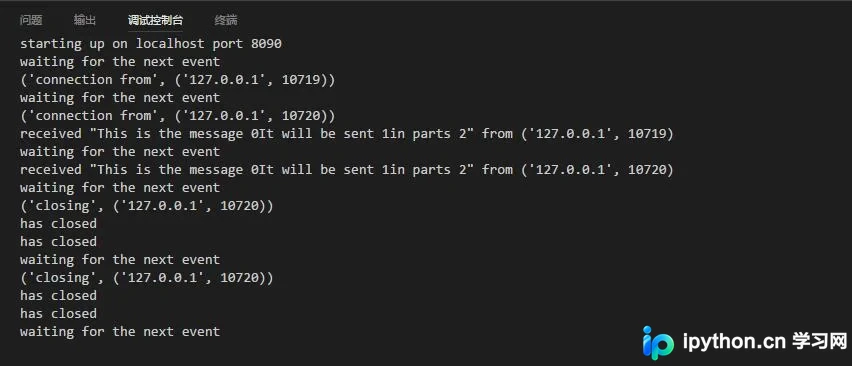
客户端的具体实现逻辑如下。
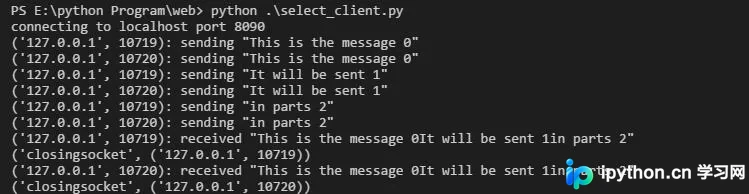
以上就是本文的全部内容,希望对大家的学习有所帮助,也希望大家多多支持本站。
本站声明
本文内容仅供参考,不代表本站观点。转载或引用请注明出处。如发现内容问题,请通过联系我们页面反馈。















