


Python使用Seaborn绘制多分类混淆矩阵及性能指标可视化

发布时间:2026-10-15 |
4人浏览过
本文介绍如何利用Python的Seaborn库绘制多分类任务下的混淆矩阵及其衍生指标图。通过计算准确率、精准率、召回率和F1分数,生成原始计数、百分比、召回率、精准率及F1矩阵的可视化图表,帮助开发者直观评估模型在多标签场景下的表现。
多标签混淆矩阵绘制概述
使用Seaborn库绘制多标签场景下的混淆矩阵,并同步展示召回率、精准率及F1分数指标。
环境依赖与数据准备
首先导入必要的Python库,包括seaborn、matplotlib、scipy以及sklearn等相关模块。
import seaborn as sns
from matplotlib import pyplot as plt
from scipy.special import softmax
from sklearn.metrics import accuracy_score, confusion_matrix, precision_score, recall_score, f1_score

sns.set_theme(color_codes=True)
从DataFrame数据框中提取真实标签y_true与预测标签y_pred数据。
y_true = df["target"]
y_pred = df['prediction']
整体性能指标计算
基于验证数据计算整体准确率acc、加权模式下的精准率precision、召回率recall以及F1分数(average='weighted')。
# 准确率acc,精准precision,召回recall,F1
acc = accuracy_score(df["target"], df['prediction'])
precision = precision_score(y_true, y_pred, average='weighted')
recall = recall_score(y_true, y_pred, average='weighted')
f1 = f1_score(y_true, y_pred, average='weighted')
print(f'[Info] acc: {acc}, precision: {precision}, recall: {recall}, f1: {f1}')
调用相关函数计算混淆矩阵。
# 横坐标是真实类别数,纵坐标是预测类别数
cf_matrix = confusion_matrix(y_true, y_pred)
五类矩阵可视化方案
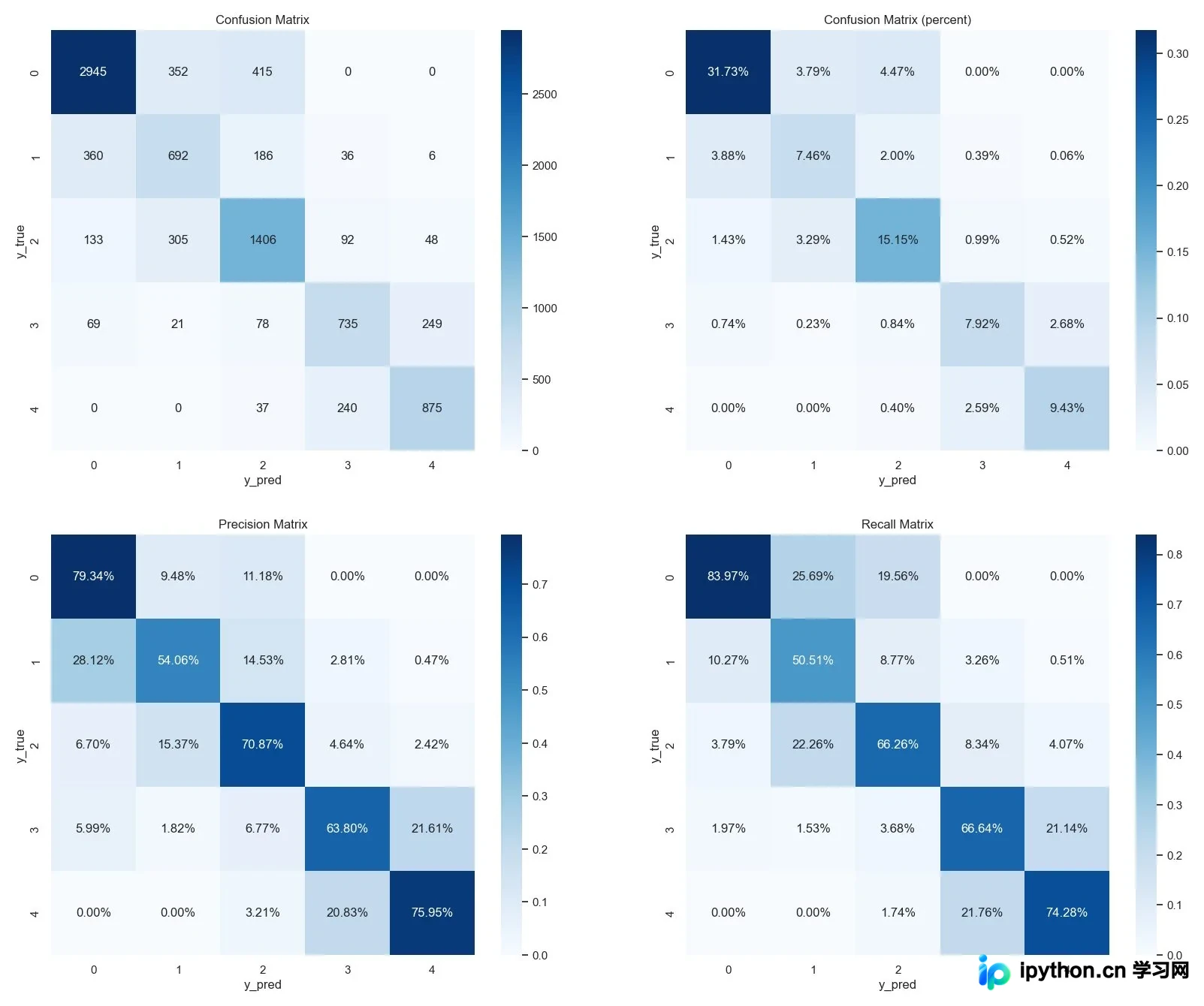
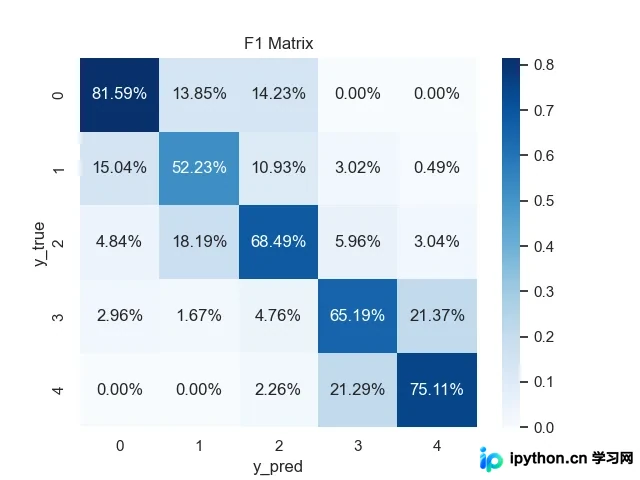
针对5类数据制定绘制方案,依次生成混淆矩阵、百分比混淆矩阵、召回矩阵、精准矩阵以及F1矩阵。
- 混淆矩阵显示的是具体的计数值,而百分比混淆矩阵展示的是各分类在总样本中的占比。
- 召回矩阵中每行数据之和为1,该行代表真实类别的样本分布,其占比数值即为召回率。
- 精准矩阵中每列数据之和为1,该列代表预测类别的样本分布,其占比数值即为精准率。
- F1矩阵依据公式2PR/(P+R)计算,需特别注意分母为0的情况,此时应补0处理,具体实现使用np.divide(a, b, out=np.zeros_like(a), where=(b != 0))。
代码实现与结果展示
具体实现代码如下。
# 横坐标是真实类别数,纵坐标是预测类别数
cf_matrix = confusion_matrix(y_true, y_pred)

figure, axes = plt.subplots(2, 2, figsize=(16*1.25, 16))

# 混淆矩阵
ax = sns.heatmap(cf_matrix, annot=True, fmt='g', ax=axes[0][0], cmap='Blues')
ax.title.set_text("Confusion Matrix")
ax.set_xlabel("y_pred")
ax.set_ylabel("y_true")
# plt.savefig(csv_path.replace(".csv", "_cf_matrix.png"))
# plt.show()

# 混淆矩阵 - 百分比
cf_matrix = confusion_matrix(y_true, y_pred)
ax = sns.heatmap(cf_matrix / np.sum(cf_matrix), annot=True, ax=axes[0][1], fmt='.2%', cmap='Blues')
ax.title.set_text("Confusion Matrix (percent)")
ax.set_xlabel("y_pred")
ax.set_ylabel("y_true")
# plt.savefig(csv_path.replace(".csv", "_cf_matrix_p.png"))
# plt.show()

# 召回矩阵,行和为1
sum_true = np.expand_dims(np.sum(cf_matrix, axis=1), axis=1)
precision_matrix = cf_matrix / sum_true
ax = sns.heatmap(precision_matrix, annot=True, fmt='.2%', ax=axes[1][0], cmap='Blues')
ax.title.set_text("Precision Matrix")
ax.set_xlabel("y_pred")
ax.set_ylabel("y_true")
# plt.savefig(csv_path.replace(".csv", "_recall.png"))
# plt.show()

# 精准矩阵,列和为1
sum_pred = np.expand_dims(np.sum(cf_matrix, axis=0), axis=0)
recall_matrix = cf_matrix / sum_pred
ax = sns.heatmap(recall_matrix, annot=True, fmt='.2%', ax=axes[1][1], cmap='Blues')
ax.title.set_text("Recall Matrix")
ax.set_xlabel("y_pred")
ax.set_ylabel("y_true")
# plt.savefig(csv_path.replace(".csv", "_precision.png"))
# plt.show()

# 绘制4张图
plt.autoscale(enable=False)
plt.savefig(csv_path.replace(".csv", "_all.png"), bbox_inches='tight', pad_inches=0.2)
plt.show()

# F1矩阵
a = 2 * precision_matrix * recall_matrix
b = precision_matrix + recall_matrix
f1_matrix = np.divide(a, b, out=np.zeros_like(a), where=(b != 0))
ax = sns.heatmap(f1_matrix, annot=True, fmt='.2%', cmap='Blues')
ax.title.set_text("F1 Matrix")
ax.set_xlabel("y_pred")
ax.set_ylabel("y_true")
plt.savefig(csv_path.replace(".csv", "_f1.png"))
plt.show()
最终输出展示混淆矩阵、百分比混淆矩阵、召回矩阵及精准矩阵的可视化结果。
同时输出F1 Score的相关数据。
本文关于Python利用Seaborn绘制多标签混淆矩阵的介绍至此结束,更多相关Python Seaborn混淆矩阵内容可搜索本站历史文章或继续浏览后续文章,感谢支持。
本站声明
本文内容仅供参考,不代表本站观点。转载或引用请注明出处。如发现内容问题,请通过联系我们页面反馈。















