


Python setup.py 构建工具参数详解与配置实战

发布时间:2026-10-12 |
2人浏览过
Python 项目的构建与分发通常依赖于 setup.py 文件。与 pip install 自动处理在线依赖不同,python setup.py install 属于本地源码安装,不会自动拉取依赖包。本文通过具体代码示例,解析如何利用 setup.py 解决依赖包与自定义模块的打包发布问题,包括生成全局可执行文件及配置命令行入口。
setup.py 核心参数解析
setup.py 是 Python 项目的构建脚本,通过 setuptools.setup() 函数定义项目元数据。以下是常用参数的分类说明:
- 基础信息:
name指定包名称;version或-V指定版本号;author与author_email定义作者及邮箱;maintainer与maintainer_email指定维护者信息。 - 项目描述:
url指向官网;license声明授权协议;description为简短描述;long_description提供详细文档。 - 分类与平台:
platforms指定适用平台列表;classifiers定义 PyPI 分类标签;keywords设置关键字列表。 - 包与模块:
packages指定包含__init__.py的包目录,通常配合find_packages()使用;py_modules指定需打包的独立 Python 文件列表。 - 数据与脚本:
data_files打包非代码文件(如图片、配置);scripts指定安装时执行的脚本列表。 - 依赖管理:
install_requires定义运行时依赖(如requests);requires定义前置依赖;provides声明当前模块提供的依赖。
基础配置示例
以下是一个基础的 setup.py 配置,展示了如何定义包名、版本、依赖及入口点:
from setuptools import setup, find_packages

setup(
 name = "test",
 version = "1.0",
 keywords = ("test", "xxx"),
 description = "eds sdk",
 long_description = "eds sdk for python",
 license = "MIT Licence",
 url = "http://test.com",
 author = "test",
 author_email = "test@gmail.com",
 packages = find_packages(),
 include_package_data = True,
 platforms = "any",
 install_requires = [],
 scripts = [],
 entry_points = {
  'console_scripts': [
   'test = test.help:main'
  ]
 }
)
排除特定包
若需排除测试目录,可使用 find_packages() 的 exclude 参数:
find_packages(exclude=["*.tests", "*.tests.*", "tests.*", "tests"])命令行工具配置 (entry_points)
通过 entry_points 中的 console_scripts,可以将 Python 脚本打包为命令行工具。等号前为工具名称,等号后为模块路径与入口函数。
单入口配置
entry_points={'console_scripts': [
   'redis_run = RedisRun.redis_run:main',
 ]}
多入口配置
支持定义多个命令行工具:
setup(
 entry_points = {
  'console_scripts': [
   'foo = demo:test',
   'bar = demo:test',
  ]}
)
完整实战示例:打包 Redis 服务
以下示例演示如何将 Redis 订阅服务打包,并在 Windows 环境下生成 exe 文件至 Scripts 目录。请注意,模块与函数之间需使用冒号 : 分隔。
#!/usr/bin/env python
# coding=utf-8

from setuptools import setup

'''
把redis服务打包成C:\Python27\Scripts下的exe文件
'''

setup(
 name="RedisRun", #pypi中的名称,pip或者easy_install安装时使用的名称,或生成egg文件的名称
 version="1.0",
 author="Andreas Schroeder",
 author_email="andreas@drqueue.org",
 description=("This is a service of redis subscripe"),
 license="GPLv3",
 keywords="redis subscripe",
 url="https://ssl.xxx.org/redmine/projects/RedisRun",
 packages=['RedisRun'], # 需要打包的目录列表

 # 需要安装的依赖
 install_requires=[
  'redis>=2.10.5',
  'setuptools>=16.0',
 ],

 # 添加这个选项,在windows下Python目录的scripts下生成exe文件
 # 注意:模块与函数之间是冒号:
 entry_points={'console_scripts': [
  'redis_run = RedisRun.redis_run:main',
 ]},

 # long_description=read('README.md'),
 classifiers=[ # 程序的所属分类列表
  "Development Status :: 3 - Alpha",
  "Topic :: Utilities",
  "License :: OSI Approved :: GNU General Public License (GPL)",
 ],
 # 此项需要,否则卸载时报windows error
 zip_safe=False
)
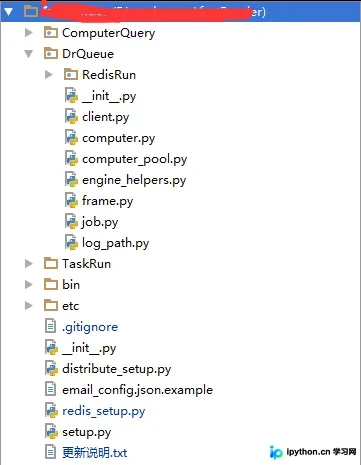
另一个变体示例,修改了包名与入口路径:
#!/usr/bin/env python
# coding=utf-8

from setuptools import setup

'''
把redis服务打包成C:\Python27\Scripts下的exe文件
'''

setup(
 name="RedisRun", #pypi中的名称,pip或者easy_install安装时使用的名称
 version="1.0",
 author="Andreas Schroeder",
 author_email="andreas@drqueue.org",
 description=("This is a service of redis subscripe"),
 license="GPLv3",
 keywords="redis subscripe",
 url="https://ssl.xxx.org/redmine/projects/RedisRun",
 packages=['DrQueue'], # 需要打包的目录列表

 # 需要安装的依赖
 install_requires=[
  'redis>=2.10.5',
 ],

 # 添加这个选项,在windows下Python目录的scripts下生成exe文件
 # 注意:模块与函数之间是冒号:
 entry_points={'console_scripts': [
  'redis_run = DrQueue.RedisRun.redis_run:main',
 ]},

 # long_description=read('README.md'),
 classifiers=[ # 程序的所属分类列表
  "Development Status :: 3 - Alpha",
  "Topic :: Utilities",
  "License :: OSI Approved :: GNU General Public License (GPL)",
 ],
 # 此项需要,否则卸载时报windows error
 zip_safe=False
)
总结
通过合理配置 setup.py,开发者可以灵活控制 Python 项目的打包行为,包括依赖管理、平台适配及命令行工具生成。掌握这些参数有助于提高项目发布的标准化程度与可维护性。
以上就是 Python 构建工具 setup.py 方法使用的详细内容,更多关于 Python 打包与发布的技术资料请关注本站其它相关文章!
本站声明
本文内容仅供参考,不代表本站观点。转载或引用请注明出处。如发现内容问题,请通过联系我们页面反馈。















