


Python configparser模块使用详解:从基础读取到数据还原

发布时间:2026-10-16 |
4人浏览过
本文详细介绍Python内置的configparser模块,涵盖从安装、读取ini文件、获取sections和options,到提取具体Key-Value值的全流程。重点解析value默认字符串类型的问题,并演示如何利用eval()函数还原列表或字典等复杂数据结构,最后提供封装类实现便捷调用。

1.configparser介绍
configparser是Python标准库中自带的配置参数解析模块,专门用于处理类似Windows INI格式的文件。这类配置文件通常由多个节点(sections)构成,每个节点下包含若干键值对(key-value)结构,便于程序读取和管理配置信息。
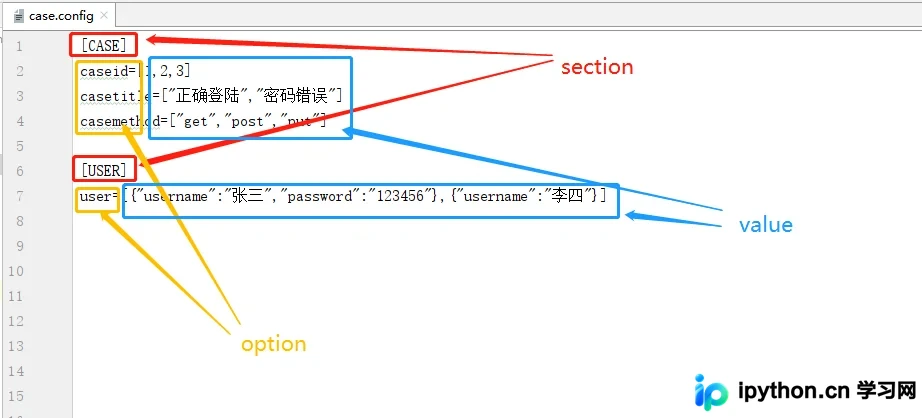
2.安装:
pip install configparse
3.获取所有的section
import configparser

cf = configparser.ConfigParser()
cf.read("case.config",encoding="utf8")#读取config,有中文注意编码
#获取所有的section
sections = cf.sections()
print(sections)
#输出:['CASE', 'USER']
4.获取指定section下的option
import configparser

cf = configparser.ConfigParser()
cf.read("case.config",encoding="utf8")#读取config,有中文注意编码
#获取指定section下所有的option
options = cf.options("CASE")
print(options)
#输出:['caseid', 'casetitle', 'casemethod', 'caseexpect']
5.获取指定section的K-V
import configparser

cf = configparser.ConfigParser()
cf.read("case.config",encoding="utf8")#读取config,有中文注意编码#获取指定section下的option和value,每一个option作为一个元祖[(),(),()]
alls = cf.items("CASE")
print(alls)
#输出:[('caseid', '[1,2,3]'), ('casetitle', '["正确登陆","密码错误"]'), ('casemethod', '["get","post","put"]'), ('caseexpect', '0000')]
6.获取指定value(1)
import configparser

cf = configparser.ConfigParser()
cf.read("case.config",encoding="utf8")#读取config,有中文注意编码
#获取指定section下指定option的value
caseid = cf.get("CASE","caseid")
print(caseid)
7.获取指定value(2)
import configparser

cf = configparser.ConfigParser()
cf.read("case.config",encoding="utf8")#读取config,有中文注意编码
#获取指定section下指定option的value
caseid = cf["CASE"]["caseid"]
print(caseid)
#输出:[1,2,3]
8.value数据类型
import configparser

cf = configparser.ConfigParser()
cf.read("case.config",encoding="utf8")#读取config,有中文注意编码
#value数据类型
user = cf["USER"]["user"]
print(type(user))
#输出:<class 'str'>
9.value数据类型还原eval()
import configparser

cf = configparser.ConfigParser()
cf.read("case.config",encoding="utf8")#读取config,有中文注意编码
#value数据类型还原
user = cf["USER"]["user"]
print(type(user))#输出:<class 'str'>
user = eval(user)
print(type(user))#输出:<class 'list'>
10.封装
import configparser

class GetConfig():
    def get_config_data(self,file,section,option):
        cf = configparser.ConfigParser()
        cf.read(file, encoding="utf8")  # 读取config,有中文注意编码
        # 返回value
        return cf[section][option]

if __name__ == '__main__':
    values = GetConfig().get_config_data("case.config","USER","user")
    print(values)
    #输出:[{"username":"张三","password":"123456"},{"username":"李四"}]
到此这篇关于Python参数解析器configparser的文章就介绍到这了,更多相关Python参数解析器内容请搜索本站以前的文章或继续浏览下面的相关文章希望大家以后多多支持本站!
本站声明
本文内容仅供参考,不代表本站观点。转载或引用请注明出处。如发现内容问题,请通过联系我们页面反馈。















