


wxPython实现窗口用图片做背景

发布时间:2026-10-11 |
2人浏览过
本文介绍如何使用wxPython在窗口中设置图片背景。通过wx.Image加载图片并转换为Bitmap,利用wx.StaticBitmap控件铺满窗口,并在其上添加其他UI组件。示例代码展示了完整的实现过程,包括异常处理和窗口标题设置。
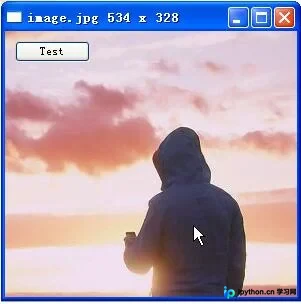
wxPython实现窗口用图片做背景
在wxPython中,可以通过代码实现窗口背景为图片。以下示例展示了具体的实现代码,并提供了运行效果图。
#!/usr/bin/env python
# -*- encoding:utf-8 -*-

import wx


class MyPanel(wx.Panel):
 def __init__(self, parent, id):
  wx.Panel.__init__(self, parent, id)
  try:
   image_file = 'image.jpg'
   to_bmp_image = wx.Image(image_file, wx.BITMAP_TYPE_ANY).ConvertToBitmap()
   self.bitmap = wx.StaticBitmap(self, -1, to_bmp_image, (0, 0))
   image_width = to_bmp_image.GetWidth()
   image_height = to_bmp_image.GetHeight()
   set_title = '%s %d x %d' % (image_file, to_bmp_image.GetWidth(), to_bmp_image.GetHeight())
   parent.SetTitle(set_title)
  except IOError:
   print 'Image file %s not found' % image_file
   raise SystemExit
  #创建一个按钮
  self.button = wx.Button(self.bitmap, -1, label='Test', pos=(10,10))
if __name__ == '__main__':
 app = wx.PySimpleApp()
 frame = wx.Frame(None, -1, 'Image', size=(300,300))
 my_panel = MyPanel(frame, -1)
 frame.Show()
 app.MainLoop()
以上就是wxPython实现窗口用图片做背景的详细内容,更多关于wxPython的资料请关注本站其它相关文章!
本站声明
本文内容仅供参考,不代表本站观点。转载或引用请注明出处。如发现内容问题,请通过联系我们页面反馈。















