


利用HTTP/2.0强制协议限制实现Python爬虫反爬方案

本文介绍一种基于强制HTTP/2.0协议的反爬虫策略。由于主流Python爬虫库如requests仅支持HTTP/1.1,且Scrapy的HTTP/2支持尚为实验性,通过Nginx配置拒绝HTTP/1.x请求可有效拦截大部分自动化脚本。文章详细演示了Nginx及Kubernetes Ingress的配置方法,并通过对比requests、Scrapy与httpx的测试结果,验证了该方案对常规爬虫的阻断效果及合法用户的兼容性。
一、前言
介绍一种高强度的反爬虫机制:直接禁用所有HTTP 1.x协议的请求。
目前多数爬虫库对HTTP/2.0的支持尚不完善,例如广泛使用的Python库requests,至今仍仅支持HTTP/1.1,何时支持HTTP/2.0尚无明确时间表。
Scrapy框架在最新版本2.5.0(发布于2021.04.06)中引入了对HTTP/2.0的支持,但官方明确声明该功能目前处于实验阶段,不建议在生产环境中使用。官方原文说明如下:
“HTTP/2 support in Scrapy is experimental, and not yet recommended for production environments. Future Scrapy versions may introduce related changes without a deprecation period or warning.
”
补充说明如何在Scrapy中启用HTTP/2.0支持:只需在settings.py文件中修改Download Handlers配置即可。
DOWNLOAD_HANDLERS = {
    'https': 'scrapy.core.downloader.handlers.http2.H2DownloadHandler',
}
当前Scrapy对HTTP/2.0的实现存在以下已知限制:
- 不支持HTTP/2.0明文(h2c)传输,因为主流浏览器均不支持未加密的HTTP/2.0。
- 没有提供设置最大帧大小超过默认值16384的选项,若服务器发送大于默认值的帧,连接将会失败。
- 不支持服务器推送(Server Push)功能。
- 不支持
bytes_received和headers_received信号。
其他库对HTTP/2.0的支持情况同样不佳。目前对HTTP/2.0支持较好的库包括hyper和httpx,其中httpx更为简洁易用。
二、反爬虫
由此引出我们的反爬虫思路。
如果我们强制禁用所有HTTP/1.x请求,是否能拦截大部分爬虫?requests库将无法使用,Scrapy即使升级到最新版本也只能使用实验性功能,其他语言库的支持也不理想,这将淘汰大部分常规爬虫工具。
与此同时,现代浏览器对HTTP/2.0的支持已经非常成熟,因此不会影响正常用户的网页浏览体验。
三、措施
接下来我们具体实施这一方案。
实现方式非常简单,只需在Nginx中进行相应配置,核心是添加以下判断逻辑:
if ($server_protocol !~* "HTTP/2.0") {
  return 444;
}
配置非常简单,其中$server_protocol代表传输协议,其可能的值包括HTTP/1.0、HTTP/1.1和HTTP/2.0。我们在判断条件中使用了!~*操作符,表示“不匹配”。具体逻辑为:如果协议不是HTTP/2.0,则直接返回444状态码。444状态码通常表示“无响应关闭连接”(CONNECTION CLOSED WITHOUT RESPONSE),即服务器不返回任何内容直接断开连接。
我的服务运行在Kubernetes环境中,因此需要修改Nginx Ingress的配置。幸运的是,https://kubernetes.github.io/ingress-nginx/user-guide/nginx-configuration/annotations/ 文档中预留了一个名为nginx.ingress.kubernetes.io/server-snippet的配置项,利用它我们可以自定义Nginx的判断逻辑。
官方文档中的用法示例如下:
apiVersion: networking.k8s.io/v1beta1
kind: Ingress
metadata:
  annotations:
    nginx.ingress.kubernetes.io/server-snippet: |
        set $agentflag 0;
        if ($http_user_agent ~* "(Mobile)" ){
          set $agentflag 1;
        }
        if ( $agentflag = 1 ) {
          return 301 https://m.example.com;
        }
因此,我们只需将之前的配置替换为上述形式即可:
apiVersion: networking.k8s.io/v1beta1
kind: Ingress
metadata:
  annotations:
    nginx.ingress.kubernetes.io/server-snippet: |
      if ($server_protocol !~* "HTTP/2.0") {
        return 444;
      }
配置完成。
测试示例网站为:https://spa16.scrape.center/
我们在浏览器中查看效果:
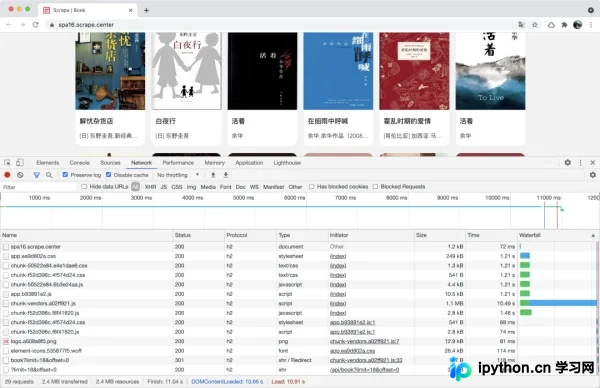
可以看到,所有请求均通过HTTP/2.0协议进行,页面加载完全正常。
然而,当我们使用requests库发起请求时:
import requests
response = requests.get('https://spa16.scrape.center/')
print(response.text)
会出现如下报错信息:
Traceback (most recent call last):
  ...
    raise RemoteDisconnected("Remote end closed connection without"
http.client.RemoteDisconnected: Remote end closed connection without response

During handling of the above exception, another exception occurred:

Traceback (most recent call last):
  ...
    raise MaxRetryError(_pool, url, error or ResponseError(cause))
requests.packages.urllib3.exceptions.MaxRetryError: HTTPSConnectionPool(host='spa16.scrape.center', port=443): Max retries exceeded with url: / (Caused by ProxyError('Cannot connect to proxy.', RemoteDisconnected('Remote end closed connection without response')))

During handling of the above exception, another exception occurred:

Traceback (most recent call last):
 ...
requests.exceptions.ProxyError: HTTPSConnectionPool(host='spa16.scrape.center', port=443): Max retries exceeded with url: / (Caused by ProxyError('Cannot connect to proxy.', RemoteDisconnected('Remote end closed connection without response')))
如果使用requests库,无论如何尝试都会失败,因为它不支持HTTP/2.0协议。
那么,我们尝试使用支持HTTP/2.0的库,例如httpx。安装方法如下:
pip3 install 'httpx[http2]'
请注意,使用httpx需要Python版本在3.6及以上。
安装完成后进行测试:
import httpx
client = httpx.Client(http2=True)

response = client.get('https://spa16.scrape.center/')
print(response.text)
测试结果如下:
<!DOCTYPE html><html lang=en><head><meta charset=utf-8><meta http-equiv=X-UA-Compatible content="IE=edge"><meta name=viewport content="width=device-width,initial-scale=1"><meta name=referrer content=no-referrer><link rel=icon href=/favicon.ico><title>Scrape | Book</title><link href=/css/chunk-50522e84.e4e1dae6.css rel=prefetch><link href=/css/chunk-f52d396c.4f574d24.css rel=prefetch><link href=/js/chunk-50522e84.6b3e24aa.js rel=prefetch><link href=/js/chunk-f52d396c.f8f41620.js rel=prefetch><link href=/css/app.ea9d802a.css rel=preload as=style><link href=/js/app.b93891e2.js rel=preload as=script><link href=/js/chunk-vendors.a02ff921.js rel=preload as=script><link href=/css/app.ea9d802a.css rel=stylesheet></head><body><noscript><strong>We're sorry but portal doesn't work properly without JavaScript enabled. Please enable it to continue.</strong></noscript><div id=app></div><script src=/js/chunk-vendors.a02ff921.js></script><script src=/js/app.b93891e2.js></script></body></html>
可以看到,HTML内容已成功获取!这就是HTTP/2.0协议带来的优势。
如果我们把http2参数设置为False呢?
import httpx
client = httpx.Client(http2=False)

response = client.get('https://spa16.scrape.center/')
print(response.text)
结果同样令人遗憾:
Traceback (most recent call last):
 ...
    raise RemoteProtocolError(msg)
httpcore.RemoteProtocolError: Server disconnected without sending a response.

The above exception was the direct cause of the following exception:
  ...
    raise mapped_exc(message) from exc
httpx.RemoteProtocolError: Server disconnected without sending a response.
这证实了只要涉及HTTP/1.x协议,爬虫都将无法正常工作。对于requests库来说,这确实是一个有效的限制手段。
这又是一种强大的反爬虫方案!各位站长可以参考实施。
到此这篇关于Requests什么的通通爬不了的Python超强反爬虫方案!的文章就介绍到这了,更多相关Python反爬虫内容请搜索本站以前的文章或继续浏览下面的相关文章希望大家以后多多支持本站!
本站声明
本文内容仅供参考,不代表本站观点。转载或引用请注明出处。如发现内容问题,请通过联系我们页面反馈。















