


Python 实现定时自动发送天气与每日问候邮件

发布时间:2026-10-12 |
1人浏览过
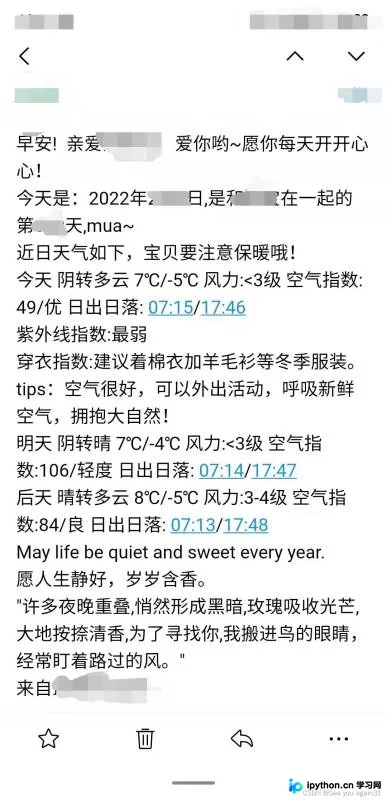
本文详解如何使用 Python 调用天气与每日一句接口,结合 QQ 邮箱 SMTP 服务编写自动化脚本,定期向指定收件人推送定制邮件。附带完整代码、Windows 定时任务配置流程及常见报错排查指南。
实现原理与准备工作
该方案通过 Python 发起 HTTP 请求获取外部公开数据,拼接定制化文案后,利用 SMTP 协议连接邮件服务器完成投递。最终借助操作系统的任务计划功能,实现每日自动触发。使用前需确保已安装 requests 库,并在支持 QQ 邮箱或其他主流邮箱的 SMTP 服务上开启独立授权码。
第一步:调用接口获取天气与每日文案
本节整合三个常用免费接口:天行数据(天气)、金山词霸(每日一句)与沙雕APP(暖心语录)。为增强脚本健壮性,采用环境变量优先读取、本地变量兜底的模式,防止因密钥缺失导致程序中断。
import os
import requests
from datetime import datetime

def get_weather_and_quotes(city):
    # 天气接口配置
    appid = os.environ.get("TIANQI_APPID", "your_appid")
    appsecret = os.environ.get("TIANQI_APPSEC", "your_appsecret")
    url = f"https://tianqiapi.com/api?version=v1&city={city}&appid={appid}&appsecret={appsecret}"

    try:
        res = requests.get(url, timeout=10)
        data_json = res.json()
        if data_json.get("errcode", 0) > 0:
            print(f"天气接口错误: {data_json.get('errmsg')}")
            return None

        data = data_json['data']
        today = data[0]
        tomorrow = data[1]
        aftertomorrow = data[2]

        # 温度与指数解析
        today_avg = (int(today['tem1'][:-1]) + int(today['tem2'][:-1])) / 2
        wdc = (f"紫外线指数:{today['index'][0]['level']}\n"
               f"穿衣指数:{today['index'][3]['desc']}\n"
               f"温馨提示:{today['air_tips']}")

        # 格式化文本
        today_w = f"今天 {today['wea']} {today['tem1']}/{today['tem2']} 风力:{today['win_speed']} 空气指数:{today['air']}/{today['air_level']} 日出日落:{today['sunrise']}/{today['sunset']}"
        tomorrow_w = f"明天 {tomorrow['wea']} {tomorrow['tem1']}/{tomorrow['tem2']} 风力:{tomorrow['win_speed']} 空气指数:{tomorrow['air']}/{tomorrow['air_level']} 日出日落:{tomorrow['sunrise']}/{tomorrow['sunset']}"
        aftertomorrow_w = f"后天 {aftertomorrow['wea']} {aftertomorrow['tem1']}/{aftertomorrow['tem2']} 风力:{aftertomorrow['win_speed']} 空气指数:{aftertomorrow['air']}/{aftertomorrow['air_level']} 日出日落:{aftertomorrow['sunrise']}/{aftertomorrow['sunset']}"

        # 获取金山词霸每日一句
        try:
            r_news = requests.get("http://open.iciba.com/dsapi/", timeout=10)
            note_content = r_news.json()['content'] + "\n" + r_news.json()['note']
        except Exception:
            note_content = "今日暂无金句。"

        # 获取暖心语录
        try:
            r_sweet = requests.get("https://chp.shadiao.app/api.php", timeout=10)
            sweet_word = r_sweet.text
        except Exception:
            sweet_word = "生活处处有惊喜。"

        # 组装最终消息
        days_counter = (datetime.now() - datetime(2020, 8, 21)).days  # 纪念日天数示例
        msg = (f"早安! 亲爱的朋友~愿你每天开开心心!\n"
               f"今天是:{datetime.now().strftime('%Y年%m月%d日')}\n"
               f"近日天气如下,请注意保暖哦!\n"
               f"{today_w}\n{wdc}\n{tomorrow_w}\n{aftertomorrow_w}\n"
               f"--------------------------------\n"
               f"{note_content}\n"
               f"{sweet_word}\n"
               f"来自最爱你的人")
        return msg
    except Exception as e:
        print(f"数据获取失败: {e}")
        return None
第二步:配置 SMTP 服务发送邮件
发送邮件需登录 SMTP 服务器。以 QQ 邮箱为例,必须在邮箱设置 → 账户 → POP3/IMAP/SMTP 中开启服务,并复制生成的 授权码(注意:此处填写的是授权码而非登录密码)。使用 SSL 加密通道(端口 465)可大幅提升投递成功率。
import smtplib
from email.mime.text import MIMEText
from email.header import Header
from email.utils import formataddr

def send_email(to_addr, message_body):
    from_addr = "你的邮箱@qq.com"  # 发件人邮箱
    password = "你的SMTP授权码"      # 邮箱设置的SMTP授权码
    smtp_server = "smtp.qq.com"

    msg = MIMEText(message_body, 'plain', 'utf-8')
    msg['From'] = formataddr(["发件人昵称", from_addr])
    msg['To'] = formataddr(["收件人昵称", to_addr])
    msg['Subject'] = Header("今日份的天气与问候", 'utf-8')

    try:
        server = smtplib.SMTP_SSL(smtp_server, 465)
        server.set_debuglevel(0)  # 生产环境建议关闭调试日志
        server.login(from_addr, password)
        server.sendmail(from_addr, [to_addr], msg.as_string())
        print(f"成功发送至: {to_addr}")
        server.quit()
    except smtplib.SMTPException as e:
        print(f"发送失败: {e}")
        raise
第三步:整合调度逻辑与批量发送
将上述模块合并,遍历目标收件人列表即可实现群发。以下为主执行入口:
def main():
    city_name = "北京"  # 查询天气的城市名
    target_emails = ["好友A@qq.com", "好友B@qq.com"]

    # 1. 获取数据
    content = get_weather_and_quotes(city_name)
    if not content:
        print("数据为空,中止发送。")
        return

    # 2. 循环发送
    for email in target_emails:
        send_email(email, content)

if __name__ == "__main__":
    main()
第四步:在 Windows 中设置定时运行
为实现全自动执行,需在操作系统层添加计划任务:
- 按
Win + R打开运行框,输入taskschd.msc回车进入 任务计划程序。 - 点击右侧面板的
创建基本任务,依次填写名称(如DailyWeatherMail)与描述。 - 触发器选择 每天,设定具体时间(如
08:00),保持默认值点击下一步。 - 操作选择 启动程序。在
程序或脚本栏填入 Python 解释器完整路径(例如C:\Python39\python.exe),在添加参数栏填入脚本绝对路径(例如E:\scripts\weather_mail.py)。 - 完成向导后,右键刚创建的任务选择
属性,勾选 使用最高权限运行 与 无论用户是否登录都要运行,以确保后台静默执行。
常见问题排查与注意事项
- SMTP 认证失败 (535 Error):绝大多数情况是因填入了 QQ 登录密码而非授权码。请重新前往邮箱安全中心生成新的 SMTP 密码。
- 网络请求超时:第三方免费接口存在并发限制。建议在代码中的
requests.get补充timeout=10参数,并可根据实际情况添加重试机制。 - 乱码问题:确保脚本文件保存为
UTF-8编码,且邮件头声明了MIMEText(..., 'plain', 'utf-8')。
以上就是 Python 实现定时自动发送天气与每日问候邮件的详细内容,更多关于 Python 自动化与接口调用的资料请关注本站其它相关文章!
本站声明
本文内容仅供参考,不代表本站观点。转载或引用请注明出处。如发现内容问题,请通过联系我们页面反馈。















