


C# 调用 Python 脚本:IronPython 嵌入与进程调用实战

发布时间:2026-10-15 |
3人浏览过
C# 项目常需借助 Python 处理数据分析或自动化任务。本文介绍两种主流集成方式:使用 IronPython 库直接在 .NET 环境中执行脚本,以及通过 Process 进程启动外部 Python 解释器以支持第三方依赖。
方案一:使用 IronPython 嵌入执行(无第三方依赖场景)
IronPython 是运行在 .NET CLR 上的 Python 实现,允许 C# 代码直接访问 Python 引擎,性能较高且交互灵活,但不支持需要编译扩展的第三方库(如 NumPy、Pandas)。
第1步:安装 IronPython NuGet 包
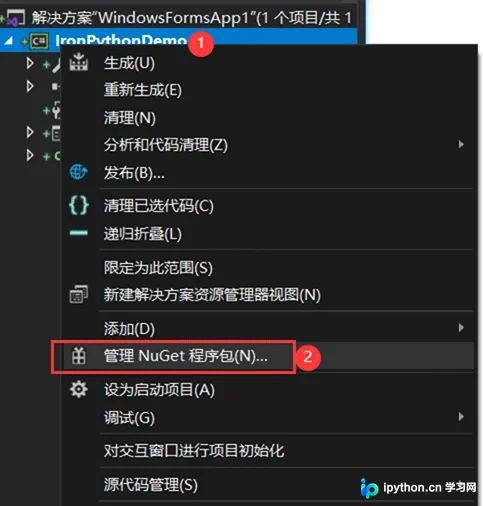
在 Visual Studio 中打开目标项目,进入“NuGet 程序包管理器”:
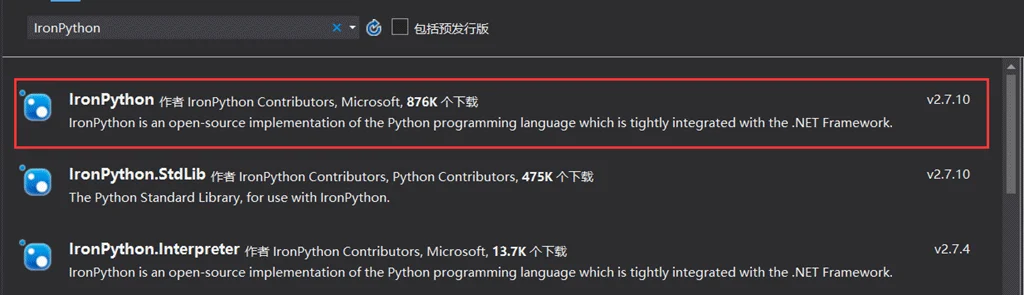
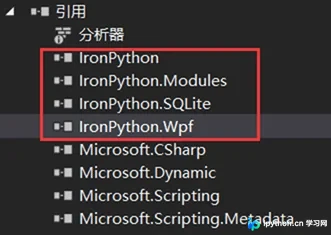
搜索并安装 IronPython 包。安装成功后,项目中将自动引用相关 DLL:
第2步:准备 Python 脚本与配置文件
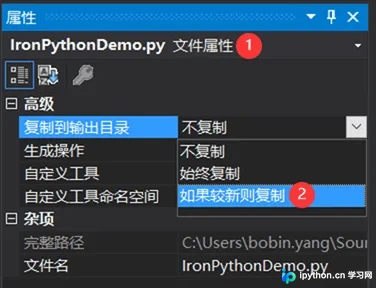
在输出目录创建 Python 脚本(例如 IronPythonDemo.py),设置其属性为“复制到输出目录”,以便运行时能正确找到文件:
 编辑
编辑 App.config,配置 microsoft.scripting 节点以识别 Python 语言引擎:
<?xml version="1.0" encoding="utf-8" ?>
<configuration>
  <configSections>
    <section name="microsoft.scripting" type="Microsoft.Scripting.Hosting.Configuration.Section, Microsoft.Scripting"/>
  </configSections>
  <microsoft.scripting>
    <languages>
      <language names="IronPython;Python;py" extensions=".py" displayName="Python" type="IronPython.Runtime.PythonContext, IronPython"/>
    </languages>
  </microsoft.scripting>
  <startup>
    <supportedRuntime version="v4.0" sku=".NETFramework,Version=v4.5" />
  </startup>
</configuration>
第3步:编写 C# 调用逻辑
场景 A:直接执行脚本语句(适合简单逻辑或脚本内定义变量)
ScriptRuntime scriptRuntime = ScriptRuntime.CreateFromConfiguration();
ScriptEngine pyEngine = scriptRuntime.GetEngine("python");
ScriptSource source = pyEngine.CreateScriptSourceFromFile("IronPythonDemo.py");
ScriptScope scope = pyEngine.CreateScope();

try
{
    // 向 Python 作用域传递参数
    scope.SetVariable("arg1", Convert.ToInt32(txtNum1.Text));
    scope.SetVariable("arg2", Convert.ToInt32(txtNum2.Text));
    scope.SetVariable("arg3", operation.SelectedIndex + 1);
}
catch (Exception)
{
    MessageBox.Show("输入有误。");
    return;
}

// 执行脚本
source.Execute(scope);
// 获取返回结果
labelResult.Text = scope.GetVariable("result").ToString();
场景 B:调用脚本中的特定函数(适合模块化代码)
// 方法 1:ExecuteFile
ScriptEngine pyEngine = IronPython.Hosting.Python.CreateEngine();
dynamic py = pyEngine.ExecuteFile(@"IronPythonDemo2.py");
int[] array = new int[9] { 9, 3, 5, 7, 2, 1, 3, 6, 8 };
string reStr = py.main(array); // 调用 Python 中的 main 函数
MessageBox.Show(reStr);

// 方法 2:UseFile(推荐,更简洁)
ScriptRuntime pyRuntime = IronPython.Hosting.Python.CreateRuntime();
dynamic obj = pyRuntime.UseFile("IronPythonDemo2.py");
string reStr2 = obj.main(array);
MessageBox.Show(reStr2);
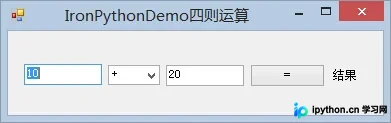
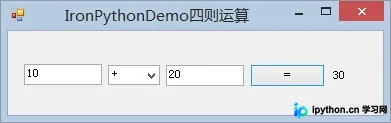
执行效果如下:
方案二:通过 Process 启动外部 Python 解释器
当 Python 脚本依赖大量第三方模块(如 serial、requests),而 IronPython 不支持这些扩展时,最稳定的方式是让 C# 启动系统的 Python.exe 进程。
第1步:构建 C# 进程启动代码
使用 System.Diagnostics.Process 指定 Python 解释器路径,并通过命令行参数传递数据。
using System;
using System.Collections;
using System.Diagnostics;

namespace Test
{
    class Program
    {
        static void Main(string[] args)
        {
            Process p = new Process();
            string path = "reset_ipc.py"; // Python 脚本相对路径
            string sArguments = path;

            ArrayList arrayList = new ArrayList();
            arrayList.Add("com4");
            arrayList.Add(57600);
            arrayList.Add("password");

            // 拼接命令行参数
            foreach (var param in arrayList)
            {
                sArguments += " " + param.ToString();
            }

            // 关键配置:重定向标准输出/错误,隐藏窗口
            p.StartInfo.FileName = @"D:\Python2\python.exe"; // 指向真实 Python 环境
            p.StartInfo.Arguments = sArguments;
            p.StartInfo.UseShellExecute = false;
            p.StartInfo.RedirectStandardOutput = true;
            p.StartInfo.RedirectStandardInput = true;
            p.StartInfo.RedirectStandardError = true;
            p.StartInfo.CreateNoWindow = true;

            p.Start();
            Console.WriteLine("执行完毕!");
            Console.ReadKey();
        }
    }
}
第2步:Python 脚本接收参数
Python 端使用 sys.argv 读取从 C# 传入的参数。
# -*- coding: UTF-8 -*-
import sys
import serial
import time

def resetIPC(com, baudrate, password, timeout=0.5):
    try:
        ser = serial.Serial(com, baudrate, timeout=timeout)
        # ... 此处省略串口通信具体逻辑 ...
        # ser.write(...)
        ser.close()
        return True
    except Exception:
        return False

# 获取命令行参数
if __name__ == '__main__':
    if len(sys.argv) >= 4:
        com = sys.argv[1]
        baudrate = int(sys.argv[2])
        password = sys.argv[3]
        resetIPC(com, baudrate, password)
总结与对比
- IronPython 嵌入模式:优势在于无缝集成,可直接在 C# 变量间交换对象,延迟低;劣势是对第三方库兼容性差,且需注意版本匹配(Python 2.x vs 3.x)。
- 进程启动模式:优势是完全隔离,支持任何标准的 Python 环境和第三方库;劣势是进程创建有开销,参数传递需序列化(通常通过命令行字符串),通信效率较低。
以上就是 C# 使用 IronPython 库及进程方式调用 Python 脚本的详细内容,更多关于 C# 与 Python 集成技术的资料请关注本站其它相关文章!
本站声明
本文内容仅供参考,不代表本站观点。转载或引用请注明出处。如发现内容问题,请通过联系我们页面反馈。















