


SpringBoot自定义MessageConverter与内容协商管理器详解

在Spring Boot开发中,默认的内容协商机制通常只处理JSON和XML格式。当业务需要返回特殊的文本格式(如分号分隔符)时,就需要自定义HttpMessageConverter。本文通过实现WebMvcConfigurer接口,详细讲解了如何添加自定义消息转换器,并配置ContentNegotiationManager使其支持通过URL参数(如?format=decade)触发该转换,确保在后端测试工具及浏览器环境中均可正常解析自定义格式。
1、自定义消息转换器MessageConverter
Spring MVC 的消息转换过程由HttpMessageConverter体系负责。在WebMvcAutoConfiguration自动配置类中,默认会注册一系列转换器。configureMessageConverters方法用于配置完整的转换器列表(会替换默认),而extendMessageConverters则用于在原有转换器后追加自定义逻辑(保留默认)。
假设我们需要后端返回一种自定义的媒体类型:application/x-decade,其内容格式为使用分号拼接 Person 对象的属性值(名称;年龄;出生日期)。
首先,我们需要创建自定义转换器类 DecadeConverter,实现 HttpMessageConverter<Person> 接口:
package com.decade.converters;
import com.decade.pojo.Person;
import org.springframework.http.HttpInputMessage;
import org.springframework.http.HttpOutputMessage;
import org.springframework.http.MediaType;
import org.springframework.http.converter.HttpMessageConverter;
import org.springframework.http.converter.HttpMessageNotReadableException;
import org.springframework.http.converter.HttpMessageNotWritableException;
import java.io.IOException;
import java.io.OutputStream;
import java.util.List;

public class DecadeConverter implements HttpMessageConverter<Person> {
    // 本例仅考虑写出,故不能读取
    @Override
    public boolean canRead(Class<?> clazz, MediaType mediaType) {
        return false;
    }

    // 判断是否支持写入指定的Class
    @Override
    public boolean canWrite(Class<?> clazz, MediaType mediaType) {
        return clazz.isAssignableFrom(Person.class);
    }

    /**
     * 声明该转换器支持的媒体类型
     */
    @Override
    public List<MediaType> getSupportedMediaTypes() {
        return MediaType.parseMediaTypes("application/x-decade");
    }

    // 本例不需要读取请求体
    @Override
    public Person read(Class<? extends Person> clazz, HttpInputMessage inputMessage) throws IOException, HttpMessageNotReadableException {
        return null;
    }

    @Override
    public void write(Person person, MediaType contentType, HttpOutputMessage outputMessage) throws IOException, HttpMessageNotWritableException {
        // 自定义输出格式:name;age;birth
        String result = person.getName() + ";" + person.getAge() + ";" + person.getBirth();
        final OutputStream body = outputMessage.getBody();
        body.write(result.getBytes());
    }
}
接下来,我们需要将该转换器注册到 Spring 容器中。推荐使用 WebMvcConfigurer 接口中的 extendMessageConverters 方法,这样不会覆盖 Spring Boot 内置的 JSON/XML 转换器:
package com.decade.config;
import com.decade.converters.DecadeConverter;
import org.springframework.context.annotation.Bean;
import org.springframework.context.annotation.Configuration;
import org.springframework.http.converter.HttpMessageConverter;
import org.springframework.web.servlet.config.annotation.WebMvcConfigurer;
import java.util.List;

@Configuration(proxyBeanMethods = false)
public class MyMvcConfig implements WebMvcConfigurer {
    @Bean
    public WebMvcConfigurer createConvert() {
        return new WebMvcConfigurer() {
            @Override
            public void extendMessageConverters(List<HttpMessageConverter<?>> converters) {
                // 将自定义转换器加入末尾
                converters.add(new DecadeConverter());
            }
        };
    }
}
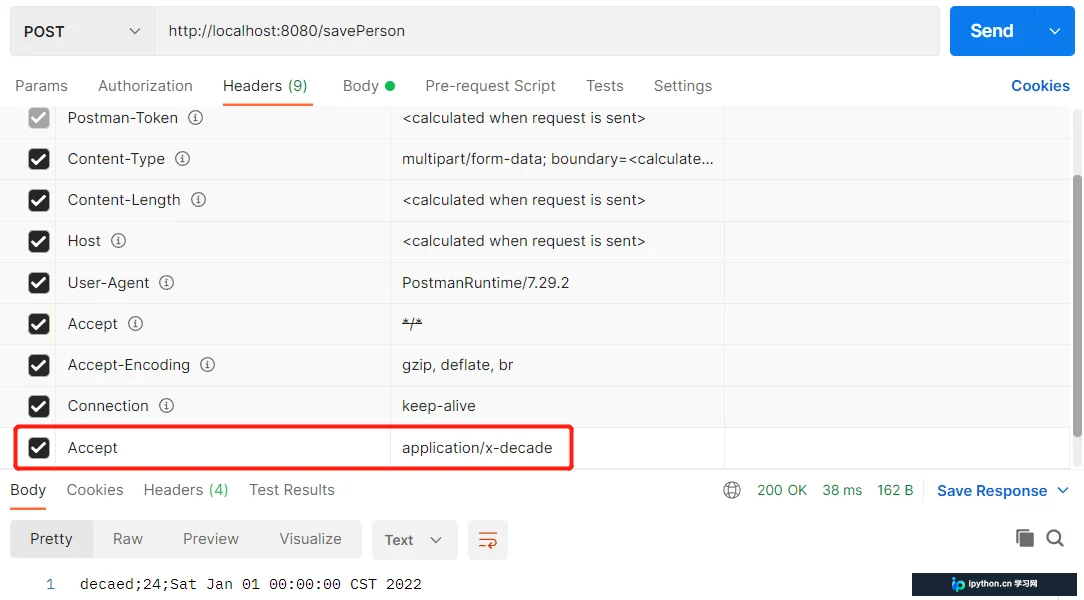
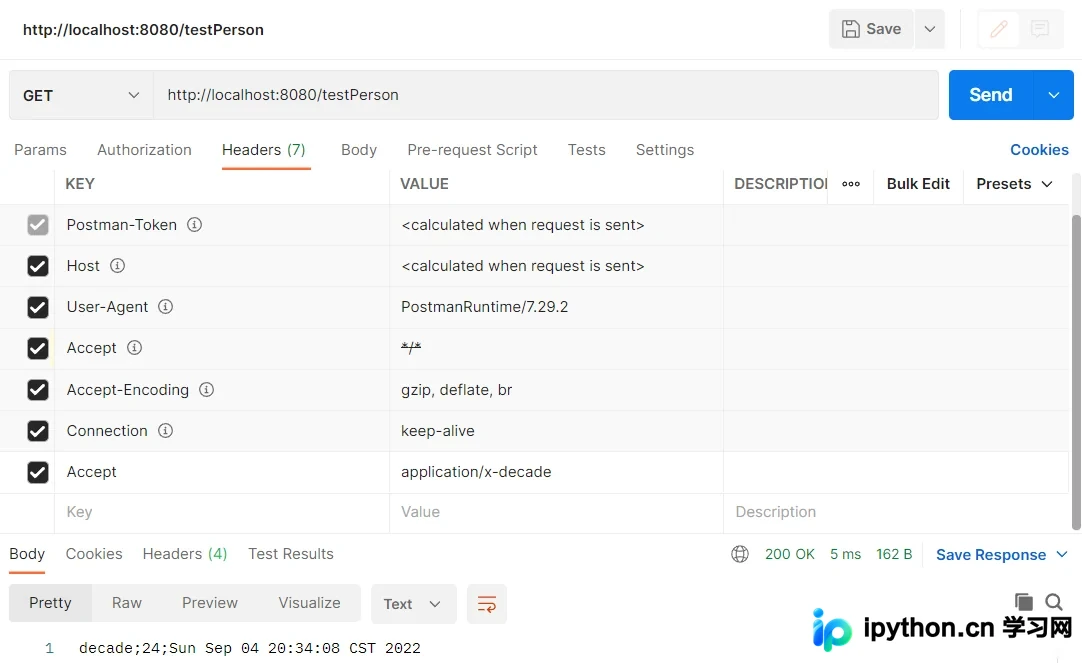
完成上述配置后,我们在 Postman 或其他 HTTP 客户端中,通过在请求头设置 Accept: application/x-decade 即可触发该转换器:
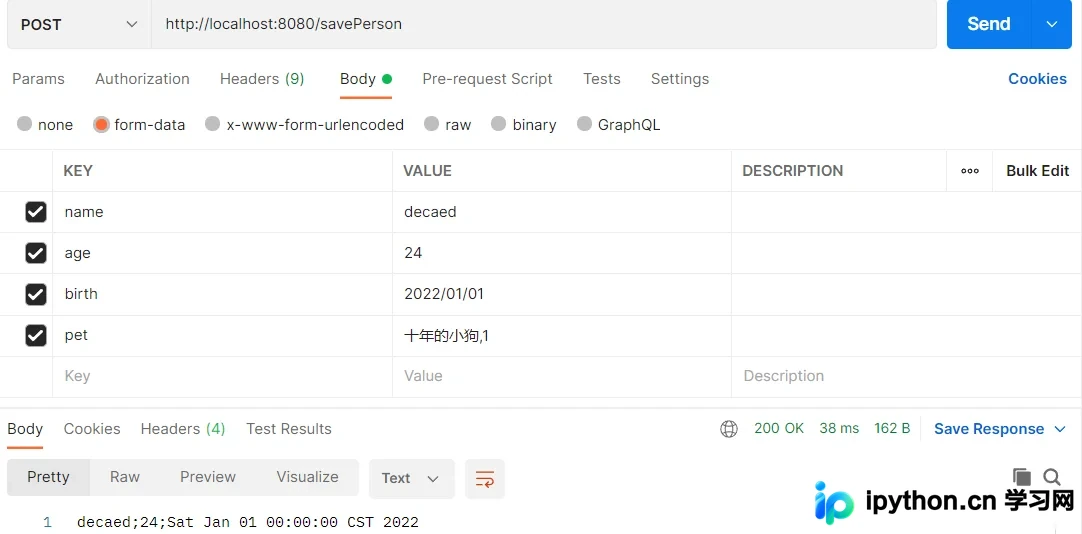
验证结果显示,服务端成功返回了符合自定义规则的分号拼接字符串:
2、自定义内容协商管理器 contentNegotiationManager
虽然 Header 方式的 Accept 头部设置可以正常工作,但这种方式在前端直接访问或浏览器调试时并不友好。为了实现更灵活的内容协商,例如通过 URL 参数(如 ?format=xxx)来指定返回格式,我们需要自定义内容协商策略。
Spring Boot 默认的内容协商策略主要依赖于 Accept 请求头和特定的 URL 参数(通常为 format)。我们需要配置 ContentNegotiationConfigurer,引入对自定义 URL 参数的支持。
在配置类中添加如下 Bean 定义:
package com.decade.config;
import org.springframework.context.annotation.Bean;
import org.springframework.context.annotation.Configuration;
import org.springframework.http.MediaType;
import org.springframework.web.accept.HeaderContentNegotiationStrategy;
import org.springframework.web.accept.ParameterContentNegotiationStrategy;
import org.springframework.web.servlet.config.annotation.ContentNegotiationConfigurer;
import org.springframework.web.servlet.config.annotation.WebMvcConfigurer;
import java.util.Arrays;
import java.util.HashMap;
import java.util.Map;

@Configuration(proxyBeanMethods = false)
public class MyMvcConfig implements WebMvcConfigurer {
    @Bean
    public WebMvcConfigurer createConvert() {
        return new WebMvcConfigurer() {
            @Override
            public void configureContentNegotiation(ContentNegotiationConfigurer configurer) {
                // 1. 映射 URL 参数到 MediaType
                Map<String, MediaType> mediaTypes = new HashMap<>();
                mediaTypes.put("json", MediaType.APPLICATION_JSON);
                mediaTypes.put("xml", MediaType.APPLICATION_XML);
                // 关联 decade 参数到我们自定义的媒体类型
                mediaTypes.put("decade", MediaType.parseMediaType("application/x-decade"));

                // 2. 创建基于参数的策略
                final ParameterContentNegotiationStrategy strategy = new ParameterContentNegotiationStrategy(mediaTypes);

                // 3. 保留原有的基于请求头的策略,以便兼容传统方式
                final HeaderContentNegotiationStrategy headerContentNegotiationStrategy = new HeaderContentNegotiationStrategy();

                // 4. 将两个策略组合起来
                configurer.strategies(Arrays.asList(strategy, headerContentNegotiationStrategy));
            }
        };
    }
}
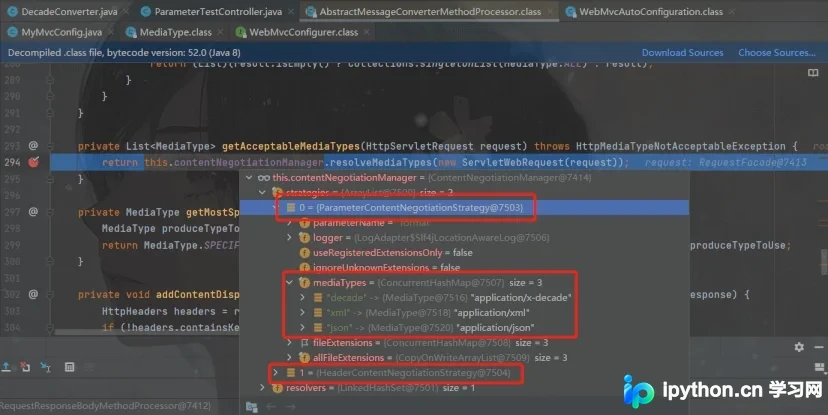
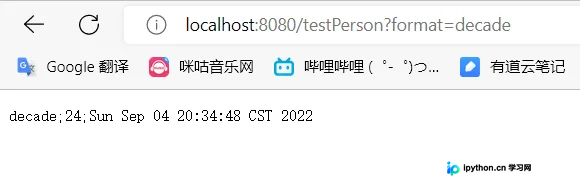
上述配置生效后,系统不仅支持通过 Header 协商,还新增了对 decade 参数的识别。当请求带上 ?format=decade 参数时,内容协商管理器会将该请求映射到 application/x-decade 类型。
配置注册后的效果如下图所示:
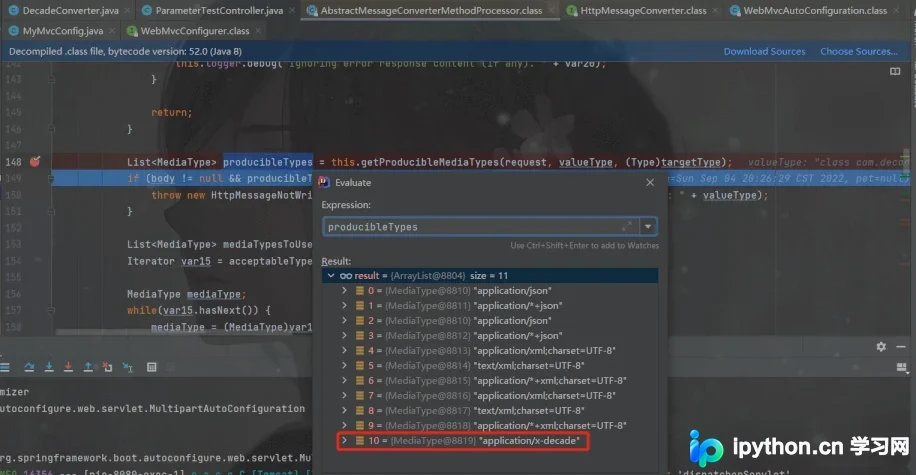
服务器能够正确解析包含自定义参数的请求信息:
为了验证这一功能,我们编写一个测试接口:
@GetMapping(value = "/testPerson")
@ResponseBody
public Person testPerson() {
	Person person = new Person();
	person.setName("decade");
	person.setAge(24);
	person.setBirth(new Date());
	return person;
}
最终测试结果如下:无论是通过 Postman 还是直接在浏览器地址栏输入参数,都能成功获取自定义格式的数据:
以上就是SpringBoot自定义MessageConverter与内容协商管理器contentNegotiationManager的详细内容,更多关于SpringBoot MessageConverter自定义格式的资料请关注本站其它相关文章!
本站声明
本文内容仅供参考,不代表本站观点。转载或引用请注明出处。如发现内容问题,请通过联系我们页面反馈。















