


Java使用RestHighLevelClient操作Elasticsearch的基础教程

本文详细讲解如何在Java环境中配置rest-high-level-client连接Elasticsearch,涵盖索引管理(创建、删除、查询)和文档操作(插入、获取、删除)的核心代码示例。同时针对Spring Boot环境下常见的版本冲突问题进行修复说明,并提供从旧版客户端向新版API迁移的技术指引。
前置环境与依赖准备
在使用RestHighLevelClient前,需确保项目具备Java运行环境和Elasticsearch服务实例。虽然Elasticsearch官方在后续版本中逐渐弃用此高级客户端,但在很多基于6.x或7.x版本的业务场景中仍被广泛使用。以下是构建项目所需的基础条件:
- Java Development Kit (JDK):通常为JDK 8或更高版本。
- Elasticsearch服务:一个可连接的ES集群节点。
- 构建工具:Maven或Gradle依赖管理。

第1步:处理Spring Boot依赖冲突
在使用较新的Spring Boot版本(如2.2.11+)时,其内置的elasticsearch-rest-client往往是低版本(如6.8.x),这会导致引入elasticsearch-rest-high-level-client(通常需保持版本一致,如7.4.2或7.17.x)时出现类路径冲突。必须手动排除并显式指定一致的版本。
<!-- 添加 Web 启动器 -->
<dependency>
    <groupId>org.springframework.boot</groupId>
    <artifactId>spring-boot-starter-web</artifactId>
</dependency>

<!-- 引入 Lombok 简化代码 -->
<dependency>
    <groupId>org.projectlombok</groupId>
    <artifactId>lombok</artifactId>
    <optional>true</optional>
</dependency>

<!-- 核心:引入 Elasticsearch 服务端依赖 (用于定义Request/Response对象) -->
<dependency>
    <groupId>org.elasticsearch</groupId>
    <artifactId>elasticsearch</artifactId>
    <version>7.4.2</version>
    <exclusions>
        <exclusion>
            <artifactId>log4j-api</artifactId>
            <groupId>org.apache.logging.log4j</groupId>
        </exclusion>
    </exclusions>
</dependency>

<!-- 核心:引入 高级Rest客户端 -->
<dependency>
    <groupId>org.elasticsearch.client</groupId>
    <artifactId>elasticsearch-rest-high-level-client</artifactId>
    <version>7.4.2</version>
    <exclusions>
        <!-- 排除内嵌的低级Rest Client,防止版本不一致 -->
        <exclusion>
            <groupId>org.elasticsearch.client</groupId>
            <artifactId>elasticsearch-rest-client</artifactId>
        </exclusion>
        <exclusion>
            <artifactId>elasticsearch</artifactId>
            <groupId>org.elasticsearch</groupId>
        </exclusion>
    </exclusions>
</dependency>

<!-- 补充:独立引入低级Rest Client以确保版本匹配 -->
<dependency>
    <groupId>org.elasticsearch.client</groupId>
    <artifactId>elasticsearch-rest-client</artifactId>
    <version>7.4.2</version>
</dependency>

<!-- 日志依赖调整:确保Log4j版本兼容 -->
<dependency>
    <groupId>org.apache.logging.log4j</groupId>
    <artifactId>log4j-core</artifactId>
    <version>2.8.2</version>
    <exclusions>
        <exclusion>
            <artifactId>log4j-api</artifactId>
            <groupId>org.apache.logging.log4j</groupId>
        </exclusion>
    </exclusions>
</dependency>
第2步:初始化 RestHighLevelClient
将RestHighLevelClient实例化为Spring Bean或在测试类中进行管理。需要传入Elasticsearch节点的地址列表(Host),底层会自动维护连接池。
@Slf4j
public class EsClientManager {

    private RestHighLevelClient client = null;

    /**
     * 初始化客户端连接
     */
    @PostConstruct
    public void init() {
        String[] ips = {"192.168.1.100:9200"}; // 请替换为实际IP
        HttpHost[] httpHosts = new HttpHost[ips.length];
        for (int i = 0; i < ips.length; i++) {
            httpHosts[i] = HttpHost.create(ips[i]);
        }

        RestClientBuilder builder = RestClient.builder(httpHosts)
                .setHttpClientConfigCallback(httpClientBuilder -> httpClientBuilder);

        this.client = new RestHighLevelClient(builder);
        log.info("Elasticsearch RestHighLevelClient initialized.");
    }

    public RestHighLevelClient getClient() {
        return this.client;
    }
}
索引管理操作
所有索引相关的操作都位于client.indices()命名空间下。操作结果通常包含是否成功执行的信息。
第3步:创建索引 (Create Index)
使用CreateIndexRequest指定索引名称。该方法返回CreateIndexResponse,可通过isAcknowledged()判断服务器是否确认收到请求。
public void createIndex(String indexName) throws IOException {
    CreateIndexRequest request = new CreateIndexRequest(indexName);
    // 此处可以设置映射 mappings 和配置 settings
    // request.mapping(...);
    // request.settings(...);

    CreateIndexResponse response = client.indices().create(request, RequestOptions.DEFAULT);
    boolean isAck = response.isAcknowledged();
    System.out.println("Index created successfully: " + isAck);
}
第4步:删除索引 (Delete Index)
使用DeleteIndexRequest配合IndicesRequest接口进行物理删除,执行后数据不可恢复,请谨慎操作。
public void deleteIndex(String indexName) throws IOException {
    DeleteIndexRequest request = new DeleteIndexRequest(indexName);
    AcknowledgedResponse response = client.indices().delete(request, RequestOptions.DEFAULT);
    boolean isAck = response.isAcknowledged();
    System.out.println("Index deleted successfully: " + isAck);
}
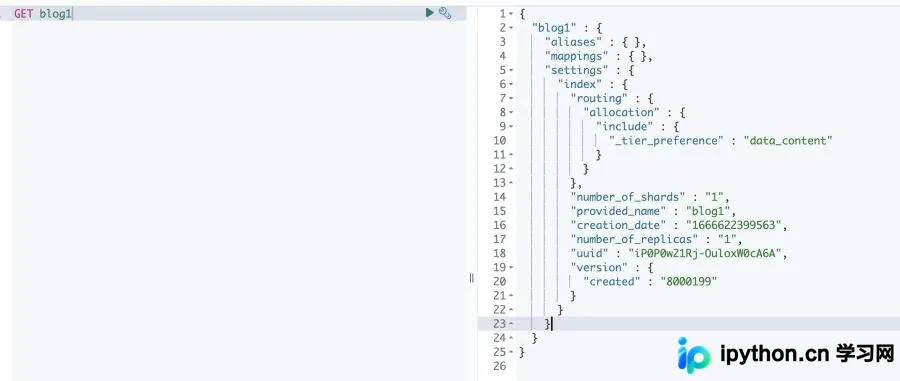
第5步:检查与查询索引信息
通过GetIndexRequest可以获取索引是否存在,以及获取其别名、Mappings结构、Settings配置等元数据。
public void getIndexInfo(String indexName) throws IOException {
    GetIndexRequest request = new GetIndexRequest(indexName);
    GetIndexResponse response = client.indices().get(request, RequestOptions.DEFAULT);

    // 获取字段类型定义 (Mapping)
    Map<String, MappingMetaData> mappings = response.getMappings();
    // 获取自定义配置 (Settings)
    Map<String, Settings> settings = response.getSettings();
    // 获取关联别名 (Aliases)
    Map<String, List<AliasMetaData>> aliases = response.getAliases();

    System.out.println("Mappings: " + mappings.keySet());
}
文档CRUD操作
文档级操作通过client.index(), client.get()等方法直接调用。
第6步:新增或更新文档 (Index Document)
当文档ID存在时,IndexRequest会执行更新操作;不存在则执行新建。需注意数据序列化过程。
public void indexDocument(String indexName, String docId, Object dataObj) throws IOException {
    IndexRequest request = new IndexRequest(indexName).id(docId);

    // 假设使用了 Jackson ObjectMapper 序列化对象为 JSON 字符串
    String jsonStr = new ObjectMapper().writeValueAsString(dataObj);
    request.source(jsonStr, XContentType.JSON);

    // 执行写入
    IndexResponse response = client.index(request, RequestOptions.DEFAULT);

    System.out.println("Doc status: " + response.status());
    System.out.println("Doc ID: " + response.getId());
}
第7步:根据ID获取文档 (Get Document)
获取原始JSON数据后,可根据反序列化逻辑转换为POJO。
public Map<String, Object> getDocument(String indexName, String docId) throws IOException {
    GetRequest request = new GetRequest(indexName, docId);
    GetResponse response = client.get(request, RequestOptions.DEFAULT);

    if (response.isExists()) {
        // sourceAsMap 返回标准 Java Map
        return response.getSourceAsMap();
        // 或者获取字符串: response.getSourceAsString()
    } else {
        throw new Exception("Document not found");
    }
}
第8步:删除文档 (Delete Document)
通过DeleteRequest指定索引和ID进行精准移除。
public void deleteDocument(String indexName, String docId) throws IOException {
    DeleteRequest request = new DeleteRequest(indexName, docId);
    DeleteResponse response = client.delete(request, RequestOptions.DEFAULT);

    System.out.println("Deleted document with status: " + response.status());
}
注意事项与技术演进
在实践过程中,开发者常遇到两个关键问题:一是JAR包版本不匹配导致的NoClassDefFoundError或运行时异常;二是Elasticsearch版本升级带来的API断裂风险。
目前Elasticsearch官方已宣布废弃RestHighLevelClient,全面转向全新的高性能API客户端。
排查建议:若发现代码无法编译或运行时抛出协议解析异常(Protocol codec errors),且ES服务端为8.x版本,请评估尽快迁移至新版Elasticsearch Java API Client。
本站声明
本文内容仅供参考,不代表本站观点。转载或引用请注明出处。如发现内容问题,请通过联系我们页面反馈。















