


JavaScript Array.forEach详解:参数、this指向与底层原理

本文详细解析JavaScript中Array.prototype.forEach方法的特性,包括三个回调参数、返回值机制、this指向控制以及异常处理技巧。通过模拟底层实现与类数组对象的调用方式,帮助开发者彻底掌握该API。
forEach基础用法
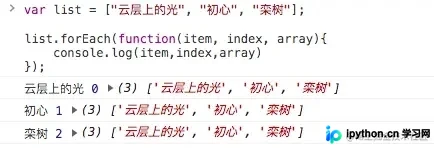
Array.prototype.forEach() 方法用于对数组的每个元素执行一次提供的回调函数。它不会修改原数组,也没有返回值。回调函数接收三个参数:
- 当前值 (item):正在处理的当前元素。
- 索引 (index):当前元素的数字索引。
- 数组 (array):调用
forEach的原始数组。
var list = ["云层上的光", "初心", "栾树"];
list.forEach(function(item, index, array) {
    console.log(item, index, array);
});
返回值与 this 指向
在使用 forEach 时,了解其返回值和内部 this 的指向非常重要。测试结果表明:forEach 始终返回 undefined,且默认情况下,回调函数中的 this 指向全局对象(在浏览器中为 window)。这在严格模式或箭头函数之外可能引发混淆。
var list = ["云层上的光", "初心", "栾树"];
var value = list.forEach(function(item, index, array) {
    console.log(this); // 输出 window
});
console.log(value); // 输出 undefined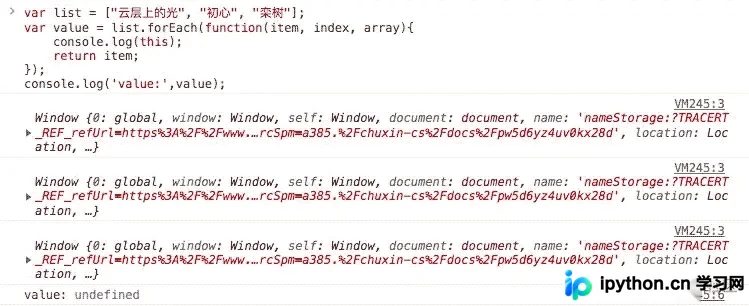
如何控制 this 指向?
forEach 方法接受两个参数。第一个是回调函数,第二个是可选的 thisArg,用于在执行回调函数时将 this 的值绑定到特定对象。
var context = { name: 'ContextObject' };
list.forEach(function(item) {
    console.log(this.name); // 将打印 ContextObject
}, context); // 传入 thisArg
模拟实现 with myForEach
为了深入理解 forEach 的工作原理,我们可以通过原型扩展来实现一个简单的 myForEach。核心逻辑如下:
- 检查回调是否为函数,否则抛出错误。
- 获取数组长度和调用者(
this)。 - 使用
for循环遍历,并通过Function.prototype.apply执行回调,确保this和参数正确传递。 - 注意:原生
forEach没有返回值,因此自定义版本也不应返回任何内容。
Array.prototype.myForEach = function (callback) {
  var _arr = this,
      _len = _arr.length,
      thisArg = arguments[1] || window;

  if (typeof callback !== 'function') {
    throw new Error(`${callback} is not a function`);
  }

  for (var i = 0; i < _len; i++) {
    callback.apply(thisArg, [_arr[i], i, _arr]);
  }
};
高级应用:类数组对象与异常退出
在类数组对象上使用 forEach
由于 forEach 定义在数组原型上,我们可以借用该方法处理具有 length 属性和数字键的对象(类数组对象)。这通常通过 call 或 apply 改变 this 指向来实现。
const arrayLike = {
  length: 3,
  0: 2,
  1: 3,
  2: 4,
};
Array.prototype.forEach.call(arrayLike, (x) => console.log(x));
// 输出: 2, 3, 4
跳出循环体
forEach 不支持直接使用 return 或 break 来跳出整个循环。如果需要在满足条件时终止迭代,可以使用抛出异常的方式,配合 try...catch 块捕获异常来实现“强制跳出”。
var list = ["云层上的光", "初心", "栾树"];
try {
    list.forEach(item => {
        if (item === "初心") throw new Error("StopIteration");
    });
} catch (err) {
    if (err.message === "StopIteration") {
        console.log("在执行到初心时跳出循环体了");
    } else {
        console.error(err);
    }
}
以上就是JavaScript基础之Array forEach使用示例的详细内容,更多关于JavaScript Array forEach的资料请关注本站其它相关文章!
本站声明
本文内容仅供参考,不代表本站观点。转载或引用请注明出处。如发现内容问题,请通过联系我们页面反馈。















