


SQL Server 2008 Apply运算符详解:Cross Join与Outer Join的区别及应用

在SQL Server中,Apply运算符是一种强大的工具,常用于将左侧表的结果集与右侧的表表达式(通常是函数或子查询)进行组合。它主要分为Cross Apply和Outer Apply两种形式,前者类似内连接,只返回匹配的记录;后者类似左外连接,即使右侧无匹配数据也会保留左侧的记录。
准备环境与测试数据
为了直观理解Apply运算符的作用,我们首先构建两个关联表:StudentList(学生列表)和ScoreInfo(成绩信息)。其中ScoreInfo表通过StudentID字段关联到StudentList表的id。
第1步:创建基础表结构
执行以下SQL脚本建立两张测试表:
create table StudentList(
    id int Identity(1,1) not null,
    Name nvarchar(20) not null,
    Sex bit not null,
    Birthday date not null,
    Class nvarchar(2) not null,
    Grade nvarchar(2) not null,
    regdate date not null,
    Primary key (id));

create table ScoreInfo(
    id int Identity(1,1) not null primary key,
    StudentID int not null,
    ClassID int not null,
    Score int not null,
    TestDate date not null,
    regdate date not null);
第2步:插入初始测试数据
为便于演示,插入三名学生的基本信息及其对应的各科成绩:
-- 插入学生名单
insert into StudentList(Name, Sex, Birthday, Class, Grade, regdate) values('张三', 1, '1988-05-28', 1, 8, '2010-05-05');
insert into StudentList(Name, Sex, Birthday, Class, Grade, regdate) values('李四', 1, '1985-09-13', 4, 4, '2010-05-05');
insert into StudentList(Name, Sex, Birthday, Class, Grade, regdate) values('王丽', 0, '1987-11-05', 1, 7, '2010-05-05');

-- 插入对应成绩记录(假设每位学生均有三科成绩)
insert into ScoreInfo(StudentID, ClassID, Score, TestDate, regdate) values(1, 1, 98, '2010-04-15', '2010-05-01');
insert into ScoreInfo(StudentID, ClassID, Score, TestDate, regdate) values(1, 2, 92, '2010-04-15', '2010-05-01');
insert into ScoreInfo(StudentID, ClassID, Score, TestDate, regdate) values(1, 3, 86, '2010-04-15', '2010-05-01');
insert into ScoreInfo(StudentID, ClassID, Score, TestDate, regdate) values(2, 1, 95, '2010-04-15', '2010-05-01');
insert into ScoreInfo(StudentID, ClassID, Score, TestDate, regdate) values(2, 2, 94, '2010-04-15', '2010-05-01');
insert into ScoreInfo(StudentID, ClassID, Score, TestDate, regdate) values(2, 3, 91, '2010-04-15', '2010-05-01');
insert into ScoreInfo(StudentID, ClassID, Score, TestDate, regdate) values(3, 1, 90, '2010-04-15', '2010-05-01');
insert into ScoreInfo(StudentID, ClassID, Score, TestDate, regdate) values(3, 2, 88, '2010-04-15', '2010-05-01');
insert into ScoreInfo(StudentID, ClassID, Score, TestDate, regdate) values(3, 3, 90, '2010-04-15', '2010-05-01');
第3步:构造特殊测试场景
为了对比不同Apply行为,特意插入一名没有对应成绩记录的学员李铭:
insert into StudentList(Name, Sex, Birthday, Class, Grade, regdate)
values('李铭', 1, '1989-05-04', 2, 7, '2010-05-05');
Cross Apply 的操作逻辑与结果
Cross Apply的行为类似于传统SQL中的内连接(Inner Join)。它将左侧表查询出的每一行作为参数传递给右侧的表表达式,只有当右侧表达式返回有效结果时,该组合才会出现在最终输出中。如果右侧无数据匹配,该行将被忽略。
第4步:执行Cross Apply查询
选取所有学生及其存在的科目成绩:
select * from StudentList a
cross apply
(select ClassID, Score from ScoreInfo where StudentID=a.id) b;
运行结果如下,可见李铭并未出现,因为他在ScoreInfo表中无记录:
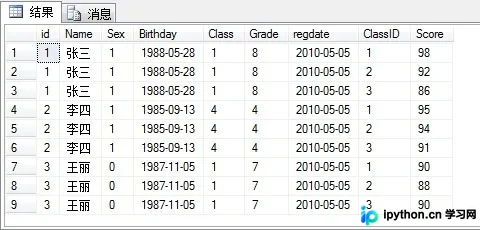
在此模式下,系统只展示了两个子集有效的交集部分,去除了无法匹配的组合。
Outer Apply 的操作逻辑与结果
Outer Apply的行为类似于左外连接(Left Outer Join)。无论右侧表表达式是否有匹配的行,左侧表的所有记录都会强制保留。若右侧无匹配项,相关字段将显示为NULL。
第5步:执行Outer Apply查询
使用相同的基础数据,改用Outer Apply:
select * from StudentList a
outer apply
(select ClassID, Score from ScoreInfo where StudentID=a.id) b;
运行结果展示如下,李铭的学生信息得以保留,但其成绩字段为空:
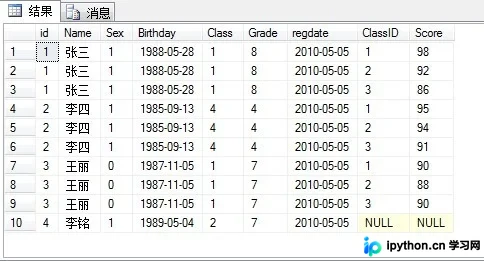
该操作完整列出了所有可能的配对情况,对于需要保留主表全量数据的分析场景非常适用。
总结
通过上述对比可以看出,Cross Apply侧重于获取严格匹配的“交叉”数据,而Outer Apply则确保左侧数据集不被截断。在实际开发中,需根据业务逻辑判断是需要过滤掉无效匹配,还是需要保留包含空值的完整清单。以上就是SQL Server中Apply运算符的使用方法及区别对比,更多关于SQL优化的资料请关注本站其它相关文章!
本站声明
本文内容仅供参考,不代表本站观点。转载或引用请注明出处。如发现内容问题,请通过联系我们页面反馈。















