


Python分形绘图实战:从基础几何到递归算法

本文详解如何利用Python和NumPy库从零构建分形图案。通过实现坐标插值、几何旋转及递归调用,逐步生成具有自相似性的复杂分形结构。文章涵盖等边三角形绘制、边长收缩参数调整及最大深度控制,展示分形在数据科学中的潜在应用价值。
分形是指在不同尺度下呈现自相似性的无限复杂模式。以树木为例,主干分裂为枝干,枝干再分裂为更细的枝条,这种结构层层递进,体现了分形的核心特征。
借助编程手段生成分形,能够将简单的几何形状转化为复杂的重复图案,从而揭示数学与计算机图形学的结合之美。
本文将介绍如何运用基础的几何原理和编程技巧,在Python环境中构建引人注目的分形图案。
分形在数据科学领域具有重要应用。例如,在分形分析中,评估数据集的分形特征有助于理解底层过程的结构。此外,分形生成背后的循环算法可广泛应用于各类数据问题,从二进制搜索算法到递归神经网络皆可见其身影。
一、目标
编写一个程序,能够绘制等边三角形,并在该三角形的每条边上绘制一个尺寸稍小且向外的三角形。该过程需支持根据用户意愿多次重复执行,从而生成有趣的视觉模式。
二、图像表示
将图像抽象为一个二维像素数组。数组中的每个单元格对应一个像素的颜色值(RGB格式)。
为此,可以使用NumPy库生成像素数组,并利用Pillow库将其转换为可保存的图像文件。
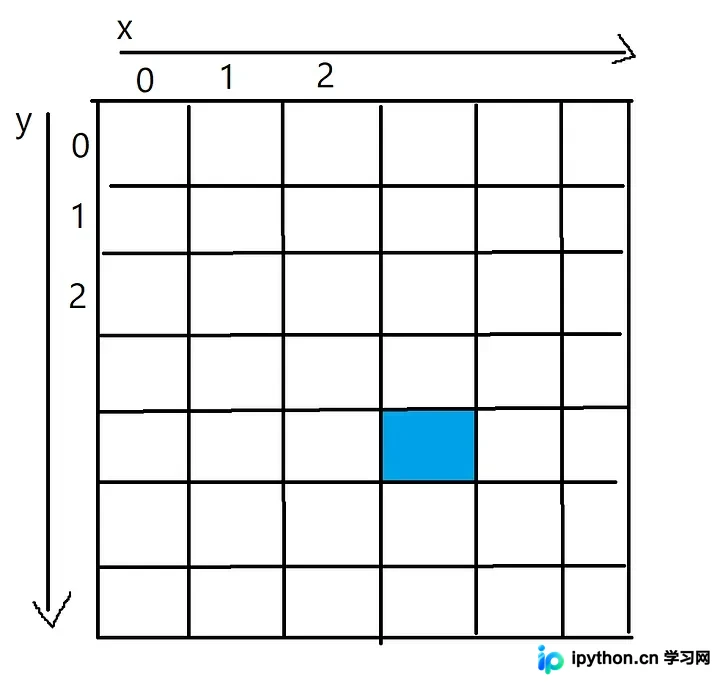
例如,蓝色像素的x坐标为3,y坐标为4,可通过二维数组索引访问,即pixels[4][3]。
三、绘制直线
开始编码,首先需要实现一个函数,接收两组坐标并在它们之间绘制直线。
该代码通过两点间的线性插值实现,每一步向像素数组添加新的像素点。这一过程可视为沿直线逐个像素进行着色。
在代码片段中,可使用连续的反斜杠“\”来续写较长的代码行。
import numpy as np
from PIL import Image
import math
def plot_line(from_coordinates, to_coordinates, thickness, colour, pixels):
    # 找出像素阵列的边界
    max_x_coordinate = len(pixels[0])
    max_y_coordinate = len(pixels)
    # 两点之间沿着x轴和y轴的距离
    horizontal_distance = to_coordinates[1] - from_coordinates[1]
    vertical_distance = to_coordinates[0] - from_coordinates[0]
    # 两点之间的总距离
    distance =  math.sqrt((to_coordinates[1] - from_coordinates[1])**2 \
                + (to_coordinates[0] - from_coordinates[0])**2)
    # 每次给一个新的像素上色时,将向前走多远
    horizontal_step = horizontal_distance/distance
    vertical_step = vertical_distance/distance
    # 此时,将进入循环以在像素数组中绘制线
    # 循环的每一次迭代都会沿着线添加一个新的点
    for i in range(round(distance)):
        # 这两个坐标是直线中心的坐标
        current_x_coordinate = round(from_coordinates[1] + (horizontal_step*i))
        current_y_coordinate = round(from_coordinates[0] + (vertical_step*i))
        # 一旦得到了点的坐标,
        # 就在坐标周围画出尺寸为thickness的图案
        for x in range (-thickness, thickness):
            for y in range (-thickness, thickness):
                x_value = current_x_coordinate + x
                y_value = current_y_coordinate + y
                if (x_value > 0 and x_value < max_x_coordinate and \
                    y_value > 0 and y_value < max_y_coordinate):
                    pixels[y_value][x_value] = colour
# 定义图像的大小
pixels = np.zeros( (500,500,3), dtype=np.uint8 )
# 画一条线
plot_line([0,0], [499,499], 1, [255,200,0], pixels)
# 把像素阵列变成一张真正的图片
img = Image.fromarray(pixels)
# 显示得到的图片,并保存它
img.show()
img.save('Line.png')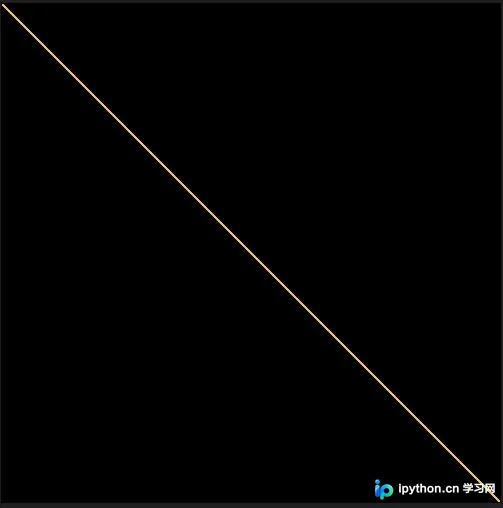
此函数在像素数组的每个角之间绘制黄线的效果如图所示。
四、绘制三角形
既然已具备绘制两点间直线的功能,接下来即可绘制第一个等边三角形。
已知三角形的中心点和边长,可通过公式计算高度:h = ½(√3a)。
利用该高度、中心点坐标及边长,可计算出三角形三个顶点的位置。调用之前制作的plot_line函数,即可在各顶点间绘制直线完成三角形。
def draw_triangle(center, side_length, thickness, colour, pixels):
    # 等边三角形的高度是,h = ½(√3a)
    # 其中a是边长
    triangle_height = round(side_length * math.sqrt(3)/2)
    # 顶角
    top = [center[0] - triangle_height/2, center[1]]
    # 左下角
    bottom_left = [center[0] + triangle_height/2, center[1] - side_length/2]
    # 右下角
    bottom_right = [center[0] + triangle_height/2, center[1] + side_length/2]
    # 在每个角之间画一条线来完成三角形
    plot_line(top, bottom_left, thickness, colour, pixels)
    plot_line(top, bottom_right, thickness, colour, pixels)
    plot_line(bottom_left, bottom_right, thickness, colour, pixels)
在500x500像素PNG图像中心绘制三角形的效果如图。
五、生成分形
准备工作完成后,即可使用Python创建首个分形图案。
最后一步最具挑战性:三角形函数需对其每条边递归调用自身。这需要计算每个新较小三角形的中心点,并正确旋转它们,使其垂直于所依附的边。
通过从旋转坐标中减去中心点的偏移量,再应用旋转公式,可利用该函数旋转三角形的每个顶点。
def rotate(coordinate, center_point, degrees):
    # 从坐标中减去旋转的点
    x = (coordinate[0] - center_point[0])
    y = (coordinate[1] - center_point[1])
    # Python的cos和sin函数采用弧度而不是度数
    radians = math.radians(degrees)
    # 计算旋转点
    new_x = (x * math.cos(radians)) - (y * math.sin(radians))
    new_y = (y * math.cos(radians)) + (x * math.sin(radians))
    # 将在开始时减去的偏移量加回旋转点上
    return [new_x + center_point[0], new_y + center_point[1]]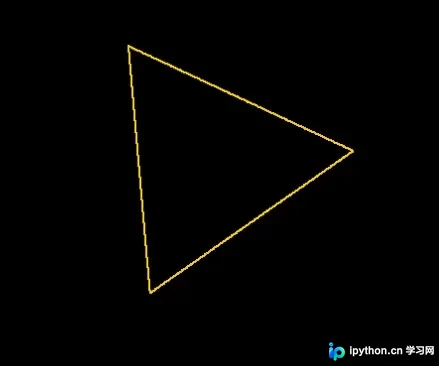
将三角形旋转35度后的效果如图。
完成三角形旋转后,需思考如何在第一个三角形的每条边上绘制新的较小三角形。
为此,扩展draw_triangle函数,为每条边计算新三角形的旋转角度及中心点,其边长通过参数shrink_side_by进行缩减。
计算出新三角形的中心点和旋转角度后,调用draw_triangle(即自身)从当前线段中心绘制新的、更小的三角形。随后,该过程会再次执行,为更小的三角形计算另一组中心点和旋转参数。
这被称为循环算法,因为draw_triangle函数会递归调用自身,直至达到设定的最大绘制深度。设置退出条件至关重要,否则理论上函数将无限循环(实际上会导致调用栈过大,引发栈溢出错误)。
def draw_triangle(center, side_length, degrees_rotate, thickness, colour, \
                  pixels, shrink_side_by, iteration, max_depth):
    # 等边三角形的高度是,h = ½(√3a)
    # 其中'a'是边长
    triangle_height = side_length * math.sqrt(3)/2
    # 顶角
    top = [center[0] - triangle_height/2, center[1]]
    # 左下角
    bottom_left = [center[0] + triangle_height/2, center[1] - side_length/2]
    # 右下角
    bottom_right = [center[0] + triangle_height/2, center[1] + side_length/2]
    if (degrees_rotate != 0):
        top = rotate(top, center, degrees_rotate)
        bottom_left = rotate(bottom_left, center, degrees_rotate)
        bottom_right = rotate(bottom_right, center, degrees_rotate)
    # 三角形各边之间的坐标
    lines = [[top, bottom_left],[top, bottom_right],[bottom_left, bottom_right]]
    line_number = 0
    # 在每个角之间画一条线来完成三角形
    for line in lines:
        line_number += 1
        plot_line(line[0], line[1], thickness, colour, pixels)
        # 如果还没有达到max_depth,就画一些新的三角形
        if (iteration < max_depth and (iteration < 1 or line_number < 3)):
            gradient = (line[1][0] - line[0][0]) / (line[1][1] - line[0][1])
            new_side_length = side_length*shrink_side_by
            # 正在绘制的三角形线的中心
            center_of_line = [(line[0][0] + line[1][0]) / 2, \
                              (line[0][1] + line[1][1]) / 2]
            new_center = []
            new_rotation = degrees_rotate
            # 需要旋转traingle的数量
            if (line_number == 1):
                new_rotation += 60
            elif (line_number == 2):
                new_rotation -= 60
            else:
                new_rotation += 180
            # 在一个理想的世界里,这将是gradient=0,
            # 但由于浮点除法的原因,无法
            # 确保永远是这种情况
            if (gradient < 0.0001 and gradient > -0.0001):
                if (center_of_line[0] - center[0] > 0):
                    new_center = [center_of_line[0] + triangle_height * \
                                 (shrink_side_by/2), center_of_line[1]]
                else:
                    new_center = [center_of_line[0] - triangle_height * \
                                  (shrink_side_by/2), center_of_line[1]]
            else:
                # 计算直线梯度的法线
                difference_from_center = -1/gradient
                # 计算这条线距中心的距离
                # 到新三角形的中心
                distance_from_center = triangle_height * (shrink_side_by/2)
                # 计算 x 方向的长度,
                # 从线的中心到新三角形的中心
                x_length = math.sqrt((distance_from_center**2)/ \
                                     (1 + difference_from_center**2))
                # 计算出x方向需要走哪条路
                if (center_of_line[1] < center[1] and x_length > 0):
                    x_length *= -1
                # 现在计算Y方向的长度
                y_length = x_length * difference_from_center
                # 用新的x和y值来偏移线的中心
                new_center = [center_of_line[0] + y_length, \
                              center_of_line[1] + x_length]
            draw_triangle(new_center, new_side_length, new_rotation, \
                          thickness, colour, pixels, shrink_side_by, \
                          iteration+1, max_depth)
三角形分形示例,收缩边比例=1/2,最大深度=2。
六、结论
以下是通过修改输入到draw_triangle函数的shrink_side_by和max_depth参数生成的不同图像示例。
有趣的是,这些多次重复的图案往往能创造出更复杂的形状(如六边形),同时保持令人着迷的对称性。
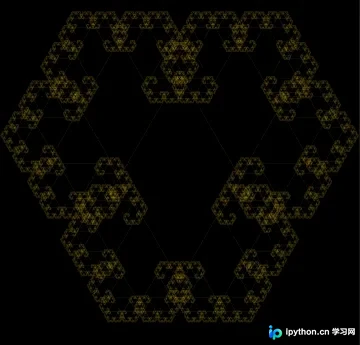
随着复杂度增加,重复三角形的对称性逐渐显现。
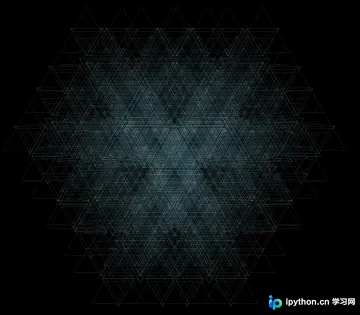
另一种分形示例,每次迭代使用较小的尺寸进行缩减。
分形极具趣味,可创造出美丽的图案。结合简单的概念与丰富的创造力,能够生成非常令人印象深刻的结构。
理解分形的核心属性并掌握循环算法,有助于深入理解数据科学中更复杂的分形问题。
本文关于Python绘制分形图案、探索无限细节与奇妙之美的介绍至此结束。如需了解更多Python绘制分形图案相关内容,请搜索本站往期文章或继续浏览后续文章,希望大家今后多多支持本站!
本站声明
本文内容仅供参考,不代表本站观点。转载或引用请注明出处。如发现内容问题,请通过联系我们页面反馈。















