


C# WinForms 绘制中国国旗(精确坐标法)

发布时间:2026-10-13 |
6人浏览过
在C# Windows窗体应用程序中绘制符合国家标准比例的中国国旗,利用GDI+技术结合固定坐标系算法计算五角星位置,确保在大、小星方位与角度上的准确性,并能响应窗口大小变化自适应缩放。
程序运行效果
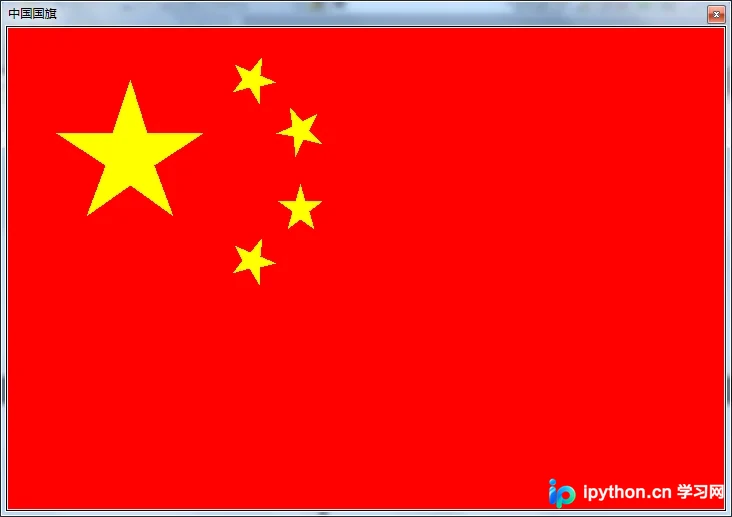
程序运行时将在指定区域显示标准的红色背景及五颗黄色五角星布局:
核心原理与设计说明
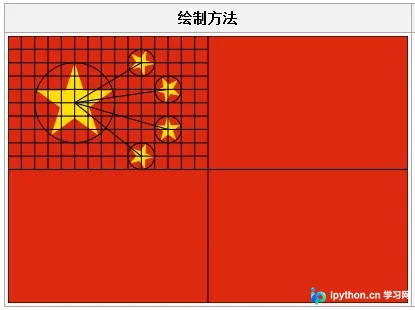
中国国旗的几何特征在《GB 12982-2004》中有严格定义。本程序采用“相对坐标系”方案:以旗面宽度分为30等分,高度分为20等分建立网格,通过特定乘数计算出各个星星的关键顶点。
大五角星位于左上角,小五角星呈环状分布。为了保持绘图时的比例正确性,代码将窗体(或图像控件)的实际像素尺寸映射到这个标准化的网格坐标中,从而实现无论窗口如何拉伸,五角星的形状和相对位置都不发生畸变。
以下是国旗各元素的大致位置示意图:
准备工作
- 新建项目:创建一个空的 C# Windows 窗体应用程序(.NET Framework 或 .NET Core/5+ 均适用)。
- 设计界面:拖入一个
PictureBox控件,命名为picFlagOfChina,将其Dock属性设置为Fill以铺满窗体。同时确保窗体类名为FormMain。 - 事件绑定:在窗体的
Load(加载)和Resize(调整大小)事件中触发重绘逻辑,以保证初次显示和改变窗口大小时国旗都能正确刷新。
C# 完整实现代码
以下代码展示了如何实现国旗的绘制逻辑。通过封装不同五角星的坐标生成方法,在主绘制函数中进行累加渲染。
using System;
using System.Collections.Generic;
using System.ComponentModel;
using System.Data;
using System.Drawing;
using System.Linq;
using System.Text;
using System.Windows.Forms;

namespace ChineseFlag
{
 public partial class FormMain : Form
 {
  public FormMain()
  {
   InitializeComponent();
  }

  // 窗体加载时绘制一次
  private void FormMain_Load(object sender, EventArgs e)
  {
   PaintFlag();
  }

  // 修改窗体大小时重新绘制,以适应新尺寸
  private void FormMain_Resize(object sender, EventArgs e)
  {
   PaintFlag();
  }

  /// <summary>
  /// 在图片框 picFlagOfChina 中绘制国旗
  /// </summary>
  private void PaintFlag()
  {
   // 设置背景为鲜艳的国旗红
   picFlagOfChina.BackColor = Color.Red;

   // 创建与控件尺寸匹配的 Bitmap
   picFlagOfChina.Image = new Bitmap(
    picFlagOfChina.Width, picFlagOfChina.Height);

   // 获取绘图上下文
   Graphics g = Graphics.FromImage(picFlagOfChina.Image);

   // 依次绘制大星和四颗小星
   Point[] p = PentacleA(this.Width, this.Height); // 大星
   g.FillPolygon(Brushes.Yellow, p);

   p = PentacleB(this.Width, this.Height); // 右上小星 (工人星)
   g.FillPolygon(Brushes.Yellow, p);

   p = PentacleC(this.Width, this.Height); // 右下小星 (农民星)
   g.FillPolygon(Brushes.Yellow, p);

   p = PentacleD(this.Width, this.Height); // 左下小星 (小资产阶级)
   g.FillPolygon(Brushes.Yellow, p);

   p = PentacleE(this.Width, this.Height); // 左侧中间小星 (民族资产阶级)
   g.FillPolygon(Brushes.Yellow, p);

   // 释放资源
   g.Dispose();
  }

  // 大五角星坐标计算
  private Point[] PentacleA(int width, int height)
  {
   return new Point[]
   {
    new Point((int)(width / 30.0 * 5), (int)(height / 20.0 * 2)),
    new Point((int)(width / 30.0 * 5.7), (int)(height / 20.0 * 4.1)),
    new Point((int)(width / 30.0 * 8), (int)(height / 20.0 * 4.1)),
    new Point((int)(width / 30.0 * 6), (int)(height / 20.0 * 5.3)),
    new Point((int)(width / 30.0 * 6.8), (int)(height / 20.0 * 7.3)),
    new Point((int)(width / 30.0 * 5), (int)(height / 20.0 * 6.1)),
    new Point((int)(width / 30.0 * 3.2), (int)(height / 20.0 * 7.3)),
    new Point((int)(width / 30.0 * 4), (int)(height / 20.0 * 5.3)),
    new Point((int)(width / 30.0 * 2), (int)(height / 20.0 * 4.1)),
    new Point((int)(width / 30.0 * 4.3), (int)(height / 20.0 * 4.1)),
   };
  }

  // 第一颗小星(右上方)
  private Point[] PentacleB(int width, int height)
  {
   return new Point[]
   {
    new Point((int)(width / 30.0 * 9.2), (int)(height / 20.0 * 2.5)),
    new Point((int)(width / 30.0 * 9.6), (int)(height / 20.0 * 2)),
    new Point((int)(width / 30.0 * 9.3), (int)(height / 20.0 * 1.4)),
    new Point((int)(width / 30.0 * 9.95), (int)(height / 20.0 * 1.7)),
    new Point((int)(width / 30.0 * 10.45), (int)(height / 20.0 * 1.1)),
    new Point((int)(width / 30.0 * 10.36), (int)(height / 20.0 * 1.85)),
    new Point((int)(width / 30.0 * 11), (int)(height / 20.0 * 2.1)),
    new Point((int)(width / 30.0 * 10.34), (int)(height / 20.0 * 2.25)),
    new Point((int)(width / 30.0 * 10.3), (int)(height / 20.0 * 2.95)),
    new Point((int)(width / 30.0 * 9.9), (int)(height / 20.0 * 2.3))
   };
  }

  // 第二颗小星(右下方)
  private Point[] PentacleC(int width, int height)
  {
   return new Point[]
   {
    new Point((int)(width / 30.0 * 11), (int)(height / 20.0 * 4.1)),
    new Point((int)(width / 30.0 * 11.65), (int)(height / 20.0 * 3.8)),
    new Point((int)(width / 30.0 * 11.55), (int)(height / 20.0 * 3.05)),
    new Point((int)(width / 30.0 * 12.05), (int)(height / 20.0 * 3.6)),
    new Point((int)(width / 30.0 * 12.7), (int)(height / 20.0 * 3.3)),
    new Point((int)(width / 30.0 * 12.35), (int)(height / 20.0 * 3.98)),
    new Point((int)(width / 30.0 * 12.9), (int)(height / 20.0 * 4.5)),
    new Point((int)(width / 30.0 * 12.1), (int)(height / 20.0 * 4.3)),
    new Point((int)(width / 30.0 * 11.8), (int)(height / 20.0 * 5)),
    new Point((int)(width / 30.0 * 11.7), (int)(height / 20.0 * 4.2))
   };
  }

  // 第三颗小星(左下方)
  private Point[] PentacleD(int width, int height)
  {
   return new Point[]
   {
    new Point((int)(width / 30.0 * 11.1), (int)(height / 20.0 * 6.7)),
    new Point((int)(width / 30.0 * 11.8), (int)(height / 20.0 * 6.7)),
    new Point((int)(width / 30.0 * 12), (int)(height / 20.0 * 6)),
    new Point((int)(width / 30.0 * 12.2), (int)(height / 20.0 * 6.7)),
    new Point((int)(width / 30.0 * 12.9), (int)(height / 20.0 * 6.7)),
    new Point((int)(width / 30.0 * 12.35), (int)(height / 20.0 * 7.1)),
    new Point((int)(width / 30.0 * 12.55), (int)(height / 20.0 * 7.8)),
    new Point((int)(width / 30.0 * 12), (int)(height / 20.0 * 7.4)),
    new Point((int)(width / 30.0 * 11.45), (int)(height / 20.0 * 7.8)),
    new Point((int)(width / 30.0 * 11.65), (int)(height / 20.0 * 7.1))
   };
  }

  // 第四颗小星(左侧中间)
  // 注:该点集相对于PentacleB向下平移了7个单位(高度方向的1/20)
  private Point[] PentacleE(int width, int height)
  {
   return new Point[]
   {
    new Point((int)(width / 30.0 * 9.2), (int)(height / 20.0 * 9.5)),
    new Point((int)(width / 30.0 * 9.6), (int)(height / 20.0 * 9)),
    new Point((int)(width / 30.0 * 9.3), (int)(height / 20.0 * 8.4)),
    new Point((int)(width / 30.0 * 9.95), (int)(height / 20.0 * 8.7)),
    new Point((int)(width / 30.0 * 10.45), (int)(height / 20.0 * 8.1)),
    new Point((int)(width / 30.0 * 10.36), (int)(height / 20.0 * 8.85)),
    new Point((int)(width / 30.0 * 11), (int)(height / 20.0 * 9.1)),
    new Point((int)(width / 30.0 * 10.34), (int)(height / 20.0 * 9.25)),
    new Point((int)(width / 30.0 * 10.3), (int)(height / 20.0 * 9.95)),
    new Point((int)(width / 30.0 * 9.9), (int)(height / 20.0 * 9.3))
   };
  }
 }
}
完成判断
编译并运行上述工程后:
- 主窗口应充满红色的背景,中央偏上位置有正确的黄色五角星排列。
- 尝试最大化、最小化或拖动窗口边框,五角星应保持原有的几何结构且不会变形,证明自适应逻辑有效。
以上就是C# WinForms绘制中国国旗的实现方法及步骤,更多关于C#图形编程的资料请关注本站其它相关文章!
本站声明
本文内容仅供参考,不代表本站观点。转载或引用请注明出处。如发现内容问题,请通过联系我们页面反馈。















