


C# Socket 实现局域网聊天工具:服务端与客户端开发详解

基于 C# 的 Socket 编程可实现高效的双向数据传输。本文将解析如何利用 TCP 协议构建局域网聊天工具,从核心的服务端监听逻辑到客户端的数据交互,再到结合 WinForms 与多线程技术优化用户体验,提供完整的代码实现路径。
核心概念:服务端与客户端的角色
C# Socket 编程的基础在于明确服务器(Server)与客户端(Client)的职责分工。服务器负责等待并接受请求,而客户端负责主动发起连接。在更复杂的场景中,两者可通过复用 Socket 对象实现对等的双向通信能力。
第1步:配置服务端环境 (IP 与端口)
服务端是通信的中心节点。首先需要声明一个 Socket 实例,并指定地址家族为 AddressFamily.InterNetwork(IPv4),套接字类型为 SocketType.Stream(TCP),协议类型为 ProtocolType.Tcp。
- Bind (绑定):调用
Bind方法将 Socket 绑定到本地的 IP 地址和端口。例如绑定到IPEndPoint(IPAddress.Any, 9050),表示监听本机所有网卡上的 9050 端口。 - Listen (监听):调用
Listen(backlog)开始监听传入的连接请求。backlog参数指定了排队等待连接的最大数量,例如设为 10。
第2步:接受连接并获取客户端信息
当有客户端尝试连接时,服务端需要响应并建立新的通信通道:
- Accept:调用
Absaccept()。这会阻塞直到有连接进入,然后返回一个新的Socket对象(例如命名为clientSock),该对象专门用于与此特定客户端通信。 - 获取元数据:通过
clientSock.RemoteEndPoint可以获取远端(客户端)的 IP 和端口信息。将其转换为IPEndPoint类型后可访问Address和Port属性。
第3步:客户端的连接发起
作为客户端,流程相对直接但也需遵循相同协议:
- 创建并初始化相同的
Socket对象。 - 可选地绑定本地端口(通常系统自动分配可用端口,也可显式指定如 905)。
- 构造目标服务器的
IPEndPoint(包含服务器 IP 和端口)。 - 调用
Connect(remoteEP)发起连接。若连接失败会抛出SocketException,应做好捕获处理。
第4步:数据的发送与接收
网络传输的单位是字节数组(byte[]),因此字符串必须经过编码转换:
发送数据
将字符串转换为字节数组后发送。若需支持中文,推荐使用 Unicode 或 UTF-8 编码;纯英文场景可使用 ASCII。
// 示例:发送 "Hello World"
string message = "Hello World";
byte[] data = Encoding.ASCII.GetBytes(message); // 或 Encoding.Unicode.GetBytes
sock.Send(data);
接收数据
创建一个缓冲区(如 byte[1024])用于暂存数据。调用 Receive(buffer) 读取数据并返回实际读取的字节长度。
byte[] buffer = new byte[1024];
int receivedCount = sock.Receive(buffer);
// 将有效字节转换为字符串
string receivedText = Encoding.ASCII.GetString(buffer, 0, receivedCount);
完整代码实现参考
服务端控制台代码
以下代码展示了基本的服务端生命周期:启动 -> 监听 -> 接收连接 -> 循环收发 -> 关闭。
using System;
using System.Net;
using System.Net.Sockets;
using System.Text;

namespace tcpserver
{
    class ServerProgram
    {
        static void Main(string[] args)
        {
            int recv;
            byte[] data = new byte[1024];
            // 绑定 IP 和端口 9050
            IPEndPoint ipep = new IPEndPoint(IPAddress.Any, 9050);
            Socket newsock = new Socket(AddressFamily.InterNetwork, SocketType.Stream, ProtocolType.Tcp);

            newsock.Bind(ipep);
            newsock.Listen(10); // 最大排队数 10
            Console.WriteLine("Waiting for a client...");

            // 接受连接
            Socket client = newsock.Accept();
            IPEndPoint clientip = (IPEndPoint)client.RemoteEndPoint;
            Console.WriteLine("Connected with client: " + clientip.Address + " at port: " + clientip.Port);

            string welcome = "Welcome here!";
            data = Encoding.ASCII.GetBytes(welcome);
            client.Send(data, data.Length, SocketFlags.None);

            while (true)
            {
                data = new byte[1024];
                recv = client.Receive(data);
                if (recv == 0) break; // 连接断开

                Console.WriteLine(Encoding.ASCII.GetString(data, 0, recv));
                // 回声发送回客户端
                client.Send(data, recv, SocketFlags.None);
            }

            Console.WriteLine("Disconnected from " + clientip.Address);
            client.Close();
            newsock.Close();
        }
    }
}
客户端控制台代码
客户端需要输入服务器 IP 和端口进行连接,并通过循环读取用户输入发送。
using System;
using System.Net;
using System.Net.Sockets;
using System.Text;

namespace tcpclient
{
    class ClientProgram
    {
        static void Main(string[] args)
        {
            byte[] data = new byte[1024];
            Socket newclient = new Socket(AddressFamily.InterNetwork, SocketType.Stream, ProtocolType.Tcp);
            newclient.Bind(new IPEndPoint(IPAddress.Any, 905));

            Console.Write("Please input the server IP: ");
            string ipadd = Console.ReadLine();
            Console.Write("Please input the server Port: ");
            int port = Convert.ToInt32(Console.ReadLine());

            IPEndPoint ie = new IPEndPoint(IPAddress.Parse(ipadd), port);

            try
            {
                newclient.Connect(ie);
            }
            catch (SocketException e)
            {
                Console.WriteLine("Unable to connect to server.");
                return;
            }

            // 接收欢迎语
            int receivedDataLength = newclient.Receive(data);
            string stringdata = Encoding.ASCII.GetString(data, 0, receivedDataLength);
            Console.WriteLine(stringdata);

            while (true)
            {
                string input = Console.ReadLine();
                if (input.Equals("exit", StringComparison.OrdinalIgnoreCase)) break;

                newclient.Send(Encoding.ASCII.GetBytes(input));
                data = new byte[1024];
                receivedDataLength = newclient.Receive(data);
                stringdata = Encoding.ASCII.GetString(data, 0, receivedDataLength);
                Console.WriteLine(stringdata);
            }

            Console.WriteLine("Disconnect from server");
            newclient.Shutdown(SocketShutdown.Both);
            newclient.Close();
        }
    }
}
进阶:Windows Forms 窗体与多线程处理
在控制台程序中,主线程同时处理 UI 交互和网络 IO 通常不会导致假死,但在图形界面应用中,如果网络操作(如 Receive 等待数据)在主线程运行,会导致界面失去响应(Frozen)。解决此问题的标准做法是另起后台线程专门处理数据接收。
此外,为了支持中文字符显示及美观的时间戳记录,我们需要结合 Unicode 编码和线程安全的 UI 更新机制。
后台线程接收消息的逻辑
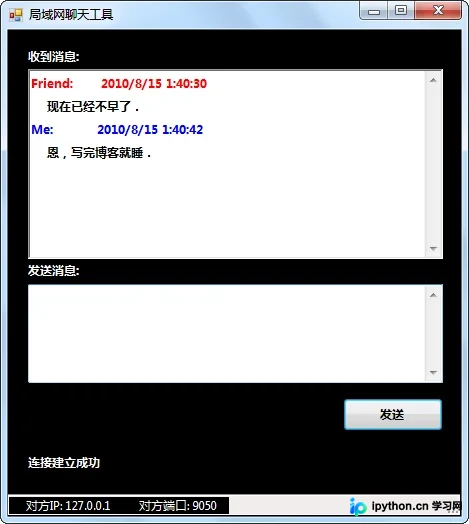
启动一个独立线程持续调用 Receive。由于不同线程不能直接访问 UI 控件(如 TextBox),需使用 SendOrPostCallback 和 Invoke/BeginInvoke 将UI更新操作调度回 UI 线程。
while (true)
{
    data = new byte[1024];
    recv = newclient.Receive(data);
    if(recv == 0) break;

    uiContext.Send(new SendOrPostCallback(
        state =>
        {
            int txtGetMsgLength = txtGetMsg.Text.Length;
            // 使用 Unicode 解码以支持中文
            string recMsg = "Friend:    " + DateTime.Now.ToString() + "\n  " +
                            Encoding.Unicode.GetString(data, 0, recv) + "\n";

            // 追加到文本框
            txtGetMsg.AppendText(recMsg);

            // 设置颜色高亮(红色表示对方消息)
            txtGetMsg.Select(txtGetMsgLength, recMsg.Length - Encoding.Unicode.GetString(data, 0, recv).Length - 1);
            txtGetMsg.SelectionColor = Color.Red;
        }), null);
}
发送消息的处理
点击发送按钮时,检查输入是否为空,并将文本内容编码后发送。同时,在本地聊天记录中添加自己的消息(蓝色显示)以便回顾。
private void btnSendMsg_Click(object sender, EventArgs e)
{
    string input = txtSendMsg.Text.Trim();
    if (string.IsNullOrEmpty(input))
    {
        MessageBox.Show("Message cannot be empty!", "Error");
        return;
    }

    try
    {
        // meIsClient 标识当前角色,决定使用哪个 socket 变量
        var targetSocket = meIsClient ? newclient : client;

        // 使用 Unicode 发送中文
        targetSocket.Send(Encoding.Unicode.GetBytes(input));

        // 本地 UI 显示
        string showText = "Me:      " + DateTime.Now.ToString() + "\n  " + input + "\n";
        int txtLen = txtGetMsg.Text.Length;
        txtGetMsg.AppendText(showText);
        txtGetMsg.Select(txtLen, showText.Length - 1 - input.Length);
        txtGetMsg.SelectionColor = Color.Blue; // 标记为自己消息

        txtSendMsg.Clear();
    }
    catch (SocketException ex)
    {
        MessageBox.Show("Send failed: " + ex.Message);
    }
}
这种架构确保了无论网络状态如何波动,用户界面的滚动条和操作始终流畅。下图展示了程序运行时的基本界面效果:
以上就是使用 C# Socket 开发局域网聊天工具的详细内容,更多关于 .NET 网络编程的资料请关注本站其它相关文章!
本站声明
本文内容仅供参考,不代表本站观点。转载或引用请注明出处。如发现内容问题,请通过联系我们页面反馈。















