


Python与Go实现服务器发送事件(SSE)详解:协议、代码与调试

本文深入解析HTML5服务器发送事件(SSE)协议,对比WebSockets差异,详细阐述HTTP头部、消息格式及关键字段。提供Python Flask与Go标准库的完整SSE服务端代码示例,介绍浏览器EventSource API用法,并推荐EchoAPI作为高效调试工具,帮助开发者快速掌握单向实时推送技术。
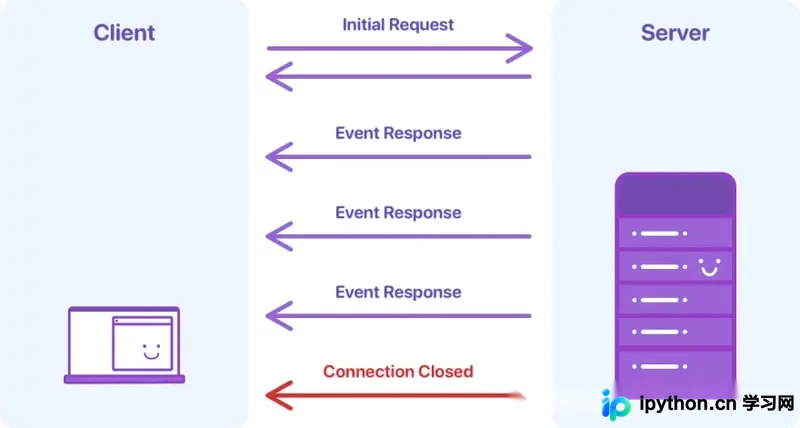
为什么选择SSE?
服务器发送事件(Server-Sent Events, SSE)是HTML5规范的重要组成部分,专为服务器向客户端推送事件而设计。凭借其简洁性、自动重连机制以及内置的事件追踪功能,SSE在数据流场景下表现优异,尤其在单向数据传输(服务器到客户端)场景中具有显著优势。
概述
SSE是一种允许服务器向浏览器实时推送消息的技术,属于HTML5规范范畴,主要涉及以下核心要素:
- 通信协议:基于HTTP标准。
- 事件对象:浏览器端原生支持的事件处理对象。
虽然WebSockets也是实时通信技术,但两者存在本质区别:
| SSE | WebSockets |
|---|---|
| 基于HTTP | 基于TCP |
| 单向(服务器到客户端) | 全双工(双向) |
| 轻量级和简单 | 更复杂的 |
| 内置重新连接和消息跟踪 | 需要手动实现这些功能 |
| 文本或Base64和gzip压缩的二进制文件 | 支持各种数据类型 |
| 支持自定义事件类型 | 不支持自定义事件类型 |
| HTTP/1.1或HTTP/2限制连接数量 | 无限连接 |
服务器实现
协议实现
从原理上看,浏览器发起HTTP请求,服务器通过HTTP状态码响应,并必须包含特定的响应头信息:
Content-Type: text/event-stream
Cache-Control: no-cache
Connection: keep-alive
SSE规范强制要求事件流的MIME类型必须设置为 text/event-stream ,禁止浏览器缓存数据,且连接必须保持持久状态(即 keep-alive )。
消息格式
事件流采用UTF-8编码的文本或Base64编码的二进制数据,并支持gzip压缩。每条消息由一个或多个字段行组成,格式遵循 field-name : field-value 的结构。每个字段以换行符 \n 结尾。以冒号开头的行被视为注释,浏览器会自动忽略。每次推送可包含多条消息,通过空行 \n\n 进行分隔。
关键字段包括:
event:定义事件类型。id:指定事件ID,浏览器利用此ID追踪最后接收的事件,以便在断线后重新连接。retry:指定浏览器在连接失败后重试连接前的等待时间(毫秒)。data:承载实际的消息数据。
示例:Python实现SSE
from flask import Flask, Response

app = Flask(__name__)


@app.route('/events')
def sse_handler():
    def generate():
        paragraph = [
            "Hello, this is an example of a continuous text output.",
            "It contains multiple sentences, each of which will be sent to the client as an event.",
            "This is to simulate the functionality of Server-Sent Events (SSE).",
            "We can use this method to push real-time updates.",
            "End of sample text, thank you!",
        ]

        for sentence in paragraph:
            yield f"data: {sentence}\n\n"

            import time
            time.sleep(1)

    return Response(generate(), mimetype='text/event-stream')


if __name__ == '__main__':
    app.run(host='0.0.0.0', port=8081, debug=True)
示例:Go实现SSE
package main

import (
    "fmt"
    "log"
    "net/http"
    "time"
)

func main() {
    http.HandleFunc("/events", sseHandler)

    fmt.Println("Starting server on :8080")
    if err := http.ListenAndServe(":8080", nil); err != nil {
        log.Fatalf("Server error: %v", err)
    }
}

func sseHandler(w http.ResponseWriter, r *http.Request) {
    flusher, ok := w.(http.Flusher)
    if !ok {
        http.Error(w, "Streaming unsupported!", http.StatusInternalServerError)
        return
    }

    w.Header().Set("Content-Type", "text/event-stream")
    w.Header().Set("Cache-Control", "no-cache")
    w.Header().Set("Connection", "keep-alive")

    // Change the output here to a specific text
    paragraph := []string{
        "Hello, this is an example of a continuous text output.",
        "It contains multiple sentences, each of which will be sent to the client as an event.",
        "This is to simulate the functionality of Server-Sent Events (SSE).",
        "We can use this method to push real-time updates.",
        "End of sample text, thank you!",
    }

    for _, sentence := range paragraph {
        _, err := fmt.Fprintf(w, "data: %s\n\n", sentence)
        if err != nil {
            return
        }
        flusher.Flush()
        time.Sleep(1 * time.Second) // Wait 1 second before sending the next piece of text
    }
}
浏览器API️
在客户端,JavaScript提供的 EventSource API允许开发者创建 EventSource 对象以监听服务器推送的事件。连接建立后,服务器可向浏览器发送事件消息。浏览器通过监听 onmessage 、 onopen 和 onerror 事件来处理接收到的消息。
<!DOCTYPE html>
<html lang="en">
<head>
    <meta charset="UTF-8">
    <meta name="viewport" content="width=device-width, initial-scale=1.0">
    <title>SSE Example 🌟</title>
</head>
<body>
    <h1>Server-Sent Events Example 🚀</h1>
    <div id="messages"></div>
    <script>
        window.onload = function() {
            if (typeof(EventSource) !== "undefined") {
                const eventSource = new EventSource('/events');

                eventSource.onmessage = function(event) {
                    const newElement = document.createElement("p");
                    newElement.textContent = "Message: " + event.data;

                    document.getElementById("messages").appendChild(newElement);
                };

                eventSource.onerror = function(event) {
                    console.error("Error occurred: ", event);
                    const newElement = document.createElement("p");
                    newElement.textContent = "An error occurred while connecting to the event source.";
                    document.getElementById("messages").appendChild(newElement);
                    eventSource.close();
                };
            } else {
                document.getElementById("messages").textContent = "Sorry, your browser does not support server-sent events...";
            }
        };
    </script>
</body>
</html>
SSE调试
目前,Postman、Insomnia、Bruno和ThunderClient等主流工具对SSE的支持尚不充分,这在开发过程中可能带来不便。近期发现的EchoAPI工具提供了优秀的SSE调试功能,显著优化了工作流程,提升了开发效率与生产力。
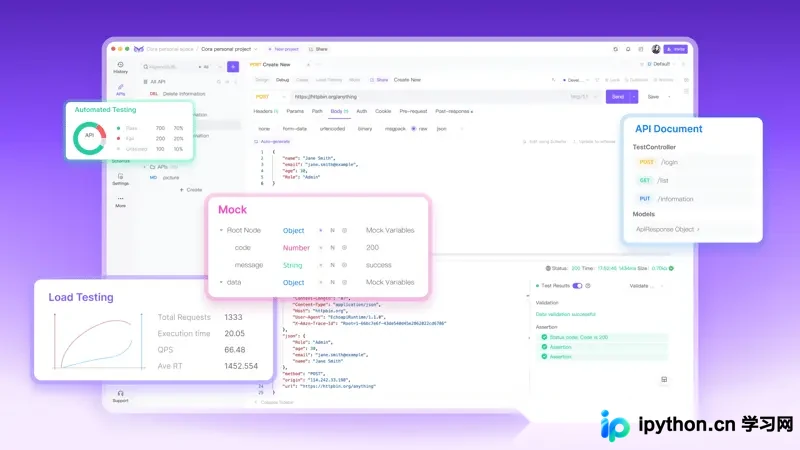
若您正在使用SSE或进行API调试,强烈建议尝试EchoAPI。它能彻底改善调试体验,简化开发流程。
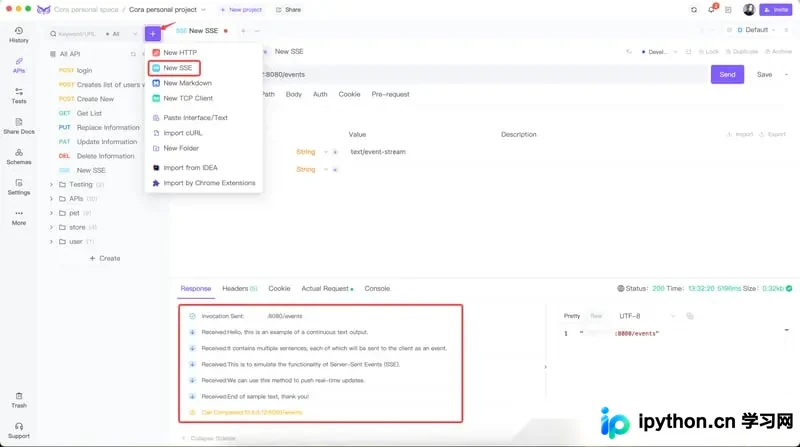
示例:SSE的EchoAPI客户端
在EchoAPI中使用SSE接口十分简便:只需输入URL,配置相关参数,点击“发送”即可查看请求结果。
以上就是使用Python和Go实现服务器发送事件(SSE)的详细内容,更多关于Python Go服务器发送事件的资料请关注本站其它相关文章!
本站声明
本文内容仅供参考,不代表本站观点。转载或引用请注明出处。如发现内容问题,请通过联系我们页面反馈。















