


Python抓取微信公众号最新推送:Selenium与Requests实战

本文介绍如何使用Python抓取指定微信公众号的最新推送文章。针对搜狗微信搜索链接的时效性及动态网页渲染问题,结合Requests与Selenium+PhantomJS技术获取HTML内容,并通过BeautifulSoup提取链接。代码包含处理验证码提示、跨平台文件路径构造及带时间戳的文件保存逻辑,旨在提供一套完整的抓取示例供参考。
问题描述
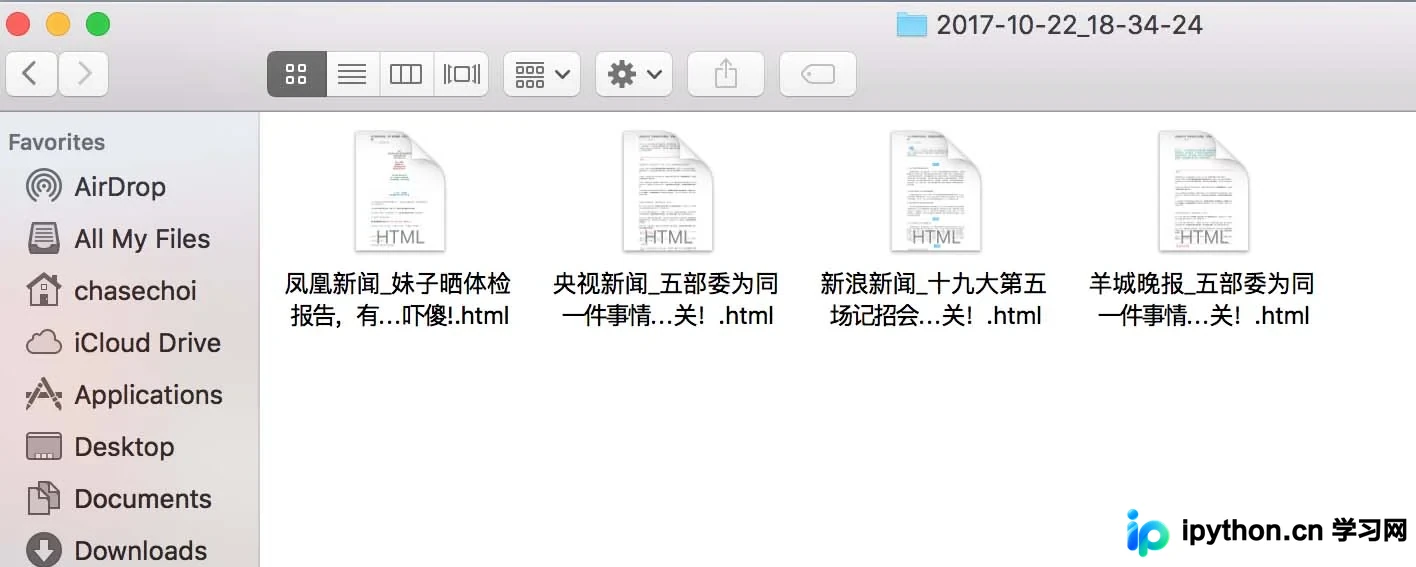
目标是通过搜狗微信搜索接口,获取指定公众号发布的最新一篇文章的推送内容,并将对应的网页保存至本地存储中。
注意点
搜狗微信提供的搜索结果链接为临时生成,具有较短的有效期限,需及时抓取。
公众号页面属于动态渲染网页(由JavaScript生成内容),直接使用requests.get()无法获取包含推送消息的完整HTML,因此需要采用selenium配合PhantomJS来模拟浏览器行为以获取渲染后的页面。
代码
#! /usr/bin/env python3
from selenium import webdriver
from datetime import datetime
import bs4, requests
import os, time, sys

# 获取公众号链接
def getAccountURL(searchURL):
 res = requests.get(searchURL)
 res.raise_for_status()
 soup = bs4.BeautifulSoup(res.text, "lxml")
 # 选择第一个链接
 account = soup.select('a[uigs="account_name_0"]')
 return account[0]['href']

# 获取首篇文章的链接,如果有验证码返回None
def getArticleURL(accountURL):
 browser = webdriver.PhantomJS("/Users/chasechoi/Downloads/phantomjs-2.1.1-macosx/bin/phantomjs")
 # 进入公众号
 browser.get(accountURL)
 # 获取网页信息
 html = browser.page_source
 accountSoup = bs4.BeautifulSoup(html, "lxml")
 time.sleep(1)
 contents = accountSoup.find_all(hrefs=True)
 try:
  partitialLink = contents[0]['hrefs']
  firstLink = base + partitialLink
 except IndexError:
  firstLink = None
  print('CAPTCHA!')
 return firstLink

# 创建文件夹存储html网页,以时间命名
def folderCreation():
 path = os.path.join(os.getcwd(), datetime.now().strftime('%Y-%m-%d_%H-%M-%S'))
 try:
  os.makedirs(path)
 except OSError as e:
  if e.errno != errno.EEXIST:
   raise
  print("folder not exist!")
 return path

# 将html页面写入本地
def writeToFile(path, account, title):
 myfile = open("{}/{}_{}.html".format(path, account, title), 'wb')
 myfile.write(res.content)
 myfile.close()

base ='https://mp.weixin.qq.com'
accountList = ['央视新闻', '新浪新闻','凤凰新闻','羊城晚报']
query = 'http://weixin.sogou.com/weixin?type=1&s_from=input&query='

path = folderCreation()

for index, account in enumerate(accountList):
 searchURL = query + account
 accountURL = getAccountURL(searchURL)
 time.sleep(10)
 articleURL = getArticleURL(accountURL)
 if articleURL != None:
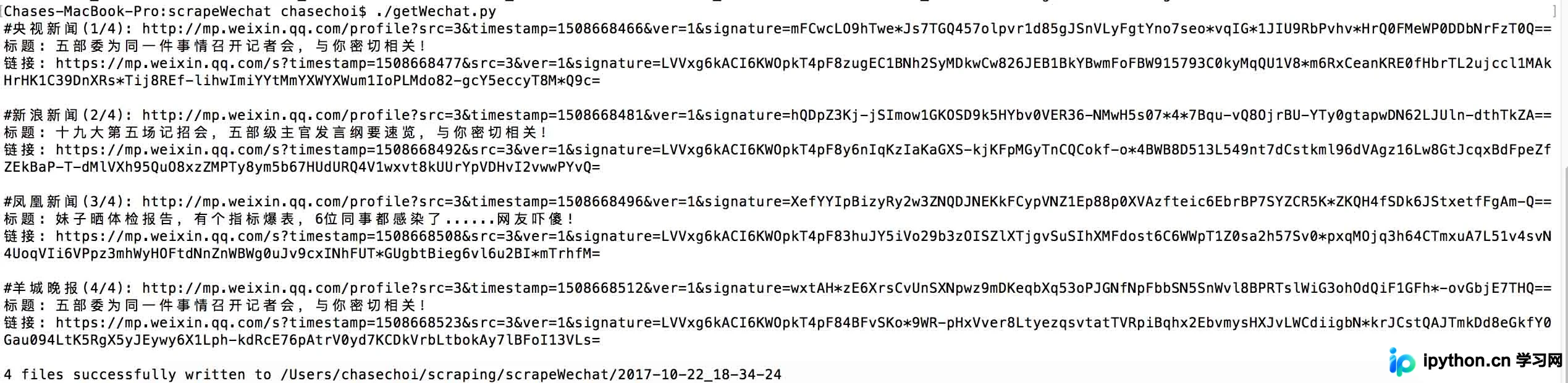
  print("#{}({}/{}): {}".format(account, index+1, len(accountList), accountURL))
  # 读取第一篇文章内容
  res = requests.get(articleURL)
  res.raise_for_status()
  detailPage = bs4.BeautifulSoup(res.text, "lxml")
  title = detailPage.title.text
  print("标题: {}\n链接: {}\n".format(title, articleURL))
  writeToFile(path, account, title)
 else:
  print('{} files successfully written to {}'.format(index, path))
  sys.exit()

print('{} files successfully written to {}'.format(len(accountList), path))
参考输出
Terminal输出
Finder
分析
链接获取
首先访问搜狗微信搜索页面,从地址栏中提取基础URL,并将公众号名称作为参数拼接,从而构建出用于请求的完整链接。
对于静态网页,可以直接利用requests库获取HTML源码,随后使用BeautifulSoup解析并提取所需的目标内容。
对于动态网页,需借助selenium驱动PhantomJS获取渲染后的HTML源码,再使用BeautifulSoup进行内容选择与提取。
若在抓取过程中遇到验证码(CAPTCHA),程序将输出提示信息。当前版本代码未实现自动识别或处理验证码的功能,需要用户手动访问页面完成验证后,再运行程序以避开验证码拦截。
文件写入
使用os.path.join()函数来构建存储路径,这有助于提高代码的跨平台通用性。例如,Windows系统使用反斜杠(\)作为路径分隔符,而OS X和Linux系统使用正斜杠(/),该函数能根据当前操作系统自动转换分隔符。
在open()函数中使用'b'(binary mode,二进制模式)参数,同样是为了增强通用性,确保在Windows系统下也能正确处理文件写入。
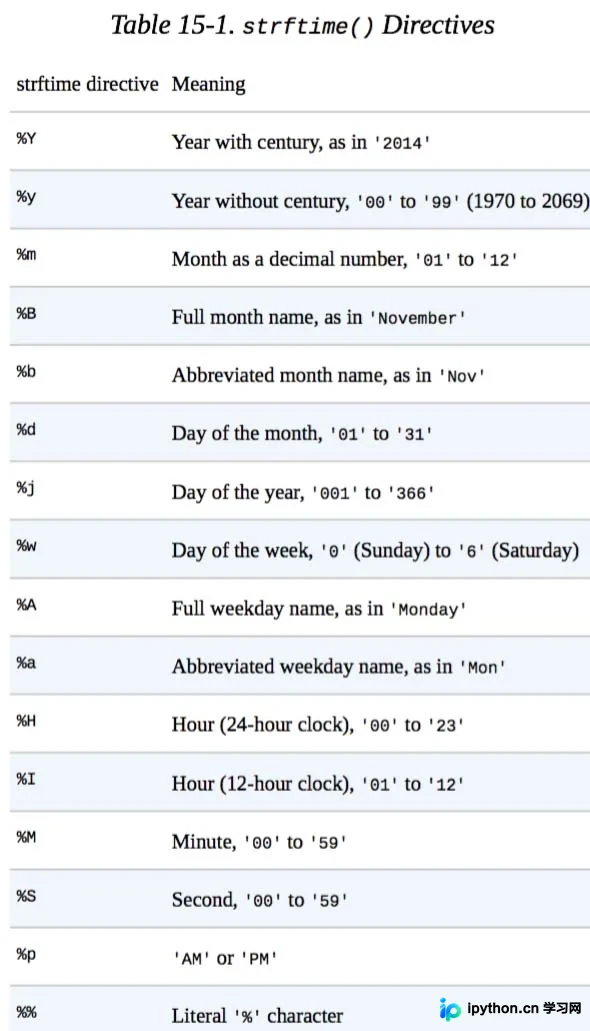
利用datetime.now()获取当前系统时间作为文件名的一部分,并通过strftime()函数对时间进行格式化(函数名中的f代表format,即格式化)。
关于strftime()的具体使用格式,可参考下表(摘自《Automate the Boring Stuff with Python》一书)。
以上这篇python爬虫_微信公众号推送信息爬取的实例就是小编分享给大家的全部内容了,希望能给大家一个参考,也希望大家多多支持本站。
本站声明
本文内容仅供参考,不代表本站观点。转载或引用请注明出处。如发现内容问题,请通过联系我们页面反馈。















